

Amazon Prime and Spotify A Guide to Integration and Savings
Let's get the big question out of the way first: Amazon Prime and Spotify are completely separate services. Your Prime membership is fantastic for a lot of things, but a Spotify Premium subscription isn't one of them.
That said, you can absolutely use your Spotify account—both Free and Premium—with Amazon's Alexa-powered devices like the Echo. In fact, it's one of the best ways to get your music fix.
Unpacking Amazon Prime and Spotify
It’s easy to see why people get these two mixed up. Amazon Prime is this giant, all-in-one subscription that bundles everything from fast shipping and video streaming to its own music service. Spotify, on the other hand, is laser-focused on one thing and one thing only: being the king of audio streaming.
Think of it this way: Amazon Prime is the Swiss Army knife of subscriptions, packed with a little bit of everything. Spotify is the finely tuned guitar, built from the ground up to deliver the perfect sound experience.
Key Differences at a Glance
While both get music into your ears, their methods and features are worlds apart. Knowing these differences is key to figuring out which one (or which combination) is right for you.
Here’s the breakdown of what really separates them:
- Part of a Package vs. Standalone: Amazon Prime Music is a perk that comes with your main Prime membership. Spotify is a dedicated, standalone service you sign up for on its own.
- Massive Library, Different Rules: Both services boast a huge library of over 100 million tracks. But here's the catch: the music included with Prime is mostly shuffle-play only.
- Control and Features: Spotify Premium is all about control—on-demand playback, unlimited skips, and powerful playlist tools. Prime Music’s included tier keeps you in shuffle mode, gently nudging you to upgrade to the paid Amazon Music Unlimited if you want full control.
The real magic isn't about picking a winner. It's about understanding how you can make these two platforms work together. Using Spotify on your Amazon Echo is a perfect example of combining the best of both worlds.
To make things even clearer, here’s a quick table that lays out the core features side-by-side.
Amazon Prime Music vs Spotify at a Glance
This chart gives you a quick, scannable comparison of what you get with the music service included in your Prime membership versus Spotify's free and paid options.
| Feature | Amazon Prime Music | Spotify Free | Spotify Premium |
|---|---|---|---|
| Cost | Included with Prime | Free | Paid Subscription |
| Ad-Free Listening | Yes | No | Yes |
| Music Catalog | 100M+ songs | 100M+ songs | 100M+ songs |
| Playback Control | Shuffle-only | Limited skips, shuffle-only on mobile | On-demand, unlimited skips |
| Offline Downloads | All-Access Playlists only | No | Yes |
| Audio Quality | Standard Definition | Up to 160 kbps | Up to 320 kbps |
As you can see, if you want full control, offline listening, and higher-quality audio without ads, Spotify Premium is the clear front-runner. The music included with Prime is a nice bonus, but it's designed more for passive, radio-style listening.
What You Get with Amazon Prime Music
Most people sign up for Amazon Prime for one big reason: fast, free shipping. But what many don't realize is that their membership comes with a pretty solid music streaming service, Amazon Prime Music, baked right in. This isn't some watered-down trial version; it's a full-blown perk that costs you nothing extra.
Think of it as a bonus feature you didn't even know you were getting. You subscribed for the two-day shipping and Prime Video, but you also get access to a massive library of over 100 million songs without a single ad.
The Core Features of Prime Music
The biggest draw is that huge, ad-free library. You can listen for hours without being interrupted by commercials, which is a major step up from the free version of Spotify. But there's a catch, and it's a big one: on your phone and computer, most of the music is played in shuffle-only mode.
So, you can pick a playlist, an artist, or an album to get started, but Amazon’s app will serve up a mix of songs inspired by your choice. You can't just pick a specific song and play it on repeat. The only exception to this rule is a curated selection of "All-Access Playlists" that do let you play songs on-demand and even download them for offline listening.
Here’s the breakdown of what you get:
- Ad-Free Listening: No commercials breaking up your music. Ever.
- Massive Song Catalog: Access to the full 100 million+ song library, putting it on par with the big players.
- Offline Downloads: You can save those special All-Access Playlists to your device for when you don't have a connection.
- Podcast Access: It's not just music; a huge selection of popular podcasts is included, too.
Where Prime Music Fits in the Amazon Ecosystem
It's really important to know the difference between Amazon Prime Music and its bigger, more capable sibling, Amazon Music Unlimited. What we're talking about here is the version included with your Prime membership. Music Unlimited is a separate, paid subscription that unlocks everything: full on-demand playback for any song, better audio quality (like HD and Ultra HD), and even spatial audio.
Amazon uses Prime Music as a fantastic value-add to make the main Prime subscription feel indispensable. It's a great entry point into their audio world, perfect for casual listeners, while clearly showing serious music lovers a path to upgrade.
This strategy has certainly worked. The inclusion of perks like Prime Music has helped fuel Prime's incredible growth. In the United States alone, Amazon Prime has a staggering 180.1 million users, which is about 75 percent of all Amazon users. You can see more stats on Prime's reach over on Backlinko. That's millions of people who have a decent music streaming service at their fingertips, possibly without even knowing it.
Knowing what Prime Music can and can't do is the first step. For a much deeper look at how it really measures up, check out our full Prime Music vs Spotify comparison. It’ll help you figure out if the included service is good enough for you, or if it makes more sense to bring your own Spotify account into the mix.
Diving Into the World of Spotify
While Amazon Prime Music is a fantastic bonus tucked into a much larger subscription, Spotify is a completely different beast. It lives and breathes audio. It's a dedicated music streaming titan, laser-focused on one thing: creating the best possible listening experience. That singular focus is precisely why it remains a powerhouse in the industry.
Spotify’s model is pretty simple. It's a two-tier system that gives you a clear choice between a free, ad-supported plan and a jam-packed premium subscription. Figuring out which one is right for you is the first step to understanding how it'll play with your Amazon devices.
The Trade-Offs: What You Get with Spotify Free
The free version of Spotify is wildly popular for a reason—it gives anyone access to its massive catalog of over 100 million tracks and podcasts without paying a dime. You can think of it as a personalized radio station that you control. But, as you'd expect, this free ride comes with some significant strings attached, all designed to nudge you toward upgrading.
The most obvious limitation? The ads. Every few songs, your vibe will be interrupted by a commercial break. On top of that, if you're using a phone, you're mostly stuck in shuffle mode and only get a handful of skips per hour.
Unlocking the Full Experience with Spotify Premium
Now, this is the version of Spotify that has won over millions of paying fans. Spotify Premium rips away all the limitations of the free tier and throws in some powerful features that put you in total command of your music.
Think of it this way: Spotify Free is like a radio, but Spotify Premium is like owning an infinite, perfectly organized record collection. You can play any song, any time, in any order, with zero interruptions—and even take it with you on the go.
Once you go Premium, you unlock a whole new world of listening. The key benefits completely change the game:
- No More Ads: Just pure, uninterrupted music, albums, and playlists.
- Unlimited Skips: Don't like a song? Skip it. And the next one. And the one after that. No limits.
- Play Anything, Instantly: Hear a song you like? Just tap it and it plays. No more shuffle-only restrictions.
- Offline Downloads: This is a big one. You can save your favorite music and podcasts directly to your device for flights, subway rides, or anywhere you don't have internet.
- High-Quality Audio: You get the option to stream music at up to 320 kbps, which delivers a much richer, more detailed sound.
This level of freedom and quality is exactly why so many people happily pay for the service. It’s also what makes it the perfect partner for a high-quality smart speaker like an Amazon Echo. When you pair Amazon Prime and Spotify Premium, you're truly getting the best of both worlds.
How To Connect Spotify To Your Amazon Devices
So, you have Amazon Prime and a Spotify account. While they’re totally separate services, the real magic happens when you get them to work together. By linking your Spotify account to your Amazon ecosystem, you can turn your Echo speakers and Fire TV into a seamless, voice-controlled sound system.
The best part? It's surprisingly simple to set up, taking just a few minutes in the Alexa app. Once you're connected, you can stop fumbling with your phone to cast music. Just ask Alexa for a specific song, one of your go-to playlists, or your favorite podcast. This works for both Spotify Free and Spotify Premium users, but a Premium account really unlocks the full on-demand experience.
The Simple Linking Process
Getting your accounts to talk to each other is all about enabling the Spotify "skill" in your Alexa app. Think of a skill as a mini-app that teaches Alexa a new trick—in this case, how to tap into and control your Spotify library.
This visual gives you a quick overview of the path from opening the app to speaking your first command.
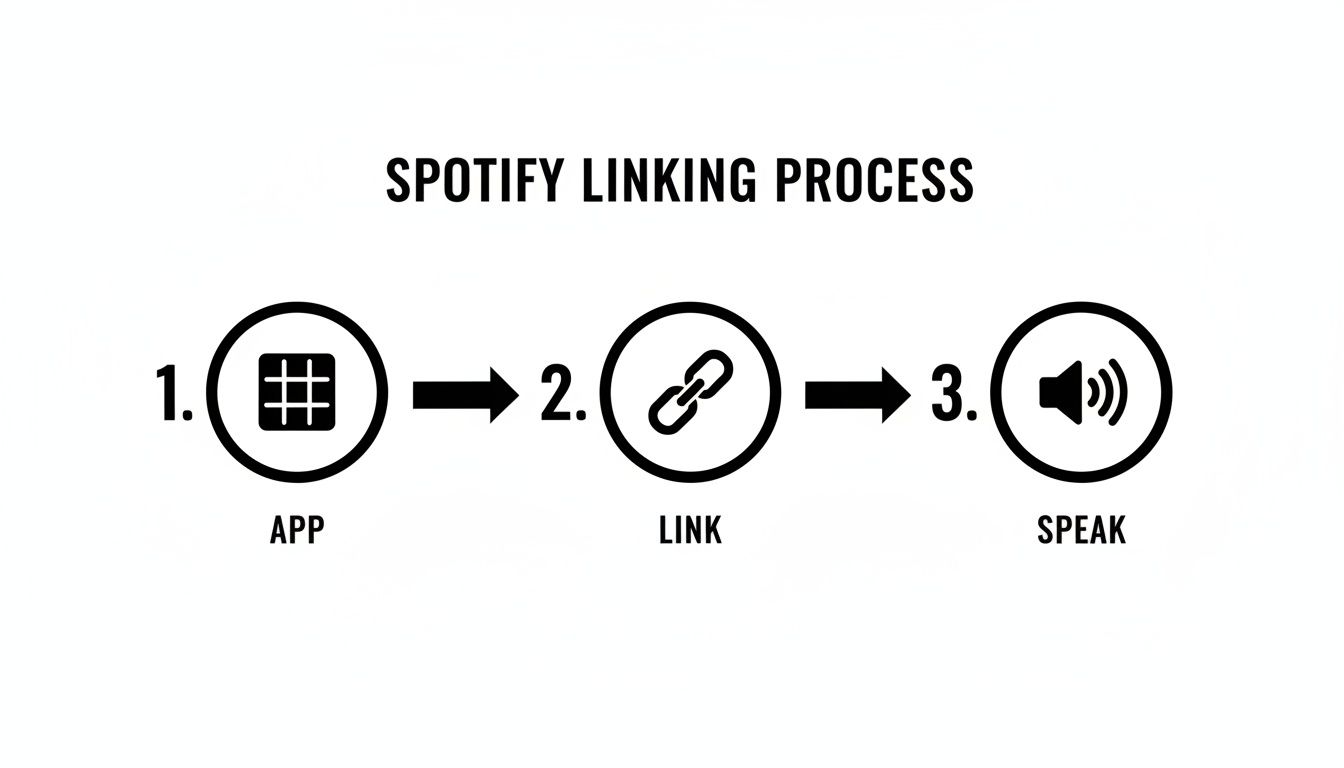
It’s really that straightforward: find the music settings, link your account, and start using voice commands.
Here’s the step-by-step breakdown to get you up and running:
- Open the Alexa App: Fire up the Amazon Alexa app on your smartphone or tablet.
- Head to Settings: Tap the "More" button in the bottom-right corner, then choose "Settings" from the menu.
- Find Music & Podcasts: Scroll down to the "Alexa Preferences" section and tap on "Music & Podcasts."
- Link a New Service: Tap the big "Link New Service" button. You'll see a whole list of music services you can connect.
- Select and Enable Spotify: Find Spotify in the list and give it a tap. You’ll then be asked to "Enable to Use."
- Log In to Spotify: The app will bounce you over to a Spotify login page. Just pop in your username and password to authorize the connection.
- Set Spotify as Your Default: This is the crucial final step! Back in the Music & Podcasts settings, tap "Default Services" and select Spotify for Music, Artist and Genre Stations, and even Podcasts.
Setting Spotify as your default provider saves you a ton of hassle. It means you don't have to say "...on Spotify" every single time. Alexa will just know to look there first.
Mastering Your New Voice Commands
With everything connected, you're ready to control Spotify hands-free. To get the most out of it, it's worth checking out guides on the best smart home devices, such as the Amazon Echo, which are perfect for this setup. This linking process is pretty similar across different smart home systems, too—you can see how it works in our guide on https://accountshare.ai/blogs/new/how-to-link-spotify-to-google-home.
Ready to give it a try? Here are a few commands to get you started:
- "Alexa, play my Discover Weekly playlist."
- "Alexa, play the new album by Taylor Swift."
- "Alexa, shuffle songs by The Killers."
- "Alexa, who is this song by?"
- "Alexa, turn the volume up."
This simple integration is a total game-changer, making your listening experience more fluid and convenient than ever before.
Sharing Subscriptions: The Smart Way to Save
Let's be real—juggling premium subscriptions like Amazon Prime and Spotify can feel like you're trying to keep too many plates spinning. The monthly fees creep up, and soon you're hit with "subscription fatigue," wondering if you're actually getting your money's worth. This is exactly why so many people are turning to a smarter way to manage these costs: sharing them.
The most obvious route is an official family plan. Spotify Family is a perfect example, giving you several premium accounts under one, neat, discounted bill. But there's a catch. These plans usually insist that everyone lives under the same roof, which just doesn't work for friends, college roommates, or family spread across the country.
A New Way to Think About Sharing
This is where a different kind of sharing comes in, kind of like a digital carpool. You wouldn't think twice about splitting the cost of gas for a road trip, right? You can do the same thing with your subscriptions—pool your money with a trusted group and split the cost of a single, feature-packed plan. It's a group-buy approach that gets everyone the good stuff for a fraction of what they'd pay alone.
Getting a handle on how membership and subscription models work really helps you see why this is such a game-changer. It shifts expensive individual plans into affordable, shared resources, making them accessible to more people.
This isn't just about pinching pennies. It’s about making essential services more sustainable for your budget, especially when platforms like Amazon Prime have woven themselves into the fabric of our daily lives.
Smart subscription sharing is the modern answer to rising digital costs. It lets you keep the services you love—like Amazon Prime and Spotify—without having to carry the full financial weight yourself.
The appeal here is huge, especially when you consider how much we already spend. In the United States, Amazon Prime members spend an average of $1,400 per year on the site—more than double what non-members spend! With over 76.6 million U.S. households signed up for Prime, the potential savings from sharing are massive.
Making Sharing Simple and Secure
Of course, trying to manage a shared plan on your own can get messy. Chasing down your friends for their share of the bill is awkward, and handing out your personal login information feels risky. This is exactly the problem that modern sharing platforms are built to solve. Think of them as a secure middleman that automates payments and manages who has access, so you don't have to.
These tools take care of all the tricky logistics. No more awkward "hey, you owe me money" texts. Everyone's share is handled automatically and on time. By taking the hassle and security risks out of the equation, it becomes incredibly simple for friends, family, or housemates to team up and save. For a deeper look, check out our full guide on how to use shared subscriptions to your advantage. It’s the first step toward a more organized and budget-friendly digital life.
How AccountShare Slashes Your Subscription Costs
Let's be honest, juggling individual subscriptions for services like Amazon Prime and Spotify can put a real dent in your wallet. As we rely on more and more digital services, those monthly fees add up fast. This is where AccountShare comes in, offering a simple and secure way to buy into these subscriptions as a group, making them way more affordable.
Think about it: you and a few friends all want Spotify Premium or the full suite of Amazon Prime benefits. Normally, one person gets stuck with the bill and has to chase everyone else for their share. AccountShare completely changes that dynamic. It acts as a trusted middleman, handling the payment collections and managing who has access, keeping everything fair and transparent for the whole group.
A Secure and Painless Way to Manage Sharing
The two biggest headaches with sharing accounts the old-fashioned way are security and logistics. Handing out your personal Amazon password is a huge risk, and nobody enjoys being the "money collector" for the group. AccountShare is built to solve these exact problems.
- Automated Payments: The platform takes care of securely collecting each person's share of the bill. No more awkward reminders or chasing down payments.
- Secure Access: It provides a safe method for managing shared access so you never have to give your main login details to anyone else in the group.
- Total Transparency: Everyone involved can clearly see what they've paid and check their access status, which eliminates any confusion or disputes.
This approach turns a messy, manual process into something smooth and completely automated.
By making it easy to purchase as a group, AccountShare lets everyone enjoy premium features without paying the full premium price. It’s simply a smarter way to handle the digital tools and entertainment you use every day, transforming expensive individual plans into affordable shared resources.
This model is becoming more relevant as these services become a bigger part of our lives—and our budgets. To put it in perspective, subscription services brought in an incredible $44.37 billion for Amazon, and that number climbs every year. As these costs keep rising, a tool like AccountShare is a practical way to keep them under control. You can read more about the growth of Amazon's subscription services to see just how big this trend is.
Got Questions? We’ve Got Answers.
When you're trying to figure out how Amazon Prime and Spotify play together, a few common questions always seem to pop up. Let's clear the air and tackle those lingering uncertainties so you can get the most out of your subscriptions.
We've walked through the big differences and how to link them, but now it's time to dive into the nitty-gritty details that often cause confusion.
Is Spotify Free with Amazon Prime?
This is easily the number one question, and the answer is a straightforward no. Spotify is not included with an Amazon Prime membership. They are completely separate services from two different companies.
Your Prime subscription gets you access to Amazon's own music streaming service, Amazon Music Prime. To listen to Spotify, you'll always need a separate Spotify account—either the free, ad-supported version or a paid Premium plan. Think of it this way: you’re just connecting your existing Spotify account to your Amazon hardware, not getting a free pass through Prime.
Can I Play Spotify on Multiple Alexa Devices at Once?
Yes, you can, but there's a catch. With a standard, individual Spotify Premium account, you can only stream to one device at a time. If you’re playing a song on your kitchen Echo and ask the living room Echo to play something else, the music in the kitchen will stop and move to the living room.
If you want to play different songs on multiple Alexa devices at the same time—say, pop music in the kitchen and rock in the garage—you'll need a Spotify Premium Family plan. This plan gives everyone in the household their own separate account, so they can all stream their own music on different speakers without bumping each other off.
Is It Safe to Share Subscriptions with AccountShare?
Absolutely. In fact, using a service like AccountShare is built from the ground up to make sharing subscriptions as safe and hassle-free as possible. It tackles the two biggest headaches of sharing with friends or family: sharing your personal password and having to chase people down for their share of the bill.
AccountShare acts as a secure go-between. It manages all the payments and access details so you never have to give out your private login information. It’s all about making group management for family-style plans both secure and easy, keeping everything above board.
Ready to slash your subscription costs without the usual risks? Find a sharing group on AccountShare and start enjoying premium perks from services like Spotify and Amazon Prime for way less. Start saving now at AccountShare.