

Access Control Keypad: A Practical Buyer's Guide
A small retailer has a stockroom door that three employees use throughout the day. They don't need an app, a badge printer, or a live connection to a cloud platform. They need a reliable way to open the door without carrying another credential. An access control keypad with a carefully managed shared PIN can be the right answer.
A large law firm has a different problem. It needs to know which person entered, revoke access immediately when someone leaves, and review an access history during an investigation. A shared PIN fails that test, even if the keypad itself is well built. The right choice depends on the door, the users, the threat, and the amount of administration the building owner can support.
Why a Keypad Still Earns a Spot on the Door
A keypad is a deliberate access architecture, not an outdated substitute for a badge reader. It fits doors where controlled entry without a physical token or phone matters more than proving exactly who entered. Stockrooms, plant rooms, service entrances, small offices, and shared utility areas often suit this model because users need dependable access with limited administrative overhead.
The market remains large enough to support that choice. One estimate values the global access control market at USD 11.62 billion in 2025. The same source values the keypad-focused segment at USD 2,983 million in 2025, projects USD 5,480.6 million by 2033, and places its projected growth at 7.9% CAGR. It also assigns North America 38.32% of keypad access control revenue in 2025. Those figures do not prove that every door needs a keypad. They do show that keypad access remains an active part of access control planning. Fortune Business Insights outlines the broader and keypad-focused market estimates.
Cost and resilience are the strongest reasons to specify one. A keypad avoids card issuance, phone charging, app installation, and dependence on a wireless credential service. A properly configured standalone unit can authenticate locally during a network outage, which suits gates, remote plant rooms, and small premises where a connection failure should not create a support visit.
The cost is accountability
A shared PIN identifies a credential, not a person. Users can disclose it, observe it during entry, or keep using it after their role changes. Individual PINs improve auditability, yet they still provide weaker identity assurance than a credential assigned to one person or a biometric trait. If an investigation requires reliable person-level attribution, choose mobile, card, or biometric authentication instead.
Mobile credentials improve individual accountability and make revocation easier, while biometrics tie access more closely to the user. Both bring added hardware, configuration, privacy decisions, and ongoing administration. A networked keypad can centralize changes and event records, but it depends on controllers, software, and communications. A standalone keypad reduces infrastructure and can operate offline, while local programming makes additions, deletions, and audits more labor-intensive.
The technology's history also shows why the category has endured. One account traces an early keypad-and-intercom prototype to 1979, followed by the founding of American Access Systems in 1984. It also describes a later low-power keypad drawing less than 20 microamps, evidence of development beyond basic code-entry hardware. American Access Systems documents these historical milestones.
Architectural rule: Choose a keypad for doors with predictable users, acceptable PIN accountability, and a clear need for offline operation. Choose another credential when identity proof and immediate administrative control matter more.
How an Access Control Keypad Actually Works
Think of a keypad as a deadbolt whose key changes whenever the administrator changes the code, but whose change rule is shared with the people who use it. The user presses digits. The system evaluates the entry. If it matches an authorised credential, an output activates the lock for the configured period.
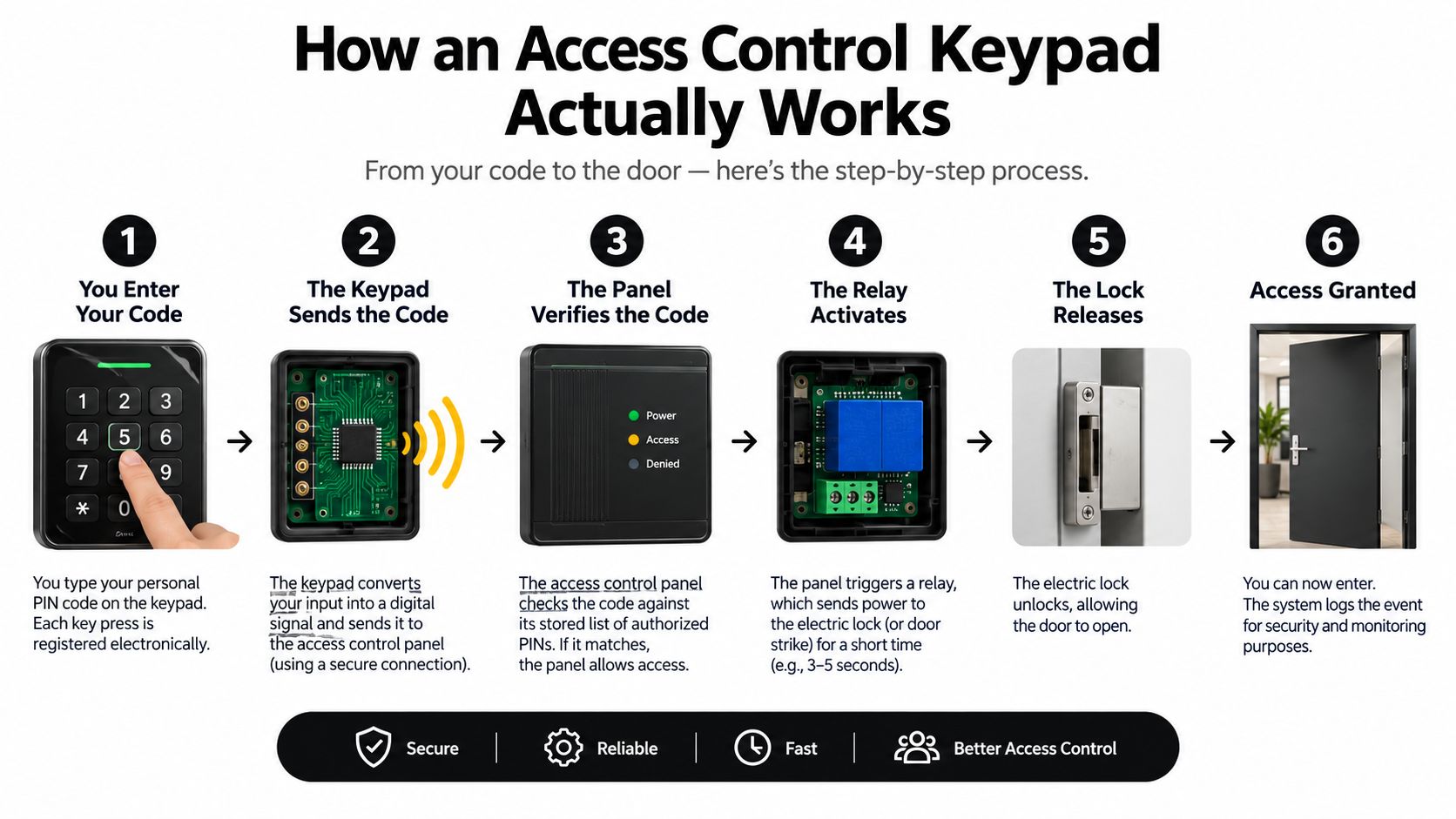
The authentication path
- Input module: The keypad detects each keypress and assembles the entered PIN. Some units store the code locally. Others pass the entry to a separate controller.
- Decision point: The device or controller compares the entered value with stored permissions. A simple standalone keypad may hold the rules inside its own memory. A larger system may consult an access panel that also manages card readers, door contacts, and schedules.
- Output signal: A valid match triggers a relay or another electronic output. A relay is an electrically controlled switch. It may power the lock directly, or it may tell a separate controller to release it.
- Lock action: The lock releases for the programmed interval, provided the power supply and door hardware are correctly matched. A request-to-exit device can also signal that someone is leaving from the secure side, avoiding the need to enter a PIN on exit.
- Event handling: The system may record a successful or failed attempt. Audit quality depends on the architecture. A keypad that only knows “code accepted” can't reliably prove which individual used a shared code.
A shared PIN is simple to issue, but it creates weak attribution. User-specific PINs are better because an administrator can disable one person's code without changing everyone else's. The improvement only matters if the keypad supports that distinction and the administrator maintains the records.
What sits between the keypad and the lock
A reader-to-panel connection may use Wiegand, a widely used signalling method, or OSDP, the Open Supervised Device Protocol, which supports more structured communication and supervision. Buyers don't need to memorise the protocols, but they should ask where the PIN comparison occurs and where events are stored.
A useful home keypad system guide can help first-time buyers understand the basic components before they compare commercial quotes. For a broader overview of access control methods, focus on how each credential affects identity, outage behaviour, and administration rather than on reader features alone.
The relay deserves particular attention. If the keypad directly switches a strike or magnetic lock, its contact rating must suit the load. If the rating is inadequate, use the keypad to drive a properly specified controller or intermediate relay instead of forcing the reader to carry the lock's electrical burden.
The Technical Features That Matter in Real Installations
A product sheet can look impressive while hiding the fields that decide whether a keypad survives its environment. Start with credential policy, then check power and switching, and only then compare appearance, lighting, or app features.
Read the specification as an installer
PIN capacity and policy determine how much control you have after deployment. Commercial keypads commonly support PIN lengths from one to eight digits, but length alone doesn't stop repeated guessing. One documented unit applies a 30-second lockout after eight consecutive invalid PINs, adding a time penalty to brute-force attempts. The AGE-ACL585 specification documents the PIN range, lockout behaviour, power, relay, and environmental ratings.
Ask whether the unit supports failed-attempt lockout, time schedules, user-specific codes, temporary codes, and an audit trail. If the vendor can't explain what happens after repeated failures, the feature list is incomplete.
| Spec Category | What to Look For | Why It Matters |
|---|---|---|
| PIN policy | Supported length, lockout behaviour, schedules, user-specific codes | Determines resistance to guessing and the quality of access attribution |
| Input power | Accepted AC or DC voltage and maximum current draw | Confirms compatibility with the existing supply and cable run |
| Relay output | Contact rating in amps and volts, plus output type | Shows whether the keypad can switch the lock or should drive a controller |
| Egress interface | Request-to-exit input and door-position input | Supports safe, predictable exit behaviour and monitoring |
| Environment | IP rating, operating temperature, mounting guidance | Predicts whether the unit suits a gate, exposed wall, or indoor corridor |
| Physical protection | Vandal-resistant construction and keypad wear resistance | Reduces failure and visible digit patterns in demanding locations |
Power figures beat marketing language
One standalone keypad specifies 12 to 24 V AC/DC, a maximum draw of 110 mA, and capacity for up to 1,000 codes or proximity keys across two zones. Another indoor keypad specifies 15 mA standby current, 30 mA during keypress, and up to 90 mA with active output, with a Form C relay rated at 1 A at 30 VDC. Onic's intelligent keypad specifications show how current draw, credential capacity, and relay limits should be compared.
Those values aren't interchangeable buying trophies. Current draw affects supply sizing and voltage drop. Relay capacity determines whether the unit can directly switch the lock. A high-rated relay isn't automatically better, and a low-current keypad isn't automatically safer. The right specification is the one that matches the door hardware with a reasonable margin.
Outdoor buyers should treat environmental data as a requirement, not a bonus. The cited commercial keypad is rated IP65 and specified for -25 to +50°C, which gives a concrete comparison point for exposed installations. A coastal side door, a gate post, and a protected lobby don't impose the same demands. For specialist storage or laboratory environments, reviewing Dasco locking systems for labs from Material can also sharpen the distinction between access hardware and the cabinets or enclosures it protects.
Standalone, Networked, and Controller-Based Systems Compared
The keypad's architecture matters more than its faceplate. A polished reader can still create an administrative burden if every code change requires a site visit.
Three ways to deploy the intelligence
A standalone keypad stores codes and rules in the device. It's usually the cleanest choice for one low-risk door with a small user group. The tradeoff is local administration. An operator may need to visit the door to add a user, remove a code, or review events, and audit capability can be limited.
A networked keypad communicates with a server or cloud platform through a wired or wireless connection. It supports central changes and consolidated logs, which suits operators managing several sites. It also introduces a dependency on the network and the platform. Ask what continues locally if communication fails, because “networked” doesn't always mean the door stops working or keeps every administrative feature available.
A controller-based system places the access logic in a dedicated panel. The panel can coordinate keypads, card readers, mobile readers, door contacts, and biometrics across multiple doors. This architecture is usually the sensible choice for offices, multi-tenant buildings, and sites where reporting and central administration matter.
| Criterion | Standalone | Networked | Controller-Based |
|---|---|---|---|
| Best fit | One or a few simple doors | Distributed sites needing remote changes | Buildings with multiple readers and central policy |
| Code management | At the door | From software, subject to connectivity | From the access panel or management platform |
| Offline behaviour | Usually local by design | Depends on local memory and platform rules | Often governed by the panel's stored permissions |
| Auditability | Basic to limited | Central logs where supported | Stronger cross-door reporting |
| Expansion | Limited by device capability | Adds networked devices | Designed for mixed readers and larger systems |
| Administrative burden | High per door | Lower central effort | Structured central administration |
Don't choose an architecture from the keypad brochure. Match it to the number of doors, the people who administer access, and the reports the building owner will need. A useful access control software resource can help frame the management layer, but the installer still has to explain where credentials and events reside during a network interruption.
Installation Considerations Most Buyers Overlook
Many keypad failures start before the unit reaches the wall. The installer has to design the power path, lock interface, exit hardware, and mounting location as one system.
Start with the door, not the reader
Confirm whether the lock is fail-safe or fail-secure. A fail-safe lock releases when power is removed, which can support emergency egress but may affect security during a power failure. A fail-secure lock stays locked when power is removed, although the building still needs a compliant means of exit. The correct choice depends on the door, occupancy, fire strategy, and local requirements.
Then check the electrical load. A keypad rated for a particular voltage isn't automatically compatible with an existing transformer. A leftover supply from an older installation may deliver the wrong voltage or insufficient current. Long cable runs can create voltage drop, leaving enough power for the keypad display but not enough for the relay or lock to operate reliably.
The relay must also tolerate the lock's startup demand, not merely its normal running load. If the numbers don't align, use an appropriately rated controller or relay rather than hoping the contact will survive.
Prevent retrofit problems
- Separate cable paths: Avoid running reader data alongside lock power for long distances, especially where electrical noise can affect signalling.
- Plan egress: Specify the request-to-exit button, sensor, and door position monitoring before the keypad is installed.
- Protect exposed hardware: An indoor reader on a gate post is an installation error, not a product limitation. Use weather protection and a unit rated for the actual location.
- Check the mounting surface: Metal mullions and reinforced frames can complicate wireless equipment and leave too little room for cable termination.
- Document the supply: Record voltage, current capacity, cable length, and lock load so the next technician doesn't have to reverse-engineer the door.
Gates deserve extra attention because the reader, lock, operator, and communications path may sit far apart. A practical FenceScape access control guide is useful when the keypad is part of a gate system rather than a simple interior door. The core lesson is the same: specify the complete access path, not just the device mounted beside it.
When a Keypad Beats Mobile and Biometric Credentials
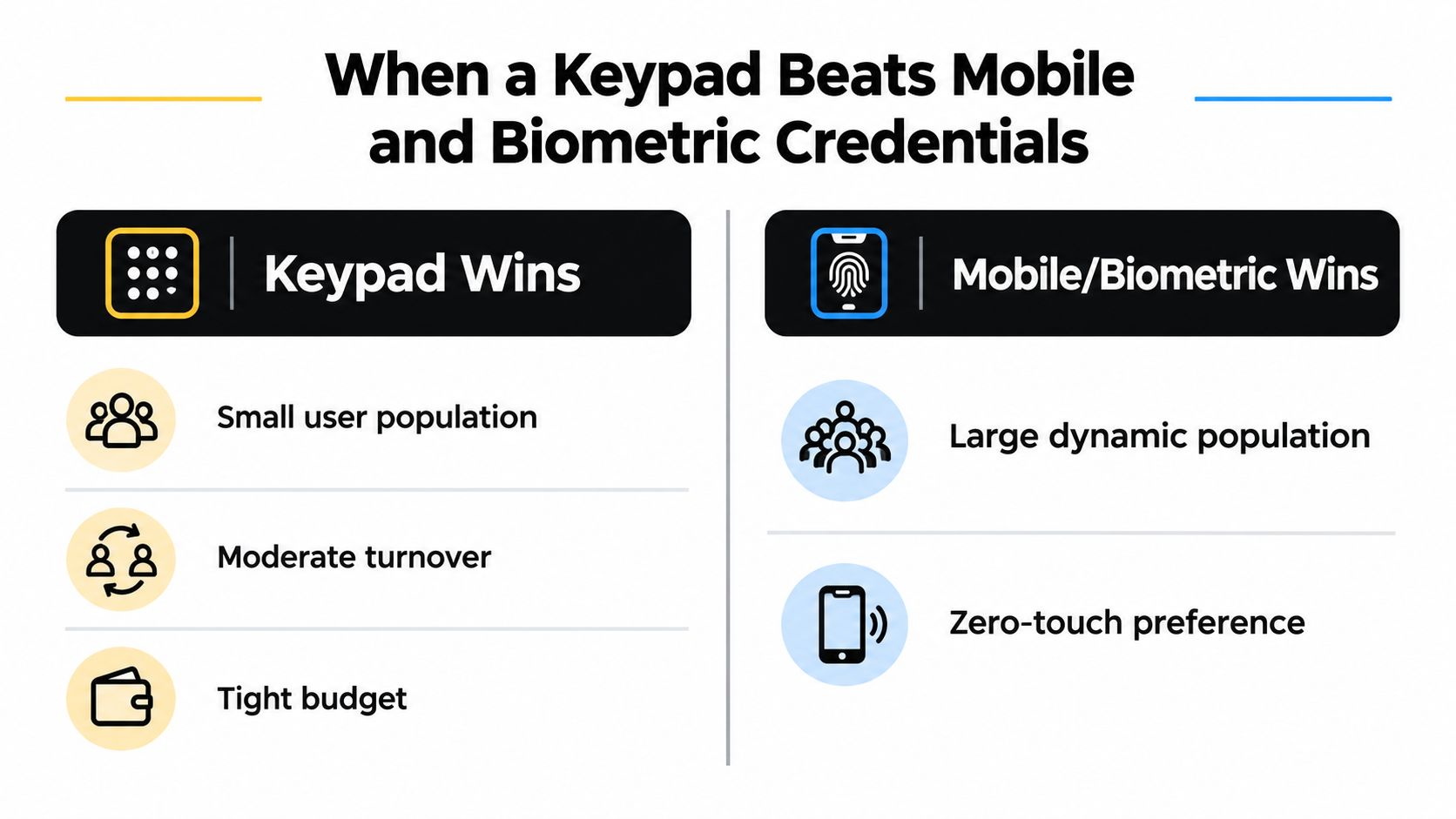
A retail back door used by a small staff does not need the same credential strategy as a main entrance. If users need reliable entry without phones, badges, or enrolment appointments, an access control keypad is often the better architectural choice. It suits stockrooms, small workshops, plant rooms, and mechanical spaces where the user group is limited and the access pattern is predictable. A local keypad can also keep authenticating during a network outage.
The category remains substantial. One market report places keypad-based access control at 17.2% of market share in 2025, with common use in residential buildings, small commercial spaces, and emergency exit doors. Fortune Business Insights provides the keypad market context and cited deployment patterns. A separate estimate puts keypad-based systems at about 25% of global access-control installations, while another places them near 30%. Treat those estimates as directional rather than a universal measurement. They show continued adoption, not a technology that has vanished.
Compare the credential to the risk
Mobile credentials are the stronger choice when rapid revocation and individual accountability matter. An administrator can usually disable one person's credential without changing access for everyone else. Mobile access also reduces casual sharing, but it depends on compatible phones, enrolment, battery availability, and a management platform. Those dependencies add administration and create failure points that a local PIN avoids.
Biometrics fit high-consequence areas where the owner needs stronger evidence that the authorised person is present. They add enrolment, privacy, accessibility, hygiene, and failure-to-read concerns. Specify them only when that identity assurance justifies the higher cost and operating complexity.
Keypads fit low-to-medium risk doors where offline operation, predictable access, and lower hardware or subscription overhead matter more than proving exactly who entered. They are a poor choice for busy public entrances, sensitive records rooms, or any door requiring reliable identification of every entrant. A PIN can be shared, and audit records identify the code rather than the person unless the system assigns individual PINs and users follow the policy.
The best design often combines credential types. Use a card or mobile reader at the main entrance, reserve PIN access for controlled service doors, and specify biometrics only where identity assurance warrants the tradeoff. Recent market coverage describes keypad and PIN devices as holding 12.8% share while declining at a -1.2% CAGR, a competitive shift that does not eliminate their practical value. Global Growth Insights discusses this changing competitive position.
Managing PINs Without Creating Constant Admin Work
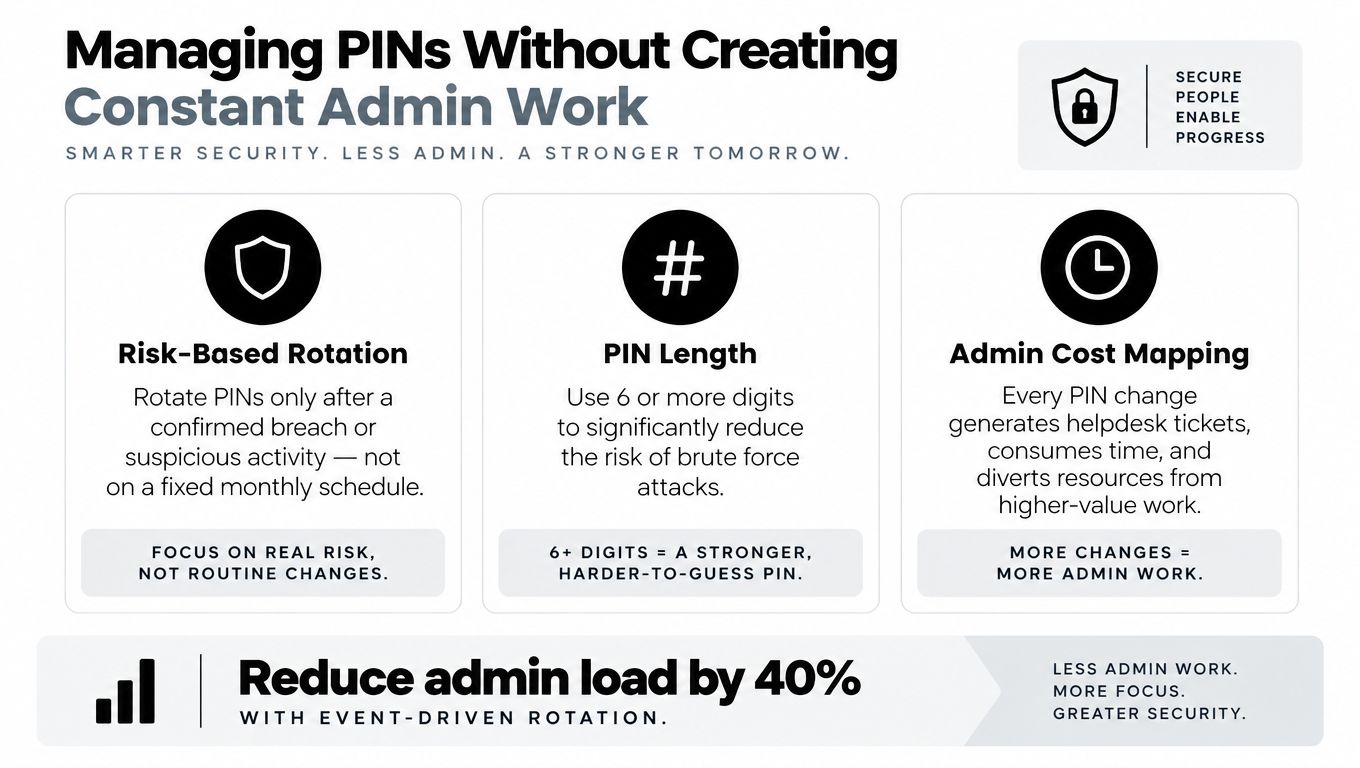
“Change the PIN every month” sounds secure, but blanket rotation can create its own failure mode. Staff write new codes on notes, forget them, call the administrator repeatedly, or keep using an old code because nobody removed it. Security policy has to account for the human work required to enforce it.
Use risk and user type to set the rule. A public-facing service door deserves more frequent review than a quiet staff-only room. A contractor who needs access for a defined task should receive a temporary credential with an expiry, not a permanent shared code. An employee's individual PIN should normally change when their role changes, their access is compromised, or the door's risk changes.
A workable operating policy
- Shared codes: Avoid them where the system supports individual PINs. If a shared code is unavoidable, change it after a user leaves the group or the code may have been exposed.
- Temporary access: Give contractors and cleaners separate credentials with an explicit end point. That makes revocation a recordkeeping task instead of a building-wide disruption.
- High-exposure doors: Review failed attempts, worn keys, and unusual access patterns more often than you review a quiet internal room.
- Routine administration: Keep a register of who received each code, why they received it, and when the permission ends.
A keypad system becomes manageable when the administrator can answer three questions quickly: who has access, why they have it, and when it should end. That is the core of group access management, regardless of whether the credential is a PIN, card, phone, or biometric template.
Vendor guidance increasingly describes smart keypads alongside access logs, expiring codes, and layered authentication. Treat those features as workflow tools, not decorations. If a product makes it difficult to issue a unique code, set an expiry, or review events, its apparent convenience will become administrative debt.
A Buyer's Checklist for Choosing the Right Keypad
Take this sequence into the vendor meeting. It prevents a quote from being decided by a backlit keypad and a long feature list.
Decide the architecture first
- Define the door population: One simple door may suit a standalone keypad. Several doors or several administrators point toward a networked or controller-based system.
- Set the identity requirement: If the owner needs person-level accountability, reject a shared-code design before discussing hardware.
- State the outage requirement: Ask whether the door continues to authenticate locally if the network or cloud service is unavailable, and which functions are lost.
Validate the physical installation
- Match the environment: Require documented IP protection and operating temperature information for outdoor or exposed locations. Don't accept “weather resistant” as a substitute for a rating.
- Match the lock: Compare the keypad relay's voltage and current contact rating with the lock's normal and startup load. Use an intermediate controller when the figures don't align.
- Confirm the power path: Check the existing supply, cable length, voltage drop, and current budget. A compatible keypad can still fail on an unsuitable circuit.
- Specify egress: Include request-to-exit hardware, door position monitoring, emergency release, and the fail-safe or fail-secure decision in the design.
Pressure-test administration
Ask how an administrator creates an individual PIN, revokes it, sets an expiry, responds to repeated failures, and retrieves an event record. Ask whether those actions happen at the door, through local software, or from a central console. If the answer changes between models, get the workflow in writing.
Reject a quote that has a vague lockout policy, undocumented current draw, no environmental documentation, or no clear route to audit logs. Those omissions predict callbacks more accurately than a missing cosmetic feature.
Finish with two direct questions: “What similar door has your team specified this unit for, and what failed during commissioning?” Then ask, “Show me the exact workflow for removing one user's access without changing everyone else's.” A vendor who can answer both questions understands deployment, not just product sales.
If you're comparing keypad, mobile, and biometric options, AccountShare offers practical tools for managing shared access and permissions across collaborative services. Visit the platform to assess whether its account-management approach can reduce administrative friction while you design a more disciplined access-control process.