

How to Watch Crunchyroll Together With Friends
Have you ever tried to hit "play" at the exact same second as a friend miles away, only to end up hopelessly out of sync? We've all been there. Wanting to share the hype of a new anime episode is a core part of being a fan, and figuring out how to watch Crunchyroll together without the frustration is key.
Luckily, you can ditch the awkward countdowns. With the right tools, like browser extensions or even Discord, hosting a synchronized watch party is totally doable.
Your Guide to Hosting an Anime Watch Party
This guide gets straight to the point. We'll walk through the best ways to get your streams in perfect sync, so you can focus on the show. We’ll cover the most popular choices, from specialized browser extensions to the screen-sharing features you might already be using.
Think of this as your roadmap to a seamless watch party. No more "3... 2... 1... play!" mishaps. Just pure, synchronized anime enjoyment.
Methods to Watch Crunchyroll Together at a Glance
So, how do you pick the right tool for the job? It really depends on what your group needs. Are you looking for the absolute best video quality, or is a quick and easy setup more important? Some methods are super simple but might compress the video, while others offer perfect playback but require a bit more setup.
To make it easier, here's a quick rundown of your main options.
| Method | Best For | Pros | Cons |
|---|---|---|---|
| Browser Extensions | Dedicated, feature-rich watch parties with integrated chat and playback control. | Perfect sync, high-quality video, built-in chat features, host has full control. | Requires all participants to install the same extension. |
| Discord Screen Share | Quick, informal viewing sessions for friends already on a server. | Very easy to use, great for voice chat, no extra software needed if you use Discord. | Video quality can be lower due to compression; requires a good internet connection from the host. |
| Third-Party Apps | Users who want a platform-agnostic solution that works across different services. | Often supports multiple streaming sites, can have more advanced features. | May come with a subscription fee; can be less integrated than a dedicated extension. |
Ultimately, browser extensions tend to offer the best all-around experience, but Discord is a fantastic, no-fuss alternative if everyone's already on there.
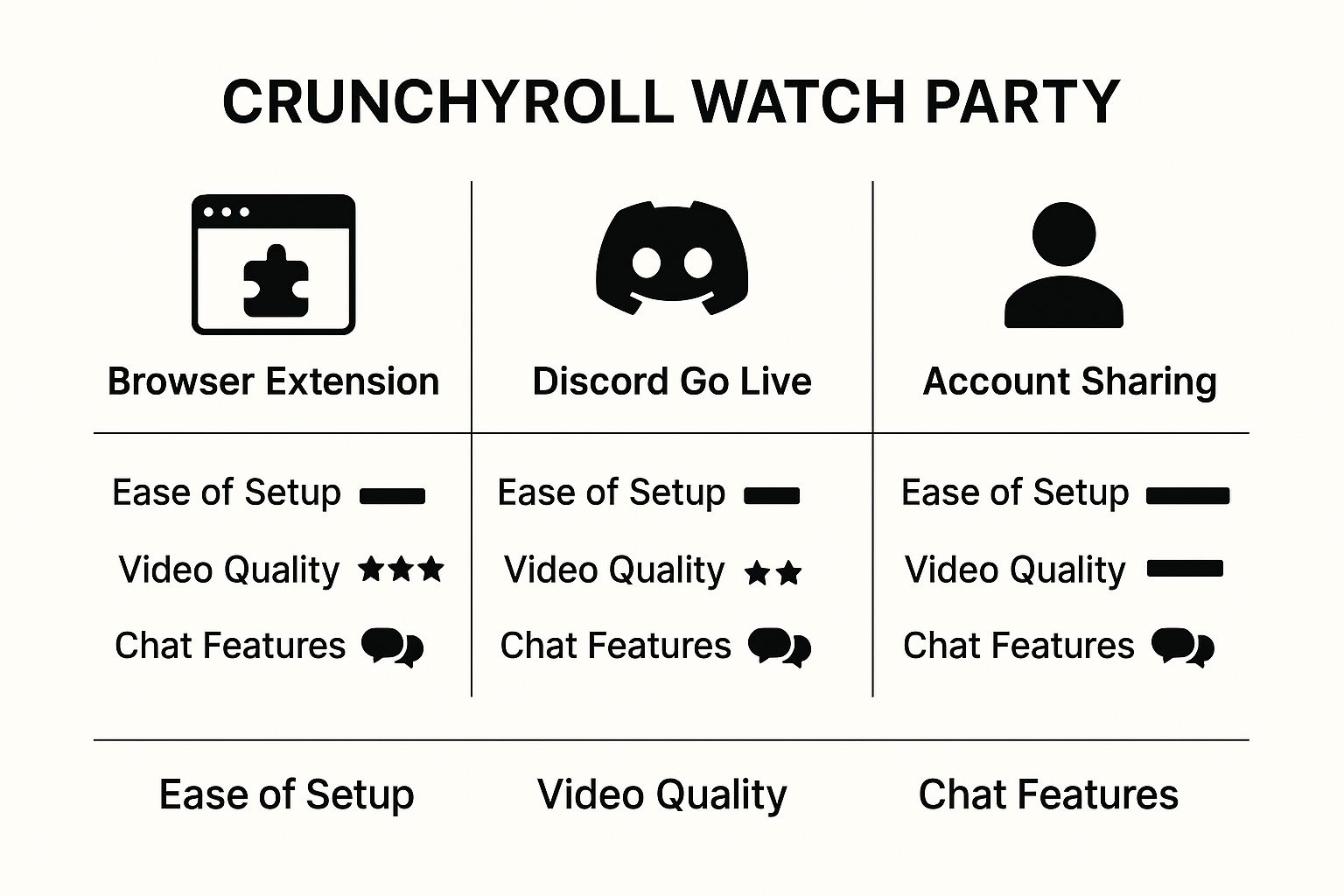
As you can see, each method has its own strengths. It's all about finding the one that fits your group's vibe.
Creating a Memorable Experience
A great watch party is more than just watching a show in sync—it's about the shared experience. It’s what makes a massive hit like Solo Leveling feel like a global event. That series absolutely shattered records, becoming Crunchyroll's most-watched show with over 610,000 user reviews. It's that collective excitement that makes anime so special.
To really lean into the fun, why not build a whole event around it? You could get some ideas for an 'anime club' theme to inspire themed snacks or even get everyone to change their Discord avatars to a character from the show. It's these little touches that turn a simple stream into a real party.
Using Browser Extensions for a Seamless Sync
When you want a tool built specifically for watch parties, browser extensions are your go-to solution. These handy add-ons plug right into your browser, creating a private viewing room where playback stays perfectly synchronized for everyone involved. It’s like having your own virtual cinema, complete with features designed to keep things running smoothly.
Getting started is usually dead simple. You just find an extension on your browser's official web store, install it with a click, and you're pretty much ready to host. Typically, one person starts the stream on Crunchyroll, creates the "party," and then shares a unique link with everyone else.
Finding and Installing the Right Extension
First things first, you'll need to head over to your browser's extension marketplace. For most people, that’s the Chrome Web Store. Just search for terms like “watch party” or “video sync,” and you’ll see a bunch of popular options that work with major streaming sites, Crunchyroll included.
Here’s a peek at what the Chrome Web Store looks like when you're browsing for a new tool.
Stick to the official marketplace. It's the safest way to find and install these add-ons, as they've been checked for basic security and functionality. Before you install, I always recommend checking the user ratings and recent reviews to see how well it's currently working with Crunchyroll.
Key Features to Look For
Not all extensions are built the same. To really nail your Crunchyroll watch party, you’ll want a tool that does more than just sync up the video feed.
Here’s what I’d look for:
- Integrated Chat: A must-have. A built-in text or video chat sidebar lets you share all those gut reactions and theories in real-time without having to juggle a separate app like Discord.
- Host Controls: Look for extensions that give the host control over pausing, playing, and skipping. It’s a small thing, but it prevents that one friend from accidentally pausing for everyone.
- Private Rooms: Make sure you can create invite-only sessions. The last thing you want is a stranger crashing your big anime reveal party.
Pro Tip: Do a quick test run with a friend before the main event. This gives everyone a chance to install the extension and figure out how to join the room. Trust me, it saves a lot of time and avoids those "is it working yet?" tech issues right when the opening theme starts.
Using Discord for Your Watch Party
For a lot of anime fans, Discord is already home base. It’s where communities chat, share fan art, and debate the latest plot twists. This makes it a fantastic, no-fuss option to watch Crunchyroll together since you don't need any extra apps or browser extensions. You can literally go from chatting about a new episode to watching it in a couple of clicks.
The magic here is Discord's "Go Live" feature. One person simply shares their browser window—the one playing Crunchyroll—with everyone else in a voice channel. Because you’re already in a voice chat, the live commentary and reactions feel completely natural. It’s this shared social experience that makes it so much fun, much like how great remote collaboration tools can bring a team together.
Getting Your Discord Stream Just Right
To sidestep common issues like a dreaded black screen or laggy playback, a little prep work makes all the difference. The number one problem people run into is the black screen, and it's almost always caused by a single browser setting.
Before you start streaming, jump into your browser's settings and turn off "Hardware Acceleration." It's a quick fix that lets Discord capture the video from Crunchyroll correctly.
A Quick Tip From Experience: The host's internet connection is the foundation of the watch party. If you can, use a wired connection for stability. A solid upload speed will prevent lag and keep the video quality crisp for everyone. If your connection is struggling, try dropping the stream quality from 1080p to 720p—it usually smooths things right out.
Audio management is also crucial to avoid that annoying echo effect. Here's the setup:
- The Streamer: Mutes the audio within Discord and listens directly from their Crunchyroll tab.
- Everyone Else: Mutes their own Crunchyroll tab and listens only to the audio coming through the Discord stream.
This simple setup has become a go-to for the massive global anime community. With 31% of global consumers tuning into anime weekly and Crunchyroll serving over 15 million subscribers, the audience is huge. Discord just happens to be the perfect, all-in-one hangout for fans to connect over the shows they love.
How to Share a Crunchyroll Account Safely
Want to watch Crunchyroll together with friends? Sharing an account is a pretty common way to do it, but you've got to know the rules of the road first. The number of people who can watch at the same time is tied directly to your subscription plan. If you're on a standard Fan plan, you're usually stuck with just one stream. That's a recipe for frustration if a friend logs in right in the middle of your binge-watch.
The easiest way around this is to upgrade to a Mega Fan or Ultimate Fan plan. These tiers are built for sharing, typically allowing up to four simultaneous streams. This is perfect for a small group of friends or family, letting everyone dive into the library without kicking someone else off. It completely sidesteps the "who's watching now?" conflict.
Managing Shared Access Smartly
Okay, so you've got a plan that supports multiple streams. Now what? The next hurdle is simple coordination. A little bit of planning can prevent that dreaded “too many streams” error from popping up just as the new episode of your favorite show drops.
Seriously, a quick group chat or a simple shared schedule can make all the difference. It’s a small effort that ensures everyone gets to watch what they want, when they want.
A quick but important tip: when you share your login info, do it securely. Never send your password in a plain text message. Use a password manager or a secure note app to keep your account safe from prying eyes.
This whole sharing thing has become a bigger deal as Crunchyroll has exploded in popularity. The platform's user base more than tripled in just five years, hitting an incredible 17 million subscribers by 2024. If you're curious about the numbers behind this growth, you can find more details in Sony's fiscal reports.
For those who want a more structured and secure way to handle a shared account, a platform like AccountShare can be a lifesaver. We've actually put together a full guide on how to manage your Crunchyroll account access that dives into keeping things smooth and secure for everyone in your group.
Tips for the Perfect Virtual Anime Night
A great virtual anime night is about more than just syncing up a video. The real fun comes from creating a shared vibe that makes everyone feel like they’re in the same room, even if you’re miles apart. It's about turning a simple stream into an actual event—something that gets everyone excited to watch Crunchyroll together week after week.

Why not add a theme? If you’re queueing up a cooking-focused slice-of-life anime, you could challenge everyone to make their own Japanese-inspired snacks. Dropping pictures of your creations in the group chat is a great way to kick things off and add a fun, interactive twist.
Set the Stage Before You Start
A little prep work can make all the difference. Before the big night, get your group on the same page with a few key details. Firing up a quick poll in your Discord or group chat can sort out the logistics and prevent that awkward "so, what are we doing?" conversation right as the show is about to start.
It's a good idea to agree on these points ahead of time:
- The Plan: Are you watching a single episode or diving into a multi-episode arc? Knowing the game plan helps everyone carve out the right amount of time.
- Breaks: Decide when you'll hit pause. Maybe a quick break between each episode for bathroom runs, snack refills, or a quick debrief?
- Spoiler Policy: Is this a first-time watch for some people? Setting a clear "no spoilers" rule from the start ensures everyone gets to enjoy the twists and turns.
The goal is to make it feel less like you’re all just watching alone in separate rooms and more like you’re hanging out together on one giant, virtual couch. A bit of planning is all it takes to transform a basic stream into a memorable get-together.
For those who want to go all out, think about themed decorations, custom Zoom backgrounds, or even looking up some simple anime characters to cosplay for the occasion.
Embrace the Live Interaction
Let's be real—the best part of watching with friends is seeing their live reactions. Get everyone to use the chat, whether it's the one built into your watch party tool or a separate Discord channel. This is your space to drop wild theories, freak out over plot twists, and spam emotes during the big fight scenes.
It's these little moments of interaction that close the physical gap and make the whole thing feel like a genuine, shared experience.
Common Questions About Watching Crunchyroll Together
When you’re trying to rally the crew for an anime night, a few questions always seem to come up. From tech glitches to subscription limits, getting the details sorted out beforehand means less time troubleshooting and more time enjoying the show. Let's walk through some of the most common things people ask when setting up a group watch.
Think of this as your pre-flight checklist. Getting these answers straight will make the entire process a whole lot smoother.
Can You Watch Crunchyroll on Discord?
Absolutely, and it's one of the most popular ways to do it. The setup is pretty straightforward: whoever has the Crunchyroll account just needs to start streaming the episode and then use Discord's "Go Live" feature to share their screen in a voice channel.
For the best experience, I always recommend the person streaming use the Discord desktop app, not the browser version. It’s just more reliable. If your friends are getting a black screen, that's a classic hardware acceleration issue. The fix is easy—just dive into your browser's settings and turn off "Hardware Acceleration." That usually clears it right up.
How Many People Can Watch Crunchyroll at Once?
This all comes down to the subscription plan you're on. A basic 'Fan' plan is locked to just one stream at a time, which obviously won't work for a group.
You’ll want to be on either a 'Mega Fan' or 'Ultimate Fan' plan to avoid anyone getting kicked off. These premium tiers open it up to four simultaneous streams, which is perfect for most friend groups. If you're trying to figure out which one makes sense, we break down all the details in our guide to the Crunchyroll subscription cost.
Remember, the stream limit is tied to the account itself. If four people are already watching on a Mega Fan account, a fifth person won't be able to log in until someone else signs out.
Does Crunchyroll Have a Watch Party Feature?
Surprisingly, no. Crunchyroll doesn't offer a built-in, native watch party feature like you might see on services like Prime Video or Hulu. This is exactly why so many fans have turned to other creative solutions to watch together.
To get that synchronized experience, you have to rely on external tools. Things like browser extensions or screen-sharing through Discord have become the go-to methods, filling the gap by providing the synced video and chat that the platform is missing on its own.
Ready to make sharing easier and more affordable? With AccountShare, you can securely group-purchase premium subscriptions and split the cost, ensuring everyone gets access without the hassle. Check out how it works at https://accountshare.ai.