

How to Share Amazon Music with Your Family
Yes, you can absolutely share Amazon Music, and there are a couple of great ways to do it. The best option for you really depends on what kind of Amazon membership you have and who you're looking to share with. You can either go all-in with the Amazon Music Unlimited Family Plan for up to six people or share your existing Prime Music benefits with another adult through Amazon Household.
Understanding Your Amazon Music Sharing Options
Before we get into the nitty-gritty, it's worth taking a step back to see where Amazon Music fits in the bigger picture. The music streaming world is massive, with a market value expected to reach around $46.7 billion by 2025. Amazon Music has carved out a nice slice for itself, holding about 12% market share, which translates to nearly 79 million subscribers enjoying its library.
If you're curious about how it stacks up against the competition, checking out comparisons of different music platforms can be really insightful. This context helps explain why Amazon has built specific sharing features—they're catering to a huge audience that wants to share music with family and friends.
So, let's break down the two official ways you can share your tunes.
The Amazon Music Unlimited Family Plan
Think of this as the premium, no-compromises option. For one monthly fee, you can get up to six people on the same plan, and everyone gets their own completely separate experience. It's perfect for families or even a group of housemates.
Here’s what makes it so good:
- Individual Profiles: No more mixed-up playlists or getting your partner's heavy metal recommendations. Everyone has their own library, playlists, and listening history.
- Personalized Recommendations: The algorithm learns each person's unique taste, so the suggestions are actually helpful.
- Full Access: This is the big one. You get the entire catalog of over 100 million songs, completely ad-free.
- Offline Listening: Everyone can download their favorite albums and playlists to their own devices for on-the-go listening.
Prime Music via Amazon Household
If you're already an Amazon Prime member, you have a built-in sharing feature you might not even know about. By setting up an Amazon Household, you can share many of your Prime benefits—including Prime Music—with another adult, plus up to four teens and four children.
It's a fantastic perk, but there are a few things to keep in mind:
- Shared Benefits: When you link accounts with another adult, you're sharing more than just music. This includes Prime shipping, Prime Video, and even payment methods, so make sure it's someone you trust completely.
- Limited Library: Prime Music offers a much smaller, rotating catalog of about 2 million songs. It's still a lot of music, but it’s a fraction of what you get with the Unlimited plan.
- Casual Listening: This option is really best for someone who just wants to put on some tunes now and then and isn't looking for a specific, hard-to-find artist or album.
This handy flowchart can help you visualize which path makes the most sense for your situation.
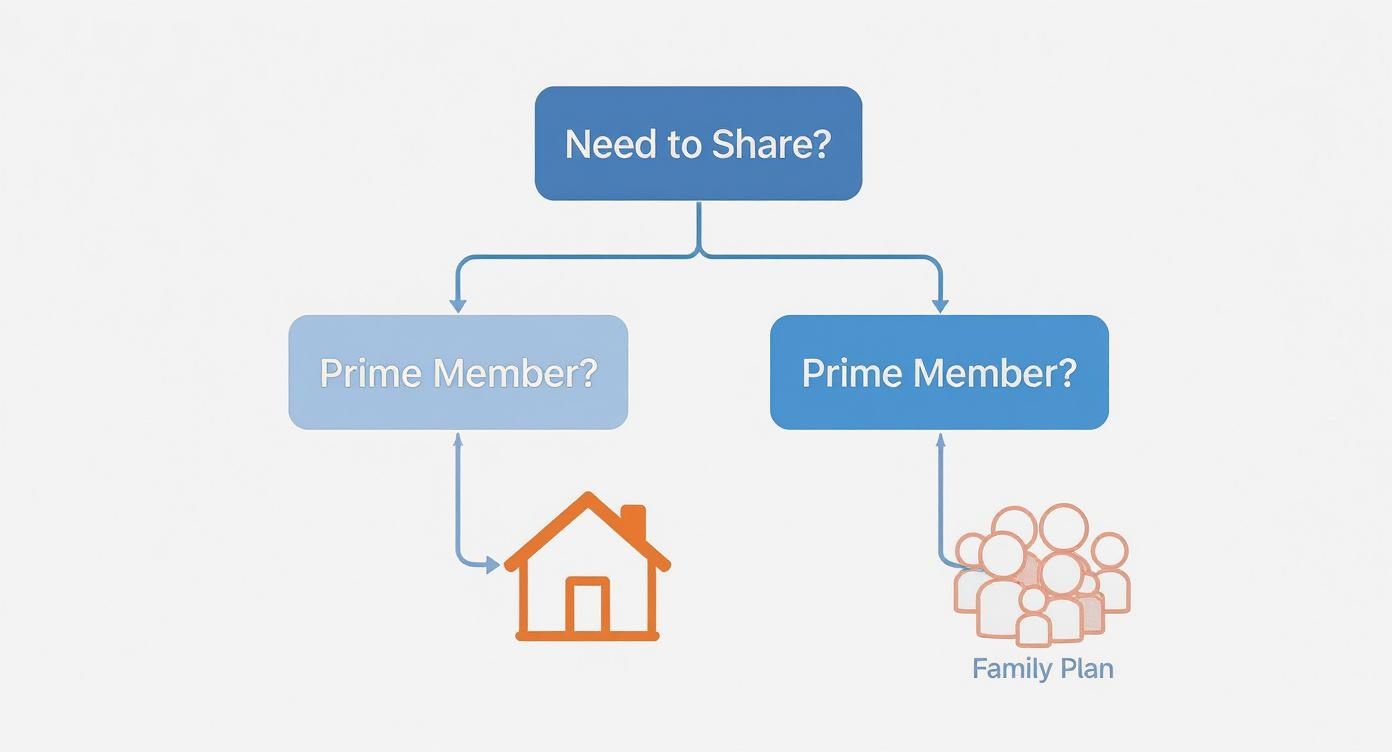
As you can see, your current Amazon membership is the biggest factor. If you're a Prime member just looking to share with one other person, Household is a great start. If you need more accounts and the full library, the Family Plan is the way to go.
Amazon Music Sharing Methods at a Glance
To make the choice even clearer, here's a direct comparison of the two options.
| Feature | Amazon Music Unlimited Family Plan | Prime Music via Amazon Household |
|---|---|---|
| Number of Users | Up to 6 individual accounts | 2 adults, plus teens and children |
| Music Library Size | Full access to over 100 million songs | Rotating access to about 2 million songs |
| Personalization | Fully separate profiles, playlists, and recommendations | Shared access, with limited personalization for the second adult |
| Cost | A dedicated monthly subscription fee | Included with your Amazon Prime membership |
| What's Shared | Just the music subscription | Prime benefits, including shipping, video, and payment methods |
| Best For | Families or groups wanting full, personalized music access | Prime members who want to share basic music perks with a partner |
Ultimately, both methods are great, but they serve very different needs. The Family Plan is a full-fledged music service for a group, while sharing via Household is more of a value-added perk for Prime members.
Setting Up the Unlimited Family Plan
If you’re tired of your meticulously crafted playlists getting hijacked by the rest of the family, the Amazon Music Unlimited Family Plan is your answer. It's the best way I’ve found to share Amazon Music without creating a digital free-for-all. This plan turns your solo subscription into a hub for up to six people, giving everyone their own private corner of the music world.
Whether you're upgrading an existing account or starting from scratch, the process is pretty simple. As the main account holder, you'll be the one in charge of the subscription and sending out invites. This gives you control, but it also gives everyone else the freedom to dive into over 100 million songs on their own terms.

Kicking Off the Invitation Process
Once you’re signed up for the Family Plan, you can start adding people right away. Head over to your Amazon Music Settings and look for the "Invite or Remove Members" option. From there, you can generate a unique invitation link to share via email or text.
Let's say you're adding your teenager to the plan. You'd just copy the link and send it over. They'll get a message that says something along these lines:
"[Your Name] has invited you to join their Amazon Music Unlimited Family Plan. Click here to accept and start listening with your own account!"
Just a heads-up: they need to be at least 13 years old and have their own standard Amazon account. It doesn't need to be a Prime account, just a basic one will do. Once they click the link and sign in, they’re in. Their app automatically gets the Unlimited upgrade, and they can start building playlists and downloading tracks immediately.
The whole process is designed to be painless. This user-friendly approach is a big reason why Amazon Music has grown so quickly, ballooning to an estimated 80 million subscribers by 2023—that's a nearly fivefold increase in just seven years. It shows how much value people place on simple, effective sharing features.
What Each Family Member Gets
This is where the Family Plan really shines. It's not like everyone is just sharing a single password; each person gets their own distinct, private experience.
Here’s what every invited member gets:
- A Personal Music Library: Their saved songs, albums, and playlists are completely separate. No more pop-punk crashing your chill-out mix.
- Unique Recommendations: Amazon’s algorithm tunes into what they like, so their suggestions are tailored to their tastes, not the entire family's.
- Simultaneous Streaming: Everyone can listen on their own device at the same time. No more "who kicked me off?" arguments.
- Offline Access: Each person can download their favorite music to their phone or tablet for on-the-go listening.
This kind of individual-within-a-group setup is pretty standard for top-tier music services. If you’re weighing your options, comparing it to other platforms can be useful—for example, our guide on the Qobuz family plan offers a good point of comparison. At the end of the day, the Amazon Family Plan ensures that sharing music makes life better, not more complicated.
Using Amazon Household for Prime Music
If you're already a Prime member and the full-blown Music Unlimited Family Plan feels like overkill, there's a fantastic, built-in alternative you might be overlooking. You can use Amazon Household to share your Amazon Music benefits with another adult and even a few kids, all without paying an extra dime. It’s the perfect setup for couples or close family members looking to get more value out of a Prime subscription they already have.

This kind of easy integration is a big reason why Amazon Music is such a major player. In the U.S., it commands a solid market share of around 21.6%, putting it in the number two spot. A lot of that popularity comes from how well the music service is woven into the larger Prime ecosystem, making it incredibly simple for millions of households to share access.
What Is Amazon Household, Exactly?
At its heart, Amazon Household lets two adults (plus up to four teens and four children) in the same home share a whole host of Prime benefits. This goes way beyond music—we're talking about Prime shipping, Prime Video, the Kindle Owners' Lending Library, and more.
But here’s the most important thing to understand: this deep integration requires trust. When you invite another adult into your Household, you're also agreeing to link your payment methods. That means they can use the credit and debit cards on your Amazon account to make their own purchases. It's a deal-breaker for some, so be sure you're comfortable with that arrangement.
Setting Up Your Household
Getting started is pretty painless. Just head to the Amazon Household section on your account and send an invitation to the other adult's email. They'll have 14 days to click the link and accept.
After they accept, you'll both have to go through a quick authorization step to officially link your payment methods. Once that's done, all the shared benefits, including Prime Music, kick in almost instantly. The other adult can then start streaming from the Prime Music library on their own devices, signed into their own Amazon account. For a closer look at the details, our guide on whether Amazon Prime can be shared covers all the bases.
The biggest trade-off with this method is the smaller music library. Prime Music offers a rotating catalog of about two million songs. While that's nothing to scoff at, it's a fraction of the 100 million-plus tracks you get with an Unlimited plan. It’s great for casual listening but probably won't cut it for a serious music buff.
Still, using Amazon Household to share Prime Music is a smart, no-cost strategy for existing Prime members. It essentially gives two people a music streaming service for the price of one Prime subscription. When you start managing shared accounts like this, it's always a good idea to think about broader strategies for family sharing and collaborative organizing to keep things simple and avoid any mix-ups.
Managing Your Family Plan and Fixing Common Headaches
Alright, so you’ve got everyone invited to your Amazon Music Family Plan. That's the easy part. The real work is keeping things running smoothly day-to-day and knowing what to do when something inevitably breaks. Staying on top of management is what keeps everyone happy and the tunes flowing without those frustrating "why isn't this working?!" texts.
Think of yourself as the captain of your family's music ship. From time to time, you'll need to adjust the sails. Maybe a family member gets their own account, or a teenager moves out. Removing someone is simple enough in your Amazon Music settings, but you need to know what happens next. The moment you remove them, they lose access to the Unlimited library. Their carefully curated playlists and downloaded songs will still be there, but they'll be greyed out and unplayable until they subscribe themselves.
Tackling Common Sharing Glitches
Even with a flawless setup, you're bound to hit a few snags. One of the most common is the infamous "device limit reached" error. This almost always pops up when someone is trying to stream on their phone and, say, an Echo speaker at the same time. The family plan is generous, but it only allows each person to stream on one device at a time.
The fix is usually just stopping the stream on one device. I also recommend a little preventative maintenance: once in a while, have everyone check the authorized devices on their account and kick out any old phones or tablets they no longer use. It’s a simple clean-up that prevents a lot of future headaches.
Another classic problem is when an invitation seems to go through, but the new member can't access the full Unlimited library.
- Wrong Account Woes: First, double-check that they accepted the invitation with the correct Amazon account. It's surprisingly easy to click the link while logged into an old, forgotten account.
- The Classic Reboot: Before you do anything else, have them completely sign out of the Amazon Music app and sign back in. This one simple trick forces the app to re-verify their subscription status and solves the issue probably 90% of the time.
- Location, Location, Location: Make sure the family member lives in the same country as you. Amazon Music Family Plans are locked to a specific region, so they won't work for your cousin studying abroad.
Quick tip: The person you invite must live in the same country. This isn't just a suggestion; it's baked into Amazon's terms of service and is the number one reason I see invitations fail.
The Mystery of the Disappearing Playlists
It can be a moment of pure panic: a family member joins the plan, and suddenly their entire music library and all their playlists are gone. This almost always means they accidentally created a new, blank Amazon account when accepting the invitation instead of logging into their existing one.
To fix this, you'll need to remove them from the Family Plan for a moment. Then, send a fresh invitation and walk them through accepting it, making absolutely sure they log into their original account. Once they do, their playlists will reappear right where they left them, now supercharged with Unlimited access. A little bit of troubleshooting is all it takes to keep your shared music world spinning without a hitch.
Sharing Music Beyond Your Household
Amazon's official sharing options are great, but they're built for a very specific idea of "family"—people living under one roof, often sharing a credit card. So, what do you do when your real-life sharing circle includes college roommates, your closest friends, or even bandmates who don't fit that mold?
This is a super common situation where the rigid rules of Amazon Household or the Family Plan just don't work. When you need more flexibility, a different approach is needed.
A New Way to Think About Subscription Management
The biggest roadblocks to sharing with friends are usually trust and logistics. For example, Amazon Household forces you to link payment methods. That’s a big ask for a group of friends and can get awkward fast. Plus, nobody wants to be the one chasing down their buddies for their share of the bill every month.
This is exactly why services like AccountShare exist. They step in to handle all the tricky parts of sharing for you.
- Automated Payments: The platform collects everyone's portion of the bill automatically. You can finally stop sending those "Hey, you owe me for music" texts.
- Secure Access: You can give people access without ever sharing your main Amazon password, which is a massive security win.
- Built for Any Group: It’s designed for how people actually share today, whether it's roommates splitting five different services or a book club sharing an audiobook subscription.
This method tackles the core headaches of informal sharing head-on, adding the structure and security that official methods just don't offer when you stretch them beyond their intended purpose. You can see how this works for all kinds of services in guides on managing shared subscriptions.
Typically, the dashboard on these platforms is straightforward, letting a group owner easily invite members and see who has paid.
This kind of view makes it simple to manage different shared accounts, see who's in each group, and keep track of costs without any confusion.
To figure out which method is right for your specific situation, it helps to see them side-by-side.
Sharing Method Suitability
This table breaks down which sharing method works best for different kinds of groups.
| Sharing Group | Best Method | Key Consideration |
|---|---|---|
| Immediate Family (same address) | Amazon Household / Family Plan | Requires high trust and linked payment methods. Easiest official route. |
| Friends or Roommates | AccountShare | Manages payments and access securely without sharing passwords or financial info. |
| Extended Family (different homes) | AccountShare | Avoids the complexities of linking accounts that aren't under the same roof. |
| Collaborators or Small Teams | AccountShare | Keeps personal and group finances separate while providing shared access. |
Ultimately, the best choice depends on how much you trust your group with sensitive information and whether you want to deal with managing payments yourself.
By separating the money from the login details, these platforms offer a much safer and less stressful way to split the cost of a subscription. It’s a practical solution for a common problem, recognizing that our sharing circles are often way bigger than just the people we live with.
Got Questions About Sharing Amazon Music? We’ve Got Answers.
When you start looking into how to share Amazon Music, a few questions always seem to pop up. I've been there. Let's cut through the confusion and get you the straight answers you need to manage your shared music world like a pro.
Can I Just Share My Individual Amazon Music Login?
This is easily the most common question, and the short answer is: not really. You can technically give someone your password, but you'll almost instantly regret it.
Amazon Music only allows one stream at a time on an individual plan. So, if you're deep into a focus playlist at work and someone back home starts a workout mix on an Echo speaker, your music will grind to a halt. One of you is getting kicked off. This constant battle for control is exactly why the Family Plan was created—it gives everyone their own uninterrupted stream.
What's the Deal with Adult, Teen, and Child Profiles?
Understanding the different profiles within an Amazon Household is key, because they all come with different levels of freedom and control. It’s not a one-size-fits-all situation.
- Adult Profiles: Think of this as giving someone the keys to the kingdom. An adult in your Household can use your saved payment methods to shop on Amazon. They also get full access to all your shared digital goodies, like Prime Music. Only add another adult you absolutely trust.
- Teen Profiles (ages 13-17): This is the "trust but verify" option. Teens get their own login to stream music and manage playlists. They can even shop, but you get a text to approve any purchase they try to make. It’s a great way to give them some independence without handing over the credit card.
- Child Profiles (ages 12 and under): These are locked down tight for safety. They're built for devices like Fire tablets or the Echo Dot Kids Edition and run everything through the Amazon Kids+ filter to make sure all content is age-appropriate.
Will My Family See My Weird Listening Habits?
Let's be honest, we all have that one playlist we'd rather keep to ourselves. So, will everyone in your Family Plan know about your secret obsession with 80s power ballads?
Thankfully, no. Your musical tastes are safe.
Whether you’re on a Music Unlimited Family Plan or sharing via Amazon Household, your listening history, personal playlists, and song recommendations are completely private to your profile.
Each person gets their own separate, personalized experience. The only way someone else sees what you’re listening to is if you physically create a playlist and send them the link. When you share Amazon Music, you're sharing the subscription, not your personal data.
Managing who owes what for group subscriptions is always a headache. If you're tired of chasing down payments for shared services like Amazon Music, you should check out AccountShare. It lets you securely split costs with friends or family without ever needing to pass around passwords. See how it works at https://accountshare.ai.