

best password manager for families: 5 top picks for 2025
In a world where every family member, from kids to grandparents, has a dozen online accounts, managing passwords has become a chaotic and risky task. Sticky notes get lost, simple passwords get hacked, and shared account details are often texted insecurely. This is where a dedicated family password manager transforms from a 'nice-to-have' into an essential household utility. It's not just about storing passwords; it's about creating a secure, centralized hub for your family's entire digital life.
A family plan allows you to securely share streaming service logins, manage kids' school portal access, and ensure everyone can access critical information in an emergency, all without compromising security. While a password manager secures your login credentials, understanding broader digital defense is key. Discover essential network security best practices to build a comprehensive security shield for your home network and devices. This foundation makes your password manager even more effective.
This guide cuts through the noise, comparing the top contenders to help you find the absolute best password manager for families, tailored to your specific needs, budget, and technical comfort level. We will dive deep into the critical features that matter most, from admin controls and account recovery options to user-friendly interfaces that even the least tech-savvy family member can master. Each review includes screenshots, direct links, and a clear breakdown of pros, cons, and pricing to simplify your decision. We’ll compare 1Password, Bitwarden, Dashlane, Keeper, and more, so you can confidently choose the right tool to protect your family’s digital identity.
1. 1Password — Families
1Password has long been a favorite in the security space for its elegant design, robust features, and user-friendly experience, and its family plan is no exception. It provides a polished and intuitive platform that simplifies complex security concepts, making it one of the best password manager for families who value both power and ease of use. The platform’s core strength lies in its "vault" system, which allows families to create separate, secure containers for different types of information.
The family organizer can create a "Shared" vault for household credentials like the Netflix password or Wi-Fi code, while each member retains their own "Private" vault for personal accounts. This granular control ensures that teenagers can't access parental bank accounts, but everyone can easily find the HBO Max login.
Key Family-Focused Features
1Password’s family management tools are straightforward yet powerful. The designated family organizer can easily invite or remove members and, crucially, assist with account recovery if someone forgets their Master Password. This single feature can prevent a major headache, as locked-out accounts are a common family tech issue.
Beyond password management, 1Password excels in security monitoring. Its Watchtower feature is a standout, actively scanning for compromised passwords, weak credentials, and accounts that lack two-factor authentication (2FA). It provides a clear, actionable dashboard to improve the entire family's digital security hygiene. Another unique security feature is Travel Mode, which allows you to temporarily remove sensitive vaults from your devices while crossing borders, protecting your data from unwarranted searches.
Pricing and Plan Details
The 1Password Families plan is competitively priced and offers a comprehensive feature set for the cost.
| Feature | 1Password Families Plan |
|---|---|
| Number of Users | Up to 5 family members included |
| Additional Users | Option to add more members for a small fee |
| Shared Vaults | Unlimited |
| Private Vaults | 1 per user |
| Account Recovery | Yes, for all family members |
| Pricing | Typically billed annually for a discounted rate |
| Free Trial | 14-day free trial available |
Pros and Cons
-
Pros:
- Excellent user interface across all platforms (Windows, macOS, iOS, Android, browsers).
- Robust family management tools, including simple account recovery.
- Advanced security features like Watchtower and Travel Mode.
-
Cons:
- No permanent free version available.
- The price is higher than some other competitors in the market.
For those looking to delve deeper into how 1Password compares to other options, you can see a detailed analysis in this review of top family password managers for 2025. Ultimately, 1Password Families is a top-tier choice for households that want a premium, secure, and hassle-free way to manage their digital lives.
Website: https://1password.com/personal
2. Bitwarden — Families
Bitwarden stands out in the password manager landscape for its commitment to open-source security, offering a transparent and highly trusted platform. Its family plan leverages this foundation, providing a powerful, no-frills solution for households that prioritize security and value. For families on a budget or those who are more technically inclined, Bitwarden presents a compelling case as the best password manager for families by combining robust encryption with an unbeatable price point.
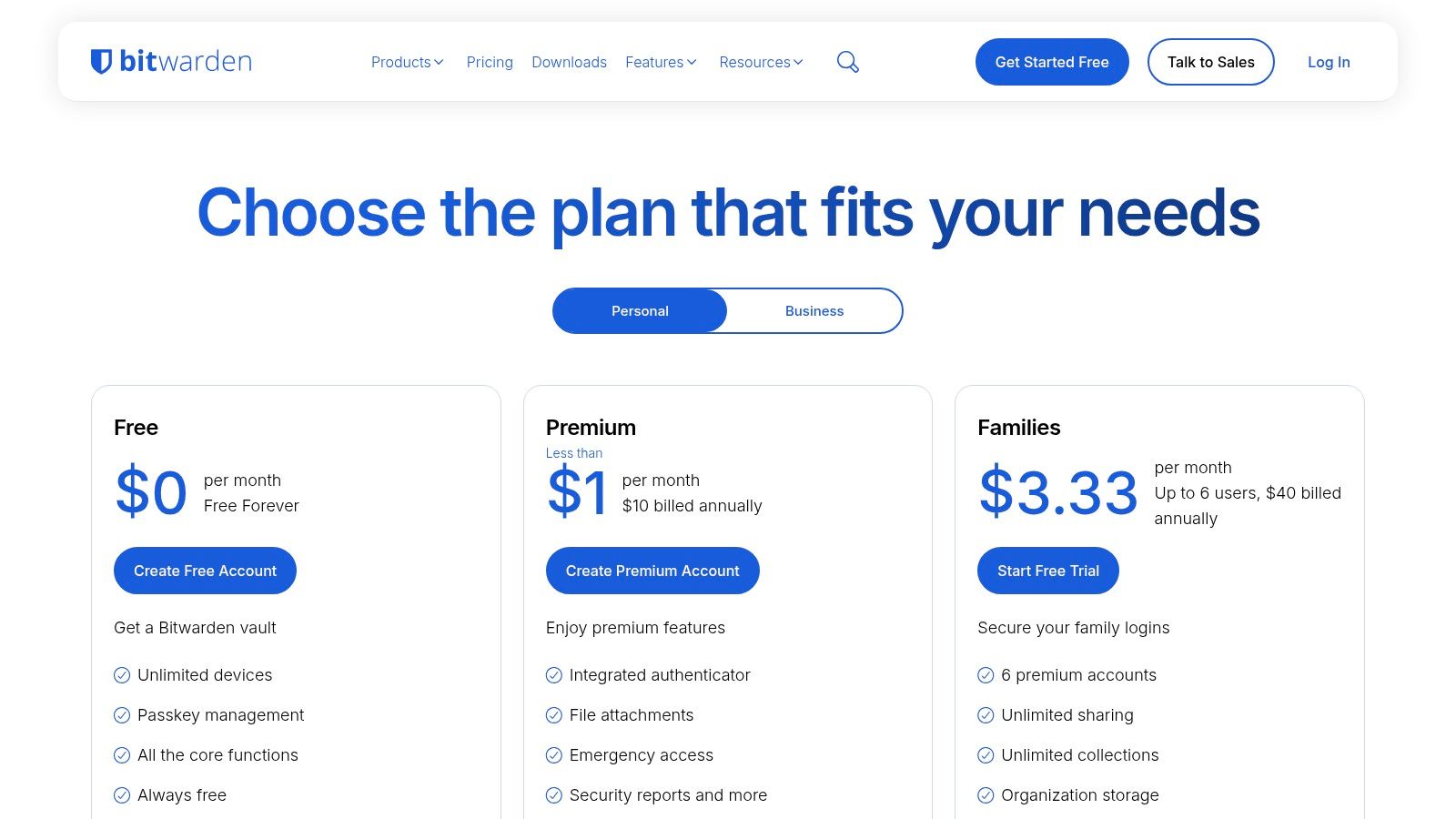
The platform is built around a "Families Organization," which acts as a central hub for shared credentials. Within this organization, you can create "Collections," which are essentially shared folders. This allows you to group logins for specific purposes, such as "Streaming Services" or "Household Utilities," and control which family members can access each collection. Each member also gets their own private vault for personal accounts, ensuring a clear separation between shared and individual data.
Key Family-Focused Features
Bitwarden’s family plan provides premium features for every member at a fraction of the cost of many competitors. The core of its family sharing is the Families Organization, where an admin can manage users and create collections for shared items. This structure is highly flexible, allowing parents to share certain passwords with older children while keeping financial logins separate and private.
A significant advantage of Bitwarden is its open-source nature. The code is publicly available for security experts to audit, providing an extra layer of confidence that your family’s data is protected by vetted, end-to-end encryption. The platform also includes a built-in authenticator for generating time-based one-time passwords (TOTP), passkey support, and detailed vault health reports to identify weak or reused passwords. Understanding the importance of sharing information safely is crucial, and you can explore more on creating a secure way to share passwords for your family.
Pricing and Plan Details
The Bitwarden Families plan is renowned for its affordability, offering an exceptional value proposition.
| Feature | Bitwarden Families Plan |
|---|---|
| Number of Users | Up to 6 family members included |
| Additional Users | Not applicable; limited to 6 users |
| Shared Vaults | Unlimited "Collections" (shared folders) |
| Private Vaults | 1 per user, with full premium features |
| Account Recovery | Admin can reset a member's master password if needed |
| Pricing | Extremely low annual fee for the entire group |
| Free Trial | A limited free plan is available for individuals |
Pros and Cons
-
Pros:
- Very affordable family plan, offering incredible value.
- Transparent and trusted security model due to its open-source code.
- Straightforward tools for importing data from other password managers.
- Cross-platform support with unlimited device syncing.
-
Cons:
- The user interface is more functional and less polished than some rivals.
- The concept of "Organizations" and "Collections" may have a slight learning curve for non-technical users.
In summary, Bitwarden is an excellent choice for families who want top-tier, transparent security without the premium price tag. While its interface is more utilitarian, its core functionality is powerful, reliable, and provides everything a family needs to secure their digital lives.
Website: https://bitwarden.com/pricing/
3. Dashlane — Friends & Family
Dashlane offers a compelling "Friends & Family" plan designed for larger households or even close-knit groups, distinguishing itself with broad coverage and a strong web-centric experience. It’s an excellent choice for those who need to manage credentials for up to 10 individuals under a single, streamlined subscription. As one of the best password manager for families, Dashlane focuses on providing a powerful autofill engine, proactive web protection, and straightforward sharing, making daily online tasks both secure and efficient.
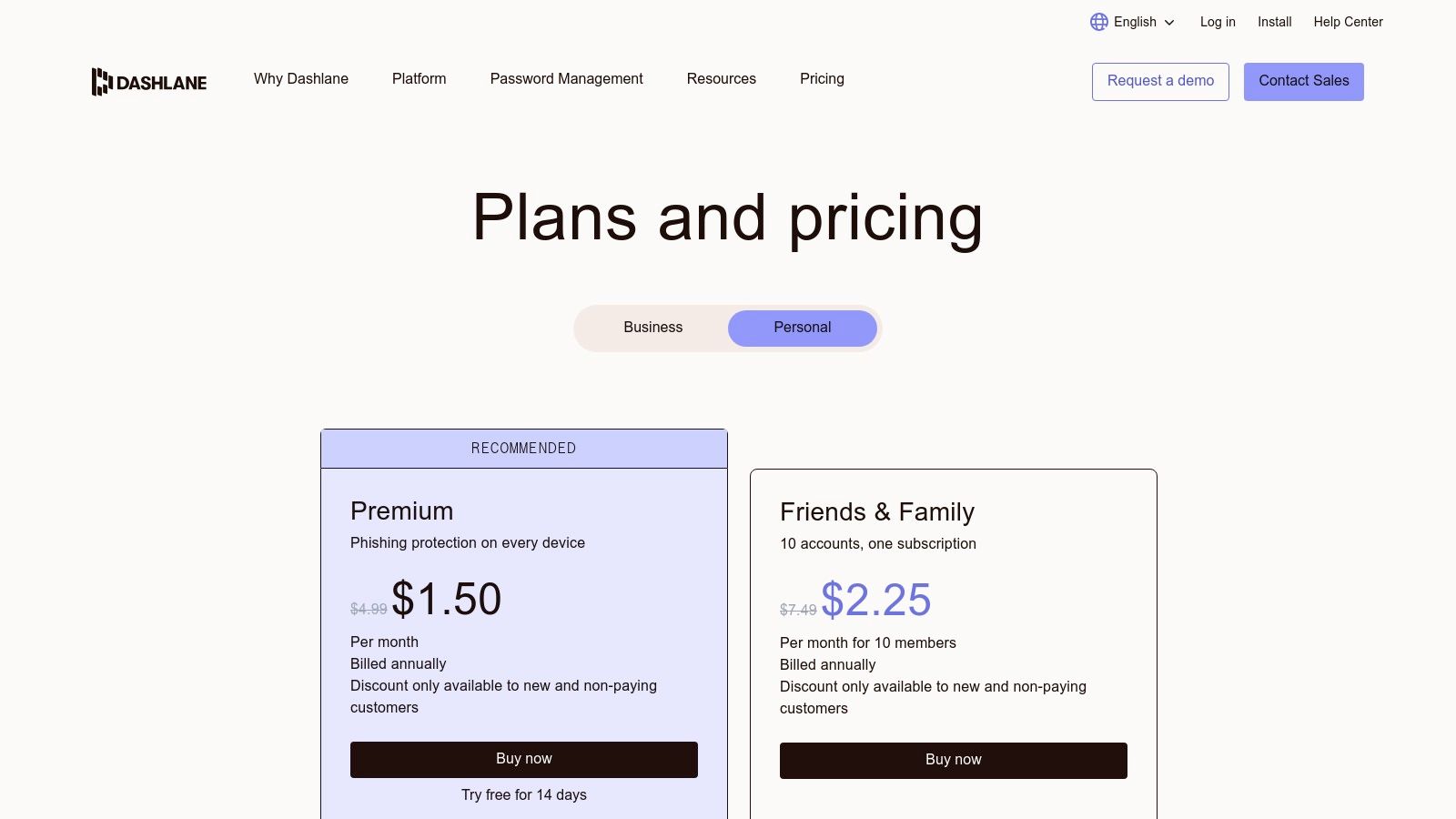
The platform allows each of the 10 users to have their own private space for personal logins while also enabling easy and secure sharing of specific credentials. The family manager has a dedicated dashboard to invite and manage members, simplifying the onboarding process for less tech-savvy family members and ensuring everyone is protected.
Key Family-Focused Features
Dashlane’s standout feature is its generous user limit, accommodating up to 10 accounts, which is double what most competitors offer. This makes it ideal for large families, blended families, or even a group of friends sharing a plan. The sharing functionality is intuitive, allowing users to share logins with specific rights, such as full access or limited view-only permissions.
Beyond user management, Dashlane provides robust security tools. Its dark web monitoring and real-time phishing alerts actively scan the internet for compromised credentials associated with users' email addresses and notify them immediately to take action. This proactive approach helps prevent account takeovers before they happen. While the plan includes a VPN for enhanced privacy, it's important to note this benefit is limited to the primary account manager, not all 10 members.
Pricing and Plan Details
The Dashlane Friends & Family plan provides significant value, especially for larger groups who can split the cost. Its pricing is competitive given the high user count and rich feature set.
| Feature | Dashlane Friends & Family Plan |
|---|---|
| Number of Users | Up to 10 members included |
| Additional Users | Not applicable; 10 users is the maximum for this plan |
| Sharing | Unlimited secure sharing with groups and individuals |
| Private Vaults | 1 per user |
| Account Recovery | Admin can help manage accounts, but master password is key |
| Pricing | Billed annually; frequent promotions available |
| Free Trial | 30-day free trial for premium features |
Pros and Cons
-
Pros:
- Generous 10-user limit is perfect for large families or groups.
- Excellent web experience with one of the industry's best autofill features.
- Strong security with real-time phishing alerts and dark web monitoring.
-
Cons:
- The included VPN is only available for the plan administrator.
- Pricing can fluctuate, so it's wise to watch for promotions.
For families aiming to establish a strong security foundation, Dashlane provides the necessary tools. To improve your overall digital safety, explore these 2025 password management best practices to get the most out of your manager. Dashlane's combination of high user capacity and proactive web protection makes it a top contender for modern, digitally-connected families.
Website: https://www.dashlane.com/pricing-personal/
4. Keeper — Family Plan
Keeper has established itself as a robust security solution, and its family plan is a powerful contender for households seeking granular control and extensive features. It offers a highly secure environment that goes beyond simple password storage, making it a top choice for families who want comprehensive digital protection. The platform’s strength is its feature-rich ecosystem, which includes secure file storage and optional dark web monitoring.
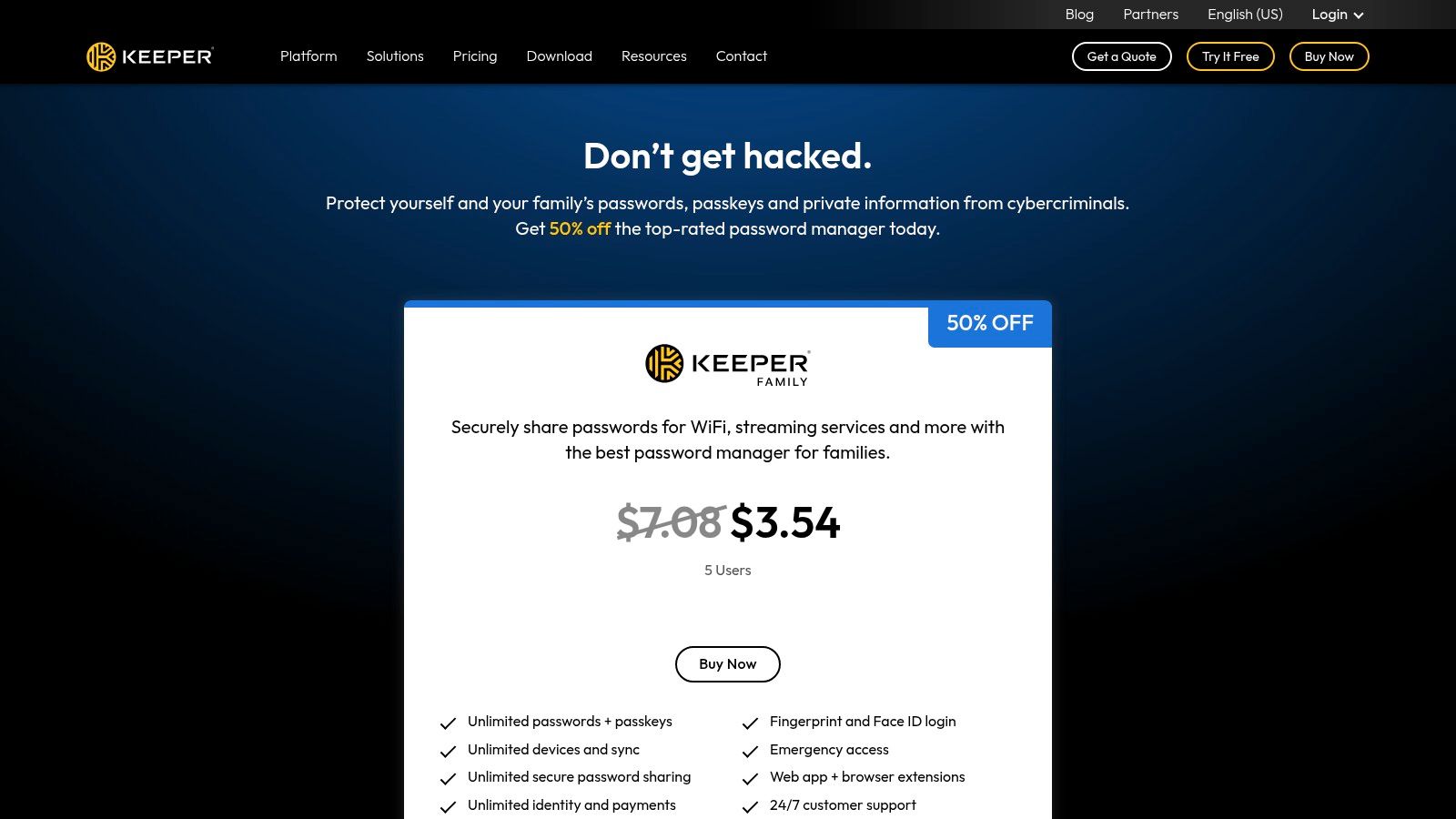
The Keeper Family Plan provides each member with a private, encrypted vault for their personal credentials, documents, and other sensitive data. At the same time, it allows for easy and secure sharing of specific records within the family group. This is ideal for managing shared streaming service accounts, online shopping logins, or important family documents, ensuring everyone has access without compromising individual privacy.
Key Family-Focused Features
Keeper excels with its administrative controls and added security layers. The plan administrator can easily manage users, set permissions, and oversee the family's overall security posture. A standout feature is Emergency Access, which allows users to grant trusted family members access to their vault in case of an emergency, providing peace of mind.
The plan also includes a generous 10 GB of secure file storage, perfect for storing digital copies of passports, birth certificates, or financial documents. While its core function is password management, Keeper offers valuable add-ons like BreachWatch, which constantly scans the dark web for credentials that have been exposed in data breaches and alerts you to take action. This proactive monitoring makes it one of the best password manager for families focused on threat detection.
Pricing and Plan Details
Keeper’s family plan is competitively structured, often featuring significant discounts for the first year, though some key features are available as paid extras.
| Feature | Keeper Family Plan |
|---|---|
| Number of Users | Up to 5 family members included |
| Private Vaults | 5 private vaults |
| Secure File Storage | 10 GB included |
| Emergency Access | Yes, for all family members |
| Add-ons Available | BreachWatch (dark web monitoring) |
| Pricing | Billed annually, with frequent first-year promotions |
| Free Trial | 30-day free trial available |
Pros and Cons
-
Pros:
- Feature-rich with strong admin controls and emergency access.
- Includes 10 GB of secure file storage for sensitive documents.
- Frequently offers large promotional discounts for the first year.
-
Cons:
- Standard renewal price is higher than some direct competitors.
- Key features like dark web monitoring are paid add-ons.
Ultimately, Keeper is an excellent option for families who want more than just a password vault. Its combination of secure storage, emergency access, and optional breach monitoring provides a comprehensive security package for the modern household.
Website: https://www.keepersecurity.com/affiliate/family/
5. NordPass — Family
Emerging from the well-regarded Nord Security ecosystem, NordPass offers a streamlined and highly secure password management solution. Its family plan is designed for simplicity and efficiency, making it an excellent choice for households that prioritize ease of use and may already be invested in Nord's suite of products like NordVPN. It provides the core functionalities families need without overwhelming them with overly complex features, positioning it as one of the best password manager for families seeking straightforward security.
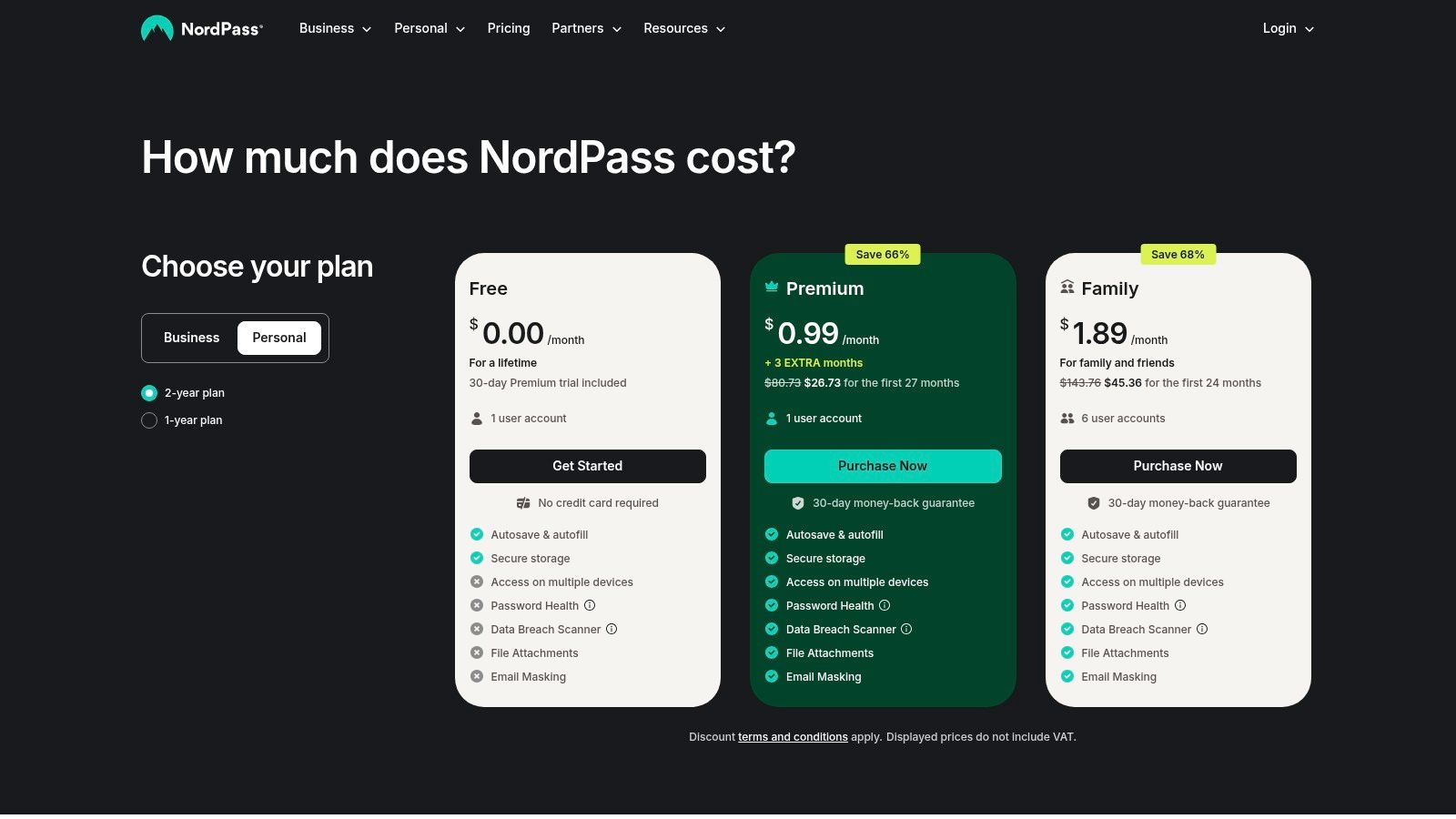
The NordPass Family plan grants up to six users their own separate, encrypted vaults. This ensures that personal, work, and financial credentials remain private to each individual, while still allowing for the secure sharing of common passwords like streaming services or online shopping accounts. The user interface is clean and uncluttered, ensuring a smooth experience across all devices.
Key Family-Focused Features
NordPass focuses on delivering essential security tools effectively. The platform includes a Password Health tool that analyzes saved passwords for weakness, reuse, and age, providing a clear score and actionable advice for improvement. Alongside this, the Data Breach Scanner actively monitors the web and alerts users if their email addresses or credentials appear in a known data breach, allowing families to take immediate action to secure compromised accounts.
While it lacks some of the advanced administrative controls of its competitors, such as direct account recovery by the family owner, its strength lies in its integration. For families already using NordVPN or other Nord products, bundling these services can offer significant cost savings and a unified security dashboard. The autosave and autofill functions are reliable and work seamlessly across various browsers and devices, reducing the daily friction of logging into accounts.
Pricing and Plan Details
NordPass is known for its aggressive promotional pricing, which can make it a very cost-effective option, especially for new users.
| Feature | NordPass Family Plan |
|---|---|
| Number of Users | Up to 6 premium user accounts |
| Shared Vaults | Yes, for sharing items with family members |
| Private Vaults | 1 per user |
| Data Breach Scanner | Yes, included |
| Password Health | Yes, included |
| Pricing | Often features deep discounts for 1 or 2-year plans |
| Money-Back Guarantee | 30-day money-back guarantee available |
Pros and Cons
-
Pros:
- Simple, clean UI that is easy for all family members to adopt.
- Excellent bundling options with other Nord Security products can provide great value.
- Strong core features like the Data Breach Scanner and Password Health checker.
-
Cons:
- Pricing can be confusing, with promotions and terms changing frequently.
- Lacks advanced family management features like admin-led account recovery.
Ultimately, NordPass Family is a fantastic choice for households that value simplicity, a clean user experience, and the potential savings that come from bundling with a trusted security brand. It covers all the essential bases of password management with a reliable and modern application.
Website: https://nordpass.com/plans/family/
6. RoboForm — Family
RoboForm has been a player in the password management game for over two decades, earning a reputation for reliability and function over flash. Its family plan continues this tradition, offering a highly practical and budget-friendly solution for households. For families seeking a no-nonsense tool that covers all essential security bases without a steep price tag, RoboForm presents a compelling case, making it a strong contender for the best password manager for families on a budget. The platform's strength is its straightforward approach to secure sharing and password management.
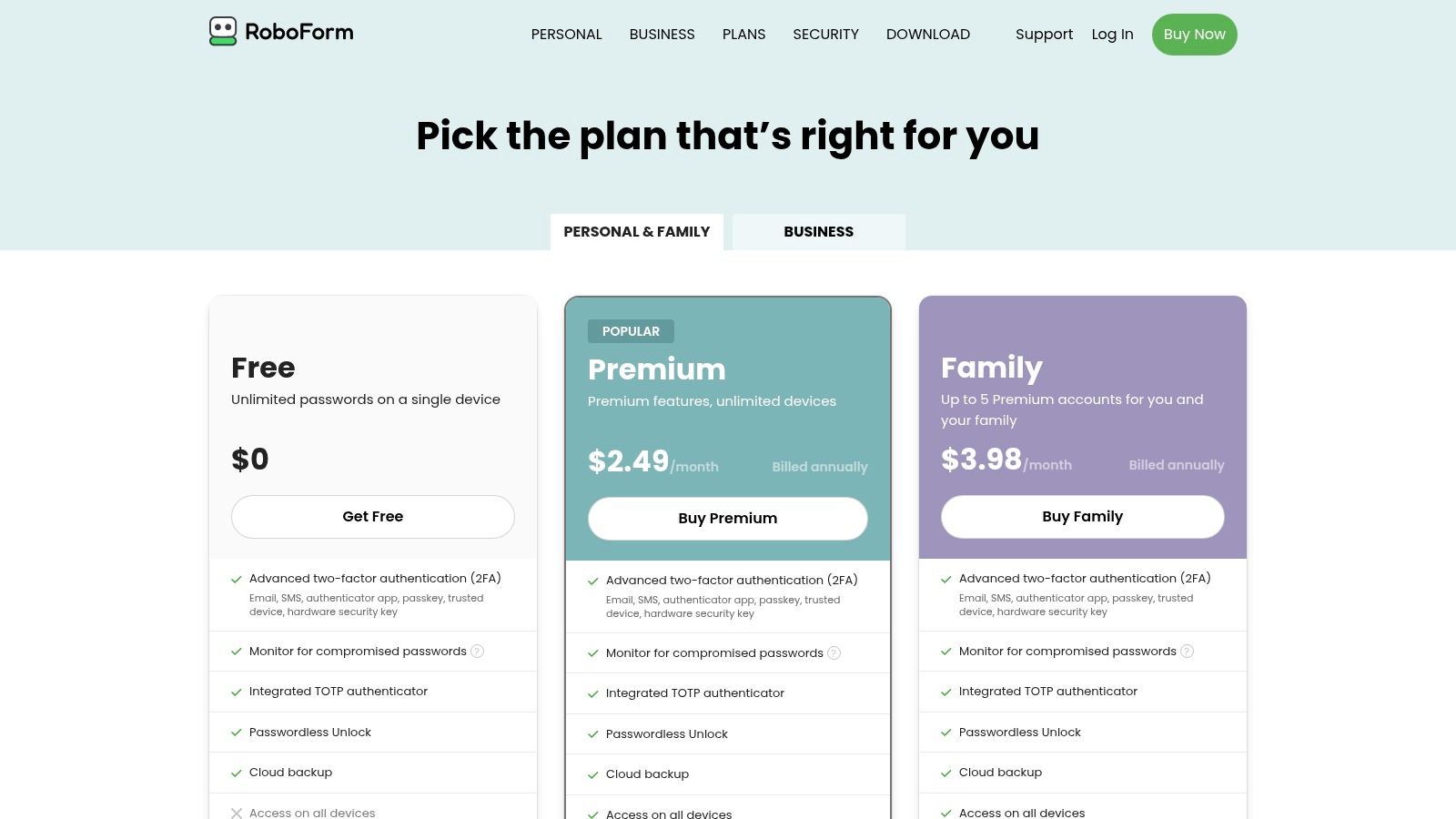
The RoboForm Family plan simplifies account management by providing up to five individual Premium accounts under a single subscription. Each member gets their own private space for personal credentials, while shared folders can be created for common family logins like streaming services or utility bills. The family manager can easily add or remove users and manage the subscription from a central dashboard.
Key Family-Focused Features
RoboForm's feature set is designed for practicality and security. The ability to create shared folders is central to its family plan, allowing the organizer to grant different permission levels (full access, read-only, or no access) to specific members. This ensures that while everyone can access the Disney+ login, only the parents can view or edit sensitive financial account details stored in a shared folder.
A significant advantage is the integrated Time-Based One-Time Password (TOTP) authenticator. This feature allows family members to store and generate 2FA codes directly within RoboForm, eliminating the need for a separate app like Google Authenticator. It streamlines the login process while enhancing security. Furthermore, RoboForm’s Security Center actively monitors for weak, reused, or compromised passwords, providing a clear path for the entire family to improve their digital security posture.
Pricing and Plan Details
RoboForm is well-known for its aggressive promotional pricing, often making it one of the most affordable premium options available.
| Feature | RoboForm Family Plan |
|---|---|
| Number of Users | Up to 5 family members |
| Additional Users | No option, limited to 5 users per plan |
| Shared Folders | Yes, with specific user permissions |
| Private Vaults | 1 per user (as part of their individual account) |
| Integrated TOTP | Yes, for all users |
| Pricing | Frequently offers significant discounts on annual plans |
| Free Trial | 30-day free trial of RoboForm Premium available |
Pros and Cons
-
Pros:
- Aggressive sale pricing appears regularly, offering excellent value.
- Solid cross-platform support for all major devices and browsers.
- Integrated OTP generator reduces the need for a separate authenticator app.
-
Cons:
- The interface and user experience are more utilitarian and less modern than some newer rivals.
- The plan is strictly limited to 5 users with no option to add more.
For families who prioritize core functionality and value over a sleek design, RoboForm is an excellent choice. Its robust security features and highly competitive pricing make it a smart and secure way to manage a household's digital credentials.
Website: https://www.roboform.com/pricing-personal
7. Enpass — Family
Enpass takes a unique approach in the password management space by offering a "local-first" or "bring-your-own-cloud" model. Instead of storing your encrypted data on its servers, Enpass allows families to store their vaults on their own trusted cloud services like iCloud, Google Drive, OneDrive, or Dropbox. This makes it an excellent choice and a contender for the best password manager for families who prioritize absolute control over where their sensitive information resides.
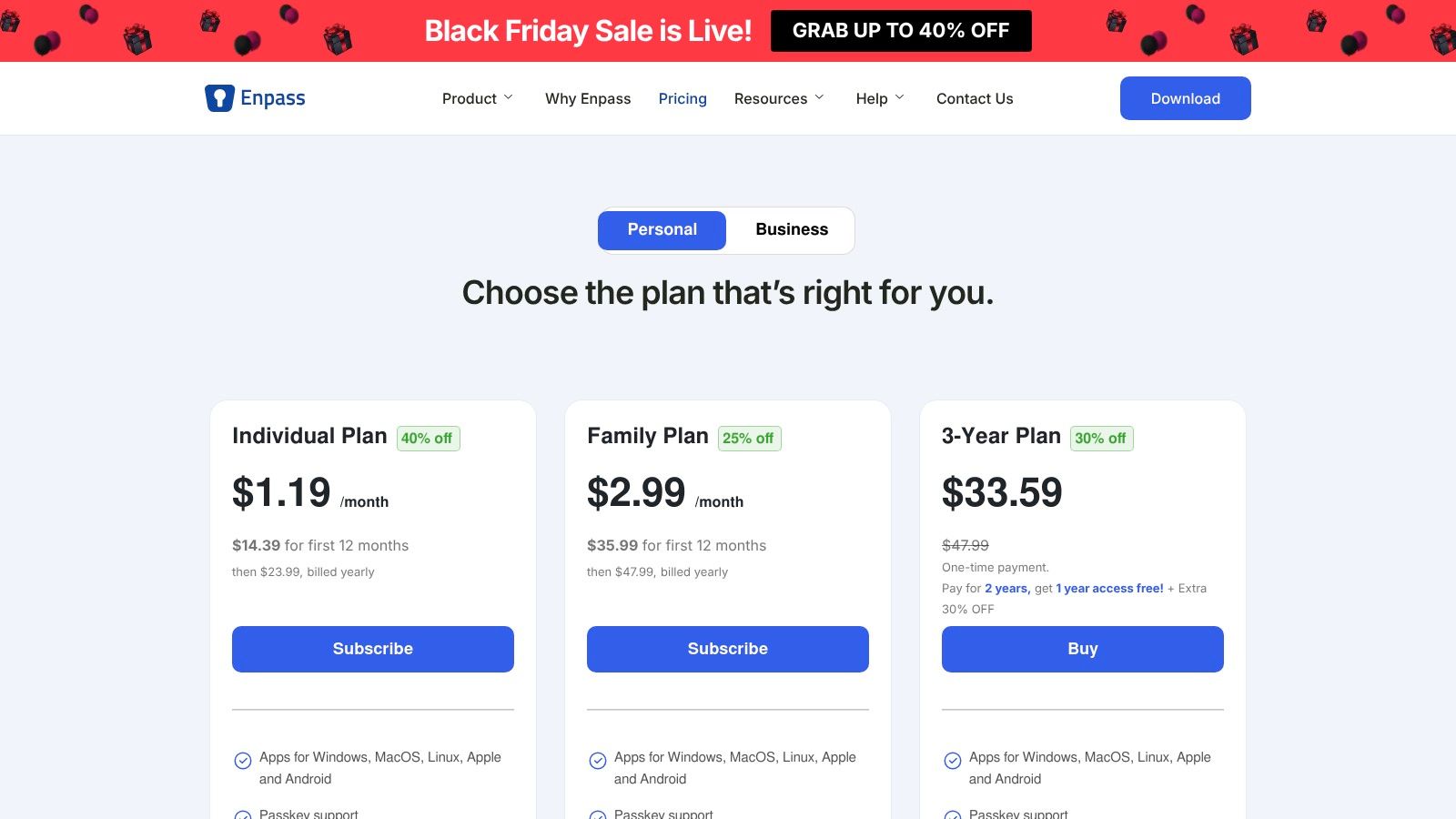
This model gives users a greater sense of ownership and privacy. The Enpass Family plan extends this control to the entire household, covering up to six members under a single, affordable subscription. Each family member gets their own space to store unlimited passwords and items across all their devices, ensuring personal data remains separate while leveraging a shared, secure framework.
Key Family-Focused Features
The core appeal of Enpass for families is its data sovereignty. The family organizer sets up the sync method, and all members' encrypted vaults are stored within that chosen cloud account. This simplifies the technical setup, as only one person needs to manage the backend connection. While it doesn't offer advanced admin recovery features like some competitors, it focuses on providing a secure, shared infrastructure that the family controls.
Enpass is also future-forward, offering support for passkeys, which are becoming the new standard for passwordless logins. Its security tools include breach alerts that notify you if any of your stored credentials appear in known data breaches, and a password audit tool helps identify weak or reused passwords. This encourages good digital hygiene across all family members, from parents to tech-savvy teens.
Pricing and Plan Details
Enpass offers highly competitive and flexible pricing, including one-time license options which are rare in the subscription-dominated market. Note that family plans must be purchased from their website to enable sharing.
| Feature | Enpass Family Plan |
|---|---|
| Number of Users | Up to 6 family members included |
| Additional Users | Not available, plan is fixed at 6 users |
| Storage Model | User-managed (iCloud, OneDrive, Google Drive, etc.) |
| Cross-Platform Sync | Yes, across all supported devices |
| Passkey Support | Yes |
| Pricing | Offered as a recurring subscription or a one-time fee |
| Free Trial | A limited free version is available for individuals |
Pros and Cons
-
Pros:
- You control where your encrypted data is stored (your own cloud).
- Competitive pricing with both subscription and one-time purchase options.
- Generous plan covers up to six family members.
-
Cons:
- Users are responsible for managing their own cloud sync and backups.
- Lacks the advanced family admin features like remote account recovery.
- Family sharing is only available when purchasing directly from the Enpass website.
Enpass offers a compelling proposition for families who are slightly more tech-savvy and prefer to keep their encrypted data off third-party servers. Its model provides an unmatched level of control and privacy, combined with modern features and flexible pricing that make it a standout option.
Website: https://www.enpass.io/pricing/
Top 7 Family Password Managers Comparison
| Product | 🔄 Complexity | ⚡ Resources & Cost | 📊 Expected Outcomes | 💡 Ideal Use Cases | ⭐ Key Advantages |
|---|---|---|---|---|---|
| 1Password — Families | Moderate — intuitive apps, admin/recovery setup | Paid plan, no permanent free tier | High security & reliable account recovery 📊⭐ | Households wanting granular sharing + recovery | Granular vaults, organizer tools, Watchtower |
| Bitwarden — Families | Low — straightforward setup, open-source model | Very affordable family plan; unlimited devices ⚡ | Strong E2EE transparency and good value 📊⭐ | Privacy‑minded, budget‑conscious families | Open‑source, low cost, easy migration |
| Dashlane — Friends & Family | Low — web‑first, easy sharing for groups | Mid-priced, covers up to 10 users (varies) ⚡ | Strong autofill, breach/phishing alerts 📊 | Larger households/groups needing web protection | 10‑user coverage, robust web experience |
| Keeper — Family Plan | Moderate‑High — many features and optional add‑ons 🔄 | Higher base price; add‑ons may increase cost | Feature‑rich security + secure file storage 📊⭐ | Families wanting extras (files, monitoring, emergency) | Secure file storage, admin/emergency access |
| NordPass — Family | Low — simple, clean UI and cross‑device sync | Mid-priced; bundling with Nord products possible ⚡ | Reliable core password security and breach scans 📊 | Families already using Nord ecosystem | Smooth UI, bundling discounts with Nord services |
| RoboForm — Family | Low — utilitarian UX, easy to deploy | Budget‑friendly with frequent promotions ⚡ | Practical password + integrated TOTP; basic breach alerts 📊 | Cost‑conscious families wanting OTP built‑in | Integrated TOTP, aggressive pricing, cross‑platform |
| Enpass — Family | Moderate — local‑first requires manual sync setup 🔄 | Flexible pricing; one‑time licenses or subscriptions | High privacy control when self‑hosting vaults 📊 | Families preferring BYO cloud and data control | Local/BYO cloud storage, competitive licensing options |
Making the Final Choice for Your Family's Digital Fortress
Choosing the best password manager for families is less about finding a single "perfect" tool and more about identifying the right fit for your unique household. We've navigated a landscape of powerful options, from the intuitive design and Travel Mode of 1Password to the budget-friendly, open-source framework of Bitwarden. Each contender, whether it's Dashlane with its built-in VPN or Keeper with its encrypted messaging, brings a distinct set of strengths to the table.
The journey doesn't end with a subscription. The real victory lies in successful implementation. Your family's digital security is a team sport, and getting everyone on board is the most critical step. The best tool is the one your family will actually use consistently.
Key Takeaways for Your Decision
As you weigh your options, revisit the core factors that matter most to your family's dynamic and technical comfort level.
- Ease of Use is Non-Negotiable: If the interface is clunky or the setup is confusing, less tech-savvy family members will quickly abandon it. Tools like Dashlane and 1Password often excel here, providing a polished experience that minimizes friction.
- Granular Sharing and Permissions Matter: Consider how your family shares information. Do you need simple, all-or-nothing sharing, or do you require nuanced controls where you can grant read-only access to a Wi-Fi password but full edit permissions for a shared streaming account? Keeper and 1Password offer robust, granular controls for these scenarios.
- Emergency Access is Your Safety Net: Don't overlook this crucial feature. Life is unpredictable. Setting up a trusted emergency contact who can access your vault in a crisis provides immense peace of mind. Evaluate how each platform handles this; some are more straightforward than others.
- Onboarding and Education are Your Responsibility: No password manager can overcome poor user habits on its own. Plan a brief "family tech night" to walk everyone through the setup process. Show them how to generate strong passwords, use the browser extension, and securely share credentials within the family plan.
A Practical Framework for Your Final Choice
To move from analysis to action, use this simple needs-based framework to guide your decision:
- For the "Set It and Forget It" Family: If your priority is a seamless, user-friendly experience that requires minimal technical fiddling, 1Password or Dashlane are top-tier choices. Their polished interfaces and guided onboarding make adoption easy for all ages.
- For the Budget-Conscious and Tech-Savvy Family: If you're comfortable with a more hands-on approach and value open-source transparency and affordability, Bitwarden is an unmatched value proposition. It delivers core security features without the premium price tag.
- For the Security-Focused Family: If advanced features like encrypted chat, detailed breach monitoring, and deep administrative controls are paramount, Keeper offers a powerful, security-first ecosystem that gives the family admin comprehensive oversight.
Ultimately, adopting any of the password managers we've detailed is a monumental leap forward from sticky notes, spreadsheets, or risky password reuse. It’s an investment in your family’s digital safety, organization, and peace of mind. For those looking to broaden their understanding beyond family plans, exploring resources dedicated to finding good password managers for various use cases can provide additional valuable context.
You are now equipped with the knowledge to build a digital fortress for your loved ones. The final step is to choose your tool, bring your family together, and lay the first stone.
Now that your family's passwords are secure, take the next step in smart digital management with AccountShare. While a password manager shares access, AccountShare helps you easily and fairly split the costs of shared subscriptions like streaming services, software, and more. Visit AccountShare to see how you can streamline your family's digital budget and maximize every subscription.