

Account Access Management for Shared Accounts
The popular advice is simple: never share an account. That advice makes sense for an enterprise administrator protecting production systems, but it doesn't fit every family, student group, or small business buying a premium subscription together. Pooled access often solves a real budget and workflow problem.
The problem isn't sharing by itself. The problem is sharing without named ownership, controlled permissions, usable audit trails, and a reliable offboarding process. A shared streaming plan, AI workspace, or design tool becomes risky when nobody can answer who accessed it, what they changed, or how to remove one person without disrupting everyone else.
That makes account access management a lifecycle discipline. You need to govern the account from purchase and invitation through daily use, access changes, review, and retirement. The practical objective isn't to eliminate every shared subscription. It's to make shared access deliberate, attributable, and recoverable.
The Shared Account Dilemma in Modern Access Control
Enterprise identity guidance often treats a shared account as a failure that should be removed immediately. That position is too blunt for households and small teams. A family may pool access to streaming services, students may share the cost of a research tool, and a small company may need collaborative software without buying a full individual seat for every occasional user.
Shared access persists because it removes friction. One subscription is easier to pay for, one workspace is easier to locate, and a group can start working without waiting for an administrator to configure a complex identity stack. Treating that behavior as a policy violation doesn't make the need disappear. It only pushes the group toward informal password exchange, private messages, and undocumented exceptions.
The real failure is missing accountability
A pooled login creates a basic governance gap: who did what, when? Recent coverage identifies shared privileged accounts as a continuing accountability problem, noting that one 2026 survey reported 87% of organizations still used shared privileged accounts, while unauthorized access or peer sharing was about five times more likely where shared accounts were supported. Those figures come from coverage of shared-account accountability gaps, and they describe privileged environments rather than ordinary family subscriptions. The underlying lesson still applies. Convenience doesn't replace attribution.
A sensible policy distinguishes between shared billing and shared credentials. The group can pool the cost while each participant receives an identifiable invitation, an appropriate role, and only the access needed for the service. If the vendor supports profiles, delegated members, activity records, or per-user sessions, use those features instead of handing everyone the owner password.
Practical rule: Share the subscription economics, not uncontrolled administrative power.
Treat the subscription as an asset with a lifecycle
Assign one accountable owner, record the renewal terms, list every member, and define what happens when someone leaves. Keep recovery methods under the owner's control, and don't let a departing member remain connected just because changing the password would inconvenience everyone else.
This is the correct compromise for most small groups. Keep sharing where it delivers clear value, but add enough structure to answer ownership, access, activity, and recovery questions without turning a modest subscription into an enterprise project.
Core Access Models Explained Through Everyday Analogies
Access control becomes easier when you stop thinking in abstract permissions and start with physical keys. Role-Based Access Control, or RBAC, is like giving a household member the keys that match their responsibilities. The parent gets the parental-control settings, the student gets access to the shared research workspace, and a guest gets a limited room key rather than the master key.
RBAC works well when responsibilities are stable. In a small design business, a designer may edit project files, a client may comment, and the owner may manage billing. Each role maps to a predictable set of actions. You can review the role assignments without examining every individual permission each time.
Attribute-Based Access Control, or ABAC, behaves more like a smart lock. It doesn't ask only, “What role does this person have?” It also checks attributes such as the device, location, time, subscription status, or risk level before allowing entry. A member might be allowed to use an AI tool from a managed laptop but asked for additional verification from an unfamiliar device.

Choose the simplest model that answers the risk
Use RBAC when the group is small and the service offers clear member roles. Use ABAC-style conditions when the account contains sensitive data, supports powerful integrations, or is used from many devices and locations. You don't need an advanced policy engine for a family video subscription, but you should apply stronger conditions to a shared business workspace containing customer files.
A useful decision sequence is:
- Identify the resource. Separate billing, content, administration, exports, and integrations.
- Name the actions. Reading, editing, inviting, deleting, and changing recovery settings carry different consequences.
- Assign the minimum role. Give each person the narrowest permission that supports their task.
- Add context where it matters. Require stronger verification for new devices, unusual locations, or administrative changes.
- Review exceptions. Temporary access should have an owner and an end point.
For a plain-language comparison of these approaches, see access control methods for shared environments. The goal isn't to imitate a large enterprise. It's to prevent one convenient login from becoming everyone's administrator account unnoticed.
The Hidden Costs of Poor Attribution and Offboarding
A shared password feels efficient until an important setting changes and nobody knows who changed it. The same problem appears when someone downloads a file, connects an unfamiliar integration, or modifies a payment method. The service may record an event, but if every participant uses the same identity, the event doesn't identify the person responsible.
That weakens both security and ordinary administration. You can't investigate a suspicious action confidently, explain a billing change, or determine whether a lost device still has access. You also can't tell whether a member used the account within the agreed rules.
Offboarding is where informal sharing breaks
Removing a person from a named member list is straightforward. Removing someone from a shared password is disruptive. The owner must change the credential, update every legitimate device, invalidate saved sessions where possible, and send the new secret to everyone who remains. Some groups delay the change, while others keep the old password active in browsers and password managers.
The result is a false choice between convenience and control. People keep access alive because revocation threatens availability for the rest of the group. That isn't a technical mystery. It's a process designed around one identity instead of several accountable participants.
A basic ownership record should include:
- Account owner: The person responsible for recovery, billing, and policy decisions.
- Current members: Each participant, their role, invitation date, and status.
- Visible details: Which login or billing details each member can see.
- Access events: Invitations, role changes, removals, and unusual activity.
- Recovery plan: The approved method for restoring access after compromise.
For teams handling several subscriptions, software license tracking practices can help turn scattered renewals and membership records into an operational inventory. The point is not paperwork for its own sake. It gives the group a reliable answer when access changes.
Named ownership beats shared responsibility
“Everyone looks after it” means nobody owns it. Give one person clear responsibility, then document a backup contact for continuity. Members should know how to report a lost device, suspected compromise, or accidental permission change without circulating the master credential.
For families, the owner might be a parent or household administrator. For students, it may be the person who manages the pooled payment. For an SMB, it should usually be a designated operations or finance owner, not an employee who happens to have the password. Account access management succeeds when accountability remains intact even if the membership changes.
Moving Beyond Static Passwords to Continuous Validation
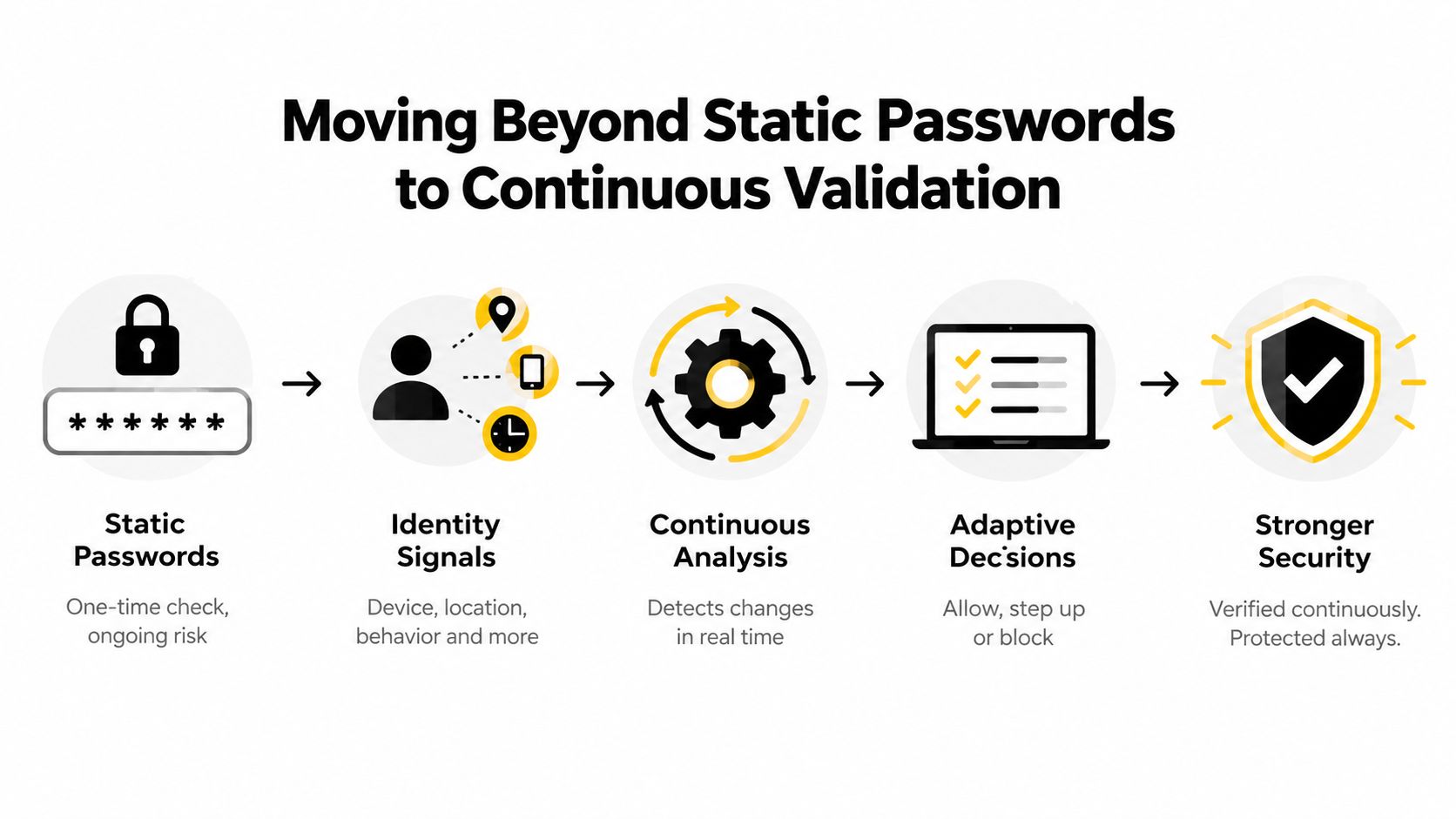
A correct login at nine in the morning doesn't prove that the same session is safe at noon. The user may have changed devices, the token may have been stolen, or the account may suddenly behave in a way that doesn't match its normal use. Static password security checks identity once. Continuous validation checks whether access should remain valid as conditions change.
Microsoft's Zero Trust identity guidance, aligned with the CISA maturity model, recommends phishing-resistant MFA and ongoing Conditional Access evaluation. It also describes Continuous Access Evaluation, which can support near-real-time revocation for critical events through Microsoft's Zero Trust identity guidance. For a shared subscription, the same principle translates into practical controls: revoke a session after membership removal, require step-up verification for billing changes, and block suspicious sign-ins rather than waiting for the next password rotation.
Apply stronger controls to higher-impact actions
Not every action deserves the same friction. Watching a family profile and changing the recovery email aren't equivalent. Reading a shared document and exporting an entire customer folder aren't equivalent either.
Set up controls in layers:
- Routine use: Allow normal access through an assigned profile or member account.
- Sensitive changes: Request MFA or owner approval for billing, recovery, invitations, and integrations.
- High-privilege tasks: Grant temporary administrative access, then remove it when the task ends.
- Risk events: Revoke sessions or require reauthentication after a lost device, unusual sign-in, or suspected compromise.
MFA is a foundation, not a complete governance system. The guide to two-factor authentication explains the basic mechanism, while practical email security checks such as checking SPF and DKIM records help protect the mailbox that often controls account recovery. If that mailbox is weak, every other access control can be bypassed through a reset flow.
The direction is clear. Use phishing-resistant authentication where the service supports it, minimize permanent privileges, and treat sessions as revocable resources. Access should depend on current membership, current risk, and current need, not merely possession of an old password.
Real-World Scenarios for Families, Students, and SMBs
A family sharing a streaming bundle usually needs simplicity, not a corporate security console. The household should create separate profiles, keep parental controls under a named adult owner, and avoid sharing the recovery mailbox. If the service supports individual invitations, use them. If it doesn't, keep the master credential with the owner and distribute only the access method that members need.
The daily friction is familiar. One person changes a profile, another reaches a device limit, and a child discovers settings that should have remained restricted. The fix is a short household policy: identify who manages profiles, decide which devices belong to the group, and remove access when a device is sold or a family arrangement changes.

Students need boundaries around pooled research tools
A student group sharing a premium AI or research service faces a different risk. Members may need the same tool, but they don't necessarily need access to one another's prompts, files, payment information, or administrative settings. Assign a coordinator, separate personal work from group work, and prohibit the upload of confidential material unless the group has agreed on how that data is handled.
Concurrent access limits create another operational issue. A shared account can become unavailable when several members use it simultaneously, so the group should agree on priority use, session release, and what happens during examinations or project deadlines. This is a scheduling problem as much as a security problem.
Small businesses should separate collaboration from administration
A small design firm may share a collaborative design platform among a few staff members, contractors, and clients. Give designers editing access, clients review access, and only the owner or operations lead permission to manage billing, integrations, exports, and invitations. Contractors should receive time-limited access tied to a specific project rather than permanent membership.
The same logic appears in physical environments. Teams comparing digital permissions with building operations may find multifamily gate access control useful as an analogy. A gate system must identify residents, guests, and administrators differently, and a pooled digital account should do the same.
Across all three scenarios, the rule is consistent: share the resource, not every permission attached to it. The right configuration reflects the group's actual activity, not an imagined enterprise policy.
How AccountShare Solves the Pooled Access Problem
A password vault solves storage. It doesn't automatically solve membership, attribution, availability, or offboarding. A practical shared-access platform needs to manage the entire relationship between the subscription owner and the people using it.
AccountShare offers a group-purchasing model for premium services such as streaming, AI tools, and software applications. Its relevant account access management functions include storing shared logins, inviting members, controlling password visibility, maintaining membership records, updating access when membership changes, and revoking unused share links or unsubscribing a member.
Design around controlled participation
The important architectural distinction is between exposing a raw credential and granting managed participation. If every participant sees the underlying password, the owner loses practical control as soon as that password is copied into a browser, notes app, or private message. If the platform controls visibility and membership, the owner can change a participant's access without treating the whole group as compromised.
That structure supports several concrete operating rules:
- Invite named members: Keep a record of who joined instead of relying on an informal chat list.
- Limit visibility: Reveal login details only when the service and policy require it.
- Manage roles: Separate ordinary use from account administration and billing control.
- Revoke cleanly: Remove a member or invalidate a share link when their participation ends.
- Track availability: Coordinate access so pooled demand doesn't undermine the subscription's usefulness.
AccountShare also addresses the economic reason groups share in the first place. Collective buying can make premium services more accessible while a managed membership layer reduces the governance burden that normally comes with pooled credentials. Availability during busy periods, response speed, and access to newly released features still depend on the underlying service and plan terms, so owners should verify those conditions before committing.
Don't confuse a platform with a policy
No tool can decide whether a member should access confidential client data, whether a family should share a subscription under a provider's terms, or who should approve a billing change. The owner still needs a written rule, a review habit, and a recovery plan.
The platform becomes useful when those decisions have somewhere to live. It gives the group a controlled way to implement invitations, permissions, visibility, and removals instead of managing all of them through memory and password messages. That's the structural improvement. The group moves from “everyone knows the login” to “each person has an intentional place in the account.”
Your Implementation Checklist for Secure Shared Access
Start with an inventory, not a password change. List every shared subscription, its owner, renewal details, recovery mailbox, current members, connected devices, and administrative capabilities. Include AI tools, design software, storage services, streaming platforms, and any account that more than one person can use.
Then classify each account by consequence. A family entertainment account may need profile separation and parental controls. A business workspace may require export restrictions, named users, and approval for integrations. A student research account may need clear rules for uploaded documents and shared project folders.
Put ownership and membership on paper
Complete these actions in order:
- Name the owner. Assign one person responsibility for billing, recovery, invitations, and incident response.
- Record every member. Use names or stable identifiers, not vague labels such as “the marketing group.”
- Map permissions. Write down who can view, edit, invite, export, delete, or change recovery settings.
- Remove dormant access. Delete old invitations, revoke unused links, and sign out devices that no longer belong.
- Protect recovery. Secure the recovery mailbox with MFA and keep recovery details away from ordinary users.
- Set an offboarding trigger. Define whether access ends when a project closes, a household arrangement changes, or a payment contribution stops.
Least privilege should guide every decision. A 2026 study of Kubernetes-inspired RBAC models describes access design as a constrained optimization problem that balances permission risk against the operational cost of role bindings. The study's access-control optimization model supports a practical conclusion for smaller groups: don't create a maze of permissions, but don't give everyone the master role just to avoid administration.
Review access as a routine
Schedule a membership review whenever someone joins, leaves, changes responsibilities, loses a device, or reports suspicious activity. For recurring operations, a lightweight review can cover active members, current roles, visible credentials, connected devices, and recent administrative actions.
As non-human identities and AI agents become part of shared software workflows, extend the inventory beyond people. Identify integrations, API connections, automation accounts, and delegated tools, then give each a defined owner, narrow scope, and retirement condition. For broader operational guidance, consult resources on how to manage multi-account workflows in 2026, but adapt any process to the provider's terms and your group's actual risk.
Don't wait for a dispute or compromise to discover that nobody owns the account. Complete the inventory today, assign named responsibility, remove stale access, and document the next review date.
AccountShare offers group purchasing for premium streaming, AI, and software services, with tools for invitations, membership changes, password visibility, and shared-account records. If your family, student group, or small team is pooling subscriptions, visit AccountShare and evaluate whether managed access can replace informal password sharing.