

Master Your Music A Guide to Spotify Playlist Management
Great Spotify playlist management is more than just throwing songs together. It’s about building a music library that’s structured, intentional, and genuinely easy to navigate. This means giving each playlist a clear job, using smart naming conventions, and adding the kind of descriptive details that make your collections truly useful.
Beyond the Basics of Playlist Creation
Does your Spotify library feel like a chaotic mess of untitled playlists and random tracks? If so, you're in the right spot. The journey from casual listener to skilled curator starts with a solid organizational foundation. It’s time to stop just hitting 'Create Playlist' and start thinking like a true music curator.
Every memorable playlist begins with a clear purpose. Before you even think about adding a song, ask yourself: what is this playlist for? Is it for a high-energy workout, a lazy Sunday morning, or a deep dive into a niche genre like 90s shoegaze? This goal becomes your North Star, guiding every single track choice from start to finish.
Define Your Playlist's Identity
A playlist’s identity really comes down to three things: its purpose, its name, and its look. Nailing these is the first real step in effective Spotify playlist management.
- Purpose: This is the 'why' behind it all. A clear purpose stops a playlist from becoming a digital junk drawer for songs that don't fit anywhere else.
- Naming: A descriptive, searchable name is everything. If it's just for you, clarity is king (e.g., "Focus Music - Ambient Electronic"). If you're hoping others will find it, think about what they'd actually search for ("Lo-fi Beats for Studying").
- Cover Art: Don't sleep on this. Custom cover art gives your library a polished, cohesive look that's not only visually appealing but also way easier to scan through quickly.
This setup work might feel a little tedious at first, but it's what creates the framework for a library you'll actually love using. It's like organizing your closet—a bit of effort upfront saves you from digging through a messy pile every single day.
A well-defined playlist isn't just a list of songs; it's a curated experience. It tells a story, sets a mood, and reflects a specific point of view, making it more valuable to both you and potential followers.
Make Your Playlists Discoverable
Getting your playlist found on Spotify is a real challenge these days. As of mid-2025, the platform is home to an estimated 8 billion playlists—a number that doubled in just a few months. With that kind of volume, you have to be strategic if you want to build an audience. If you want to dive deeper, you can find more details and other key platform insights by checking out these Spotify statistics.
To cut through that noise, the description box is your best friend. Use it to expand on the playlist's vibe, tag some of the key artists, and sprinkle in relevant keywords. A solid description does more than just inform listeners; it also tells Spotify's algorithm what your playlist is all about. This dramatically increases its chances of popping up in search results and recommendations, turning your personal collection into a discoverable gem.
A simple, consistent framework can make all the difference in keeping your library organized. Here's a quick summary of the core principles.
Playlist Organization Framework
This table breaks down the key elements of a well-managed playlist library.
| Element | Best Practice | Why It Matters |
|---|---|---|
| Theme & Purpose | Define a clear mood, genre, or activity for each playlist. | Prevents playlists from becoming random and unfocused. It ensures every song has a reason to be there. |
| Naming Convention | Use a consistent format (e.g., [Mood] - [Genre] or [Activity]: [Descriptor]). | Makes your library instantly scannable and helps you find the right playlist for any moment without thinking. |
| Descriptions | Write keyword-rich descriptions that explain the vibe and list key artists. | Boosts discoverability in Spotify search and gives new listeners a reason to hit 'Follow'. |
| Cover Art | Create custom, visually distinct art for different playlist categories. | Adds a professional touch and makes navigating your library by sight much faster and more enjoyable. |
By thinking about these four elements for every playlist you create, you'll move from just collecting songs to actively curating a high-quality music experience.
Advanced Curation and Organization Techniques
So, you've got the basics down. You’re no longer just saving songs; you're building a library. Now it's time to go from simply collecting music to truly curating it. This is where you start thinking like the pros, adding a layer of intention and structure that turns a good playlist into an unforgettable one.
First things first: if your sidebar is a chaotic, endless scroll of playlists, you need folders. Seriously, this is a game-changer. Think of them as digital record crates. I have a "Workout" folder, and inside it are my "HIIT Cardio," "Weightlifting Power," and "Cool Down Yoga" playlists. It's a simple move, but it cleans up everything and lets me find the exact vibe I need in seconds.
Master the Art of Track Sequencing
A great playlist is so much more than a jumble of good songs—it’s about the flow. This is what we call track sequencing. A perfectly sequenced playlist tells a story and guides the listener's mood from one track to the next, almost without them noticing.
Think about the journey you want to create. Are you building energy for a run, maintaining a consistent vibe for a dinner party, or winding things down for the evening?
- The Opener: This is your first impression. The opening track needs to perfectly capture the essence of the playlist and hook the listener from the first note.
- The Energy Arc: Arrange your tracks to create a sonic journey. For a workout mix, I'll start with something to warm up, build to a peak-energy anthem, and then ease into a cool-down. It’s all about controlling the energy.
- Key & BPM: You don’t need to be a professional DJ, but paying a little attention to a song's key and its beats per minute (BPM) can make a huge difference. Transitions between songs with similar tempos or compatible keys just feel smoother and more polished.
Putting this much thought into the order transforms a simple list of tracks into a cohesive, compelling experience.
Unlocking Collaborative Potential
Collaborative playlists are one of Spotify's best features, but let's be honest—they can get messy, fast. To keep the vibe you're going for, you have to set some ground rules for everyone you invite. For example, if you're creating a "Chill Indie Focus" playlist with friends, be upfront: "Hey, let's keep this to no pop, no electronic, and songs under 120 BPM."
A collaborative playlist is a conversation. Setting ground rules ensures everyone is speaking the same musical language, resulting in a cohesive mix rather than a random collection of personal favorites.
Just communicating the playlist’s purpose from the get-go makes all the difference. It’s the secret to successful spotify playlist management with other people, ensuring every song added enhances the experience instead of derailing it.
Find Anything with Advanced Search
We've all been there—endlessly scrolling through a massive playlist trying to find that one specific song. Stop the scroll. Use the search bar inside the playlist. On the desktop app, it's right at the top, and you can filter by artist, song title, or even album.
This little trick is a lifesaver for managing huge, ever-growing playlists. Let’s say you have a giant "All-Time Favorites" list; you can instantly type in an artist’s name and see every track you’ve ever added by them. It's a deceptively simple tool for quickly navigating and fine-tuning your biggest collections.
Working Smarter with Automation Tools
Let's be honest, manually updating your playlists can become a real chore, especially if you're juggling more than a handful. The good news is you don't have to do all the heavy lifting yourself. A little bit of automation can keep your playlists fresh and interesting, freeing you up to focus on the fun part: curation.
This is where third-party automation tools come in. They hook into your Spotify account and act like a personal music assistant, following rules you set. Imagine automatically getting new releases from your favorite artists, discovering sonically similar tracks, or even having entire playlists built around your listening habits. It's all about letting smart tech handle the repetitive stuff.
To really get the most out of this, it helps to understand the basic principles of workflow automation. This concept isn't just for big businesses; it’s about creating simple systems that run in the background, saving you a ton of time and mental energy.
Getting Started with Automation
One of the easiest yet most powerful tools for this is IFTTT, which stands for "If This Then That." It lets you create simple command chains, or "Applets," that connect different apps and services you already use.
For example, I have an IFTTT Applet that links Shazam to Spotify. Anytime I'm out and hear a great song, I Shazam it, and IFTTT automatically adds that track to a "Shazam Discoveries" playlist. No more forgetting the name of that song or trying to hunt it down later.
Here are a few other ideas to get you started:
- Automate New Releases: Set up a rule to monitor your top artists. The moment they drop a new single or album, it gets added to your "Fresh Finds" playlist.
- Sync Across Platforms: Do you find a lot of music on YouTube? Create an Applet that automatically adds any music video you "like" on YouTube to a specific Spotify playlist.
- Build an Archive: Never lose a great recommendation again. You can have IFTTT automatically save your Discover Weekly or Release Radar playlists each week before Spotify swaps them out.
Before diving deep into automation, it’s crucial to have a solid organizational foundation. This simple flowchart can help you think through whether you need to refine a single master playlist or build out a more structured system of folders.
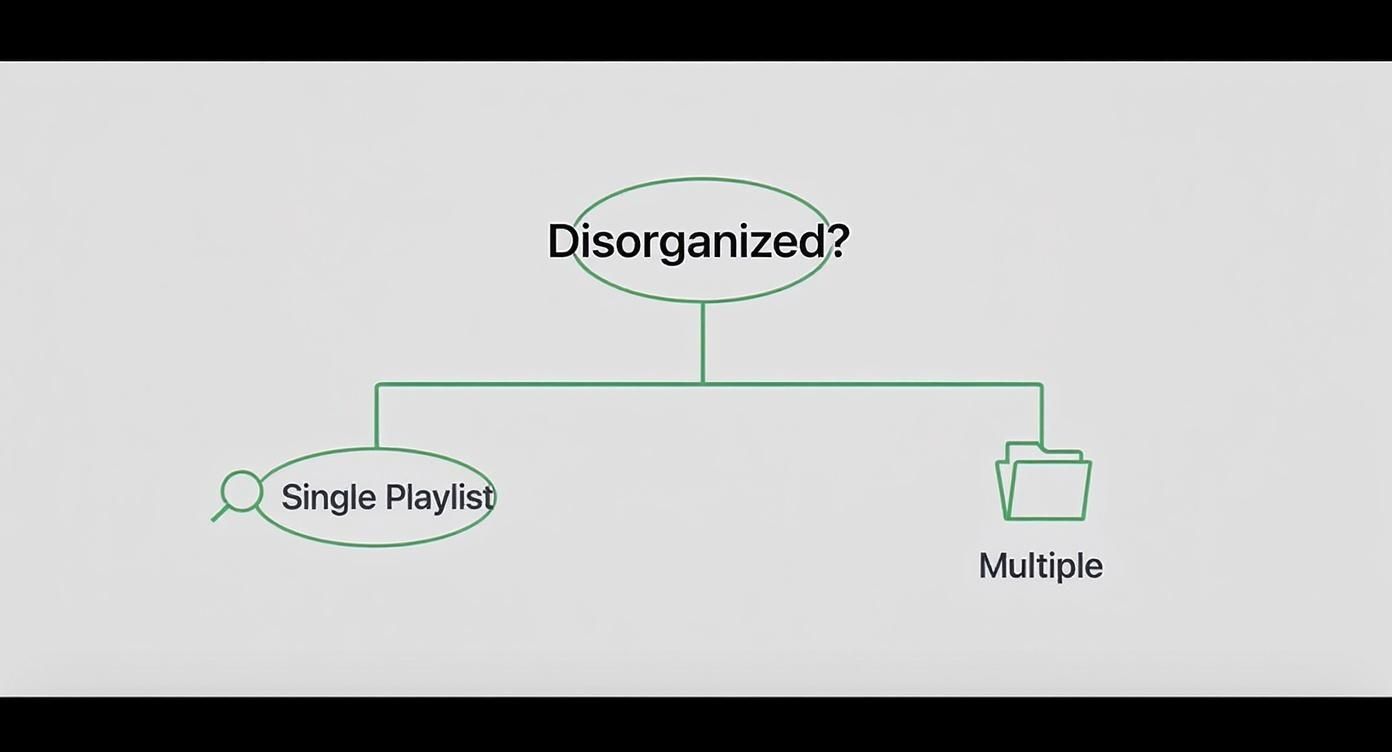
As you can see, the path to better organization often starts with a simple decision based on your personal needs. Getting this right makes automation far more effective.
Popular Spotify Playlist Management Tools
Beyond simple connections, there are some seriously powerful platforms built specifically for Spotify. These services offer advanced features for analysis, syncing, and discovery that you just can't find in the native app. Many of these tools can even be integrated into your smart home, and if that’s something you’re into, you can learn more about how to link Spotify to Google Home for a fully connected setup.
Automation isn't about taking the human element out of music curation—it's about eliminating the boring, repetitive tasks. This gives you more time to actually discover new music and perfect the vibe of your playlists.
To help you choose the right tool for the job, here’s a quick comparison of some of the most popular options out there.
Popular Spotify Playlist Management Tools
| Tool Name | Primary Function | Best For |
|---|---|---|
| IFTTT | Connects Spotify to other apps and services. | Creating simple, custom automations like saving liked songs from other platforms or archiving weekly discovery lists. |
| Soundiiz | Syncs playlists across multiple streaming services. | Listeners who use more than one music platform (e.g., Apple Music, YouTube Music) and want to keep their libraries consistent. |
| Smarter Playlists | Builds complex, rule-based playlists. | Power users who want to create dynamic playlists based on detailed criteria like BPM, genre, release date, and more. |
Choosing the right tool can turn your playlist management from a manual slog into a streamlined and genuinely creative process. Give one a try—you might be surprised how much time you get back.
How to Optimize Playlists for Growth and Discovery

Crafting a playlist with the perfect vibe is the fun part. The real challenge? Getting it in front of new listeners. With billions of playlists out there, you can't just throw something together and hope people find it. If you want to grow an audience, you have to learn to work with Spotify's algorithm, not against it.
Think of the algorithm as an ever-watchful curator. It’s paying close attention to user engagement signals, especially two key metrics: the save rate (how many people save your playlist) and the skip rate (how often listeners skip songs). A low skip rate is a huge green flag for Spotify, signaling that your curation is hitting the mark and keeping people hooked.
This is why effective Spotify playlist management for growth isn't a one-and-done task. You have to treat your playlist like a living, breathing project, constantly fine-tuning the experience to send all the right signals to the algorithm.
Master Your Title and Description
Your playlist's title and description are your best friends when it comes to search. People look for music based on a mood, a specific genre, an activity, or their favorite artists. Your metadata needs to speak their language.
So, instead of a vague title like "Chill Mix," get specific and pack it with keywords. Something like "Lofi Chillhop Beats for Study & Focus" instantly tells both a potential listener and the algorithm exactly what to expect.
The description is where you can add even more color. Expand on the mood, mention a few of the core artists, and weave in related keywords. For example: "Instrumental hip-hop and downtempo electronic perfect for late-night work sessions. Featuring artists like Nujabes, J Dilla, and Bonobo." That one simple change can make a world of difference for your playlist's visibility.
The Power of Consistent Updates
A stagnant playlist is a dead playlist, at least in the eyes of the algorithm. Updating your list on a regular basis signals that it's active and relevant. You don't need to do a complete overhaul every day, but adding a handful of new tracks while swapping out some older ones once a week can have a massive impact.
Keeping a playlist fresh does more than just give your followers new tunes. It constantly pushes your playlist back into the algorithmic pool, boosting its chances of getting featured in places like Discover Weekly or on other users' homepages.
When you consider that a whopping 66% of Spotify users listen to algorithmically generated playlists regularly, feeding into that system becomes absolutely critical for growth. Small, consistent updates are one of the most reliable ways to do it. And if you're serious about getting your music out there, learning how to get more Spotify listeners is a great next step.
Encourage Engagement and Sharing
Don't be shy about promoting your own work! Share your playlist on your social media channels, post it in relevant online communities, and send it to your friends. That initial burst of engagement from people who already know and trust you can be the spark that gets Spotify's algorithm to show it to a much wider audience.
Making your playlist collaborative is another fantastic tactic. Not only does it help you discover music you might have missed, but every time a collaborator adds a song or shares the list, it's another signal that expands its reach. If you need help building your network, check out our guide on https://accountshare.ai/blogs/new/how-to-find-friends-on-spotify-connect-share.
Maintaining and Protecting Your Playlists
You've spent hours, maybe even days, putting together the perfect playlists. The last thing you want is for all that work to just disappear. Good playlist management isn't just about what you add; it's about protecting what you've already built. Think of it as insurance against that accidental click of the delete button—which, trust me, happens more often than you'd think.
The first line of defense is creating backups. While Spotify does have a "Restore playlists" feature on its website, it’s not a permanent solution and only keeps deleted lists for a short time. It's much smarter to take matters into your own hands. You could simply copy and paste your track lists into a spreadsheet, or use a service like Soundiiz to export your playlists as a CSV or text file. It's a small bit of effort that can save you a massive headache later.
Practice Smart Playlist Hygiene
Beyond just saving your work, you need to keep your playlists fresh. I like to call this playlist hygiene—it's the simple habit of regularly checking in on your lists to make sure they're still great and serving their purpose.
A playlist should feel alive. As time goes on, some songs might start to feel a bit stale, or your own tastes might just change. I recommend setting a reminder every month or so to do a quick tune-up.
- Trim the Fat: Give it a listen and cut any songs that just don't hit the same way anymore or feel out of place.
- Check the Flow: Does the energy still transition well from one track to the next? Sometimes just reordering a few songs is all it takes to make a playlist feel brand new.
- Add Fresh Tracks: Toss in a few new discoveries. This keeps the list exciting for you and gives anyone following it a reason to keep listening.
This kind of regular maintenance ensures your playlists don't just become dusty digital mixtapes but stay as your go-to collections. For times you want to review your lists on the go, it's also handy to know how to play Spotify offline.
Manage Collaborative Permissions
Collaborative playlists are a fantastic way to discover new music with friends, but they can get messy fast without a few ground rules. When you let others add songs, you’re giving them a say in the playlist's identity. You have to be proactive to prevent things from going off the rails.
The best collaborative playlists I've ever been a part of were built on a clear, shared vision. If everyone knows the goal, the curation stays focused and the playlist is way better for it.
Before you even share that invite link, lay out the expectations. Is this a playlist for a specific genre? A certain decade? A particular mood? A quick message upfront, like "Hey, this is for my lo-fi study playlist—please keep it instrumental and chill!" can prevent a well-meaning friend from dropping a party anthem right in the middle. Setting these simple boundaries is a key part of smart playlist management and makes sure the collaboration is fun for everyone involved.
A Few Common Spotify Playlist Questions
Even the most seasoned playlist curators run into questions. So, to wrap things up, I’ve put together some quick answers to the problems and curiosities that pop up most often. Think of this as your back-pocket guide for those "wait, how do I do that?" moments.
Help! I Accidentally Deleted My Playlist!
We've all been there—that heart-sinking moment you realize a playlist you've spent hours, maybe even years, building has vanished. Take a deep breath. It's almost certainly not gone for good.
Spotify keeps your deleted playlists tucked away for 90 days. To bring one back from the dead, just log into your account on the Spotify website (you can't do this from the app). Look for the "Restore playlists" option in your account settings, find the one you need, and hit "Restore." Problem solved.
Can I See Who Follows My Playlists?
This is probably one of the most-asked questions, but the answer is a simple no. To protect user privacy, Spotify doesn't show you a list of the specific people following your public playlists.
You can see the total follower count, which is a fantastic way to gauge how much your playlist is resonating with listeners. But since you can't see who is listening, it’s much more effective to focus on metrics like saves and stream counts to understand your audience.
How Do I Reorder Songs on My Phone?
Thankfully, rearranging tracks on the mobile app is much easier than it used to be. If you want to tweak the flow of your playlist on the go, it only takes a few taps.
- Head to the playlist you want to adjust.
- Tap the three-dot menu (...) to see more options.
- Choose "Edit playlist."
- From there, just press and hold the three little lines next to a song to drag it into its new spot.
It’s a small feature, but it’s essential for getting that perfect sequence and energy right, no matter where you are.
The secret to great playlist management isn't knowing everything from the start. It's about knowing where to look for the answer when you hit a snag. Keeping these fixes in mind will help you solve problems without skipping a beat.
What’s the Difference Between Hiding and Removing a Song?
When you’re listening to a playlist you didn’t create, like your Discover Weekly, you’ll see two different options for songs that just aren't doing it for you: Hide and Remove.
They’re not the same thing, and knowing the difference is key.
- Hiding is for playlists you don't own. It tells Spotify, "Hey, I don't want to hear this song," and it'll be skipped just for you. The song stays on the original playlist for everyone else.
- Removing is for playlists you do own or collaborate on. This action permanently deletes the track from the playlist for you and anyone who follows it.
Using the right tool for the job is a core part of good Spotify playlist management. Hiding tailors your personal listening, while removing edits the experience for your entire audience.
Ready to make managing all your premium subscriptions, including Spotify, easier and more affordable? AccountShare lets you securely share accounts with friends, family, or colleagues, cutting costs while keeping everything organized. Stop juggling passwords and start saving today. Learn more at AccountShare.