

Fast Response Time: Benchmarks, Metrics and Fixes
You're trying to open a shared streaming account a few minutes before a live event starts. You tap to sign in, the screen sits there, and you're not sure if the app heard you, the network stalled, or support will reply in time. That's three different waits bundled into one frustrated feeling. Learning to separate them is the first step toward a fast response time, because each wait has its own clock, its own benchmark, and its own fix.
Fast Response Time Benchmarks by Context
A button press, a web request, and a support message can all feel like waiting, but each runs on a different clock. Fast response time may mean milliseconds for an app interaction, fractions of a second for a network response, or minutes or hours for support. Comparing unlike clocks can make a service look fast on paper while users are still stuck.
Use the table to identify the right kind of measure. App thresholds describe how a delay feels, the TTFB target describes when a server begins replying, and survey findings describe what customers expect. Expectations are useful context, not universal performance standards.
| Context | Response metric | Reference point | What it means for the user |
|---|---|---|---|
| App interaction | Perceived instant feedback | About 100 ms | Feels immediate, no waiting cue needed |
| App interaction | Flow of thought preserved | Up to 1 second | User stays focused on the task |
| App interaction | Progress feedback needed | Beyond 10 seconds | Attention may shift without visible status |
| Web network | Time to First Byte | Below 800 ms (commonly used target) | Server and network begin responding |
| Customer support | First-reply expectation in a survey | About one-third of customers expect a reply in under 2 hours | Customer knows the request was received |
| Customer support | Resolution expectation in a survey | 67% of customers expect resolution within 3 hours | Problem is actually fixed |
| Social media and direct messages | First-reply expectation in a survey | About one-third of respondents expect a reply within 1 hour | Public or urgent messages are not left hanging |
The Three Interface Thresholds
App response targets are about the user's sense of waiting. About 100 ms feels instantaneous, delays up to 1 second generally preserve a person's flow of thought, and waits beyond 10 seconds call for visible progress feedback because attention may shift, according to Nielsen Norman Group's response time limits. A light switch is a familiar comparison: when the light comes on as you press it, you do not wonder whether the switch worked. A delay makes you check.
For actions such as signing in, switching profiles, or opening a dashboard, quick acknowledgment can prevent a second tap, refresh, or duplicate support request. Background work may take longer. The interface should show that the action was received and, when a wait continues, what is happening.
Network and Support Benchmarks
Time to First Byte, or TTFB, measures how long it takes for the first part of a response to begin arriving. A target below 800 ms is commonly used as a server-responsiveness objective in the Cloudflare edge network benchmark discussion. It marks the start of a reply, not completion of the full page or task, much like hearing someone answer a call before the conversation is finished.
Support has a different clock. In Front's 2025 support expectations research, about one-third of customers expected a first reply in under two hours, 87% expected support to be both fast and accurate, and 67% expected a support ticket to be resolved within three hours. These are reported expectations, not proof that every team can or should promise those times. Acknowledging a request and restoring access are separate outcomes.
A fast acknowledgment tells you someone found your request. It does not tell you your access is back.
Social messages often feel more urgent because they are public or sent directly to a brand. About one-third of respondents expected a reply to social tags and direct messages within one hour, according to Emplifi's 2025 consumer brand survey. To set a meaningful internal target, first define when the clock starts and what counts as a reply. This guide to measuring time to first response can help clarify those points.
Adapt the reference points to the request. A live-event outage may call for an acknowledgment within minutes; a billing question may allow more time if the estimate is clear. In either case, a quick generic reply can create the appearance of speed without fixing the problem. Set expectations for both the first response and the action needed to resolve the issue.
How Response Time Is Measured Correctly
Most arguments about speed aren't really about speed. They're about people measuring different things and using the same label. One person times the first reply, another times the fix, and both insist they're reporting response time.
Start by separating the clocks. First response time starts when a ticket or message is created and stops at the first reply, automated or human, so it mainly measures acknowledgement. Time to resolution starts at creation and stops at confirmed closure, so it measures real recovery, meaning the user is able to do the thing they were blocked from doing.
The Network Clocks
Time to First Byte starts when a request is sent and stops when the first byte begins arriving. It isolates how quickly the server and network start responding, not how long the full page takes to finish. Latency percentiles work differently. They run from request sent to full response received, then show what typical and slower users experienced.
You'll see these written as p50, p95, and p99. The p50 is the median, the middle experience. The p95 means 95 out of 100 requests finished at or below that time, and the p99 exposes the slowest edge that averages tend to hide.
Why Averages Mislead
Say ten tickets get first replies after 4, 5, 6, 7, 8, 9, 10, 12, 30, and 45 minutes. The average is 13.6 minutes, which looks acceptable on a dashboard. Yet two customers waited 30 minutes or more, and they'll remember the service very differently from someone who waited five minutes.
- Median: Shows the typical case without letting a few extremes dominate.
- 95th percentile: Shows the slower experience you still need to design for.
- Calendar clock: Counts every hour, including nights and weekends.
- Business-hours clock: Counts only staffed support hours.
That last pair causes quiet confusion. A ticket sent late Friday and answered Monday morning can look fast on a business-hours clock and slow on a calendar clock. Neither number is lying, but comparing them without naming the clock is misleading.
Practical rule: Never quote a response time until you can say exactly when the clock started, when it stopped, and whose experience the number represents.
Use a three-step check before you publish or compare any figure. First, define the start event. Second, define the end event. Third, report the median and 95th percentile together, so readers see both the typical wait and the bad day hiding behind it.
Why Seconds Compound Into Real Outcomes
A single slow checkout lane doesn't just delay one shopper. It holds up everyone queued behind them, and some people abandon their baskets entirely. Digital waits compound in a similar way, because one stuck login can block a family, a work group, or a whole shared account.

Emergency medicine gives us the clearest evidence that delay changes outcomes, though it's not identical to a support ticket. In a 2020 study of witnessed out-of-hospital cardiac arrests in the Swedish Registry of Cardiopulmonary Resuscitation, 30-day survival was 19.5% when emergency medical services arrived within 0 to 6 minutes. When arrival took 10 minutes or longer, survival fell to 9.4%, less than half the earlier rate.
That gap is a 10.1-percentage-point reduction. Survival also declined as response time increased, including among patients who received cardiopulmonary resuscitation before professionals arrived. Early help mattered, but it didn't erase the cost of a slower professional response.
Don't transfer those exact numbers to software. A shared account outage isn't a cardiac arrest, and pretending otherwise would overstate the evidence. The principle transfers, not the percentage. When assistance is time-sensitive, delay closes options. A meeting starts without you, a live event ends, group members try workarounds, and trust erodes because nobody knows whether help is coming.
That's why response time should be treated as a measurable operating variable, not a vague promise of good service. Set a threshold, measure against it, and watch what happens when you miss it. A team that only says it responds quickly has given you nothing you can test.
Keeping App Interactions Under One Second
Your goal isn't to make every backend operation instant. That's neither realistic nor necessary. Your goal is to keep frequent, visible actions inside the 1-second boundary whenever possible, so users stay in flow instead of wondering whether the app froze.
The actions that need this most are the ones people repeat under pressure. Authentication checks, account switching, permission updates, and dashboard interactions should feel direct. If switching profiles stalls, users don't blame a database query. They blame the product.
A Five-Step Procedure
- Measure p95 and p99 latency for each action. Averages hide the slow tail. You need to know what happens to your slowest users, not just your typical ones.
- Move slow work out of the request path. Sending notifications or syncing usage data rarely needs to block the tap that triggered it. Acknowledge the action, then finish the heavy work behind the scenes.
- Cache responses that don't depend on the session. Repeated dashboard loads shouldn't rebuild identical data from scratch every time.
- Acknowledge any request expected to exceed 1 second immediately. A spinner, a button state change, or a short status line tells the user the request landed.
- For operations that may exceed 10 seconds, show progress and allow cancellation. Include the expected completion state so the user can decide whether to wait or do something else.
For a deeper engineering walkthrough, our guide to practical latency optimization techniques expands on how to find and shrink slow paths. Use it after you've identified which actions are breaching your threshold, not as a substitute for measuring first.
Why Variability Hurts More Than Slowness
A steady, predictable wait is easier to tolerate than a random one. If an action usually takes half a second but sometimes takes eight, users can't form a mental model. They retry, refresh, and create extra load, which makes the next wait worse.
Users need more feedback when they cannot predict how long a response will take.
That's why improving p99 latency often matters more than shaving a little off the average. Finish with a peak test. Simulate busy conditions, trigger the same actions, and check whether the p99 still meets your threshold. If it only works on a quiet Tuesday morning, it doesn't work when your users need it most.
Network Latency and Why Distance Adds Delay
A request from a user far from your server travels a longer route before the first byte arrives. The application code may be identical for nearby and distant users, yet the distance and network path add delay, much like a parcel takes longer to reach a faraway address even when it leaves the shop on time.

Time to First Byte (TTFB) measures how long it takes to receive the first byte of a response. It includes more than application processing: the network route and the server's location affect the result too. A slow first byte can therefore come from a distant server, a congested path, or slow work at the origin. TTFB helps you separate these possibilities rather than treating every delay as a code problem.
Matching Causes to Symptoms
| Cause | Symptom | Fix |
|---|---|---|
| Distant origin server | Slow first byte mainly in far regions | Cache static and session-independent responses near users |
| Slow origin processing | Similar delay across regions | Profile backend queries and cache frequently used paths |
| Congested ISP path | Spikes in one market during busy periods | Measure by ISP and consider an alternate route or region |
| Heavy uncached payloads | First byte arrives promptly, full page does not | Compress responses, paginate lists, and defer non-critical data |
| Averages hiding the tail | Typical experience is fine, but some users wait much longer | Track p95 and p99 by region and alert on changes |
Match the fix to the symptom. If distant regions are slow while nearby users are not, rewriting application code will not shorten the network route. If users everywhere see delays, moving content closer may leave a slow origin untouched. For intermittent problems, connection stability under load can help explain why performance changes as network conditions shift.
The first byte is only one clock. A network can deliver it quickly while the interface still takes time to finish loading, and a support reply can arrive quickly without restoring access. Measure network delay separately from application work and the user's full wait. Track TTFB by region and ISP, including p95 and p99 during peak periods, so slower routes do not disappear inside one global average.
Support Response Stages That Build Trust
A fast generic reply can look like good service while the user still has no access. That's false speed. The ticket metric turns green, but the person's problem hasn't moved.
Separate support into three stages. Acknowledgment confirms the request was received and logged. Estimated recovery gives a realistic time for restoration, even if that time is longer than you'd like. Resolution is the moment the problem is confirmed fixed and the user can proceed.
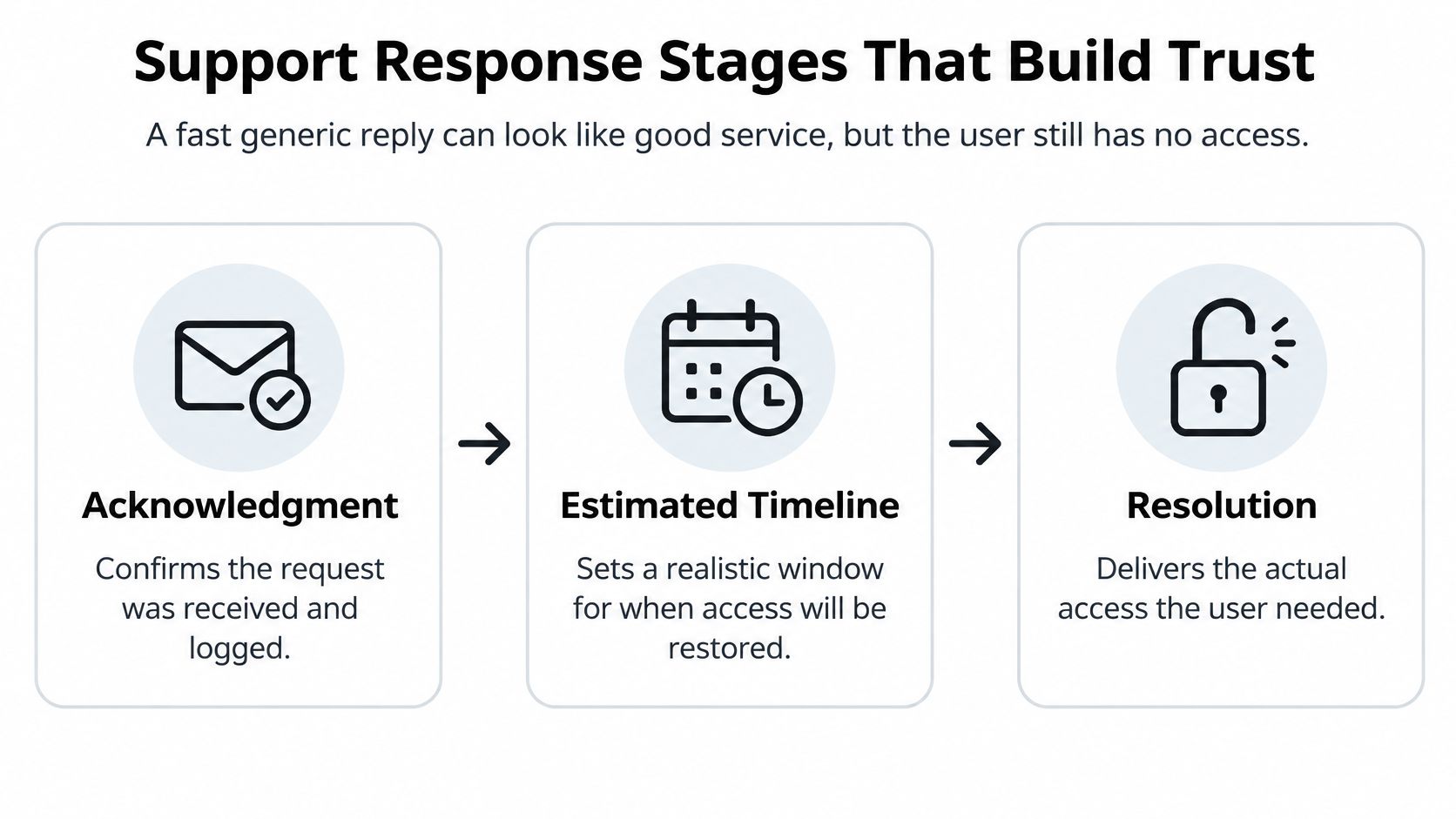
Customers don't only want speed. As covered in the benchmark section above, they also expect accuracy and actual resolution. That's why each stage needs its own target instead of one blended promise. When you're evaluating tools for the first stage, an Expressify AI live chat assistant is one example of how teams handle immediate acknowledgement, but the tool matters less than whether the reply contains a real next step.
Setting and Reporting Each Stage
- Send acknowledgment immediately, with the ticket reference and assigned severity.
- Post an estimated recovery time in the first interaction and update it whenever it changes.
- Track resolution as median and 95th percentile, not as one average that hides long waits.
Then shorten the queue itself with three levers. Triage by severity at intake, so a live-event outage moves ahead of a billing question. Use reply templates for common incidents, but require a ticket-specific next action in each one so it doesn't read like a placeholder. Staff reviewers for peak hours, especially when live events drive simultaneous demand.
Take a streaming outage during a live event. Acknowledgment should arrive within minutes, the first message should state a recovery estimate, and resolution should be reported separately once access works again. A password or permission problem is different. It needs a verification step, which takes longer by design, and you should label that delay as a security step rather than pretending it's instant.
Compare any published response commitment against these three stages. If we cite a 48-hour window, ask which stage that window covers. A commitment to acknowledge within 48 hours is very different from a commitment to resolve within 48 hours, and you deserve to know which one you're being offered.
When Automation Should Hand Off to a Person
Faster isn't always better. That sounds odd in an article about response time, but it's where many support systems go wrong. They optimize for an instant message instead of fast progress toward a trustworthy outcome.
In a 2025 consumer survey, two-thirds of respondents preferred a human response even though they knew AI support might be faster. That finding comes from the Emplifi survey linked in the opening benchmark section. The same research warned that waiting beyond 24 hours risked losing the customer, so people aren't asking for slow help. They're asking for help they can trust when access, privacy, or billing is at stake.
Drawing the Boundary
| Situation | Automated handling | Human review required |
|---|---|---|
| Incident acknowledgment | Confirm ticket and show status | No, unless severity is high |
| Estimated recovery time | Post ETA and send updates | Only if the ETA slips |
| Shared account outage during a live event | Immediate acknowledgment and status page link | Yes, for restoration |
| Login from an unfamiliar location | Notify user and prompt verification | Yes, for identity confirmation |
| Permission change request | Confirm the request was received | Yes, with an audit trail |
| Payment dispute | Log and acknowledge the dispute | Yes |
| Possible credential exposure | Prompt password reset | Yes, as a priority review |
Automation is good at confirming an incident, showing account status, and posting an estimated timeline. It's the receptionist who can tell you your appointment exists and when the specialist expects to see you. It shouldn't perform the surgery. For more on where automated tools help and where they don't, see our guide to AI tools for customer service.
Escalation Rules That Prevent Stalls
- Automate acknowledgment for every request.
- Automate status and ETA updates while the issue is open.
- Escalate to a person when an identity or security signal appears.
- Escalate when an ETA slips past its promised time.
- Log each handoff with a timestamp so nobody has to reconstruct who handled what.
You can tell a real service update from a placeholder by looking for three things, a ticket reference, a named next action, and a time commitment. If all three are missing, you've received noise at high speed. That's worse than a slightly slower reply that tells you exactly what happens next.
Confirm Response Commitments Before You Choose
AccountShare aims to respond to all inquiries within 48 hours. That is the company's response commitment, not a promise of immediate access or resolution. Before relying on it, check which clock is being described: the interface clock measures how quickly a screen reacts, the network clock measures the delay in moving data, and the support clock measures time to a human response. A quick generic reply can stop the support clock without restoring access.
Three Checks Before You Commit
- Get the response commitment in writing. AccountShare aims to reply to all inquiries within 48 hours. Support is available during business hours (GMT+8), five days a week, Monday to Friday. The company is closed on weekends and holidays, and holiday responses are postponed. A request sent over the weekend may therefore wait until support resumes.
- Clarify what a reply means. Acknowledging a request, estimating recovery time, and resolving the issue are different stages. Ask which stage the stated response window covers. A fast acknowledgment is useful, but it does not tell you when service will be available again.
- Confirm service availability before buying. Online submission of sensitive authorization is not available, so buyers must confirm availability with support first. Treat this as a step in the buying process, not as a detail to discover after purchase.
Check before you buy: Record the first-response target, the hours it covers, and what happens after the first reply. If those details are unclear, you cannot tell whether the stated speed will help with your actual need.
Make the comparison before an interruption creates pressure. When access is down, a prompt message may feel reassuring, but the useful measure is whether it leads to a clear next step and restored access.
If you are considering shared access to streaming, AI tools, or software, AccountShare lets users join group purchases with managed permissions. Confirm availability for the service you need with support, then assess the response commitment on its own terms.