

Best Access Control for Shared Accounts: A Comparison Guide
“Never share an account” is tidy advice, but it fails real households, students, and small teams. People share streaming services, AI tools, and software because subscriptions cost money and collaboration requires access. The dangerous choice isn't always sharing itself. It's sharing one permanent credential with no permission boundaries, revocation process, or audit trail.
The best access control for legitimate sharing replaces informal password exchange with controlled delegation. Each person should receive only the access they need, for the period they need it, from the devices and contexts you can monitor. That approach accepts the practical reason people share while refusing to accept unmanaged exposure as the price.
| Approach | Convenience | Accountability | Revocation | Security boundary | Best fit |
|---|---|---|---|---|---|
| Password sent by message | High at first | Very low | Manual and uncertain | None beyond the password | Temporary, low-risk access only |
| Shared password manager entry | High | Limited | Possible, depending on the tool | Credential-level | Trusted households |
| RBAC | High for stable groups | Good | Centralized | Role-based | Small teams and recurring users |
| RBAC plus contextual checks | High after setup | Strong | Immediate and policy-driven | User, action, device, time, and risk | Shared services with changing users |
| Separate named accounts | Varies by service | Strongest | Clear and direct | Per-user identity | Sensitive work and regulated data |
Why the No-Sharing Rule Fails for Real Households
A blanket ban on sharing treats a family, a student project, and a software team as if they have the same risk profile as an enterprise administrator. They don't. A household may need coordinated access to a streaming service, students may need a shared AI workspace for a project, and a small business may need collaborative software without purchasing an isolated license for every occasional contributor.
The Australia Cyber Security Centre warns that shared accounts can weaken accountability and make malicious activity difficult to trace, while recommending that organizations limit shared accounts and secure those that remain necessary in its small business cyber security guidance. That warning is sound, but it doesn't answer the practical question many people face: what should you do when sharing can't be eliminated?

Controlled delegation beats informal exchange
Typing a password into a group chat creates a permanent copy. Someone can forward it, save it in a notes app, reuse it elsewhere, or keep using it after leaving the household or project. The account owner usually can't prove who accessed a resource, identify the device involved, or revoke one participant without changing the credential for everyone.
A managed sharing model changes the unit of control from the password to the person, action, and session. One member may be allowed to view an entitlement but not change billing. Another may invite a collaborator but not rotate credentials. A temporary participant may receive access that expires when the project ends.
Practical rule: If you must share, share a narrowly defined permission, not an unrestricted identity.
That distinction matters more than the slogan “never share.” The right questions are practical:
- What is being shared? A film library carries less risk than an account connected to business data or payment recovery.
- Who needs access? A parent, classmate, contractor, and unknown online contact don't deserve the same trust.
- What can they do? Viewing content is different from changing credentials, exporting data, or modifying billing.
- How long should access last? Permanent access is rarely justified for a temporary need.
- What happens when someone leaves? If the answer is “we'll remember to change the password,” the process is weak.
The goal isn't to pretend sharing has no risk. It's to make the risk visible, bounded, and reversible. For families and small teams, that is a more honest and useful standard than advice that people can't follow.
The Real Risks of Uncontrolled Credential Sharing
Uncontrolled sharing creates more than a confidentiality problem. It removes the evidence needed to separate a legitimate user from a compromised device, a former participant, or an attacker using a stolen session. Once the same credential reaches several phones, browsers, and laptops, the owner loses a reliable identity boundary.
Understanding password sharing helps clarify the central issue: the password identifies the account, not the individual using it. That makes every later decision harder. You can't confidently attribute an action, narrow a user's permissions, or revoke one person's access without affecting everyone else.
Credential theft is only the first step
Verizon's 2021 Data Breach Investigations Report analyzed 29,207 real-world security incidents, including 5,258 confirmed breaches, and found that 61% of breaches involved credential data. The same report found that the human element appeared in 85% of breaches, while phishing appeared in 36%, up from 25% the previous year. These figures are available in Verizon's 2021 breach findings and executive summary.
Those findings don't mean every shared subscription becomes a breach. They do show why password secrecy alone is an incomplete defense. A participant can be tricked by phishing, use the password on an infected device, or copy it into another service. The account owner may never see the original compromise, but the attacker inherits the same permissions as the legitimate user.
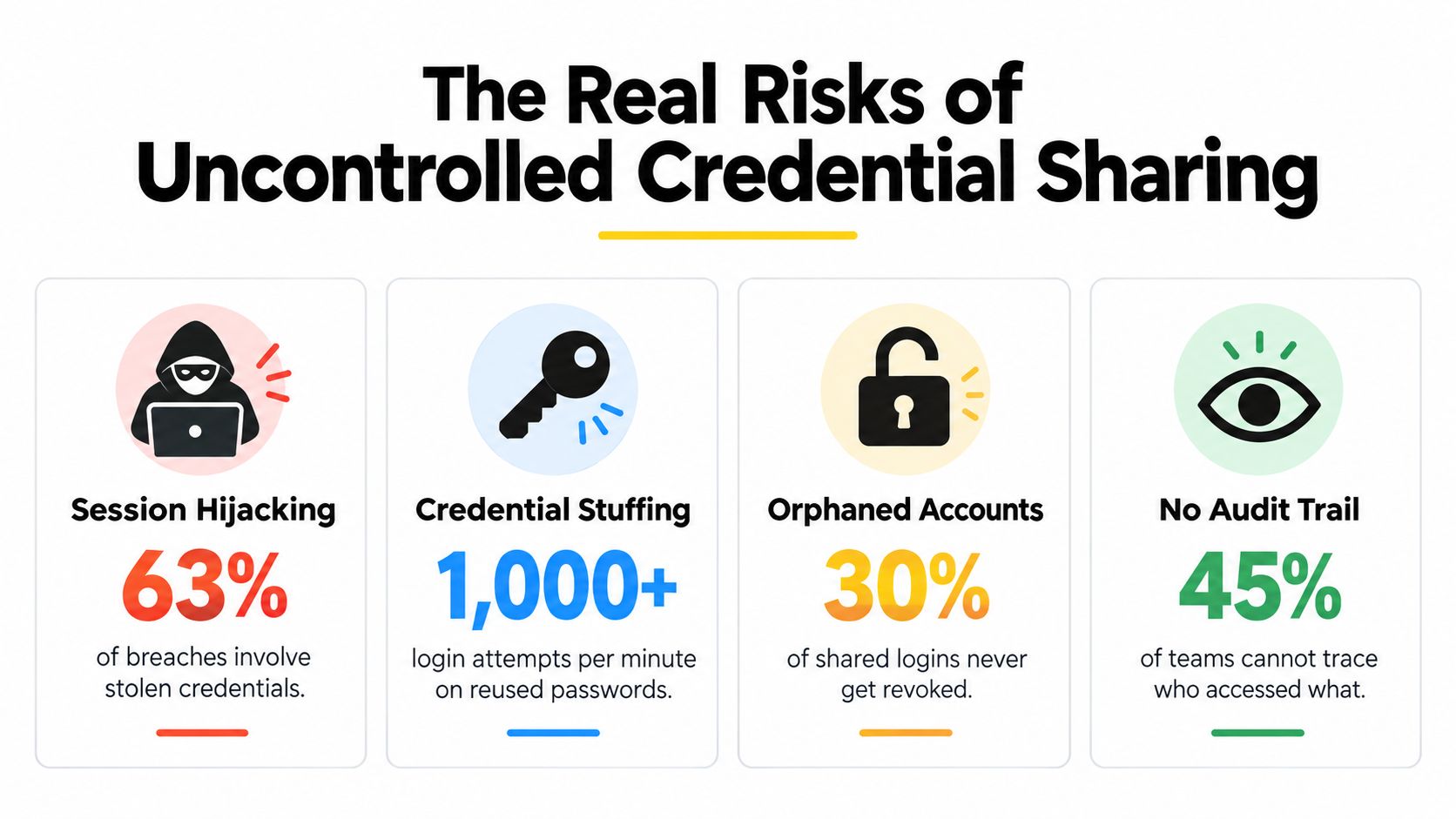
Verizon's 2026 report examined more than 31,000 real-world security incidents and more than 22,000 confirmed breaches involving organizations in 145 countries. It found that vulnerability exploitation accounted for 31% of breaches as the initial access vector, credential abuse accounted for 13%, and credential abuse appeared somewhere in the broader attack progression in 39% of breaches. The report also found third-party involvement in 48% of breaches, according to the analysis published by GitGuardian on the 2026 DBIR findings.
Access limits control the blast radius
A stolen password becomes more damaging when the account can invite users, change recovery details, rotate credentials, access payment information, or reach connected services. Strong authorization limits what happens after authentication succeeds. That is why a secure design combines multifactor authentication, least privilege, short-lived sessions, rapid revocation, and activity monitoring.
The wider lesson is relevant to preventing unauthorized access in 2026, but the principle is durable: stopping entry isn't enough if every authenticated account can do everything. A platform should deny by default, enforce authorization on the server for every endpoint, check resource ownership, and use action-specific permissions.
For a shared account, the high-risk actions deserve special treatment:
- Credential rotation: Restrict it to the owner or an explicitly authorized administrator.
- Recovery changes: Require stronger verification because recovery access can defeat other controls.
- Billing updates: Separate payment authority from ordinary service use.
- Member invitations: Limit who can expand the circle of access.
- Session management: Let an owner revoke a device without forcing every user to sign in again.
Uncontrolled sharing fails because it combines weak attribution with excessive reach. Good access control addresses both.
Evaluating Authorization Models for Shared Services
A password list is not an authorization model. It answers one question, whether someone knows the secret, but ignores who the person is, what they want to do, which resource they want, and whether the request fits the current context. For shared streaming, AI, and software services, the useful comparison is between role-based access control, or RBAC, and a hybrid design that adds attribute-based and contextual checks.
The main access control methods differ mainly in how precisely they express permission. Simple password sharing gives every participant the same broad capability. RBAC assigns permissions to stable groups, while ABAC evaluates attributes such as device, location, subscription status, time, or risk when a request occurs.
RBAC is the foundation
RBAC works well when groups remain stable. An owner, member, administrator, and billing manager are understandable roles for a household or small team. The model is easy to explain, easy to review, and easier to operate than a collection of custom rules for every person.
RBAC also creates useful separation. A member might consume a service without inviting others. An administrator might manage access without changing payment details. A billing manager might update a subscription without viewing unrelated content.
Its limitation is rigidity. A role usually describes who someone is, not whether the current request makes sense. A student who normally belongs to a project may be signing in from a new device. A contractor may need access only during a defined task. A digital nomad may be traveling in a way that looks unusual but is legitimate.
Hybrid control handles changing context
ABAC adds conditions around the subject, resource, action, and environment. A policy can permit a member to view an entitlement from a recognized device, deny credential rotation, and require an additional check when the request comes from an unfamiliar location. The user remains in the same broad role, but the allowed action changes with context.
The Cloud Security Alliance identifies least privilege, segregation of duties, multifactor authentication, RBAC, ABAC, and complete identity lifecycle management as core cloud access-control practices in its Cloud Controls Matrix guidance. OWASP's authorization guidance also supports default-deny behavior, server-side enforcement, centralized authorization logic, resource-ownership checks, and action-specific permissions.
For AccountShare, explicit actions are more useful than a generic “shared account” role:
- View entitlement
- Invite member
- Rotate credential
- Revoke session
- Change billing
- Manage recovery settings
This structure makes permissions auditable and reduces privilege escalation. It also avoids the role explosion that can occur when administrators create a separate role for every small variation. A compact RBAC layer paired with a centralized policy decision point is the strongest choice for shared services that need both simplicity and context.
Essential Features to Demand in a Sharing Platform
The best access control platform should make unsafe behavior difficult and responsible administration routine. Don't judge a product by whether it can store or distribute a password. Judge it by what happens when a device is lost, a member leaves, a location changes, or someone attempts an action outside their permission.
Start with permission granularity
A secure platform should let the owner distinguish between using a service and managing the account. Look for permissions that map to real actions rather than a single access switch.
- Usage access: Let a member use the approved service without granting administrative control.
- Membership access: Permit invitations only to people who need to add participants.
- Credential access: Keep password viewing and rotation separate from ordinary use.
- Billing access: Restrict payment changes to the owner or a designated financial administrator.
- Recovery access: Protect recovery email, backup methods, and emergency lockout controls.
This is the practical difference between delegation and password exposure. The account access management guide offers useful terminology for thinking about ownership, permissions, and lifecycle events.
Treat revocation as a first-class feature
A member leaving should trigger immediate session invalidation, not a reminder to update the password later. Entitlement expiry should remove access automatically. A lost device should be removable without disrupting every legitimate participant.
Activity logs must capture enough context to support investigation. At minimum, records should identify the subject, resource, action, decision, policy version, device context, and timestamp. Logs are useful only when the platform makes them searchable and understandable to an owner who isn't a full-time security analyst.
Device and location monitoring add another layer. They shouldn't punish normal travel automatically, especially for students and digital nomads, but they should surface unfamiliar devices, impossible session patterns, and unusual actions. A good system explains why it blocked or challenged a request.
Test the system under real demand
Dynamic authorization adds processing work, so benchmark it with realistic policy complexity rather than a basic allow-or-deny test. One evaluated dynamic Zero Trust framework reported 32 milliseconds of average added latency across 1,000 requests, compared with 14 milliseconds for traditional RBAC, along with maximum CPU utilization of 17.3%, maximum memory utilization of 19.1%, and less than 5% latency degradation across 1,000 concurrent sessions in five regions. These are experimental results from one implementation, not a universal benchmark, as described in the evaluated access-control framework.
Use the same discipline when reviewing vendor claims. For broader orientation, Fitness GM access control insights can help frame system-selection questions, but your own tests should decide whether a platform meets your requirements.
Measure cached decisions, ordinary membership checks, and high-risk operations separately. Record p50, p95, and p99 latency, throughput, cache-hit rate, policy errors, and revocation propagation time. Sensitive operations should fail closed if the policy service is unavailable, while read-only access may rely on tightly bounded, signed cache entries.
Use Cases for Families, Students, and Small Teams
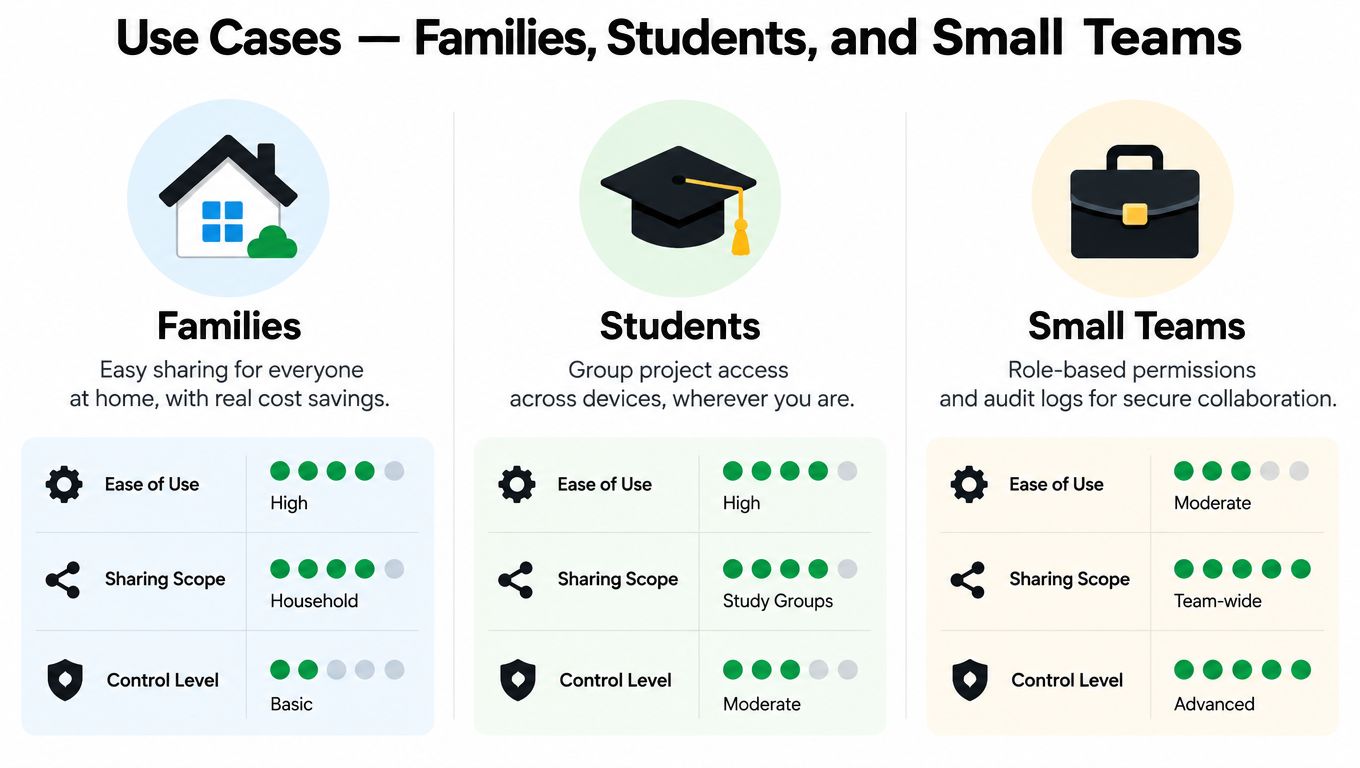
The same control can be excessive in one setting and inadequate in another. A family sharing entertainment access doesn't need the same approval workflow as a business sharing customer data, but neither should rely on a password copied into a group chat.
Families need ownership and easy recovery
A household should designate one account owner and make that responsibility explicit. Other members can receive use permissions, while billing, recovery settings, member invitations, and credential rotation remain restricted.
Parental controls may require a separate permission layer. A child can use approved content without changing age settings, adding a payment method, or inviting an unknown participant. Device visibility also matters because family members may use televisions, tablets, phones, and shared computers.
The household decision rule is simple:
Share low-impact usage broadly, but keep recovery, payment, and administrative actions narrow.
Families should also agree on what happens when someone leaves the household. Remove the member, invalidate sessions, and review connected devices. If the service cannot support those actions, the family should treat the account as higher risk than its entertainment value suggests.
Students and digital nomads need temporary access
Students often collaborate across personal laptops, campus computers, and phones. A group project may require access for a defined period, but not indefinitely. Temporary membership, device/session inventory, and simple revocation matter more than a complex hierarchy of roles.
A traveling user creates a different challenge. A login from a new country may be legitimate, yet location change can also indicate account takeover. The platform should combine location with device identity, session history, action sensitivity, and user confirmation instead of blocking every unfamiliar location.
Students should separate project access from personal recovery accounts. A classmate may need to use a shared tool but shouldn't control the owner's backup email or payment information. Teams that split subscription costs may also benefit from tools for apps that split bills evenly, provided financial coordination doesn't lead to broader account authority.
Small teams need auditability and separation
A small business should use named users wherever the service supports them. If a shared entitlement is unavoidable, assign a clear owner, a service administrator, and ordinary members. Keep billing and recovery separate from day-to-day usage.
Audit logs become more important when the account touches client work, internal documents, or paid software. The team should be able to answer who invited a user, who changed a credential, who accessed a resource, and when a departing contributor lost access.
A practical small-team setup combines RBAC for stable responsibilities with contextual checks for device, time, and risk. The team doesn't need enterprise complexity, but it does need accountable decisions.
How to Choose the Right Balance of Security and Cost
Cost savings justify sharing only when the exposure remains proportionate to the value of the service and the information inside it. A family entertainment account and a business account connected to customer records should never receive the same controls just because both use one subscription.
Use this decision framework before choosing a platform:
| Risk question | Lower-risk answer | Higher-risk answer | Recommended control |
|---|---|---|---|
| What does the service contain? | Entertainment or non-sensitive tools | Business, personal, financial, or recovery data | Separate sensitive services or use named accounts |
| Who needs access? | Known household members | Contractors, classmates, or changing contributors | Temporary invitations and explicit ownership |
| What can users do? | View or use content | Export, invite, bill, recover, or rotate credentials | Action-specific permissions |
| How long is access needed? | Ongoing household use | Short project or trial period | Expiry dates and automatic revocation |
| How unusual is the context? | Familiar devices and sessions | New devices, locations, or behavior | Context checks and step-up verification |
| What happens during failure? | Read-only use can pause | Administrative changes must be blocked | Fail closed for sensitive actions |
Pay for control where consequences are high
Basic sharing may be acceptable when the service contains little sensitive information, participants are trusted, and the owner can revoke access quickly. Even then, use a unique credential, multifactor authentication where supported, and a documented owner.
Premium access control becomes worthwhile when the account includes payment authority, recovery privileges, business data, or a changing group of users. It also becomes worthwhile when the owner can't confidently answer who accessed the service or when a departing participant can retain a session.
The strongest model is layered:
- Authenticate the person. Use multifactor authentication or phishing-resistant sign-in where supported.
- Assign the smallest useful role. Don't give administrative permissions just because someone needs ordinary access.
- Evaluate the request context. Consider device, location, subscription state, time, and risk.
- Protect sensitive actions separately. Billing, recovery, invitations, and credential rotation deserve stronger checks.
- Log every meaningful decision. Record who requested what, the outcome, and the context.
- Revoke automatically. End sessions when membership or entitlement ends.
- Review exceptions. Temporary overrides should expire and remain visible to the owner.
Passkeys are increasingly available, with a cited 2025 industry analysis reporting that more than 15 billion accounts can use passkeys in its identity security analysis. Strong authentication helps, but it doesn't replace authorization. A verified user can still have excessive permissions, and a stolen session can bypass the original sign-in step.
The right question isn't whether sharing is perfectly safe. It isn't. Ask whether the arrangement gives you clear ownership, limited permissions, temporary access where appropriate, visible activity, and fast recovery. If it doesn't, the cost saving is being funded with unmanaged risk.
For shared services, AccountShare offers customizable permissions and secure credential-sharing features intended to avoid exposing sensitive account information directly. Visit AccountShare to evaluate whether its access controls fit your household, student group, or small-team sharing model.