

What Is Password Sharing: A 2026 Guide to Risks
Password sharing means giving another person access to an account by revealing login credentials or otherwise enabling use of the same subscription. A 2024 USENIX study found that participants shared an average of 3.3 accounts each, showing that this is usually a recurring access pattern rather than a one-time exception.
Why, then, do familiar household and workplace habits get treated as if they're automatically the same as an account takeover? The answer depends on who receives access, what they can do, how the credentials travel, and whether the account owner can revoke or trace that access later.
People share streaming subscriptions with family, send work credentials through chat, and give roommates access to household services because sharing is quick and socially normal. The security problem begins when convenience replaces control. A password copied into a message can outlive the relationship that justified it, while a shared login can make it impossible to identify the person who changed settings, viewed data, or made a purchase.
Understanding what password sharing includes, why people do it, and where safer workflows fit will help you make better decisions without pretending that every shared account serves the same purpose.
What Password Sharing Actually Means
Does giving your partner a streaming login count as password sharing when you both pay for the account? Yes. Password sharing is any arrangement in which another person gains access to an account or subscription through your credentials or a shared-access feature.
The method can vary. You might hand over a username and password, enter your credentials on someone else's device, forward a one-time login link, or invite another person through a multi-user account. The common thread is that someone beyond the original account holder can use the service. That access may be reasonable and agreed upon, or informal and difficult to control.
Common examples include:
- Household access: A family member uses a subscription connected to one person's account.
- Shared plans: Several people use a streaming, gaming, software, or productivity plan.
- Collaborative access: Coworkers use one login because individual profiles or permissions were never configured.
- Informal delegation: Someone receives credentials to complete a task, manage a page, or make a purchase.
The label does not cover every situation involving shared technology. Public Wi-Fi access, a corporate data breach, and credential stuffing involve exposure or misuse, but they are not intentional acts by one person enabling another person's access.
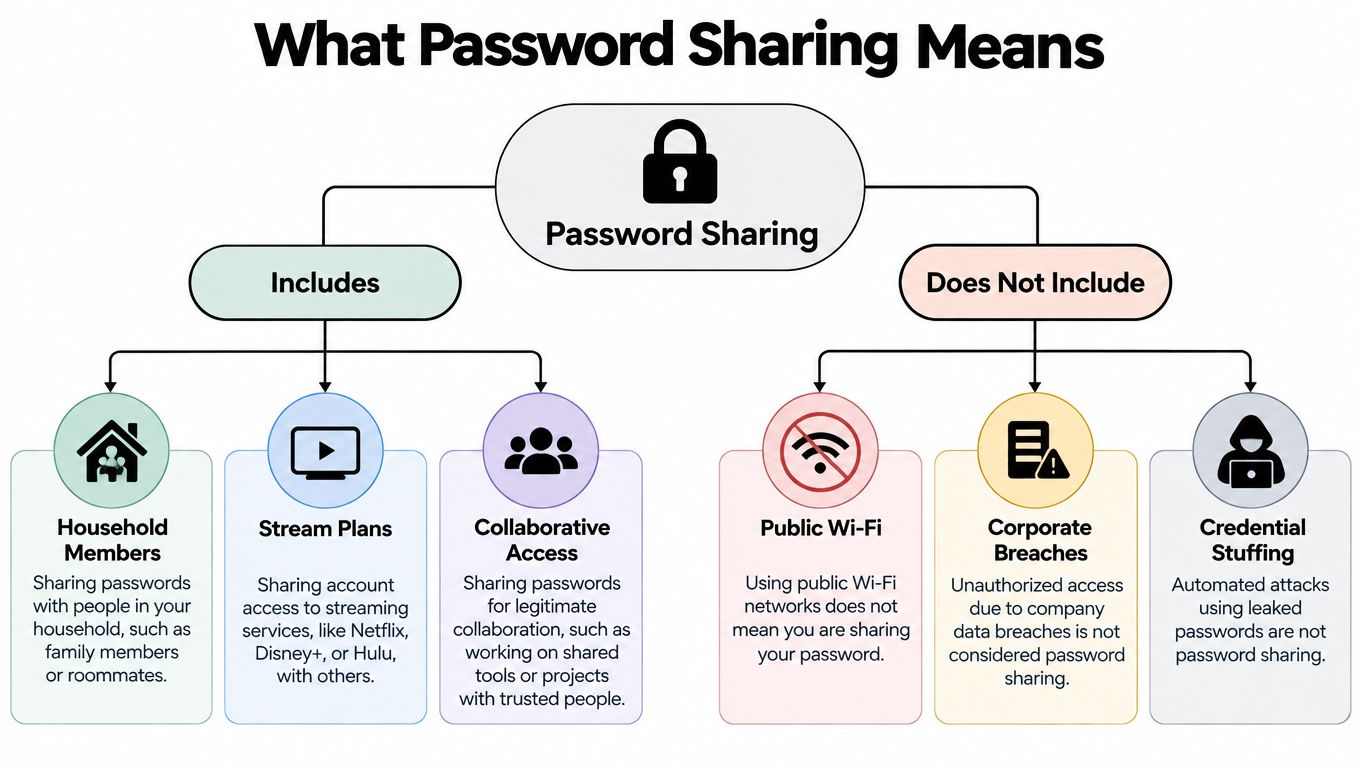
The distinction shapes the response. A household sharing access needs clear user management and a way to remove permission. A compromised account calls for investigation, password changes, and containment. Services that support multiple users can provide a more controlled alternative to passing credentials around. This guide to a password-sharing website explains how those arrangements can work.
Why People Share Passwords in Real Life
A family splits the cost of a streaming plan. One person pays, another watches on a television, and a third uses the account while traveling. Nobody thinks of the arrangement as a security decision. They see it as a practical way to use something they've agreed to share.
Roommates follow a similar pattern with internet services, shopping accounts, smart-home tools, or a digital calendar. They may trust each other, but they still exchange credentials through a group chat because creating separate profiles feels slower than typing a password. Once the message is sent, it can remain in chat history, backups, screenshots, or a synced device.
Small teams often share accounts for a different reason. A company may subscribe to a tool before it has set up role-based access, or a team may reuse one login because the vendor's plan appears easier to manage that way. A departing employee might still know the password, while a new employee receives it from a colleague without any central record of the change.
The social driver is usually convenience, not malicious intent.
That doesn't make the practice harmless. It explains why blanket advice such as “never share passwords” often fails. People share because they're coordinating costs, helping relatives, avoiding unnecessary setup, or solving an urgent access problem. A safer solution has to fit those situations instead of assuming users will abandon them.
The behavior is also widespread across multiple services. The 2024 USENIX study of password sharing, which involved 300 participants, found an average of 3.3 shared accounts per participant, with a median of 3 accounts. That pattern suggests that many people aren't making one isolated exception. They're using sharing as a repeated way to organize digital life.
Recent survey summaries point in the same direction. Security.org reported that about 37% of people share personal passwords in its 2026 summary, while a Bright Defense roundup cited a GoodFirms figure of 52.9%. The exact results vary by survey design, but the broader lesson is consistent: password sharing has become a social habit.
Recognizing that habit helps you ask a better question: not “Can trusted people share?” but “How can access remain limited, visible, and easy to revoke?”
Security and Governance Risks of Shared Credentials
The first risk appears when a credential leaves the original user's control. A password sent through email, SMS, chat, or a spreadsheet can create copies that the owner may never see. Those copies can remain in archives, screenshots, synced notes, inboxes, or local files after the original reason for sharing has disappeared.
Every additional person or device expands the attack surface. A recipient may lose a phone, reuse the password elsewhere, forward the message, or store the credential in an unprotected document. The owner may trust the person and still lose control of the places where the secret exists.
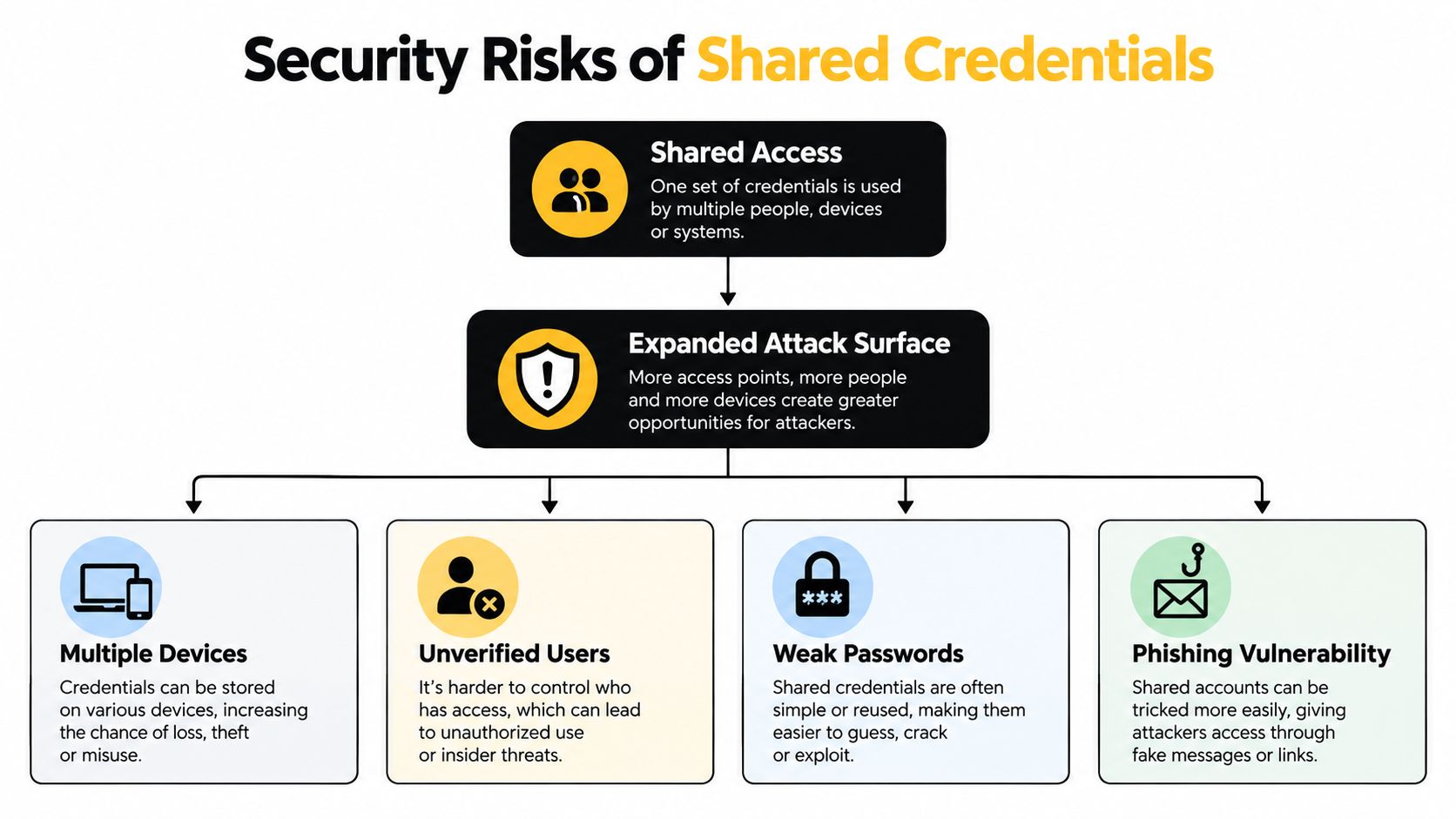
The account owner loses visibility
Shared credentials also weaken accountability. If several people use the same username, an audit log can show that the account performed an action, but it may not show which human performed it. That makes it harder to investigate a suspicious change, resolve a dispute, or determine whether an employee still has access.
The problem becomes more serious during offboarding. Resetting the password may remove known access, but it doesn't reveal whether someone saved the old credential, connected a device, or used the account through another session. A business may end up choosing between an inconvenient reset and uncertainty about who remains inside the account.
A shared login can also increase the blast radius of a compromise. Passwork's explanation of shared credentials notes that stolen or weak credentials are a primary attacker path, drawing on Verizon's security guidance. Once an attacker obtains a shared credential, the same identity can provide an easier route to reuse or lateral movement across connected services.
Convenience can hide a governance failure
The deepest issue isn't always the password itself. It's the loss of a reliable answer to three questions:
- Who is authorized right now?
- What can each person do?
- How quickly can access be removed?
If the answer depends on memory or old chat messages, the account lacks effective access governance. A guide to account takeover prevention can help frame the response, but the practical principle is simple: give people individual identities and permissions whenever the service supports them.
Shared credentials create uncertainty before they create an incident. That uncertainty slows detection, investigation, and recovery.
How Streaming and Platforms Changed the Conversation
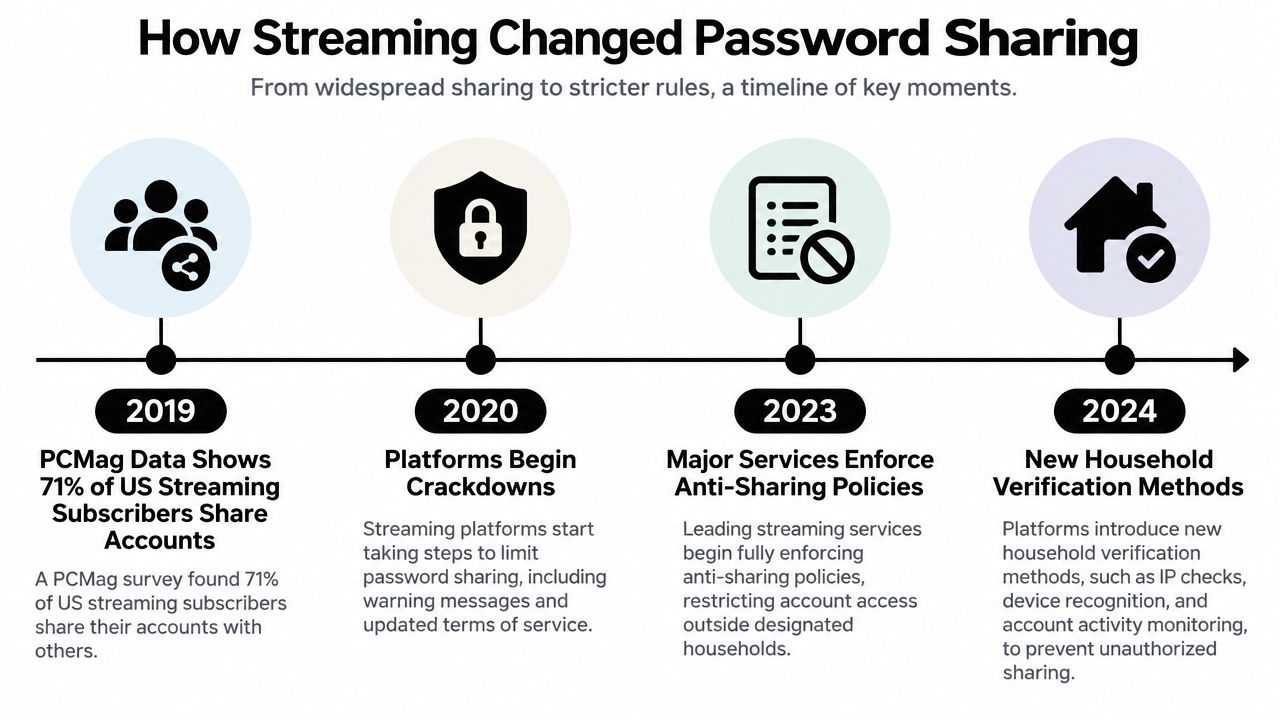
Streaming made password sharing visible because the use case was easy to understand. One person paid for a subscription, several people watched, and the service could see devices or locations that didn't fit its original assumptions.
A 2019 PCMag survey of 1,001 US streaming subscribers found that 71% said they shared streaming-app passwords. The survey reported that 55% shared with family, 23% with a spouse, and 8% with friends. Those figures show why the behavior couldn't be reduced to anonymous abuse. Much of it took place among people who already considered the arrangement legitimate.
Later evidence showed that sharing also extended beyond immediate households. A 2021 Harris Poll summary reported that 53% of Americans with streaming services shared login information with people outside their immediate household, with an average of 3.5 other people. The PCMag reporting on streaming password sharing captures the broader shift from private convenience to a platform-level problem.
Why enforcement feels personal
Services responded by tightening household rules, checking devices, and asking users to verify where an account is being used. From a platform's perspective, those controls help distinguish intended subscribers from access that falls outside the service's entitlement model. From a consumer's perspective, the same controls can feel like a sudden redefinition of a familiar family arrangement.
Attitudes add another layer. A later consumer survey found that 69% of respondents reported using someone else's password, and 80% of US consumers did not consider password sharing to be stealing. Those figures come from the PCMag-linked consumer coverage, and they help explain why enforcement often triggers debate rather than simple acceptance.
The distinction is important. A service can prohibit an arrangement without every user seeing that arrangement as immoral, while a household can consider access fair even when the subscription terms say otherwise. Users should check the current rules for each platform instead of assuming that a past family habit still qualifies.
Safe Alternatives and Structured Sharing Options
Texting a password is easy, but it gives the recipient a durable copy and gives the owner little control afterward. A password manager can improve delivery by storing credentials in an encrypted vault and sharing access through a controlled workflow. The trade-off is that everyone may need compatible accounts, and the owner still needs to review who can use the item.
Permission-based accounts are stronger where they're available. A business social profile, cloud workspace, or project tool may let each person sign in separately, assign limited roles, and remove one user without changing access for everyone else. This approach preserves accountability because activity is connected to an individual identity.
| Sharing method | Main advantage | Main trade-off |
|---|---|---|
| Text, email, or screenshots | Fast and familiar | Copies are difficult to track or revoke |
| Password manager sharing | More controlled credential delivery | Requires setup and trusted software |
| Individual profiles | Better attribution and permissions | May cost more or depend on the service |
| Managed group access | Central coordination for shared subscriptions | Users must follow the platform's rules and access model |
A managed group model can make sense when several people want the same subscription but don't want to exchange personal login details. AccountShare is one example of a platform that coordinates group purchasing and shared access for services such as streaming, AI tools, and software applications. Its stated features include managed groups, secure payment handling, customizable permissions, and access without directly exposing sensitive login information.
The right choice depends on the account. Sharing a low-sensitivity entertainment subscription with a defined group has a different risk profile from sharing email, banking, payroll, or an administrator account. For a fuller comparison of group access models, explore this guide to shared subscriptions.
Choose the method that makes the safe behavior easier than copying a password into a chat.
Best Practices for Sharing Access Responsibly
Some access will still need to be shared. Use a process that limits exposure and gives you a clear way to recover control.
- Limit the audience: Share with named people who have a specific reason to use the account. Avoid forwarding credentials through broad group chats or leaving them in shared documents.
- Use a secure delivery method: Prefer a password manager's sharing function or the service's own invitation system. Don't send credentials in screenshots, email threads, or notes that synchronize across unmanaged devices.
- Separate sensitive accounts: Never reuse a password from a shared subscription for email, banking, work administration, or another important service. A shared entertainment login shouldn't become a key to unrelated accounts.
- Turn on stronger verification: Enable multifactor authentication where the service supports it. Decide in advance who controls the second factor and how an authorized user will complete verification without creating another uncontrolled copy.
- Set a review date: Record who has access and when you'll check it. Temporary access should have an expected end point, even if the account is used by family or a long-running team.
- Revoke promptly: Remove users when a job, household arrangement, project, or relationship changes. Change the password when individual removal isn't possible, then review active sessions and connected devices.
- Document ownership: Keep a simple record of the account owner, billing contact, recovery method, and approved users. Documentation prevents accidental exposure when the person who originally set up the account leaves.
These steps won't remove every risk, but they replace informal trust with limited access, clear responsibility, and a repeatable recovery process.
How to Decide What Sharing Model Fits Your Situation
Start with the account's sensitivity. A household streaming plan may support shared profiles, while email or financial services deserve individual identities and stronger controls. The more damaging an unauthorized action would be, the less suitable a shared password becomes.
Then assess the access pattern:
- Personal-only account: Choose this when the service contains private data or has no meaningful sharing controls.
- Household sharing: Use the provider's profiles, family features, and approved household rules where available.
- Team access: Prefer individual logins, role-based permissions, and activity records for work tools.
- Managed group solution: Consider this when several people need a subscription, cost coordination matters, and the model provides clear membership and removal processes.
Ask whether you can answer who has access, what they can do, and how you'll revoke it. If you can't, the arrangement is uncontrolled, regardless of how much you trust the people involved.
Password sharing isn't automatically wrong. Untracked, persistent, and non-revocable sharing is the riskier model. Choose structured access when the service supports it, and treat every shared credential as an account-governance decision rather than a casual favor.
AccountShare offers managed group purchasing and shared access for subscriptions such as streaming services, AI tools, and software, with features including customizable permissions and coordination without directly exposing personal login details. If you're looking for a more controlled alternative to sending credentials through chat, visit AccountShare and review whether its group model fits your access needs.