

Discover youtube premium vpn: Your Guide to Cheaper YouTube Premium
Want to get YouTube Premium for a fraction of the cost? A youtube premium vpn is the trick many people use to get the service at a much lower price. By simply connecting to a VPN server in a country like Turkey or Argentina, you can tap into local pricing and slash your monthly bill by over 60%.
It’s a straightforward strategy that takes advantage of how digital services price themselves around the world.
How a VPN Unlocks Cheaper YouTube Premium
The concept is surprisingly simple. Companies like YouTube often price their services based on the local economy. A subscription fee that feels normal in the U.S. might be far too expensive in a country with a different economic landscape. So, they adjust the price to fit the market.
A Virtual Private Network (VPN) works by hiding your actual IP address and giving you a new one from a server located somewhere else. When you connect to a server in Turkey, for instance, and then head over to the YouTube Premium page, the website thinks you're browsing from Turkey.
As a result, it shows you the Turkish price, which is often a tiny fraction of what you’d pay back home.
The Staggering Price Differences
The savings here aren't just a few bucks—they can be huge. While currency exchange rates cause prices to shift, the cost difference is consistently massive.
To give you an idea of what's possible, let's look at some real-world numbers.
YouTube Premium Price Comparison Across Regions
| Country | Local Price (Approx. USD) | Potential Monthly Savings (vs. U.S. Price) |
|---|---|---|
| United States | $13.99 | - |
| Turkey | $1.80 | $12.19 |
| Argentina | $2.36 | $11.63 |
| India | $1.55 | $12.44 |
As you can see, the difference is dramatic. An individual plan in the U.S. runs $13.99 per month, but if you sign up through a Turkish server, you could pay less than $2. This is the same tactic people use to find better deals on sports streaming, which we cover in our guide on getting a cheaper NBA League Pass with a VPN: https://accountshare.ai/blogs/new/vpn-nba-league-pass
People have caught on to this. For years, savvy users have used VPNs to connect to servers in places like Turkey, Argentina, and India to lock in these lower prices. While the standard U.S. plan is $13.99 monthly, in Turkey it’s as low as $4.45 (or even €3.80 via services like GamsGo). That's a 68% savings that makes ad-free viewing and YouTube Music accessible for anyone on a budget.
When you visit the YouTube Premium page from a higher-priced country, you'll see their standard offer.
This page highlights all the great features like ad-free videos and background play. Those benefits are the same no matter where you are—the only thing that changes is the price. The key is to change your perceived location with a VPN before you ever land on this page.
Why This Method Is So Popular
This cost-saving trick has become a go-to for a few obvious reasons. First and foremost, the financial benefit is impossible to ignore. Saving over $100 a year on a single subscription is a big deal, especially for families or students.
The real appeal is getting the exact same premium features—ad-free videos, offline downloads, and YouTube Music—without paying the premium price tied to your location. It levels the playing field for a better viewing experience.
Second, the process itself isn't complicated. If you're comfortable with basic tech, you can do this. Once you get the hang of connecting to a VPN server, the rest of the signup is just like normal. It’s less of a "hack" and more of a smart way to navigate the global digital marketplace.
And this knowledge is useful beyond just getting a discount. To get the most out of the platform and bypass any frustrating geo-blocks, it helps to understand how to unblock YouTube in general.
The Smart Way to Subscribe Using Your VPN
Alright, you get why using a VPN for YouTube Premium is a game-changer for your wallet. Now, let’s get into the how. Don’t worry, this isn't some complex technical hack; it's a straightforward process that’ll have you saving money in minutes.
The core idea is simple. You'll use a VPN to make it look like you're browsing from a country with lower prices, clear out any data that gives away your real location, and sign up for Premium like a local.
This is basically what you're doing:
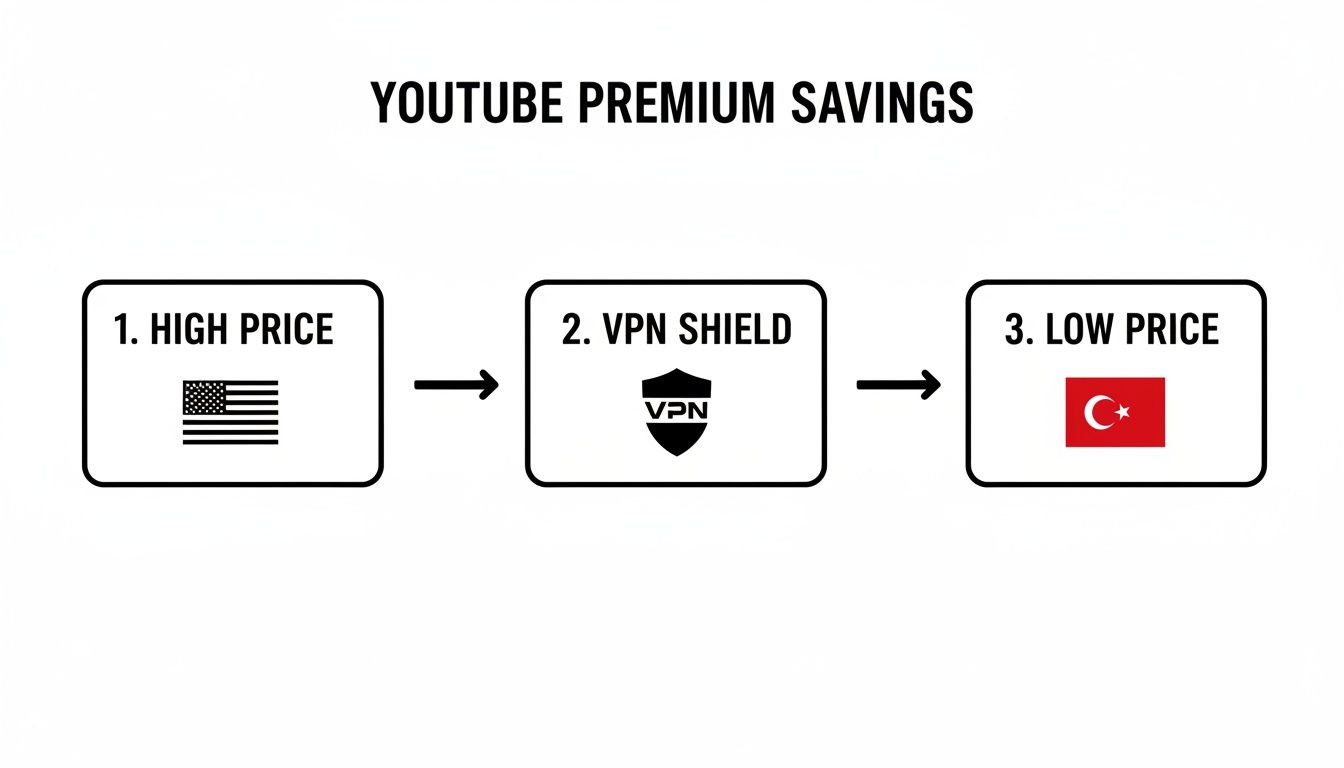
As you can see, the VPN is just the bridge that gets you from the high-priced U.S. storefront to the much cheaper one in a country like Turkey.
Preparing Your Digital Footprint
First things first, before you even open your VPN app, you need to prep your web browser. Google is incredibly good at knowing where you are—it uses cookies, cached data, and your account history to keep tabs. For this to work, you need a clean slate.
The easiest and most effective way to do this is to open an incognito or private browser window. This creates a fresh session without your existing cookies or login info, making it much harder for YouTube to see that you aren't actually in the country your VPN is connected to. It’s a simple but vital step.
Choosing Your Virtual Location
With your private browser window open, it's time to pick a country. In the past, places like Argentina and India were the go-to spots for super-low prices, but YouTube has cracked down, making it tough to use foreign payment methods there.
From what I've seen work reliably for people recently, a few countries hit that sweet spot of low cost and payment flexibility:
- Turkey: This is the most popular choice for a reason. It's consistently one of the cheapest options available.
- Peru: Often a good backup, as it tends to be more accepting of international credit cards.
- Romania: Another solid European option with great pricing and fewer payment hurdles.
Fire up your VPN, connect to a server in one of these countries, and you're set. For instance, if you're going for Turkish pricing, just pick a server in Istanbul. Once you're connected, every website you visit will think you're right there in Turkey.
Pro Tip: Ever get that "We couldn’t verify your country" error on YouTube? It usually just means the specific IP address your VPN gave you has been flagged. The fix is simple: disconnect from the VPN and reconnect to the same country. You'll get a new IP, and that almost always solves the problem.
Solving the Payment Puzzle
This is the part where most people hit a wall. You've made it to the Turkish YouTube Premium page, you see the amazing low price, and then... your U.S. credit card gets rejected. It's usually a billing address mismatch.
Here’s how you get around it.
The trick is to use a payment method that isn't so strictly tied to your home country. I've found that using a virtual credit card from a service like Revolut works wonders. These services let you create digital cards that are designed for global use and are far less likely to be flagged.
Another clever tactic is to create a brand-new Google account while your VPN is still connected to the foreign server. This starts the account off geo-tagged to that country (like Turkey), which can make the whole payment process go much more smoothly.
When you get to the payment form, it might ask for a local address. This is almost never strictly verified. A common workaround is to just use a public address, like a hotel or library in the capital city, which you can find with a quick online search.
Once your payment goes through and your subscription is active, you're done with the hard part.
You can now disconnect the VPN and enjoy YouTube Premium everywhere—on your phone, smart TV, and computer—just like normal. Your subscription is tied to your Google account, not your physical location. The VPN is only needed for that initial sign-up and if you ever need to update your payment info down the road.
Choosing a Safe VPN and Avoiding Common Risks
It's tempting to just grab the first free VPN you find, but this is where a smart money-saving move can go wrong. While using a youtube premium vpn is a great way to find a better deal, picking the wrong one can throw your security and privacy out the window.
Let's be real—the VPN market is crowded, and not every service has your best interests at heart. Many free VPNs have a business model where you are the product. They aren't charging you a subscription, so they make money by logging your browsing activity and selling it to the highest bidder.
What starts as a hunt for cheap YouTube Premium can quickly become a privacy nightmare. As this trick has become more popular, the risks have grown. Projections for 2025 suggest that 60% of free VPNs could be selling user data. Other studies have found 80% embed trackers, 39% of free Android VPNs contain malware, and a staggering 84.5% suffer from IP leaks. Suddenly, that "free" service looks very expensive.
The Problem with Free VPNs
Running a secure, global server network costs a lot of money. If a company isn't charging you for their service, you have to ask how they're paying the bills. Usually, it's in ways that completely undermine the point of using a VPN.
Instead of security, you get vulnerability. Free services often come with major strings attached:
- Your Data for Sale: Many free VPNs log everything you do—the sites you visit, what you download—and sell that data to advertisers and data brokers.
- Malware & Trackers: Some free apps are just a front for injecting malware or adware trackers onto your device, following you around the web.
- Weak Security: They often skip essential features like a kill switch or use outdated encryption, leaving your real IP address exposed the moment the connection flickers.
When it comes to your online privacy, a free VPN is a gamble where the odds are never in your favor. Let's break down the real-world differences.
Free VPN vs. Premium VPN Security Risks
| Feature/Risk | Free VPNs | Premium VPNs |
|---|---|---|
| Business Model | Often relies on selling user data, ads, or bundling malware. | Funded by user subscriptions, incentivizing privacy protection. |
| Data Logging | Frequently logs browsing history, IP addresses, and connection times. | Strict, audited no-logs policies are standard. |
| Encryption | May use weak or outdated encryption protocols that are easily broken. | Employs military-grade AES-256 encryption, the industry gold standard. |
| Connection Speed | Slow and unreliable due to overcrowded servers and bandwidth throttling. | Fast speeds optimized for streaming and browsing across a global network. |
| Kill Switch | Rarely offered, leaving your real IP address exposed if the connection drops. | An essential feature that prevents accidental data leaks. |
| Malware & Trackers | High risk. Studies show many free apps contain malware or intrusive trackers. | Reputable providers have a vested interest in keeping their software clean. |
| Customer Support | Limited to non-existent. You're on your own if something goes wrong. | Typically offer 24/7 support via live chat, email, or help centers. |
The takeaway here is clear: opting for a reputable, paid VPN is the only reliable way to keep your activity private while you hunt for better regional pricing.
Must-Have Features for a Secure VPN
When you're choosing a VPN for YouTube Premium—or anything else, really—there are a few non-negotiable features you need to look for. Think of this as your security checklist.
A good VPN service is always transparent about its technology and privacy policies. The best ones even bring in independent auditors to verify their claims.
Here's what to put at the top of your list:
- A Strict No-Logs Policy: This is the big one. It means the provider doesn't collect or store any information about what you do online. If they don't have the data, they can't sell it or be forced to hand it over.
- AES-256 Encryption: This is the gold standard, used by governments and security experts worldwide. It essentially scrambles your internet traffic, making it unreadable to anyone trying to snoop.
- An Automatic Kill Switch: This is your fail-safe. If the VPN connection drops for even a second, the kill switch instantly blocks your internet access, preventing your real IP address from being exposed.
- IP and DNS Leak Protection: This feature ensures your true location (your IP address) and your browsing history (your DNS requests) never leak outside the secure VPN tunnel.
If you're looking to protect the whole family, it's also worth checking out providers with good multi-device plans. You can see how one of the top services handles this in our detailed NordVPN family plan guide. At the end of the day, the small monthly cost of a premium VPN is a tiny price for genuine peace of mind online.
Troubleshooting Common YouTube Premium VPN Issues
Even when you follow all the steps, you can still hit a snag. Getting a youtube premium vpn to work isn't always a one-and-done deal, but the good news is that most issues have a surprisingly simple fix. I'll walk you through how to handle the most common headaches, from rejected payments to those frustrating error messages.
The biggest hurdle people run into is almost always a payment failure. You've done everything right—connected to a server in Turkey, opened an incognito window, and landed on the cheap subscription page—only for your credit card to be flat-out declined. This is nearly always because your card's billing country doesn't match your new virtual location.
Another common problem is YouTube catching on and hitting you with an error like, "We couldn’t verify your country." This just means the specific IP address your VPN gave you has been flagged by Google's systems. It happens all the time, especially with popular server locations.
Solving Payment and Billing Rejections
When your card gets rejected, don't throw in the towel. The trick is to use a payment method that isn't so tightly linked to your home country's billing address. Here are the workarounds I’ve found most effective.
- Use a Virtual Credit Card: Services like Revolut are perfect for this. They let you create a digital, multi-currency card that’s built for international payments and is much less likely to trigger a regional mismatch alert.
- Try a Google Play Gift Card: This is my favorite "secret weapon" because it's so reliable. Just buy a Google Play gift card from the same country as your VPN server (for example, a Turkish gift card). You can usually find these on digital marketplaces like G2A. Then, create a brand-new Google account while connected to the VPN, and redeem the gift card to pay for your subscription.
- Fudge the Address Details: If the payment form asks for a local address, try using a real but public address from that country, like a hotel or library. Sometimes, this small detail is all it takes to push the payment through.
The VPN workaround, which got its start in countries like Peru and Ukraine, faced a major shake-up on September 26, 2025. On that day, YouTube began canceling accounts caught using VPNs for regional price-shopping, hitting thousands who were enjoying 60-70% discounts. This crackdown came as VPN usage was projected to hit 2 billion global users by 2025.
Overcoming VPN Detection Errors
If YouTube throws up that "can't verify your country" error, the fix is usually quick and easy. All it means is that the platform has recognized your current IP address as coming from a VPN. The great thing about premium VPNs is that they have thousands of other IPs waiting for you.
Your first move should be to disconnect from your current server and simply connect to a different one in the same country. This gives you a fresh, unflagged IP. In 90% of cases, that’s all it takes. If the problem sticks around, try clearing your browser's cache and cookies before reconnecting—old location data can sometimes give you away.
Handling Subscription Cancellations
It's rare, but sometimes YouTube might cancel a subscription it believes was created against its terms of service, especially with their recent policy changes. If this happens to you, your best bet is to start the process from scratch.
This time, use a different Google account and a more bulletproof payment method, like the Google Play gift card strategy I mentioned earlier.
For more helpful pointers on network settings and VPNs for streaming on different devices, these general VPN setup and troubleshooting tips for streaming can provide some excellent insights. By tackling these issues one by one, you can get past the common roadblocks and lock in that sweet YouTube Premium discount.
Is There an Easier Way Than Using a VPN?
Let's be honest. Messing with VPNs, figuring out foreign payment methods, and worrying if Google will shut down your account can be a massive headache. While the YouTube Premium VPN trick definitely works for some, it’s not for everyone. If you’re not particularly tech-savvy—or you just don’t want the hassle—it can feel like way too much effort.
But what if you could get the same deep discount without all the digital gymnastics?
Turns out, there’s a much simpler way that doesn't involve faking your location, creating new accounts, or hunting for international gift cards. It’s all about working smarter, not harder, by sharing the cost with others.
A Quick Look at Managed Account Sharing
The idea is incredibly straightforward. You probably already know that YouTube Premium offers a "Family Plan" where multiple people can share a single subscription, but each person gets their own private profile. A managed sharing platform simply acts as a matchmaker, connecting you with other people to fill up a Family Plan.
You aren't trying to trick YouTube into giving you a cheaper price from another country. Instead, you're legitimately joining a full-price group plan and just paying for your slice of the pie. It's a method that gets you huge savings without bending any of the rules about geo-pricing.
Here’s the process in a nutshell:
- You find a platform that organizes these shared accounts and claim an open spot in a YouTube Premium Family group.
- You pay your portion of the monthly bill, which is way less than a full individual plan.
- The service sends you an official invitation to join the family group.
- You accept with your own Google account, and—bam—you have full YouTube Premium access.
The platform takes care of all the logistics and payments, so you can skip the technical hurdles and security worries that come with the VPN method. It’s perfect for anyone who just wants to save money and get on with their day.
Why This Approach Is Often a Better Bet
Going the managed sharing route has some serious upsides compared to wrestling with a VPN. It’s less about finding a clever hack and more about being practical with your spending.
First and foremost, you get guaranteed service without the risk. Since you’re on a legitimate Family Plan, there’s zero chance of your account getting flagged or canceled for bypassing regional locks. Your subscription is totally above board, so your access is secure.
This shifts the focus from "finding a loophole" to just "smart budgeting." It gives you a stable, predictable, and safe way to enjoy premium features without constantly looking over your shoulder.
On top of that, you get built-in security and effortless management. You never share your Google password with anyone. The platform is a trusted middleman, handling all the payments and invites while keeping everyone’s personal information private. If you're looking to explore your options, you can discover YouTube Premium discount deals for 2025 and see how much you could save.
This makes it a fantastic choice for families splitting costs, digital nomads who need reliable access anywhere, or really, anyone who wants the savings without the stress. You get the same ad-free videos, offline downloads, and YouTube Music access with none of the technical baggage. It's a simple, secure, and genuinely cost-effective way to go premium.
Common Questions About Using a VPN with YouTube Premium
If you're thinking about using a VPN to get a better deal on YouTube Premium, you probably have a few questions. It’s smart to think about things like legality, potential risks to your account, and how this all works in the long run. Let's tackle some of the most common things people wonder about.
Is It Legal to Use a VPN for YouTube Premium?
This is the big one, and the answer isn't a simple yes or no. Using a VPN service itself is completely legal in most places, like the US and the UK. It’s just a tool for privacy, encrypting your connection and hiding your IP address.
The tricky part is that using a VPN to get around YouTube's geographic pricing does violate their Terms of Service. So, while you're not breaking the law, you are breaking the rules you agreed to when you signed up for the service.
The key thing to understand is the difference between what's illegal and what's against a company's policy. You won't face legal action, but you are technically bending YouTube's rules, which has its own potential (though usually minor) consequences.
It's a popular workaround, but it's good to go in with your eyes open about this distinction.
Could Google Ban My Main Account?
The fear of losing your main Google account is understandable, but the risk is incredibly low. Thousands of people have been doing this for years, and stories of anyone getting their entire Google account banned are almost non-existent. Google is more interested in stopping payment fraud than in nuking loyal users from orbit.
What's far more likely to happen? Your subscription might just get canceled. If YouTube's systems flag your account for using a VPN to get a regional discount, they'll probably just revoke your Premium status and ask you to sign up again with a payment method that matches your actual country.
To play it extra safe, a lot of savvy users create a brand-new Google account just for this one purpose. This builds a protective wall between your main account (with all your emails, photos, and files) and your discounted YouTube subscription.
Do I Have to Keep the VPN on to Watch Videos?
Here's the best part: nope! The VPN is only necessary for the initial sign-up.
Once your payment goes through and your account is officially upgraded to Premium, that status is tied to your Google account, not your location. You can turn the VPN off completely and enjoy ad-free YouTube and YouTube Music on all your devices, from anywhere in the world, just like anyone else. The only time you'd need to fire up the VPN again is if you ever have to change your billing details.
Can I Share a Family Plan I Bought This Way?
Yes, you can absolutely share a family plan, which is where the savings really get impressive. There's just one major catch you need to know about. YouTube's rules state that all members of a family plan have to live in the same household, and they enforce this by making sure all accounts are registered in the same country.
So, if you sign up for a family plan while connected to a VPN server in Turkey, you can only invite other Google accounts that are also based in Turkey. Trying to add family members with US or UK-based accounts just won't work.
If dealing with VPNs and international payments sounds like more trouble than it's worth, AccountShare gives you a much simpler way to save. We'll connect you with a shared YouTube Premium Family plan, giving you the full ad-free experience for a fraction of the price, minus the headache. Grab your spot today.