

Your Guide to Unlocking Spotify Discounts for Students
How To Get Your Spotify Student Discount
Getting one of the best Spotify discounts for students is pretty straightforward. It all comes down to a quick online verification to prove you're actually enrolled in college. The whole process is handled by a company called SheerID, and as long as you have your school info ready, you’ll be set.
The savings are definitely worth it. Right now, the Spotify Premium Student plan is just $6.99 a month in the US. Compare that to the standard $12.99 for an individual plan, and you're saving a solid 46%.
But here's the real kicker for students in the States: the plan also comes bundled with a Hulu (With Ads) subscription. That alone usually costs $11.99 a month, so you're getting a massive deal. You can always check the latest offers on Spotify's official premium plans page.
Getting Started With The Sign-Up
First things first, head over to the Spotify Premium Student page. You can either sign up for a new account or just log into your existing one.
One thing to watch out for: if you're already on a different Premium plan, like a Family or Duo subscription, you'll need to cancel it first. Just let your account switch back to the free version. Don't worry, all your playlists, saved songs, and podcasts will still be there waiting for you.
Once you’re ready, you'll fill out a form with your basic info:
- Your full name (make sure it matches your school records)
- The country where you're studying
- The full name of your accredited college or university
- Your date of birth
This is the initial step that gets the ball rolling with SheerID's verification system.
The SheerID Verification Process
Spotify doesn't handle the verification themselves; they pass you over to SheerID, which specializes in this stuff. It's a secure way to confirm you're an active student. The process usually goes one of two ways.
Most of the time, it’s instant. If your school is in their system and you have a school-issued email address (like one ending in .edu), you'll likely get approved on the spot. This is the smoothest and most common scenario.
Sometimes, though, the system can't automatically confirm you. If that happens, you'll be prompted for a manual verification. It's no big deal, just an extra step. You’ll need to upload a document that proves your enrollment. Accepted documents typically include:
- Your student ID card (as long as it has an expiration date)
- An official enrollment letter for the current semester
- Your class schedule for the current term
- A recent tuition receipt or a transcript
Below is a glimpse of what the verification portal looks like. It’s a simple form where you’ll enter your school’s details.

As you can see, the interface is clean and not at all intimidating. Just make sure whatever document you upload is easy to read and clearly shows your full name and a recent date to avoid any delays.
Pro Tip: Before you start, find your documents and have them saved on your device. Having a clear photo of your student ID or a PDF of your class schedule ready will make the manual verification process take minutes instead of becoming a hassle.
Looking for even more ways to cut down on streaming costs? We've put together a full guide on how to get Spotify for cheap.
Spotify Premium Student vs. Standard Premium at a Glance
So, what exactly do you get with the student plan compared to the regular one? Here's a quick breakdown.
| Feature | Premium Student | Individual Premium |
|---|---|---|
| Monthly Price | $6.99 | $12.99 |
| Ad-Free Listening | Yes | Yes |
| Download for Offline | Yes | Yes |
| On-Demand Playback | Yes | Yes |
| Included Hulu Subscription | Yes (With Ads) | No |
Essentially, you get all the core features of a standard Premium account plus the Hulu bundle, all for nearly half the price. It's one of the best deals out there for students who love music and TV.
First, Make Sure You Actually Qualify
Before you get too excited about scoring a sweet deal on Spotify Premium, let's make sure you tick all the right boxes. There’s nothing worse than getting halfway through a sign-up process only to hit a wall.
Spotify uses a service called SheerID to verify everyone, and their rules are pretty firm. You basically need to meet two main criteria: you have to be at least 18 years old and be enrolled at an accredited college or university.
What Exactly Is an "Accredited" School?
This is the part that trips some people up. An accredited institution is just a fancy way of saying it's a legitimate, recognized school that meets certain educational standards.
If you're at a major four-year university or a community college, you're almost certainly in the clear. Think places like:
- Big public schools (like the University of California system)
- Well-known private colleges (like New York University)
- Most community colleges that offer associate degrees
Where you might run into trouble is with certain vocational programs, coding bootcamps, or other non-accredited courses. High schools don't count, either. The good news is that SheerID has a massive database, so if your school is eligible, it should pop right up during the verification process.
It's a Global Deal, But With Local Rules
One of the coolest things about this discount is that it's not just for students in the U.S. Back in 2017, Spotify rolled out its student plan to 36 countries, a huge expansion that made it one of the best deals for students worldwide. You can read more about this global student offer expansion to see just how big of a deal it was.
Just keep in mind that the rules can change a bit from country to country. While being enrolled in a verified school is always a must, the specific perks (like getting Hulu bundled in the U.S.) and the verification documents might differ.
A key thing to remember: Your eligibility is tied to the country where your school is, not your home country. You’ll need to prove you’re a student in a participating country and pay with a method from that same region.
Knowing these details ahead of time makes the whole process a lot smoother. And if you're a student looking to save on more than just music, check out our guide on how to get a Disney student discount as well.
Navigating the SheerID Verification Process
This is where the rubber meets the road. Spotify uses a service called SheerID to handle the verification, and it's the one step that tends to trip people up. Think of it as the gatekeeper for your discount. But once you know what they're looking for, it’s actually pretty straightforward.
The whole point is just to prove you're actively enrolled at an accredited college or university.
For most students, this part is over in seconds. If you've got a school-issued email address (one ending in .edu or a similar country-specific domain) and your school is in SheerID's massive database, you’ll likely get verified instantly. This is the fast lane to locking in one of the best Spotify discounts for students available.
What to Do If You Need Manual Verification
If the system can't automatically confirm you're a student, don't sweat it. This happens all the time. You'll just be prompted to upload a document that proves you're enrolled. It’s a common detour and just requires a tiny bit of prep.
SheerID is looking for a document that clearly shows three things: your full name, your school's name, and a date from the current academic term (or within the last 3 months).
Here are the most common documents that work:
- Your current class schedule: This is usually the easiest one to grab from your student portal.
- An official enrollment letter: You can typically get this from your registrar's office.
- A recent tuition receipt: This confirms you've paid for the current semester.
- A valid student ID card: The key here is that it must have an expiration date printed on it.
This flowchart breaks down the basic eligibility checkpoints you need to pass before you even get to the verification stage.
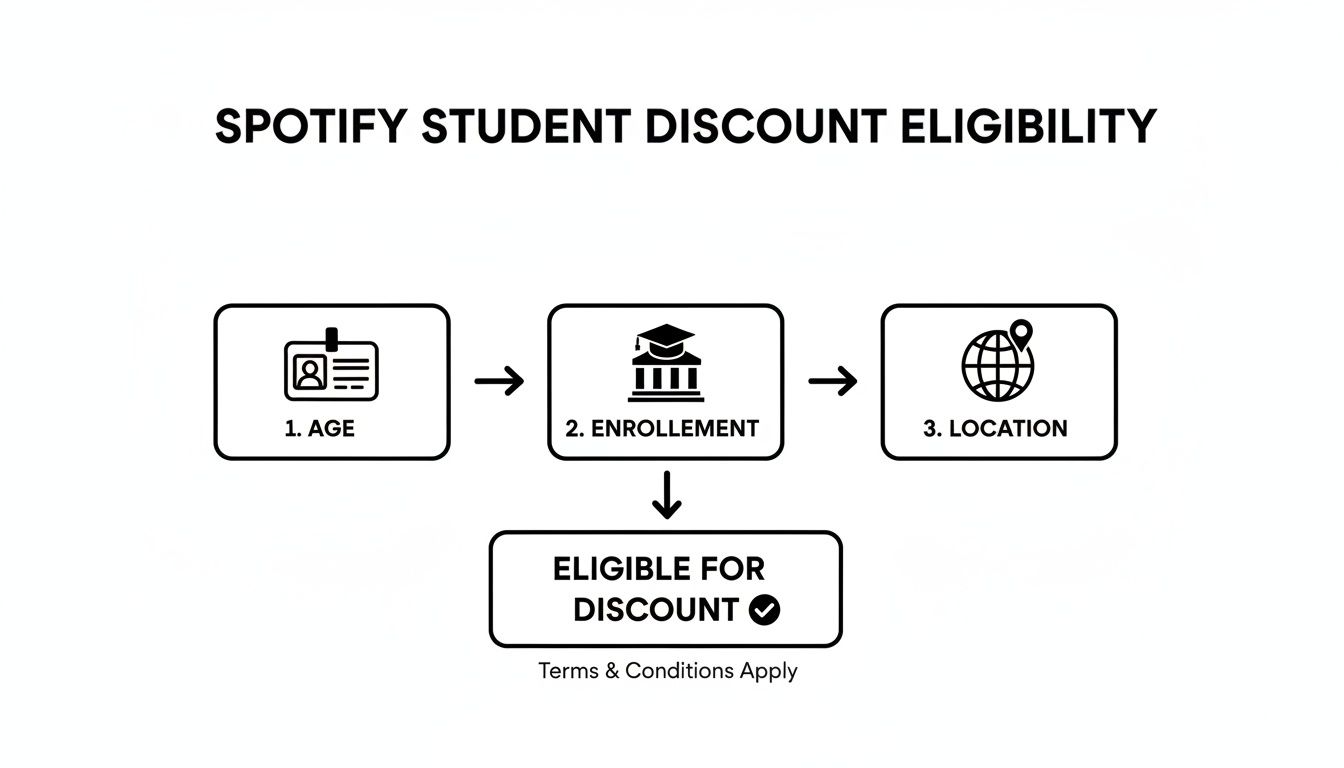
As you can see, ticking the boxes for age, enrollment, and location is the first step to a smooth verification.
Common Issues and How to Fix Them
Even when you have the right paperwork, things can get stuck. From what I’ve seen, rejections almost always come down to a few simple, fixable mistakes. A blurry photo of your document, an expired student ID, or a name on your school records that doesn't match your Spotify account are the usual culprits.
Pro Tip: When you upload your document, lay it on a flat, well-lit surface and take a picture with your phone. Make sure all four corners are in the shot and every word is sharp and easy to read. Avoid using a screenshot—they often get compressed and become unreadable on SheerID’s end.
If you do get rejected, SheerID is pretty good about telling you why. Just fix the issue they point out—like taking a clearer picture or uploading a more recent document—and try again. A little troubleshooting is usually all it takes to get approved.
Keeping Your Discount Active Each Year
Getting that Spotify student discount is a great feeling, but don't forget it's not a "set it and forget it" kind of deal. You'll need to re-verify your student status once every 12 months to keep the savings flowing.
Think of it as a quick annual check-in with Spotify. Thankfully, the process is usually way faster than the first time you signed up.
The Annual Re-Verification Process
Spotify is pretty good about this. They'll send a reminder email to the address on your account a few weeks before your discount is about to expire. This email is your heads-up, so make sure you’re checking your inbox (and your spam folder, just in case).
Once you click the link in that email, you’ll be sent back to SheerID, but the process is streamlined for renewals.
- You’ll be asked to confirm your school and personal details are still correct.
- Most of the time, SheerID can instantly re-verify you using your school's database or by checking your .edu email again. It's often automatic.
- If for some reason it can't verify you instantly, you’ll just need to upload a fresh document, like a new class schedule or an enrollment letter for the current semester.
The whole thing usually takes just a few minutes, and then your discount is locked in for another year without any interruption.
What to Do If You Don't Get an Email If you know your renewal date is coming up and you haven't seen an email, don't just wait for the price to jump back up. Be proactive. Log in to your Spotify account page, and you should find a banner or prompt inviting you to re-verify your student status right there.
Life After Graduation
Here’s the thing to keep in mind: the Spotify student discount can only be renewed for a maximum of four years. Once you graduate or hit that four-year mark, your plan will automatically switch over to a standard Individual Premium subscription at the full monthly price.
But there's a bit of good news. Spotify usually gives you a grace period. Your discount will often last until your next scheduled verification date, even if you graduated a few months earlier.
So, if you graduate in May but your verification isn't due until August, you get to enjoy that sweet discount for the summer. It gives you some breathing room to sort out your budget before the price changes, ensuring the music doesn't stop just because you got your diploma.
What If You Don’t Qualify? Smarter Ways to Save on Spotify
So, what happens if you can't get the student discount? Maybe you're not eligible, or you’ve already tossed your graduation cap in the air. Don't worry, you still don't have to get stuck paying full price for Spotify Premium.
Spotify has several other plans designed for sharing, and they can bring the price per person down to something surprisingly close to the student rate. This is a big part of how they've grown to over 260 million paid subscribers—these premium members are the financial backbone of a platform with a massive 670 million total users. Getting people to upgrade through smart, shareable plans is key to their whole model.
Let's break down a few of the best ways to keep your music budget low without giving up the ad-free experience.

Go Halfsies with Spotify Duo
The Duo plan is tailor-made for two people living at the same address. It’s the perfect middle ground for couples, roommates, or any pair looking to split the cost without the fuss of a big family plan.
The best part? You both get your own separate Premium accounts. No more awkward moments when your friend’s death metal shows up in your Discover Weekly. All your playlists, recommendations, and listening history stay yours and yours alone. Spotify also throws in a cool "Duo Mix," a shared playlist that cleverly blends your tastes.
The Ultimate Money-Saver: The Family Plan
If you want the absolute best bang for your buck, the Family plan is where it's at. This plan lets up to six people who live under the same roof get their own individual Premium accounts. When you split the cost six ways, the per-person price often drops below what you'd pay with the student discount.
Just like Duo, everyone gets their own private account, so there’s no crossing the streams. The Family plan also includes a "Family Mix" playlist and access to Spotify Kids, a separate, kid-friendly app with curated content.
Here’s a common workaround: A group of four college roommates can easily sign up for a Family plan using their shared dorm or apartment address. This lets them skip the individual student verification hassle and locks in a lower price for everyone.
A Modern Fix: Group Purchasing
A clever and increasingly popular route is to use a group purchasing service. Platforms like AccountShare act as a matchmaker, connecting individuals to fill the empty slots in a Family plan. This is a game-changer if you don't have five roommates or family members to share with.
You essentially join a pre-existing group and pay a small fee to get one of the Premium slots. These services manage all the payments and logistics, so it's a completely hands-off way to get the best possible price on Spotify.
And if you're a savings fanatic, there are plenty of other deals out there. Check out our guide to other student discount streaming services to see where else you can cut costs.
Keeping educational costs down is a top priority for any student. Finding affordable laptops for students is a great way to manage your budget, leaving you with more cash for things like, well, music streaming.
Cost-Saving Comparison Spotify Plans
To see how the numbers stack up, here’s a quick breakdown of how sharing a plan can dramatically lower your monthly cost.
| Plan | Total Monthly Cost | Number of Users | Effective Cost Per User |
|---|---|---|---|
| Individual | $10.99 | 1 | $10.99 |
| Student | $5.99 | 1 | $5.99 |
| Duo | $14.99 | 2 | $7.50 |
| Family | $16.99 | 6 | $2.83 |
As you can see, the Family plan offers an incredible value if you can fill all six spots, making it the most cost-effective option by a long shot.
Got Questions About the Spotify Student Discount?
Even when a process seems simple, there are always those little "what if" scenarios. I've been through this process myself and have helped countless others, so I've put together answers to the most common questions that pop up.
What If My School Isn't on the List?
It’s a heart-stopping moment: you type in your school’s name and… nothing. Before you panic, take a breath.
First, double-check your spelling. I mean, really check it—no typos, and try any official abbreviations your school might use. If it's still a no-go, that doesn't mean it's game over.
If you’re positive you attend an accredited institution, SheerID actually lets you request to have your school added. But for a faster solution, jump straight to the manual document upload. As long as you have something official with your name, the school's name, and a recent date on it, a real person can often approve you, even if the automated system can't find your college.
Should SheerID ultimately decide your school isn't eligible, you'll have to pivot. Look into plans like Spotify Duo or the Family plan—splitting the cost with a roommate or a few friends can get you pretty close to the student price.
Can I Get the Discount If I’m Studying Abroad?
Yes, you can! But there’s a critical detail you can't miss. Your eligibility is tied to the country where you're currently studying, not your home country.
Key Takeaway: To get the discount, you need to be enrolled in an accredited school in a country where the offer is available. On top of that, your payment method has to be from that same country. You can't, for example, use your US college enrollment to get the discount while living in Spain if your credit card is still American. The system checks both.
Does the Student Plan Come with Anything Else?
This is a huge perk, especially if you're in the United States. Right now, the US version of the Spotify Premium Student plan comes bundled with a subscription to Hulu's ad-supported tier. Honestly, this is an incredible deal, saving you a good chunk of change every month.
Just remember that these bundles change and are very country-specific. The deal in the UK or Canada might not include anything extra. Your best bet is to always check the official Spotify Premium Student page for your region to see exactly what you’re getting.
How Do I Switch from a Family Plan to the Student Plan?
Switching over is a common move and, thankfully, Spotify makes it painless. You won't lose a single one of your carefully curated playlists.
It’s a simple three-step dance:
- First, leave the old plan. The owner of the Family or Duo plan can remove you, or you can do it yourself in your account settings.
- Wait for your account to revert. Once the current billing cycle ends, your account will temporarily switch to the free, ad-supported version of Spotify.
- Sign up for the student discount. Now that you're on the free plan, just head over to the Spotify Premium Student page and go through the normal SheerID verification.
The best part? All your music, podcasts, and listening history will be right there waiting for you. It's a seamless transition back to Premium.
Ready to slash your subscription costs without the hassle? AccountShare makes it easy to join shared premium plans securely and affordably. Stop overpaying and start saving today at https://accountshare.ai.