

Best Software for Client Management: The 2026 Guide
The best software for client management is the tool that fits your workflow with the least implementation friction, not the platform with the longest feature list. The CRM market reached USD 101.41 billion in 2024 and is projected to reach USD 112.91 billion in 2025, so the primary challenge isn't finding options, it's avoiding an expensive system nobody uses.
That market scale tells you something important. Client management software has moved beyond sales contact storage and now supports sales, service, marketing, operations, billing, and collaboration. Yet a family coordinating shared subscriptions, a student tracking projects, a small business managing leads, and a digital nomad serving international clients need very different systems.
The practical question is simple: what will replace your current spreadsheets, inboxes, calendars, and scattered notes without creating another administrative burden? This guide compares tools by workflow fit, setup effort, and likely value for specific users.
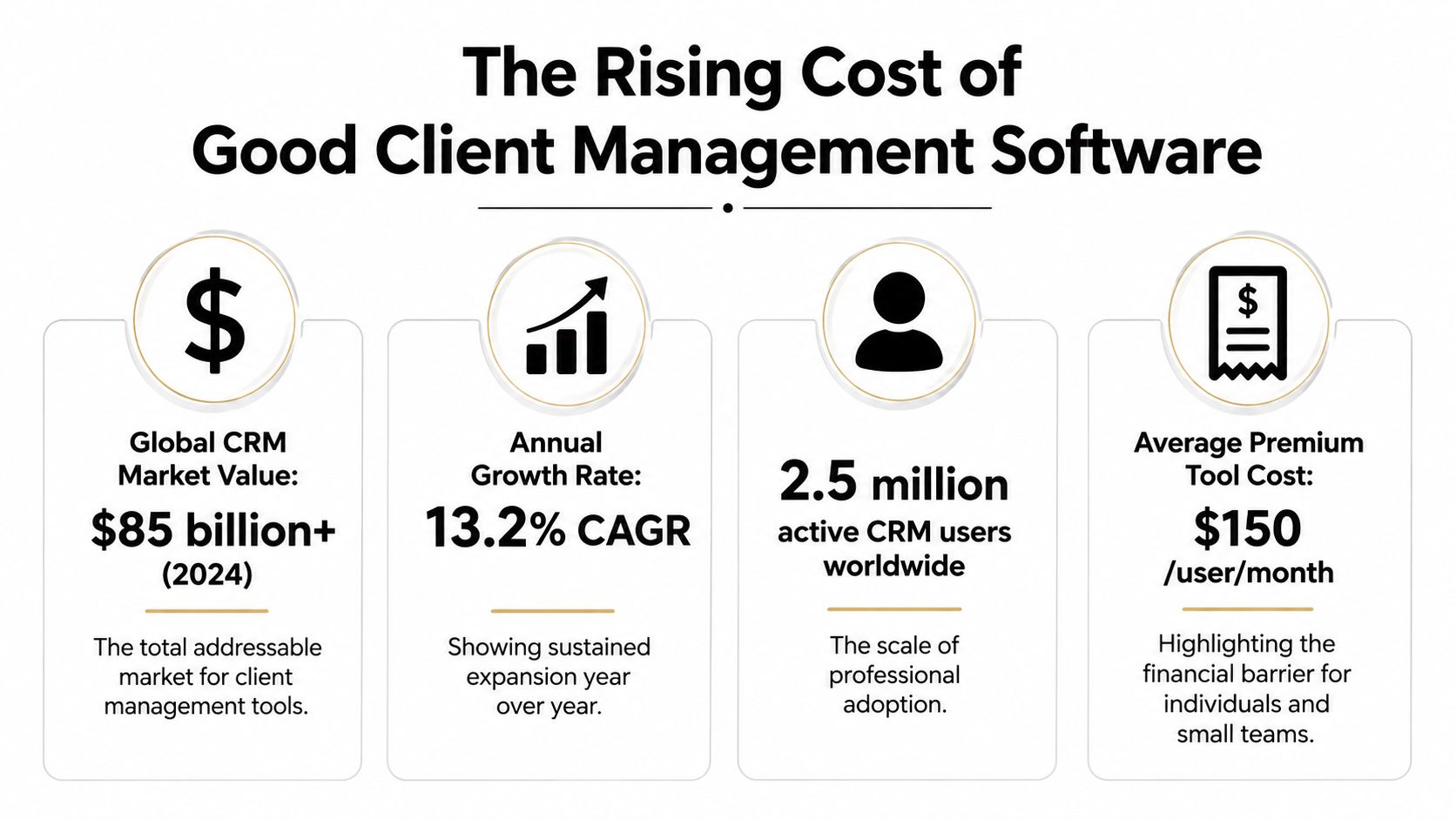
The Rising Cost of Good Client Management Software
Client management software has become a major operational category because businesses now expect one system to preserve client context across the relationship. A useful platform can hold contact history, track pipeline movement, trigger follow-ups, assign tasks, connect email and calendars, and expose reporting that helps managers see what teams do.
The market reflects that expansion. The CRM market overview from Cyntexa values the category at USD 101.41 billion in 2024, with projections of USD 262.74 billion by 2032. Another forecast cited in the same industry coverage places the market at USD 126.17 billion in 2026 and USD 320.99 billion by 2034, with a 12.40% CAGR. These are projections, not guarantees, but they show why buyers face a crowded field of increasingly specialized products.
Subscription price isn't the full cost
A low subscription can still produce a high operating cost if employees must copy information between tools, chase updates manually, or maintain duplicate records. A more capable platform can justify its cost when it removes repetitive handoffs, but only if the workflow is simple enough for people to follow consistently.
That makes cost per active user more useful than the advertised plan price. Ask how many people need full access, who only needs visibility, whether external collaborators require accounts, and whether the platform charges separately for automation, storage, reporting, or communication features. A tool that looks affordable for one person may become less attractive once every occasional contributor needs a paid seat.
Practical rule: Judge software by the recurring behavior it creates, not by the features it promises.
Adoption is part of financial control
Forrester's 2023 analysis found that 70% of surveyed organizations used CRM for customer service, 64% for B2B marketing automation and sales force automation, and 62% for field service, as reported in its CRM adoption and satisfaction analysis. Adoption is high, but adoption alone doesn't prove that a platform is satisfying or efficient.
The strongest buying decision balances three costs:
- Subscription cost: What you pay for seats, usage, modules, and add-ons.
- Implementation cost: The time needed to clean data, configure stages, import records, and train users.
- Friction cost: The daily effort required to keep information accurate and workflows current.
A free tool may be sensible for a family or student who needs shared tasks. It may be a poor choice for a small company if it leaves sales follow-ups, customer conversations, and billing context scattered across separate tools. Conversely, an enterprise platform can be wasteful when a visual board and dependable reminders solve the underlying problem.
Comparing the Leading Platforms for Different Workflows
The leading platforms differ less by whether they have contacts and pipelines than by how they expect you to work. HubSpot organizes around a broad customer record and connected ecosystem. monday CRM gives teams a visual workspace that can bend around different processes. Zoho CRM emphasizes configurable client management with AI assistance, while Freshsales puts built-in phone and email communication closer to the center of daily work.
| Platform | Primary Strength | Best For | Key Differentiator |
|---|---|---|---|
| HubSpot | Unified records and broad integrations | Teams that need one customer context across functions | Scalable platform structure |
| monday CRM | Visual pipelines and no-code automation | Project-heavy teams with changing workflows | Flexible boards and point-and-click process design |
| Zoho CRM | AI-assisted client management | Budget-conscious teams willing to configure a system | Broad customization within the Zoho ecosystem |
| Freshsales | Built-in phone and email tools | Sales teams that communicate heavily inside the CRM | Native communication and AI features |
HubSpot for the single source of truth
Choose HubSpot when marketing, sales, service, and operations need to see the same client history. Its advantage is less about one standout screen and more about the way records and integrations can connect multiple functions.
The trade-off is complexity. HubSpot's modular structure can expand beyond what a small team needs, and buyers must understand which functions they require before committing. It works best when someone owns the system and can keep properties, permissions, and lifecycle stages disciplined.
monday CRM for visual operators
monday CRM is the practical pick for teams that think in boards, stages, owners, and deadlines. A design studio, consultancy, or implementation team can use a visual pipeline for sales and then carry the same client into onboarding or delivery work.
Its no-code automation is useful when the team wants reminders and assignments without building a technical project. Don't choose it because customization sounds impressive. Choose it when people naturally understand a board faster than a conventional CRM record.
For a broader evaluation of the functions buyers should expect, review this guide to B2B CRM software features. Teams comparing lightweight options can also use this CRM software guide for small businesses to keep the decision grounded in everyday operating needs.
Zoho CRM for configurable value
Zoho CRM suits organizations that need more structure than a spreadsheet but don't want a platform built around enterprise administration. Its AI-assisted approach can help with routine client management, while the wider Zoho suite gives teams room to connect adjacent business processes.
The catch is configuration effort. Zoho can become a strong fit when a knowledgeable owner defines fields, stages, permissions, and automations. Without that ownership, flexibility turns into inconsistency.
Freshsales for communication-first teams
Freshsales deserves consideration when phone and email are central to the sales motion. Built-in communication reduces the temptation to maintain a separate call log and email history, which helps representatives keep the client record current while they work.
It's most suitable for teams that measure progress through conversations and follow-ups. If your main challenge is project coordination rather than relationship outreach, monday CRM may be a more natural fit.
Matching the Right Tool to Your Persona
The best software for client management changes with the user's life. A small business owner needs dependable pipeline control and room to grow. A family needs shared visibility without sales terminology. A student needs lightweight task coordination, while a digital nomad needs browser and mobile access that works across locations and time zones.
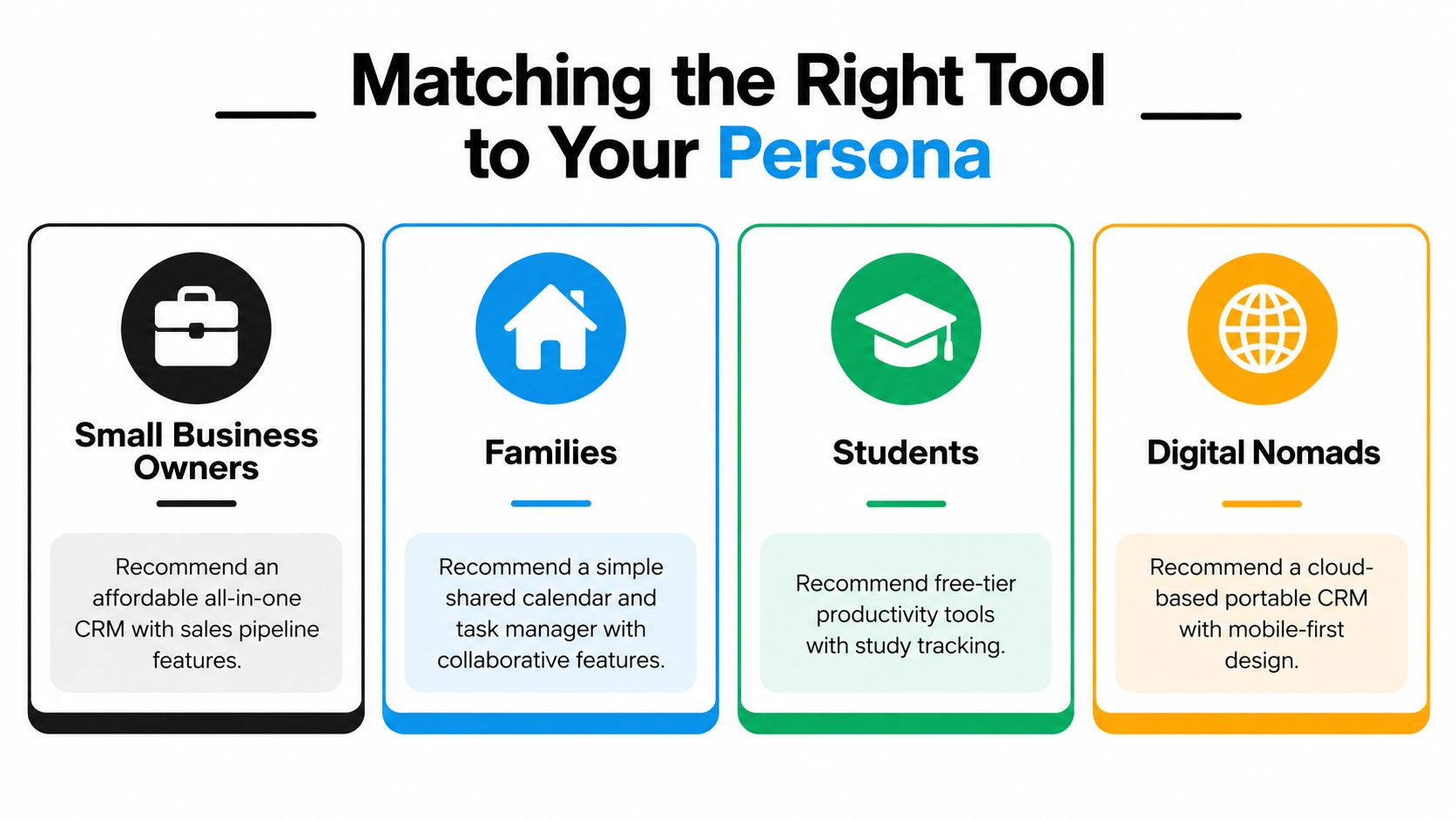
| Persona | Recommended direction | What to prioritize | What to avoid |
|---|---|---|---|
| Small business owner | HubSpot, Zoho CRM, or Freshsales | Pipeline visibility, integrations, permissions, reporting | A platform requiring constant manual customization |
| Family | Shared calendar and task manager | Simple collaboration, reminders, clear ownership | A full CRM with unnecessary sales fields |
| Student | Free-tier productivity tool | Study tracking, deadlines, easy sharing | Paid complexity for a temporary workflow |
| Digital nomad | Cloud-based, mobile-first CRM | Portability, communication history, access controls | A desktop-dependent system with weak mobile support |
Small business owners
Start with the minimum workflow that protects revenue. You need a contact record, a clear next step, an owner, a pipeline stage, and a way to see overdue activity. HubSpot is a strong choice when the business expects marketing and service needs to grow around the same records. Zoho CRM is better when customization and broader suite integration matter more than immediate simplicity.
Freshsales fits a sales-led company that lives in calls and email. monday CRM works when client delivery and project management sit close to the sales process.
Families
Families shouldn't buy a conventional CRM unless they manage a shared service or side business. A shared calendar paired with a task manager usually creates less friction for household schedules, subscriptions, travel planning, and recurring responsibilities.
The test is whether every person can understand the system without training. If adding a task requires explaining stages, fields, and automations, the tool is too elaborate for the job.
Students
Students need a system that makes deadlines visible and collaboration painless. A free-tier productivity platform can handle assignments, study sessions, group projects, and application tracking without forcing a long implementation cycle.
Use one workspace for active commitments, establish a simple status system, and archive completed work. A student's main risk isn't missing an advanced CRM feature. It's abandoning a complicated tool halfway through the term. This feature comparison matrix can help compare tools without treating every available function as necessary.
Digital nomads
Digital nomads should prioritize cloud access, mobile usability, shared records, and permission control. A portable CRM matters when client conversations happen from different devices and work continues across changing locations.
Freshsales can suit communication-heavy independent consultants. HubSpot fits nomads who need marketing, sales, and service context in one place. Zoho CRM is attractive for those willing to configure a more customized workspace.
The Hidden Friction of Migrating from Spreadsheets
Many teams don't remain on spreadsheets because spreadsheets are ideal. They remain because the existing process is familiar, visible, and already populated with data. A new CRM must overcome that familiarity without making users enter the same information twice.
Recent buyer data in Capterra's CRM software buyer insight shows that 46% of CRM buyers still rely on non-specialized tools, while 14% use spreadsheets and email. The same source identifies inefficiency as a pain point for 36% of buyers and limited functionality for 33%. Those figures point to a specific problem: teams know their current workflow is imperfect, but switching systems can feel riskier than tolerating it.
Migration creates three failure points
First, data quality causes trouble. Spreadsheets often contain inconsistent company names, duplicate contacts, incomplete fields, and notes that only make sense to the person who wrote them. Importing everything without cleaning it transfers confusion into a more expensive interface.
Second, process translation takes judgment. A spreadsheet column called “status” might combine lead qualification, contract progress, and delivery risk. A CRM usually needs those concepts separated so automations and reports behave correctly.
Third, behavior changes determine whether the project succeeds. If employees continue recording updates in email and only enter information into the CRM before meetings, the company pays for two systems and trusts neither.
The best migration preserves useful habits while removing fragile ones.
Choose for workflow compression
Before selecting a platform, document one real client journey from first contact to completed work. Mark where a person currently copies data, waits for an answer, searches for context, or manually reminds someone to act.
Then ask four questions:
- What must be centralized? Usually contacts, recent communication, ownership, next actions, and files.
- What can be removed? Duplicate fields, unused stages, and reports nobody reviews.
- What should trigger an action? A stage change, unanswered message, new inquiry, or completed contract.
- Who owns accuracy? Every record needs a clear maintainer, even if several people can edit it.
A smaller system with reliable adoption beats a feature-rich platform that creates extra administration. Run a pilot with representative records, not a pristine demo dataset. If users can't complete common tasks quickly during the pilot, don't assume training will solve a structural mismatch.
Accessing Premium Tools Through AccountShare
Premium client management software is difficult to justify when advanced features are needed only occasionally. A student may need an AI function for one project, a digital nomad may need a professional workspace between contracts, and a family may want several digital services without buying every subscription separately. The practical question is cost per user and implementation friction, not the length of the feature list.
AccountShare uses group purchasing and shared account management to provide access to digital subscriptions, including software applications and AI tools, through centralized management and configurable permissions. That model changes the buying decision from “does every person need a full individual subscription?” to “which access arrangement matches the way this group uses the service?”
Where shared access makes sense
Shared access works best when users have separate responsibilities and do not need simultaneous, unrestricted control of one workspace. It can suit budget-conscious users who want to test a premium service before choosing a direct plan, provided the subscription terms and access requirements allow that arrangement.
The risk is data exposure. A client CRM can contain private conversations, contact details, contracts, and internal notes. Do not put confidential business records in a shared workspace to reduce subscription costs. Use individual accounts or a properly administered business plan when several clients' records require formal access logs, clear ownership, or controlled permissions.
Compare price against actual usage
Compare the cost with the functions users will use, not the platform's maximum feature set. A shared arrangement may suit personal projects and low-risk workflows when it reduces unused capacity while retaining the required tools. Login confusion, permission conflicts, or unclear ownership erase that saving through operational friction.
Set an access policy before joining:
- Define ownership: Decide who controls billing, recovery, and account changes.
- Limit exposure: Keep client-confidential information in individually controlled workspaces.
- Check continuity: Confirm how access is handled if a participant leaves.
- Review permissions: Give each user only the access required for the intended task.
AccountShare belongs in a comparison with free tiers, direct subscriptions, and simpler alternatives. Choose shared access for personal coordination and occasional use. Choose a governed system of record when client work demands individual accountability, privacy controls, and dependable continuity. Review the AccountShare site for available options, then compare them with the cost and administration of separate accounts.
Setting Up Your New Client Management System
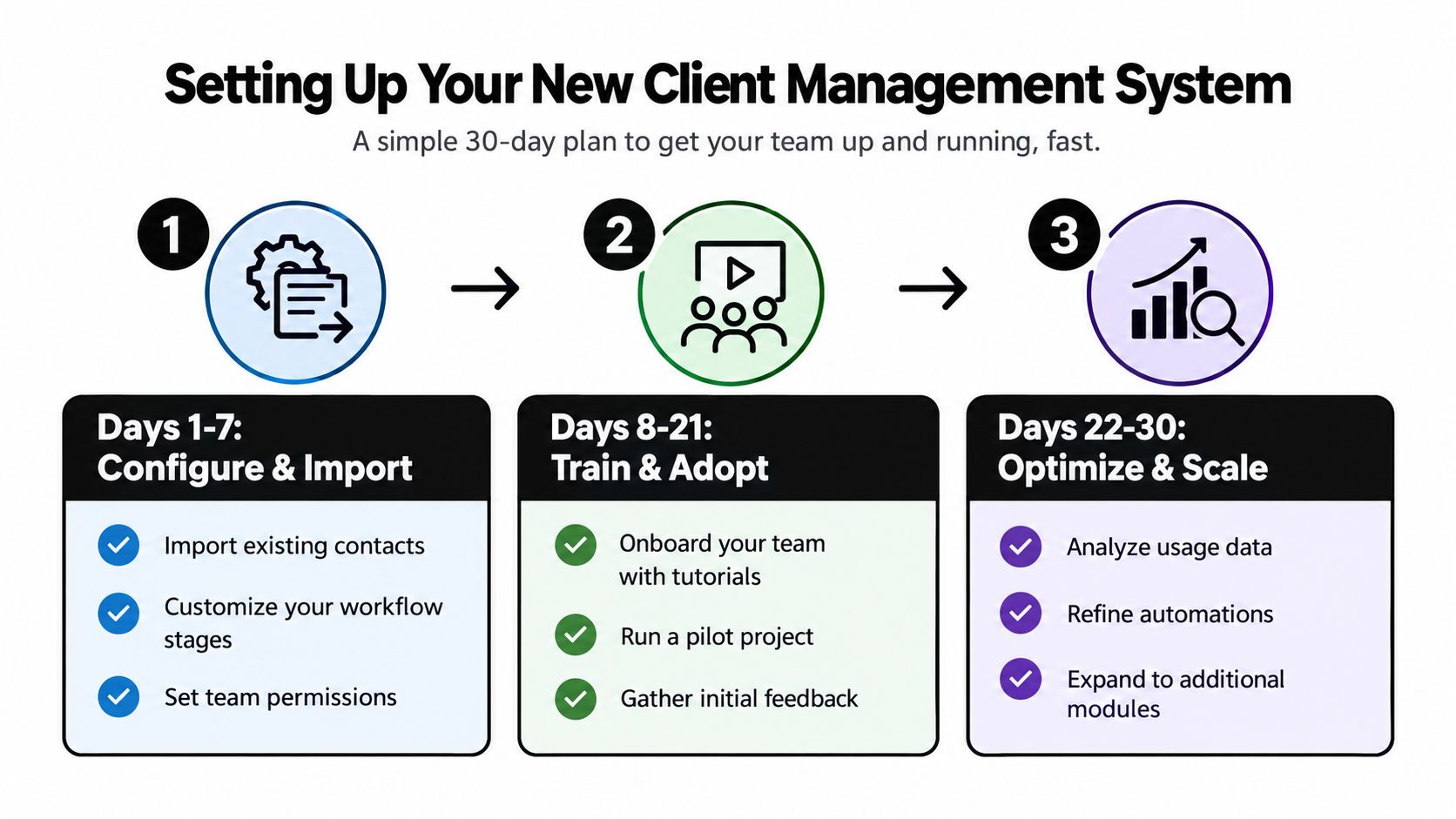
Implementation should begin with one dependable workflow, not a grand redesign. Configure the path a real client follows, import only useful records, and create a visible quick win that shows users why the system deserves their attention.
Days 1 to 7
Define your stages before importing data. A small services team might use inquiry, qualified, proposal, active, waiting, and complete. Keep stages tied to decisions or actions, not vague descriptions.
Clean contacts, remove duplicates, standardize company names, and import a focused set of active records first. Create permissions based on responsibilities, then connect only the calendar, email, billing, or project tools that support the initial workflow.
For client intake, an organized B2B client onboarding form guide can help you collect consistent information before records enter the system.
Days 8 to 21
Train users around tasks they already perform. Show how to add a contact, record an interaction, assign ownership, schedule the next action, and find the latest context. Don't deliver a tour of every menu.
Run a pilot with real work. Ask users where the system slows them down, which fields they skip, and which notifications they ignore. Fix the workflow rather than blaming users for avoiding it.
Days 22 to 30
Review record completeness, overdue tasks, duplicate contacts, and automation outcomes. Remove fields that nobody maintains and adjust alerts that create noise.
Then expand carefully. Add a second workflow only after the first one works consistently. A successful launch is not the moment every feature is enabled. It's the point at which the team stops returning to spreadsheets and email for the same core tasks.
Navigating the Future of AI in Client Management
AI in client management is moving beyond drafting summaries and suggesting replies. Trend coverage from Bigin's CRM outlook describes a shift toward agentic AI, connected customer data, privacy-first handling, multi-agent orchestration, and outcome-based pricing.
That shift changes the buying question. Don't ask only whether a platform has an AI assistant. Ask what the assistant can read, what it can change, which messages it can send, when a human must approve an action, and how the vendor records those decisions.
Agentic automation can create useful workflow automation, but autonomy raises governance requirements. A system that updates records, routes clients, or triggers outreach needs clear identity resolution, permission boundaries, auditability, and a way to reverse mistakes.
Cost control also deserves attention. Seat-based pricing is familiar. Usage or outcome-based pricing can become less predictable when agents perform more actions, especially if several automated processes operate across connected systems.
Choose AI for a defined operational job, such as summarizing conversations or creating follow-up tasks. Keep sensitive record changes and external communications behind approval rules until the system has earned trust through consistent results.
AccountShare offers group purchasing and centralized shared-account management for digital subscriptions, including software and AI tools, which can help budget-conscious students, families, and independent professionals evaluate premium access without immediately paying for separate plans. Visit AccountShare to review available options and choose an access model that fits your client-management workflow.