

A Guide to Amazon Music Share for Family and Friends
Absolutely, you can share Amazon Music, and the best official way to do it is with the Amazon Music Family Plan. This plan is a game-changer, giving up to six people their own separate accounts under one subscription. It’s not just about splitting the bill; it's about giving everyone their own personal music world.
Why Sharing Amazon Music Is Smarter Than You Think
Working out how to share an Amazon Music account is more than just a savvy financial move—it’s a practical solution for any modern household, group of friends, or family. It neatly consolidates several subscriptions into one simple payment, so you can stop juggling a bunch of different renewal dates and login details. That kind of convenience is a huge, often underrated, benefit.

But it's not all about saving money. Sharing genuinely improves the listening experience for everyone.
Think about these real-life situations:
- For Families: A family of five can set up individual profiles for everyone. No more dad's 80s rock messing up a teenager's hip-hop recommendations, or vice-versa. Everyone gets their own space.
- For Roommates: Instead of multiple expensive accounts, housemates can chip in for one premium plan. Perfect for ad-free study sessions or background music during a weekend hangout.
- For Friends: A tight-knit group can split the cost to unlock high-definition audio and exclusive content, making those top-tier features way more affordable.
Suddenly, a personal subscription becomes a shared hub for entertainment.
The Value in a Shared Subscription
The real magic here is unlocking premium features for a whole group at a fraction of what it would cost individually. With the Family Plan, each person gets their own library, playlists, and listening history. This separation is the key to keeping the peace.
The real win isn't just saving money—it's giving everyone the freedom of their own premium account under one simple plan. No more arguments over who messed up the "Chill Vibes" playlist.
Let’s not forget that Amazon Music is a major player, holding a 13% market share in the music streaming world. For Unlimited subscribers, that means access to a library of over 90 million songs. With over 100 million downloads on the Google Play Store alone, it’s clear that tons of people use it as their daily soundtrack. If you want to dig deeper into the numbers, you can check out these Amazon Music statistics on Toneisland.com.
Ultimately, when you get the benefits of https://accountshare.ai/blogs/new/shared-subscriptions, you can make a much smarter choice. Taking a few minutes to set up a shared plan pays for itself almost immediately in cost savings and pure convenience for everyone involved.
Your Official Options for Sharing Amazon Music
Amazon gets it—music is better when you share it. That's why they’ve built a couple of official ways to loop others into your subscription. Going through Amazon directly is always the safest and simplest route.
The two main paths are the Amazon Music Family Plan and Amazon Household. Each one is designed for a slightly different situation, so figuring out which is best for you really comes down to who you're sharing with and whether you want to share more than just music.
The Dedicated Amazon Music Family Plan
If your main goal is simply sharing tunes, the Amazon Music Family Plan is your best bet. It’s built from the ground up for this exact purpose. For one monthly price, you can give up to six different people their own full-blown Amazon Music Unlimited experience.
This isn't just a shared login; it's a completely separate and personalized space for everyone.
- Individual Accounts: Everyone gets their own profile. This is huge. It means their listening history, curated playlists, and personal recommendations stay theirs. Your meticulously crafted workout mix won't get invaded by your nephew's sea shanty phase.
- Listen Anytime: All six members can stream music simultaneously on their own devices. No more getting booted from your session because someone else hit play.
- The Full Experience: Everyone gets the complete, ad-free catalog, unlimited skips, and the ability to download songs for offline listening.
This plan is perfect for families, of course, but it's also great for a tight-knit group of friends who want to split the cost without the headache of a shared password. It's designed for music lovers who need their own space.
Using Amazon Household for Music Sharing
Now, Amazon Household is a different animal. Think of it less as a music-sharing feature and more as a way to link your entire Amazon life with another person. Music is just one of the many perks you can share.
An Amazon Household is structured specifically for:
- Two adults, each with their own Amazon account.
- Up to four children, whose profiles are managed by the adults.
When two adults form a Household, they can share a ton of Prime benefits, which includes access to the Amazon Music Prime library. If one of those adults has a full Amazon Music Unlimited subscription, that benefit extends to the other members of the Household.
Amazon Household really shines for couples or small families who are already all-in on the Amazon ecosystem—sharing Prime Video, Kindle books, and even payment methods. The music sharing is a fantastic bonus, but it's part of a much bigger package.
The main limitation here is the "two adult" rule. It’s far less flexible than the six-person Family Plan if you have a larger group. So, while it's a no-brainer for a couple looking to merge their Amazon perks, it’s not the solution for a bigger crew that just wants to share music.
Comparing Official Amazon Music Sharing Methods
Choosing between the Family Plan and Household can be tricky, as they serve different needs. The Family Plan is a specialized tool for music, while Household is a broad, all-encompassing sharing program for the entire Amazon ecosystem.
This table breaks down the key differences to help you decide which one fits your situation.
| Feature | Amazon Music Family Plan | Amazon Household Sharing |
|---|---|---|
| Max Users | 6 individuals | 2 adults, 4 child profiles |
| Primary Focus | Music streaming only | Entire Amazon ecosystem |
| Account Type | Separate, personalized profiles | Linked Amazon accounts |
| Best For | Families or groups of up to 6 | Couples or nuclear families |
Ultimately, if you just want to share your tunes with a group of people, the Family Plan is the clear winner. But if you and your partner want to combine all your Amazon benefits into one, Household is the way to go.
Getting Your Amazon Music Family Plan Up and Running
Switching to an Amazon Music Family Plan is one of the best moves you can make to get more value out of your subscription. It’s a pretty straightforward process, but knowing the exact steps—and a few common pitfalls to avoid—can make it go off without a hitch. Let's walk through how to get your account upgraded and your family members on board.
First, the primary account holder needs to get the Family Plan. You can either sign up fresh or, if you already have an individual plan, just upgrade it. Head over to your Amazon Music Settings, either on the website or in the app, find where you manage your subscription, and make the switch to the Family Plan.
Once you’ve done that, you're officially the plan manager. This just means you’re handling the monthly payment and you're the one who can invite or remove people. Amazon lets you add up to five other members, bringing the grand total to six people on a single plan.
How to Invite Your Family and Friends
With your new plan active, it's time to bring everyone into the fold. Amazon gives you a couple of easy ways to do this: you can either generate a unique invitation link to send out yourself or have Amazon email an invite directly to the person you want to add. You'll find this option in your Amazon Music settings under "Manage Family Members."
You'll need the email address each person uses for their own Amazon account. A common point of confusion is whether they need Prime—they don't. A standard, free Amazon account is all that's required to join your music plan.
Here’s what the invitation process looks like from their side:
- The Invitation: They'll get an email from Amazon with a clear, clickable link to accept your invite.
- Time Limit: These links don't last forever. Invitations usually expire in seven days, so it’s a good idea to give them a heads-up to accept it soon.
- Confirmation: After clicking the link, they’ll just need to confirm a few details, and boom—they're officially part of your Family Plan.
This flow chart gives a great visual of how sharing works, whether you're using the dedicated Family Plan or the broader Amazon Household feature.
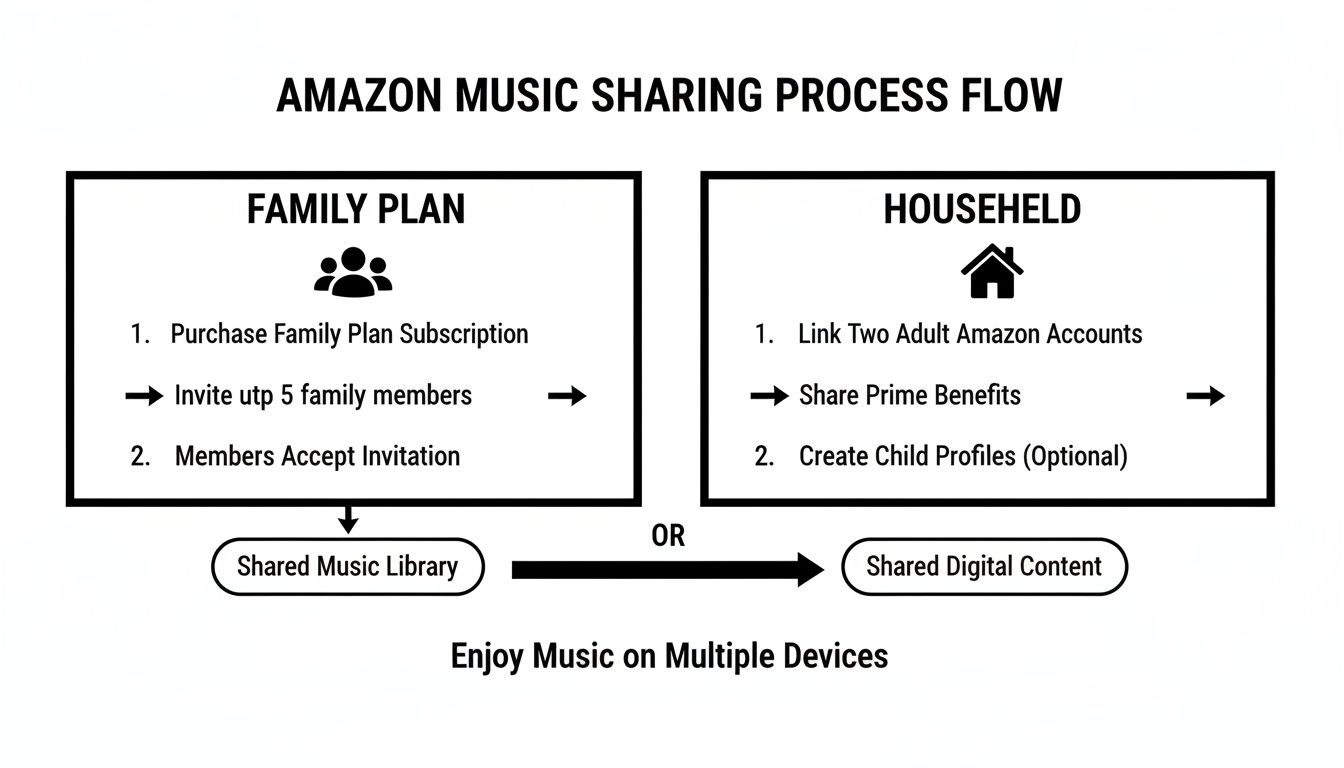
As you can see, the Family Plan is a direct invitation system just for music, which makes it the most flexible option if you're sharing with friends or a larger group.
Side-Stepping Common Setup Problems
Even with a simple process, things can sometimes go sideways. From my experience, the most frequent issue is a country mismatch. Every single person on the plan has to have their Amazon account registered in the same country. If someone gets an error message, the very first thing to check is that their account's marketplace (like Amazon.com vs. Amazon.co.uk) is the same as yours.
Another hurdle can be adding kids under 13. They can't have their own Amazon accounts, but you can still get them listening. The plan manager just needs to create a child profile through the settings, which lets them use Amazon Music on approved devices, like an Echo Dot in their room.
My biggest tip? Just talk to your people. A quick text letting them know an invite is coming and to double-check their account details can save you a world of headache trying to troubleshoot later.
It's also worth remembering that music is often just one piece of the Amazon puzzle. If your family is already deep in the ecosystem, our guide on how to share Amazon Prime benefits can be a huge help in getting all your shared services streamlined.
And if all else fails and an invitation link just isn't working? Try sending it again. Links can glitch or expire. A fresh one from your account settings page almost always does the trick and gets everyone listening without any more fuss.
Sharing Securely When a Family Plan Isn't the Right Fit
The Amazon Music Family Plan is a fantastic deal for, well, a family. But what if your "family" is more like your college roommates, a close group of friends, or the people you share a house with? In those situations, the official plan's structure can feel a little too rigid.
That’s where a more modern approach to an amazon music share comes in. Instead of just texting your Amazon password—a massive security mistake—you can lean on platforms built specifically for this. Services like AccountShare create a secure, organized space for sharing subscriptions with people you trust, even if they aren't immediate family.

Think of these platforms as a trusted go-between. The account owner can invite members, see who has access, and even handle payments, all in one spot. Most importantly, they use secure methods for sharing credentials, so you never have to send your actual Amazon password over an insecure channel like a text message or email.
The Perks of Using a Sharing Platform
Using a dedicated service isn't just about making things easier; it’s a much smarter and safer way to manage a shared account. The benefits directly solve the biggest headaches of trying to do this on your own.
- Better Security: Your main Amazon password, which is probably linked to your credit cards and a ton of personal info, is never exposed.
- Easier Payments: No more chasing down friends for their share of the bill. The platform can automate collections, which saves you from those awkward conversations.
- Clear Oversight: As the account owner, you get a simple dashboard to see who's in your group. Adding or removing members is straightforward.
At its core, the idea is simple but powerful: you get all the financial benefits of sharing without putting your personal account security on the line. It's the responsible way to split subscription costs with your trusted circle.
This kind of purpose-built interface takes the guesswork out of sharing and gives you a structured way to handle the logistics of an amazon music share.
Why This Is Becoming a Bigger Deal
The need for these kinds of flexible sharing options is growing right alongside the music streaming industry itself. The global music streaming market is expected to reach an incredible $24.7 billion by 2027, showing just how essential these services are in our lives. As more people sign up, the demand for smart, budget-friendly ways to share access is only going to get stronger. You can read more about these music streaming trends on musicalpursuits.com.
Choosing a secure sharing platform is simply acknowledging this reality. It lets you safely and legally split the cost of a premium service, making high-quality, ad-free music more affordable for everyone involved. For the person managing the account, it turns a potentially messy favor into a clean, automated process. Everyone gets to enjoy their favorite tunes without any of the usual drama.
Best Practices for Smart and Safe Account Sharing
The secret to sharing any subscription successfully, whether it's Amazon Music or your favorite streaming service, really comes down to two things: trust and clear communication. It doesn't matter if you're setting up an official Family Plan or using a platform to manage your amazon music share; getting on the same page from day one is the best way to avoid future headaches.
Think of it like being a good roommate. Before anyone even gets an invite, take a few minutes to set some ground rules. Figure out who's handling the monthly payment and how everyone will chip in. It's also smart to decide what the plan is if someone decides to leave the group. A quick, friendly chat upfront saves a world of awkwardness down the road.
Secure Your Logins
This is the big one: never, ever share your main Amazon password in a text message, email, or chat. Seriously. Your Amazon account is the gateway to your payment info, purchase history, and a ton of personal data. Handing over that password puts a lot more than just your carefully curated playlists at risk.
Instead, you have a couple of much safer ways to give people access.
- Official Plans: The Amazon Music Family Plan is easily the most secure official method. It’s designed so that everyone gets their own unique login, which means you never have to share your password in the first place.
- Third-Party Platforms: Services like AccountShare are built specifically for this. They act like a secure vault for the login details, so you're not just sending sensitive info out into the digital ether.
If you remember one thing, make it this: protect the master password at all costs. Using a system designed for secure sharing isn't just a good idea—it's essential.
If you’re the one managing the account, getting a handle on password security is crucial. We've put together a full guide on a secure way to share passwords that breaks down why old habits just don't cut it anymore.
Understand the Terms of Service
It’s always a good idea to know what you’re agreeing to, so take a look at Amazon's Terms of Service (TOS). Their official Family Plan is intended for sharing within a single household. While it's not something they typically police with an iron fist, bending the rules too far could theoretically jeopardize your account.
This is where a dedicated cost-splitting platform can help. It ensures the primary account holder always stays in control and has full oversight, which adds a layer of responsibility. By setting clear rules, protecting your password, and being aware of the guidelines, you can create a seamless and secure amazon music share experience for your whole group.
Common Questions About Sharing Amazon Music
So, you've decided to share your Amazon Music account. That's great! But even with the best intentions, a few questions almost always pop up once you get started. It's one thing to read the instructions, but it’s another to deal with the real-world quirks of sharing.
Think of this as your quick-and-dirty FAQ for the common hurdles. We’ll cover everything from clashing music tastes to the nitty-gritty of how many people can listen at once. Let's clear these up so you can get back to the good part: the music.
Can We All Listen at the Same Time?
Yes, you absolutely can, and this is the main reason to get the Amazon Music Family Plan. Up to six different members can stream their own music on their own devices simultaneously.
This means you don't have to worry about kicking someone else off the account. One person can be on their morning run listening with earbuds, another can be playing tunes through an Echo in the kitchen, and someone else can be deep in a focus playlist at their desk—all at the same time, all under one plan. It’s a huge step up from trying to juggle a single individual account.
What if Our Music Tastes Are Worlds Apart?
That’s perfectly fine. In fact, the Family Plan is built for this exact scenario. Each person on the plan gets their own unique profile, keeping everyone’s listening experience completely separate and personalized.
Your recommendations, playlists, and listening history are tied directly to your profile. Here’s how that plays out:
- Your Own Recommendations: The algorithm learns what you like, so your suggestions won't be skewed by your teenager's obsession with hyperpop.
- Separate Music Libraries: Everyone saves their favorite songs and artists to their own library, so your carefully curated collection doesn't get cluttered.
- Private Playlists: Build all the workout mixes or rainy-day playlists you want. They stay yours unless you specifically choose to share them with the group.
The whole system is designed to keep each member’s musical world walled off. It’s the key to making sure one person’s death metal phase doesn’t derail someone else’s classical piano vibe.
This separation is what makes sharing Amazon Music genuinely work for a family or group of friends with completely different tastes.
Can I Share What I'm Listening To on Social Media?
Definitely. Amazon Music has been beefing up its social features. One of the newer additions is a "Share to TikTok" function, which lets you post songs, albums, or even your own listening stats right into a video or story.
This works alongside similar sharing options for other social platforms. It’s a fun way to show your friends what you're into and spark a conversation about new artists, taking the sharing experience beyond just your family plan.
Ready to make sharing simple and secure? AccountShare provides a platform to manage your shared subscriptions effortlessly, ensuring everyone pays their part without you ever having to share a password. Learn more about organizing your group on AccountShare.