

AI Tools for Customer Service: A Practical Buyer's Guide
A support queue rarely exposes an AI problem at launch. It exposes one a few months later, when customers ask questions that cross billing, identity, product policy, and account permissions. The chatbot answers one part, the ticketing system stores another, and the agent inherits the confusion.
The best AI tools for customer service aren't the ones with the most impressive demo. They're the ones your support team can connect to real systems, monitor after deployment, correct without waiting for a vendor, and safely operate when several people share access to the same account or inbox.
The Monday Morning That Reveals the Deployment-Integration Gap
At 9:05 on Monday, the queue is growing fast. A chatbot greets a customer with a billing dispute, asks for an order number the customer does not have, then transfers the conversation without its context. The agent opens the ticket, checks the CRM, and searches the knowledge base for the policy that should have appeared in the AI summary.
The customer repeats the problem. The agent provides a careful answer, but the interaction has already taken longer than a direct human response. Later, a dashboard may record the handoff as automated containment or successful deflection, depending on how the vendor defines its metric.
That gap separates deploying AI from integrating AI. A widget can go live quickly. A service system earns its place when it shares customer context, transactional data, permissions, knowledge, escalation rules, and accountability with the people handling exceptions. It must also work when several agents share an account or inbox, without blurring who viewed data, changed a record, or approved an action.
Practical rule: Judge the tool by what happens after a failed automation, not by how smoothly it handles the happy path.
A mature deployment retrieves the right account information, identifies changes the AI cannot safely make, preserves the conversation, and routes the case to an agent with authority to act. It gives that agent the relevant policy paragraph instead of a vague summary. Supervisors need a usable record of what the AI said, which data it used, what permissions applied, and why the handoff occurred.
The buyer's test starts after launch. Ask whether the support team can operate the system when a case requires identity verification, a billing adjustment, a permission change, or a decision that must remain with a human. If the answer depends on manual reconstruction across several systems, the organization has deployed AI without integrating it.
What AI Customer Service Tools Actually Do
AI customer service tools sit between customer conversations and the systems your team already uses. They interpret language, retrieve relevant information, suggest actions, and sometimes complete those actions. The practical difference between products comes from the quality of their data access, controls, and workflow integration, not from the presence of an AI label.
Older support automation relied heavily on decision trees, keyword rules, and DTMF phone menus. Modern platforms may combine language models, retrieval from a knowledge base, intent classification, workflow automation, and real-time analytics. That doesn't make every answer reliable. If the system retrieves outdated content or lacks permission to access the relevant record, a more fluent model can produce a more convincing mistake.
A buyer should compare four capability groups.
Conversational bots
These handle customer-facing chat, messaging, or web self-service. Evaluate whether the bot can identify the customer, retrieve the correct account or order data, complete a supported action, and transfer the full context when it cannot continue.
Intelligent IVR and voice
These systems replace rigid menu trees with natural-language routing and, in some cases, voice-based answers. Test accents, interruptions, background noise, ambiguous requests, and the handoff to a human queue. A polished voice demo says little about routing accuracy in production.
Agent assist and copilots
An agent copilot can summarize a conversation, draft a reply, recommend a next step, or retrieve a policy. The important test is grounding. A useful copilot surfaces the exact source and lets the agent verify it. A weak one generates a plausible paragraph that still forces the agent to search manually.
Analytics and quality
Analytics tools classify intent, identify sentiment, summarize interactions, and support quality review. Buyers should ask whether the platform exposes the underlying conversation and taxonomy, or merely presents attractive charts. The system should help managers find repeat contacts, failed handoffs, knowledge gaps, and risky answers.
Tools such as Exerta's approach to automation are useful references when comparing how automation fits into broader support workflows. Don't compare feature labels alone. Ask what happens inside the ticketing system, CRM, telephony platform, and knowledge base after the AI makes a prediction.
Core Capabilities Worth Bookmarking
The four capability groups overlap, but they fail in different ways. Evaluate each one with a real support scenario, not a vendor script.
| Capability | What Good Looks Like | Typical Failure Mode |
|---|---|---|
| Conversational bots | Identifies the customer, retrieves the order, explains the return policy, and completes or routes the request with context intact | Loops when an order ID is missing, gives a generic policy, or transfers without the conversation history |
| Intelligent IVR and voice | Understands a natural request, verifies the caller when appropriate, and routes to the correct queue on the first useful attempt | Mishears intent, traps the caller in menus, or sends a billing issue to a general queue |
| Agent assist and copilots | Surfaces the applicable policy paragraph, cites the knowledge source, and drafts a response the agent can verify | Produces a broad summary, cites stale content, or recommends an action the agent can't perform |
| Analytics and quality | Connects intent, sentiment, repeat contact, resolution, and agent behavior to an operational decision | Counts conversations and automated closures without showing whether customers received a lasting answer |
Bots need an action path
A return bot should do more than explain the return policy. It should collect the relevant order information, determine whether the item qualifies, create the return request when authorized, and tell the customer what happens next. If your system can't expose that workflow, the bot should say so and transfer cleanly.
The most common failure isn't poor grammar. It's an incomplete connection to the back end. A bot may understand “I want to send this back,” but still fail because it can't locate the purchase, validate the deadline, or write to the returns system.
Voice tools need routing discipline
Natural-language IVR can reduce the frustration of menu navigation, but only when intent categories map to real queues. Test requests that contain two issues, such as a login problem combined with a payment dispute. Then test a caller who changes their mind halfway through the explanation.
The buyer question is simple: can the system get the customer to the right person with enough context to avoid repetition? If not, conversational voice is only a more expensive front door.
Copilots need evidence
An agent assistant should show the source behind a recommendation. For a refund question, it should retrieve the applicable eligibility rule and any exception, then allow the agent to confirm the answer before sending it. This supports consistency without turning the agent into a passive approver.
Don't accept “AI-generated summary” as proof of usefulness. Ask agents to resolve a difficult policy question using the tool and observe whether they trust the result enough to act.
Analytics must change a decision
A sentiment label has value when it helps a supervisor identify a broken process, an escalation risk, or a knowledge article that creates confusion. Intent tagging matters when managers can connect it to resolution, repeat contact, routing, and product feedback.
Dashboards that only count tickets or automated closures create activity reports. The better systems help answer operational questions: which intents produce repeat contact, where do handoffs fail, and which policies cause agents to override the AI?
Why Adoption Is Surging but Integration Still Lags
AI adoption is moving faster than operational maturity. The global AI customer service market was valued at $12.06 billion in 2024 and is projected to reach $47.82 billion by 2030, with a projected compound annual growth rate of 25.8%. North America represented 37.2% of global revenue share in the cited market view, which reflects how quickly contact-center AI became a budgeted enterprise category rather than a small experiment. The market overview from Azumo provides that historical context.
Contact-center adoption figures tell a more complicated story. A 2026 industry roundup reports that 9 in 10 contact centers use AI in some capacity, while only 25% have fully integrated it into daily operations. The same roundup cites a Salesforce 2026 survey in which 66% of service organizations reported using AI agents, and 70% of those users said they saw measurable value within 60 days. Those figures appear in the 2026 AI customer service statistics roundup from Ringly.
The buyer mistake is treating deployment as proof of integration. A tool can be connected to a channel while remaining disconnected from the workflow that determines whether the customer receives help.
| Capability | At Deployment | After 12 Months |
|---|---|---|
| Knowledge | Imports a selection of articles | Owners maintain freshness, exclusions, versioning, and approval rules |
| CRM and ticketing | Reads selected customer fields | Uses controlled read-write actions and preserves an auditable history |
| Agent workflow | Displays summaries or drafts | Supports intervention, correction, and clear ownership during handoff |
| Analytics | Reports usage and automated interactions | Tracks resolution, repeat contact, escalation quality, and long-tail failures |
| Governance | Relies on launch testing | Runs ongoing QA, taxonomy reviews, access reviews, and incident handling |
Three bottlenecks appear repeatedly. First, shallow API connections let an AI read a record but not update it, or retrieve a customer profile without exposing the transaction needed to resolve the issue. Second, agents receive suggestions without the training or controls to know when those suggestions require verification. Third, managers get dashboards about usage instead of evidence about outcomes.
The useful question isn't “Are we using AI?” Ask, “How closely is AI connected to the service operation, and who is accountable when it fails?”
Resolution Versus Deflection in Customer Service AI
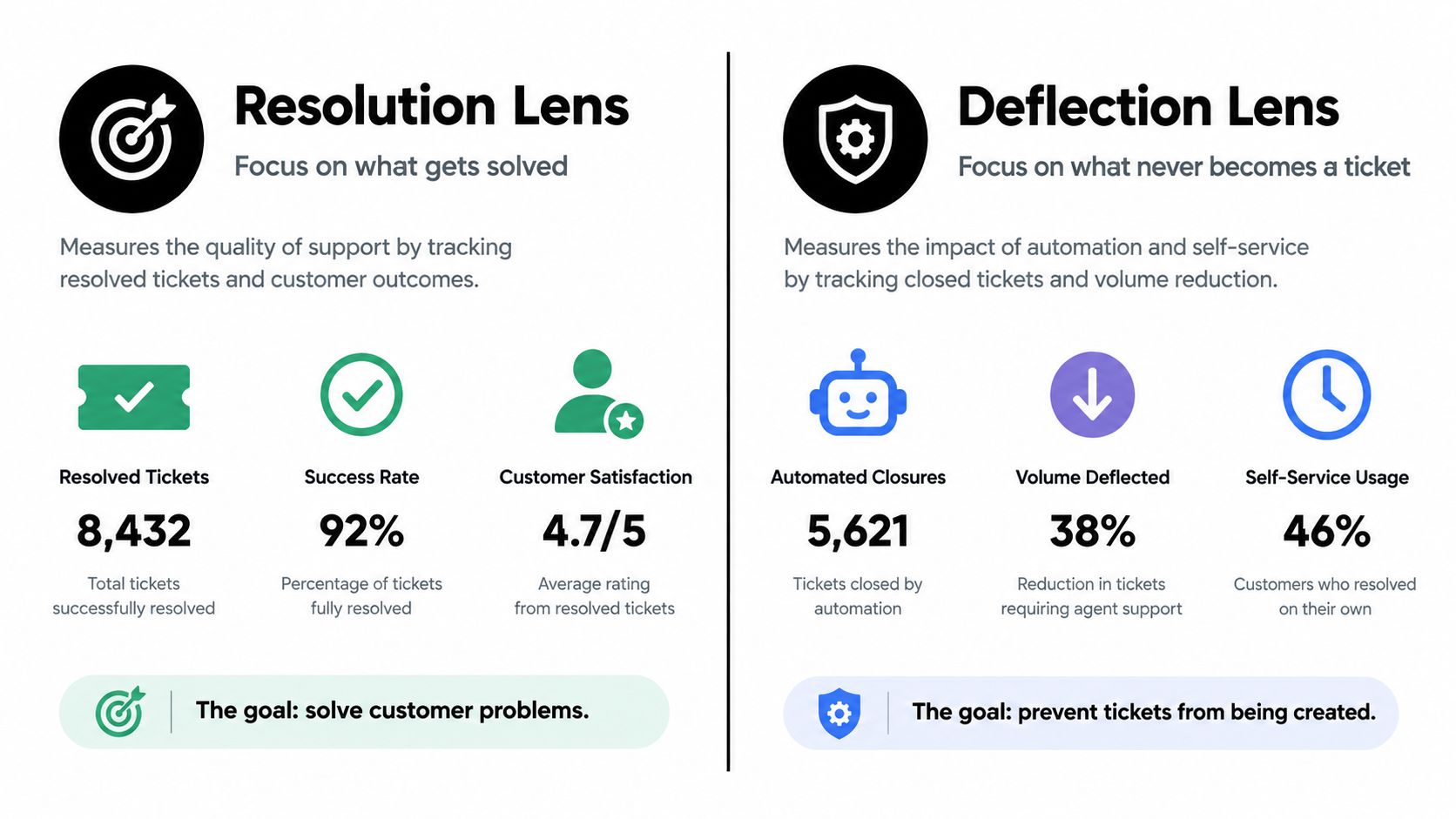
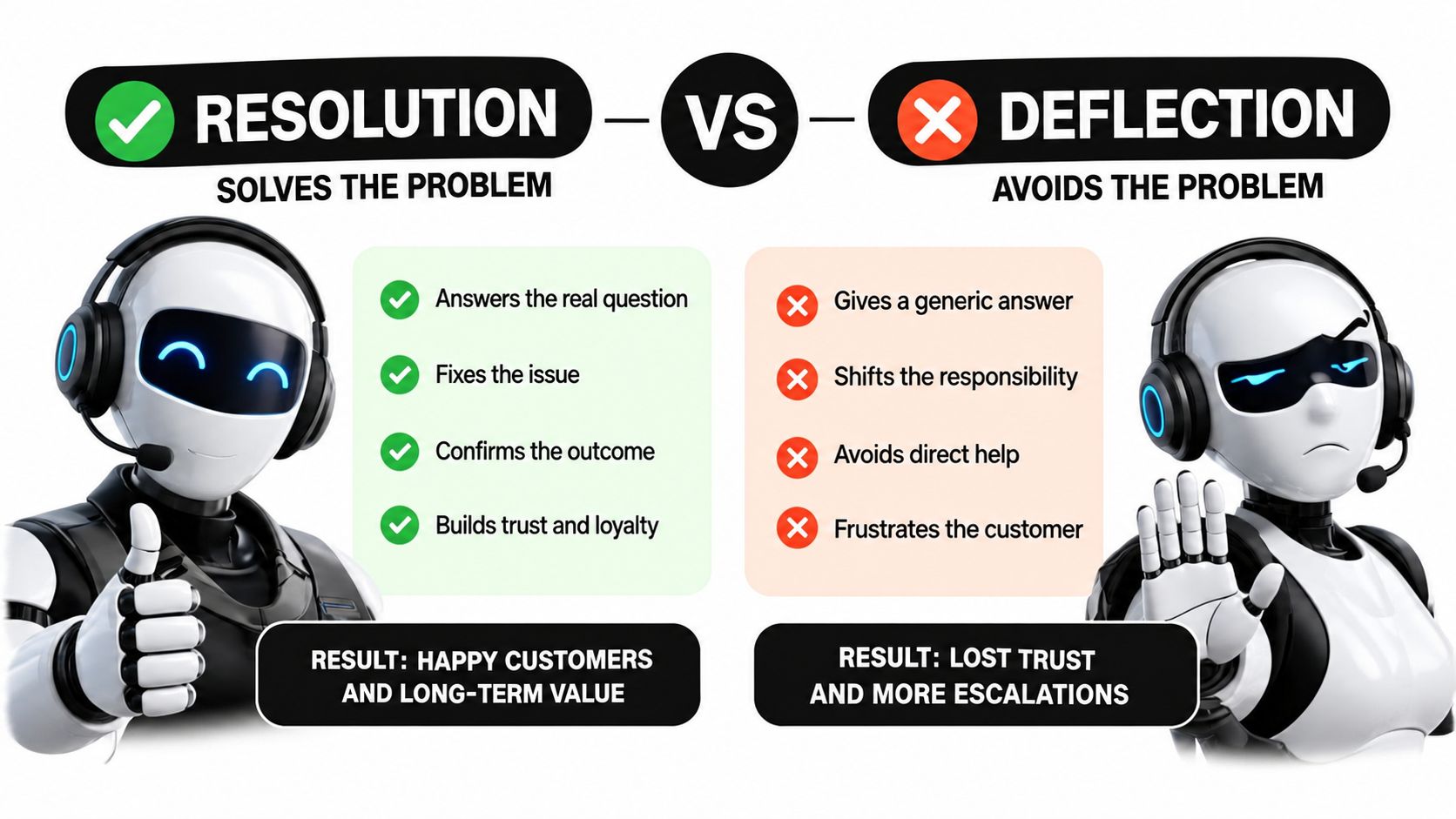
Defiction means the customer didn't reach a human channel. Containment usually means the automation ended the interaction within the automated channel. Resolution means the customer's underlying issue was closed. Recontact reveals whether the customer had to return because the first interaction didn't hold.
These measures aren't interchangeable. A bot optimized for containment may avoid escalation even when the customer needs an account change. A bot optimized for resolution may hand off early, which can make its dashboard look weaker while giving the customer a faster path to a correct answer.
Independent benchmark data reports a verified median end-to-end AI resolution rate of 41%, with the top quartile near 59%. In ecommerce and retail, structured intents such as order status, returns, and shipping can reach 70% to 84% in industry-specific deployments. The benchmark attributes the difference to factors such as retrieval quality, intent taxonomy design, and access to transactional systems, rather than model fluency alone. The AI customer service benchmark from Aissist explains the distinction.
The same source also supports a practical deployment sequence. Start with high-frequency, low-ambiguity requests. Measure whether the issue closes end to end. Expand only after you understand latency, grounding, and handoff accuracy.
Pick the metric that matches the operating model
A self-service-first operation can make containment a useful leading indicator, but it still needs a recontact check. An assisted-agent model should prioritize resolution quality and agent productivity. A hybrid model should measure whether the handoff preserves context and prevents the customer from starting again.
A large benchmark built from platform telemetry across more than 32,000 companies and 1.2 billion tickets reported a median first response time of 1 hour, a top-20% response time of 3 minutes and 10 seconds, a bottom-tier response time of 7 hours and 4 minutes, and a median resolution time of 6 hours and 15 minutes. Those figures come from the customer service AI benchmark published by Macha. The operational lesson is to track both the median and the long tail, because routing failures and escalation loops can hide behind a healthy average.
Repeat contact is the test that exposes inflated automation success. Twenty-nine percent of customers still contact a company again about the same problem, and AI-handled support can trail human CSAT slightly unless a human handoff is available. One 2026 CX benchmark cited a hybrid escalation design that narrowed the CSAT gap to 0.05 points. Onclarity's report on AI in customer service covers that relationship between automation, handoff, and post-resolution quality.
Measure the customer's second attempt, not just the bot's first answer.
If the customer has to log in again, explain the billing issue again, or find a different agent because the first workflow lacked permissions, the automation didn't resolve the problem. It moved the work.
Integration and Security in Customer Service AI
Integration and security aren't procurement checkboxes. They're operating conditions. An AI support tool may touch conversation transcripts, identity data, CRM records, knowledge content, voice recordings, ticket fields, and agent performance information. Each surface needs an owner, a permission model, a retention rule, and an audit trail.
Start with identity and access. Ask whether the platform supports SSO, role-based access control, shared inboxes, supervisor overrides, and logs that show who changed an intent, approved an article, or accessed a customer record. Shared access deserves special attention. A team may need to collaborate on one support account without giving every participant unrestricted access to billing, credentials, or private customer history.
Ask what the integration can actually do
A native connector may be easier to maintain than middleware, but the label doesn't tell you whether the connection is useful. Ask the vendor to demonstrate:
- Read permissions: Which objects and fields can the AI access, and can access vary by role or intent?
- Write permissions: Can the system update a ticket, create a return, or change a status, or can it only read records?
- Approval controls: Can sensitive actions require human confirmation?
- Context preservation: Does a handoff transfer the transcript, retrieved sources, customer identity, and actions already attempted?
- Auditability: Can a supervisor reconstruct the AI's answer, source material, permissions, and escalation decision?
Then examine data handling. Ask where data is stored, how long transcripts and audio are retained, whether personally identifiable information is redacted before prompts are processed, and whether your data is used to train shared models. “Uses your data” and “trains on your data” aren't the same contractual statement.
Security problems often appear after launch, when a supervisor needs to override a bot, an agent works from a shared inbox, or a knowledge manager removes an outdated policy. The right design makes those actions visible and reversible.
Use this guide to ensuring data security as a prompt for your own review, then ask each vendor to demonstrate the controls in your actual support workflow. Don't accept a slide deck in place of a permissions test.
Choosing the Right AI Vendor for Support Teams
The vendor with the strongest launch demo may be the wrong partner for a support operation. Post-sale control matters more than a polished containment number because your team will spend far longer maintaining taxonomies, reviewing failures, updating knowledge, and tuning handoffs than watching the initial demonstration.
Score vendors on four operational pillars.
Shared building access
Support leads should be able to edit intents, routing rules, knowledge connections, and escalation behavior without opening a professional services request for every correction. Give non-technical users a controlled workspace with approvals and version history.
Intervention visibility
Supervisors need to see emerging intents and intervene while the system is operating. They should be able to pause an automation, adjust a route, or mark a response for review without waiting for a quarterly vendor meeting.
Complete audit trails
The record should span the bot turn, retrieved content, tool action, human handoff, agent response, and final disposition. A transcript alone isn't enough if it doesn't show what the AI knew when it made the recommendation.
A responsive roadmap
Ask how customer feedback affects product priorities. A vendor that understands your deployment volume, support tier, and governance needs can help you improve the operation. A vendor that only sells feature access will leave your team managing the integration gap alone.
| Evaluation Pillar | What to Score | Red Flag |
|---|---|---|
| Operational control | Support leads can edit, test, approve, and roll back changes | Every taxonomy or workflow change requires vendor services |
| Intent visibility | Real-time intent trends, failed routes, and intervention controls | You see only aggregate usage after the interaction ends |
| Auditability | Full records of sources, actions, handoffs, and overrides | The vendor stores a transcript but not the decision path |
| Access governance | Granular roles, shared-workspace controls, and access logs | Users share credentials or receive broad permissions by default |
| Model maintenance | Testing against historical conversations and drift monitoring | Accuracy claims rely on a static demo set |
| Commercial fit | References from teams with similar complexity and support needs | Sales relies on large enterprise logos unrelated to your operation |
Ask for references at your tier. Then give the vendor difficult scenarios: a customer with incomplete identity information, a billing dispute requiring a human, a shared inbox with different permission levels, and a knowledge article that conflicts with the CRM record.
A useful feature comparison matrix can keep those answers comparable across vendors. Score observed behavior, not promises.
Your Next Move as an AI Buyer
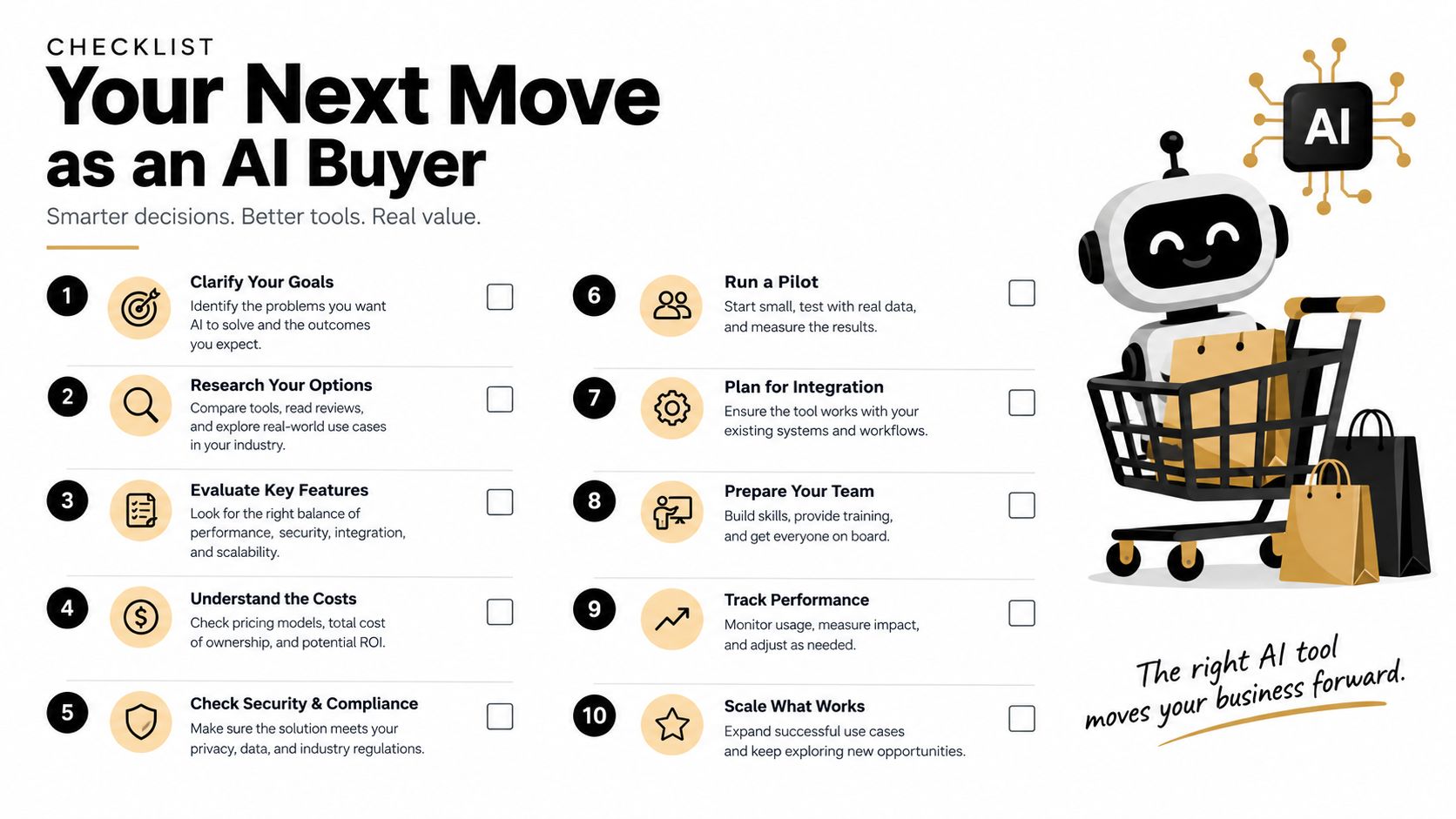
You don't need a large transformation program to test the maturity gap. You need a small, honest audit of one automation that already touches customers.
Audit one live automation
Choose a bot, IVR route, or copilot workflow. Separate containment from genuine resolution, then check whether customers recontact the business about the same issue within your chosen review window. Read the conversations that ended in transfer, not just the ones marked successful. Those failures usually reveal missing data access, weak intent definitions, or a handoff that loses context.
Map who can change the system
List the people responsible for intents, knowledge articles, permissions, routing, and escalation rules. Mark which changes support leads can make themselves, which require security approval, and which require vendor involvement. If a simple policy correction can sit in a services queue, your integration curve will stall.
Run a governance-focused demo
Bring operations, security, and knowledge management into the same session with the sales engineer. Ask the vendor to demonstrate a shared inbox, a supervisor override, a sensitive account action, a failed retrieval, a human handoff, and an audit review. Make the vendor show what each user can see and change.
Use those findings to challenge an incumbent renewal or new RFP. A tool that requires constant vendor intervention may still be useful for a narrow, stable intent, but it shouldn't be treated as a fully integrated service platform. A tool your team can operate, govern, and improve has a better chance of surviving the first difficult Monday.
If you want to test access and subscription-sharing workflows alongside your AI evaluation, review the available trial option and document which permissions your team needs before making a purchase decision.
AccountShare offers shared access to premium services and subscriptions through group purchasing, with account-management features such as password sharing options and customizable permissions. Visit AccountShare to evaluate whether its shared-access model fits the collaboration and access-control needs your support or operations team has identified.