

Spotify Premium Share A Guide to Saving Money on Music
Looking to share Spotify Premium and cut down on costs without getting into trouble? The best way to do it is by using Spotify's own Duo and Family plans. These are designed so you can legally split the bill while everyone gets their own private account, playlists, and recommendations.
Unlocking Savings: The Smart Way to Share Spotify
Sharing a Spotify Premium subscription is about more than just passing your password around—it's about finding a smart, secure way to make it more affordable. The appeal of ad-free listening and offline downloads is huge. In fact, Spotify's Premium subscriber base has ballooned to a massive 281 million worldwide as of Q3 2025.
That's a staggering 44.1% jump from the 195 million subscribers they had back in Q3 2022. This explosion in growth, detailed further on Backlinko, shows just how much people value the premium experience.
This trend creates a fantastic opportunity for anyone looking to save. A standard Premium plan in the US runs about $10.99 a month, but sharing can slash that cost dramatically. By splitting the bill with a partner, family, or a group of friends, you can get all the premium perks for a much lower price. The trick is to pick the right method so you don't break Spotify's rules or put your account at risk.
Why Official Sharing Plans Are a No-Brainer
Spotify didn't just leave sharing to chance; they built the Duo and Family plans for this exact reason. They are the official, intended way to share one subscription with multiple people.
Here’s why that’s a big deal:
- Everyone gets their own space. No more clashing playlists or getting recommendations for your roommate's guilty pleasures. Your "Discover Weekly" stays all yours.
- Your login credentials remain private. You never have to hand out your main password, which is a huge security win.
- You stay on the right side of the rules. Using the official plans keeps you in line with Spotify's Terms of Service, so you don't have to worry about your account being flagged or shut down.
This infographic breaks down just how much you can save by sharing.
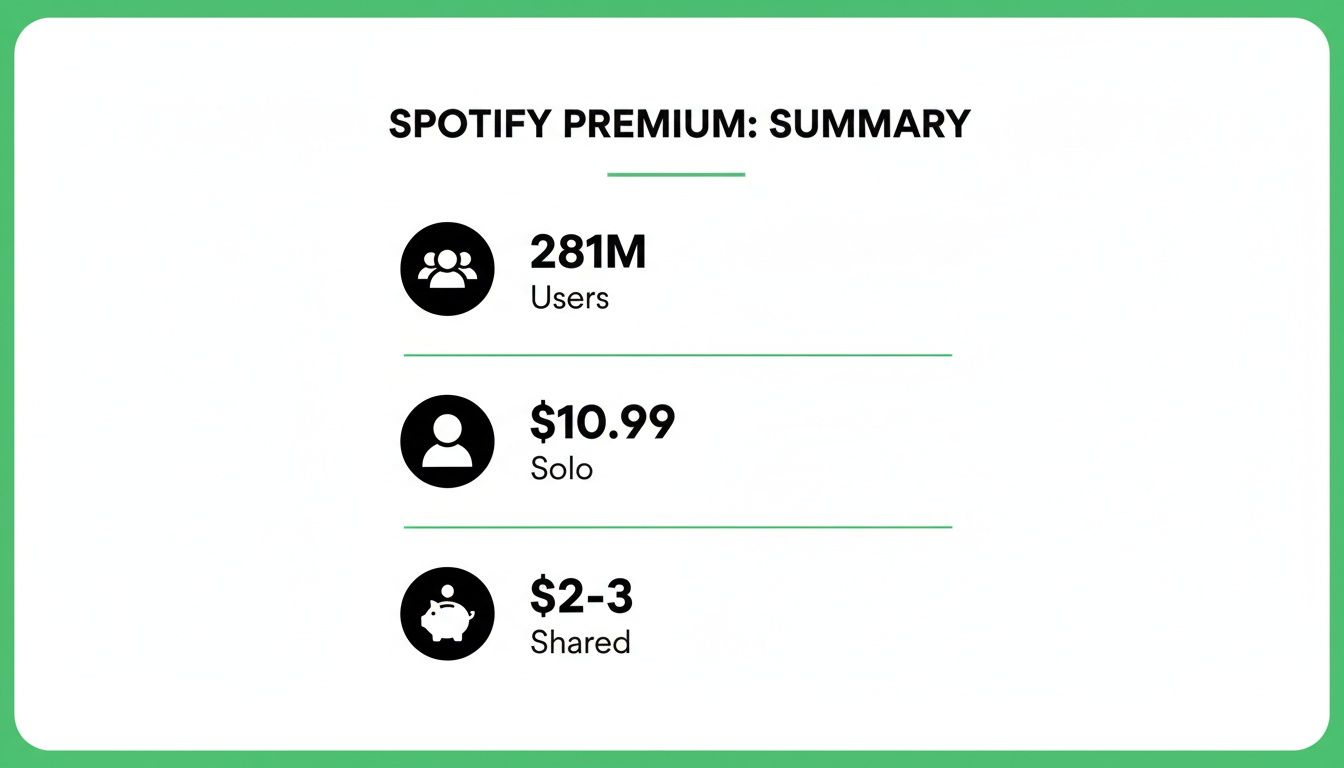
As you can see, the numbers speak for themselves. Millions of people pay for premium, but the per-person cost can drop from over $10 to just a few dollars with a shared plan.
Spotify Sharing Options at a Glance
To make it easier to decide, here's a quick rundown of the main ways you can share Spotify Premium.
| Sharing Method | Best For | Max Users | Key Requirement | Average Cost Per Person (US) |
|---|---|---|---|---|
| Premium Duo | Couples or two people living together | 2 | Must reside at the same physical address | ~$7.50 |
| Premium Family | Families or groups of housemates | 6 | All members must live at the same physical address | ~$2.83 |
| Device Sharing | Casual, short-term sharing (e.g., parties) | 1 (active stream) | Sharing your own account login | Same as your plan |
| AccountShare | Friends or groups who don't live together | 6 | Group members can live anywhere | ~$3.50 |
This table shows that while official plans offer the lowest cost, they have strict location requirements. Other methods provide more flexibility.
What If You Don't Live Together?
Spotify's plans are great, but they all hinge on that strict "same household" rule. For friends, students in different dorms, or anyone who doesn't share a physical address, this can be a deal-breaker.
This is where platforms like AccountShare step in. These services act as a middleman, helping you connect with others to form a group and manage the payments. It makes it possible to get the savings of a Family plan without the headache of chasing people for money or living under the same roof. Before you jump in, it helps to understand the basics—check out our guide on how to add someone to your Spotify account to get started.
The core idea behind smart sharing is simple: get the most savings with the least amount of risk. Whether you stick with an official Spotify plan or use a managed service, the end goal is the same—a full-featured Premium experience that doesn't break the bank, all while keeping your data and listening history safe.
Using Spotify's Official Duo and Family Plans
If you want to split the cost of Spotify Premium the right way, their official Duo and Family plans are your best bet. They’re built specifically to let multiple people have their own separate, full-featured accounts while paying a single, discounted monthly bill. This is the official, secure way to do a spotify premium share and completely avoids the security headaches and playlist messes that come from just passing a password around.
With these plans, everyone gets to keep their own music library, their personalized Discover Weekly, and their private listening history. It’s all the perks of Premium, just a lot cheaper for everyone involved.
Setting Up a Spotify Duo Plan
The Premium Duo plan is perfect for any two people living under the same roof—think couples, roommates, you name it. It gives you two completely independent Premium accounts for one reduced price, which is a much smarter deal than paying for two individual subscriptions.
Getting started is simple. The primary account holder just needs to upgrade their plan to Duo. From there, they can send an invitation link to the second person via text, email, or whatever messaging app you use. The other person just has to open the link, log into their Spotify account (or make a new one), and confirm their home address.
One of the coolest perks of Duo is the Duo Mix. This is an exclusive playlist that automatically blends the musical tastes of both of you. It's a great way to find new music you'll both like, and it updates regularly as your listening habits change.
Managing a Spotify Family Plan
For bigger households, the Premium Family plan is a no-brainer. It supports up to six individual Premium accounts, which is perfect for families or a house full of roommates. The per-person cost drops significantly this way. If you want to see exactly how the numbers break down, we've got a full guide on how much a Spotify Premium Family plan costs.
The person who signs up for the plan is the plan manager, and they have a few specific jobs:
- Handling the monthly payment: The entire subscription fee gets charged to the manager's card each month.
- Inviting and removing members: The manager gets a dashboard where they can send out invites and keep track of the six available slots.
- Setting the home address: All members have to confirm they live at the same address that the manager enters.
A huge bonus for parents is Spotify Kids, a totally separate app that comes with the Family plan. It’s a safe, ad-free space filled with curated audio content just for kids, which gives parents some much-needed peace of mind. The plan manager can set up Kids accounts right from their Family plan hub.
The Crucial Address Verification Rule
Here’s the catch, and it's a big one: for both Duo and Family plans, all members must live at the same physical address. This isn't just a suggestion buried in the terms of service; Spotify actively enforces it.
Spotify periodically asks members to verify their location, either by entering their address into Google Maps or using their device's GPS. If your address doesn't match the plan manager's, you could be kicked off the plan or even have your account suspended.
This rule can be a real headache for a lot of common living situations. For example:
- A college student: If your kid is living in a dorm, they're technically at a different address and aren't eligible for the family plan back home.
- A newly moved-in couple: You might be living together, but if one of you hasn't officially updated your address yet, the Duo plan verification could fail.
- Friends as "family": Trying to create a "family" plan with friends scattered across town or in different states is a direct violation of the rules and is almost guaranteed to get flagged.
This strict enforcement is why it’s so important to know what you’re getting into. While the official plans are fantastic for people who actually live together, that "same household" rule is a hard line. If your sharing group is spread out geographically, you'll have to look at other ways to get a spotify premium share without breaking the rules and risking your accounts.
The Hidden Dangers of Password Sharing

It sounds so simple, right? Just give a friend your Spotify password, split the cost of a standard Premium plan, and you both save money. It seems like a total win-win. But I’ve seen this “harmless” shortcut go wrong more times than I can count, turning a great music experience into a massive headache.
Think about why you love Spotify. It gets you. Your Discover Weekly and daily mixes are your personal soundtrack, crafted perfectly from what you listen to. The moment you hand over your password, you throw all that personalization out the window.
Suddenly, your recommendations are a bizarre mix of your friend’s death metal phase and their roommate's sea shanty obsession. Your carefully curated "Chill Vibes" playlist gets invaded by party anthems from their weekend. It's more than just annoying—it completely breaks the core feature that makes Spotify Premium worth paying for.
The Real-World Consequences
Beyond the algorithmic chaos, sharing a single password creates a constant battle for control. A standard Premium account only allows one active stream at a time. This is where things get really frustrating.
You could be in the middle of a great workout, hitting your stride, and—poof!—your music cuts out because your friend just logged in at their desk. It's an endless game of "who gets to listen now?" that nobody ever wins. Imagine trying to unwind with a podcast, only to be booted offline three times in ten minutes. The few dollars you saved don't feel so great anymore.
One of the most common complaints I hear from people sharing a standard account is the "now playing" conflict. It’s not just about losing your music; it’s the constant back-and-forth and the feeling that you don't truly have access to the service you're paying for.
Translating the Terms of Service
Let's be real: Spotify’s rules against password sharing aren't just legal fluff. They exist to protect your account and ensure the service works as intended. Here’s what their Terms of Service actually mean for you.
- "Your password protects your user account...": This is about way more than just music. Is your Spotify linked to your Facebook? If so, you've just created a weak point in your security. Sharing a password opens you up to risks that go far beyond a messed-up playlist.
- "...you are solely responsible for keeping your password confidential...": This is the big one. If your friend shares the password with someone else or your account details get changed, Spotify isn't going to play mediator. The responsibility—and the consequences—are all on you.
The biggest risk here isn't getting a scary letter from a lawyer. It’s the very real chance of having your account suspended or even shut down for good. If that happens, you could lose years of playlists and saved music in a flash. If you absolutely have to share login details for something, you need to find a secure way to share passwords.
A Relatable Scenario
I know a couple of college roommates, Alex and Ben, who tried this. They decided to split a Premium account to save a few bucks. It was fine for a week. Then Alex noticed his Discover Weekly was full of Ben's favorite indie bands, and his own recommendations were totally off.
The real trouble started during finals week. Alex needed his focus playlists to study, but Ben was using the account to stream music for his study group. They were kicking each other offline constantly. The tiny savings led to arguments and frustration, and they ultimately caved and got their own accounts—but not before Alex had to spend hours cleaning up his musical profile. This story is incredibly common and it’s the perfect example of why official plans or managed platforms are a much smarter way to handle a spotify premium share.
A Better Way to Share: Using Group-Buying Platforms
Let's be honest: managing a Spotify Family plan can be a headache. It sounds great at first, but you quickly become the designated bill collector, chasing down friends or family for their share every month. It’s awkward, and frankly, a waste of time.
This is exactly why group-buying platforms have emerged. They offer a much smarter, automated way to handle a spotify premium share. These services act as a trusted middleman, connecting people who want to split the cost of a Family plan without any of the usual drama.
Think of it as a coordinator for your digital life. The platform handles all the tricky parts—collecting payments, managing who's in the group—so you can just focus on the music and the savings. Best of all, your own account details and password remain completely private.
You get the massive discount of a Family plan without needing to live at the same address or pestering anyone for money. It's a perfect setup for students, remote workers, or just friends who want to save some cash.
How Do These Sharing Platforms Actually Work?
The model behind a service like AccountShare is refreshingly simple and works within Spotify's rules. They aren't selling sketchy, cracked accounts. Instead, they just make it easy for people to legitimately share a single, paid-for Premium Family plan.
Here’s the process in a nutshell:
- A Group Gets Formed: The platform connects individual users looking to join a Spotify group, filling the empty slots on a Family plan.
- Payments Are Automated: Everyone pays their monthly slice directly to the platform. No one has to front the full amount and hope to get paid back.
- Access is Granted Securely: Once you pay, you get an official invitation link to join the Family plan. You click it, log in with your own Spotify account, and you’re in.
- The Platform Handles the Rest: The service manages the subscription, makes sure payments are on time, and handles member changes if someone leaves the group.
This system means the person who owns the plan never gets stuck with the bill. And for members, it provides peace of mind knowing your access is stable as long as you pay your small share.
Step-by-Step: Joining a Shared Spotify Group
Getting started on a platform like AccountShare is designed to be incredibly easy. You don't need to be tech-savvy at all.
First, you sign up on their website and browse the available groups for Spotify Premium. When you see an open spot, you grab it and make your first payment.
After that, you'll receive an invitation link. Just click it, log into your personal Spotify account, and confirm your address details. That's it. Your account is instantly upgraded to Premium with all the perks—no ads, offline downloads, and high-quality audio. All your playlists, history, and recommendations stay exactly as they were.
The real value here is eliminating friction. These platforms take the biggest sharing headaches—payment chasing, trust issues, and security risks—and solve them with an automated, secure system. This makes a spotify premium share accessible to just about anyone.
With its massive user base, Spotify is the perfect service for this kind of cost-sharing. It holds a commanding 31.7% of the global music streaming market, and its 281 million Premium users show just how much people want an ad-free experience. Platforms like AccountShare unlock that value by letting groups split costs safely, saving a group over $120 a year while giving everyone their own private account. You can learn more about Spotify's market dominance and subscriber growth to see just how popular it is.
What About Security and Trust?
Security is obviously a huge concern. Any reputable sharing platform will prioritize your safety by never asking for your Spotify password. The entire process is handled through official invitation links—the exact method Spotify created for adding people to a Family plan.
This means your account login is never exposed to the platform or anyone else in the group. You always have full control over your personal Spotify account. It’s a secure and practical way to get the deep savings of a Family plan with the flexibility that modern life demands.
Best Practices for Secure and Easy Sharing
Whether you’re running a Spotify Family plan or jumping into a group on a sharing platform, laying down a few ground rules makes the whole experience better for everyone. A successful spotify premium share really boils down to clear communication and a little digital etiquette.
Think of these tips as your guide to sidestepping the usual headaches, from payment squabbles to security scares. Setting up a clear framework from the get-go means you can avoid awkward conversations later and turn a messy arrangement into a smooth, cost-saving team effort.
Pick a Trustworthy Plan Manager
The plan manager is the captain of the ship. This person handles the monthly payment and invites everyone, so you need to pick someone reliable. It’s not just about who’s the most organized; it’s about trust.
Remember, the manager's account holds the payment info and all the administrative power. That’s why they absolutely must use a strong, unique password for their Spotify account—something they haven't used anywhere else. If their account gets compromised, the whole plan is in jeopardy.
Pro Tip: A great plan manager isn’t just good with money; they’re also a great communicator. Find someone who is comfortable sending reminders and sorting out small issues before they blow up into big problems.
Set Clear Payment Rules Upfront
Money talk can make things weird, but it doesn't have to. The secret is to leave no room for guesswork right from the start. Before you even send the first invite, the group needs to agree on how payments will work.
There are even dedicated platforms for managing shared subscription payments designed to take the friction out of these arrangements. This is a huge perk of services like AccountShare, which automates the whole thing for you.
If you’re handling it all yourself, here’s what you need to sort out:
- Pick a payment date: Will everyone pay the manager on the 1st of the month, or a few days before the bill is due? Decide and stick to it.
- Use one payment app: Get everyone on the same page with a single app like Venmo or PayPal. It keeps everything organized and easy to track.
- Set up recurring payments: The best way to avoid forgotten payments is to have everyone set up an automatic monthly transfer.
Your Account Sharing Security Checklist
To keep your shared plan running smoothly and securely, it helps to have a checklist. These are the practical steps everyone, especially the plan manager, should follow to protect the account and keep the music playing without any drama.
| Security Action | Why It's Important | Recommended Frequency |
|---|---|---|
| Use a Unique Password | Prevents a breach on another site from compromising the Spotify account. | Always |
| Enable 2FA (if available) | Adds an extra layer of security beyond just the password. | Immediately |
| Review Member List | Ensures only authorized and active members have access. | Quarterly |
| Set Ground Rules | Establishes clear expectations for payment and etiquette. | At the beginning |
| Update Payment Info Securely | Protects the plan manager’s financial data from exposure. | As needed |
| Communicate Changes | Keeps all members informed about billing dates or member changes. | Whenever they happen |
By making these actions a regular habit, you build a foundation of trust and security that benefits everyone in the group. It's a small effort for a big payoff: worry-free listening.
Keep Communication Open and Set Group Etiquette
A shared plan is like a tiny community, and good communication keeps it from falling apart. Set up a simple group chat on an app everyone uses. It's the perfect spot for payment reminders, troubleshooting a bad invite link, or just general plan talk.
Good etiquette also means having a plan for when someone leaves. The person exiting should give plenty of notice—ideally before the next billing cycle kicks in. This gives the manager time to find a replacement and remove them from the plan properly. This simple step prevents the manager from getting stuck paying for an empty spot and keeps the plan running without a hitch for everyone else.
Spotify's massive growth tells you everything you need to know about how much people love its premium features. The user base is projected to jump from 236 million Premium subscribers in Q4 2023 to an estimated 281 million by Q3 2025. That's a 19% increase in under two years! It’s no wonder a spotify premium share is so popular—it’s the best way to dodge the $131 annual solo cost and pay under $3/month per person. You can see more on Spotify's subscriber growth on Statista.
Common Questions About Sharing Spotify
Even with all the different ways to share Spotify Premium, a few key questions always seem to come up. It's easy to get tangled in the rules, the tech, and just trying to keep everyone happy. I've pulled together the most frequent questions I hear to give you straight answers so you can share with confidence.
These are the nitty-gritty details that can trip people up—from worrying about address checks to what happens to your precious playlists. Getting these right from the start will make sure your sharing setup is smooth, secure, and free of any nasty surprises.
Does Spotify Actually Check if Family Plan Members Live Together?
In a word: yes. And you really need to take this seriously. Spotify will periodically ask members of a Family or Duo plan to verify their home address. This isn't just a suggestion; they have systems in place to confirm everyone is actually living under the same roof.
So, how do they check? It can happen in a few ways:
- GPS Confirmation: Spotify might ask for location access to ping your device's GPS and see if it matches the plan manager's address.
- Manual Address Entry: You might get a prompt to type in the address manually, which their system then cross-references.
- Wi-Fi Network: Sometimes, simply being on the same Wi-Fi network can act as an informal check.
Look, some people might get away with it for a while, but you're rolling the dice. If Spotify catches a mismatch, they can boot the person off the plan or, in some cases, suspend the entire account without warning. This is exactly why it's best to either stick to the household rule or use a managed service that handles this for you.
What Happens to My Playlists if I Join Someone's Plan?
This is a big one, and the answer is a huge relief: absolutely nothing happens to your personal account. When you hop on a Duo or Family plan, your Spotify account stays 100% yours. You're just getting a massive discount on a full Premium membership that's billed through someone else.
All your carefully curated playlists, saved songs, listening history, and personalized recommendations like Discover Weekly are completely separate and private. The plan manager can't see what you listen to, and your guilty pleasure pop playlist won't mess up their algorithms. It’s your own Premium bubble, just at a much friendlier price.
The real beauty of Spotify's official sharing plans is how they separate the billing from the user experience. You get the group savings without sacrificing the personal, curated space that makes Spotify so good in the first place.
Are Sharing Services like AccountShare Legal?
Yes, they are. There's a common myth that these services are shady or dealing in stolen accounts, but the reality is far more straightforward and totally above board.
Platforms like AccountShare simply act as an administrator for a legitimate Spotify Premium Family plan. They bring individual users together to fill the empty slots and then handle all the admin work. They collect the small monthly payments from each person and make sure the subscription stays active, allowing everyone to legally tap into the group discount. The underlying Spotify subscription itself remains fully compliant.
What Is the Best Way to Handle Payments in a Shared Plan?
Nobody likes chasing friends for money. It's awkward and the number one reason these sharing arrangements fall apart. If you're managing a plan for friends or family, the key is to automate it.
By far, the best way is to have one person (the plan manager) pay the main Spotify bill. Then, have everyone else set up a recurring monthly transfer using a payment app like Venmo, Zelle, or PayPal. It’s a "set it and forget it" approach. A shared calendar reminder is also a good backup.
This is where a dedicated sharing platform really shines. They take care of the entire billing process, collecting each person's share automatically every month. It completely removes the "bill collector" role from the equation, making the whole spotify premium share experience better for everyone involved.
Ready to enjoy Spotify Premium without the high cost or management headaches? AccountShare connects you with a group to share the subscription safely and automatically. Get your own private account for a fraction of the price at https://accountshare.ai.