

How to View Old YouTube Videos and Find Lost Content
Ever get hit with a wave of nostalgia for YouTube's early days? Maybe you're looking for those grainy, unpolished vlogs or a specific clip you remember from a decade ago. The quickest and most direct way to view old YouTube videos is to use the tools YouTube already gives you, like date filters in search, sorting a channel's uploads by "Oldest," or digging into your own Watch History. These tricks let you sidestep the algorithm and jump straight to the content you're after.
Your Gateway to YouTube's Digital Past
That sudden urge to find a video from the platform's unfiltered, wild-west era is a common one. But YouTube’s powerful algorithm is a double-edged sword; it’s brilliant at serving up what’s new and trending, but this often leaves older content feeling buried under layers of algorithmically-curated suggestions. Trying to find a specific video from 2009 can feel like searching for a needle in a digital haystack.
Think of this guide as your treasure map. We'll walk through a few immediate, practical strategies to unearth the videos you're looking for, starting with the simplest tools already built into YouTube. Forget endless, frustrating scrolling—you'll learn how to precisely filter your searches by date, sort entire channels from their very first upload, and even tap into your own viewing history to rediscover forgotten gems.
Core Methods at a Glance
Before we dive into the nitty-gritty, let's get a quick overview of the most direct ways to find older content. This visual lays out the most common tools you'll use right on the YouTube platform to kick off your search.
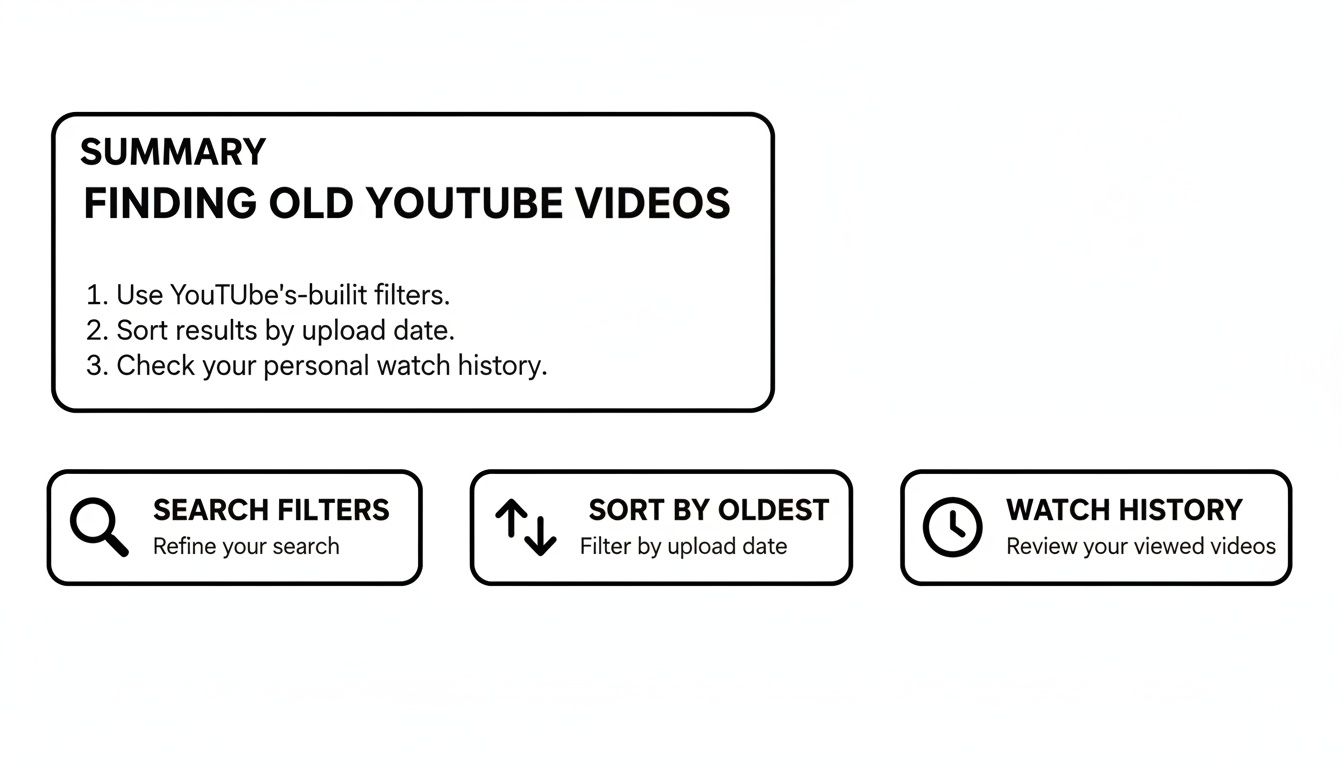
Each of these methods—Search Filters, Sort by Oldest, and Watch History—is suited for a different kind of search. Knowing which one to reach for first will save you a ton of time and effort.
Whether you're chasing down a specific memory, researching a piece of internet history, or just curious to see how your favorite creators got their start, this is your launchpad. The right technique can turn a vague recollection into a rediscovered classic.
Key Takeaway: YouTube's algorithm is built to push new content, so you have to be intentional about finding older videos. Using built-in features like date filters and channel sorting is the most reliable way to cut through the noise and find exactly what you're looking for.
Quick Methods for Finding Old YouTube Videos
To get you started, here's a quick breakdown of the most direct methods available right inside YouTube. Think of it as a cheat sheet to help you pick the best tool for the job.
| Method | Best For | Limitation |
|---|---|---|
| Search Filters | Finding videos on a topic from a specific time (e.g., "iPhone review 2008"). | It’s only as good as the video's title and description; can be imprecise if keywords don't match. |
| Sort by Oldest | Exploring a single creator’s entire back catalog, starting from their very first upload. | Only works on a channel-by-channel basis, not for general topic searches. |
| Watch History | Relocating a video you know you've watched before, even if it was years ago. | You had to be logged into your Google account, and it's limited to your personal viewing data. |
As you can see, each approach has its strengths. Knowing these limitations upfront helps you choose the smartest path from the get-go and avoid wasting time on a method that isn't suited for your particular search.
Mastering YouTube's Hidden Search Filters

The real trick to finding what you're looking for on YouTube isn't just about keywords—it's about knowing how to use the platform's own tools against its massive library. YouTube has some powerful, but easily missed, filtering options that can cut through the noise and get you straight to the video you want. This is the most reliable way to view old YouTube videos without just hoping for the best.
Let's say you're looking for original uploads from a major news event back in 2008. If you just type "2008 news coverage" into the search bar, you'll mostly get modern documentaries and retrospectives. That’s because the algorithm prioritizes newer, high-production content.
To fix this, look for the "Filters" button right under the search bar after you've searched. Clicking it opens up a whole new world of options.
Filtering by Upload Date
Once you're in the Filters menu, your eyes should go straight to the "Upload Date" column. This is where you can tell YouTube to ignore everything published outside the specific timeframe you care about.
You’ll see some presets that are great for recent content:
- Last hour
- Today
- This week
- This month
- This year
While these are handy, their real power comes from combining them with other sorts. For example, selecting "This year" and then sorting by "View count" is a fantastic research strategy to find the most-watched videos on a topic within that period. To really understand a creator's journey, it's also smart to see what topics were trending back then. You can learn more about effective keyword research for content creators in our guide.
Using the Sort by Oldest Feature on Channels
What if you're not looking for a topic, but a specific creator's early work? Maybe you want to see the very first, awkward video from a now-famous YouTuber. The best way to do this is to go straight to their channel page.
Once you’re there, click on their "Videos" tab. You'll see a "Sort by" dropdown, which almost always defaults to "Latest." Just click that and select "Oldest" instead. Boom. Their entire video history flips, and their very first upload is now at the top of the list. It’s the easiest way to trace a channel's evolution right from the beginning.
Pro Tip: If a channel has thousands of videos, sorting by "Oldest" can take a moment to load. Just give it a second—it’s sifting through years, sometimes over a decade, of content for you.
Advanced Search Operators for Pinpoint Accuracy
For those who want ultimate control, you can skip the Filters menu entirely and use special commands called search operators. You just type them directly into the search bar with your keywords for surgical precision.
The two most useful operators for finding old content are before: and after:.
- To find videos uploaded before a certain date, add
before:YYYY-MM-DDto your search. - To find videos from after a certain date, use
after:YYYY-MM-DD.
You can even combine them to create a custom date range. For instance, a search for gaming tutorials before:2010-01-01 after:2008-12-31 will zero in on videos uploaded during 2009. This is hands-down one of the most powerful tricks for anyone serious about finding specific content from a particular era on YouTube.
Unlocking Your Personal YouTube Time Capsule
Sometimes, the old YouTube video you’re desperate to find isn't from some random channel—it’s one you’ve already seen. Your own Watch History is a powerful digital archive that most people forget they even have. While sifting through years of viewed videos might sound like a chore, it's often the best way to track down a video when all you have is a vague memory.
Think of your watch history as a personal breadcrumb trail. As long as you were logged into your Google account when you watched it, YouTube probably has a record of it. Just head over to the "History" tab in your account. You'll find a chronological list of everything you've ever watched.
Digging Through Your Viewing Data
The real magic is the search bar within your history. Instead of scrolling for hours, use the "Search watch history" field. Even a single keyword from the title or channel name—like "baking tutorial" or "space documentary"—can instantly filter years of data. It’s a surprisingly effective way to jog your memory and pinpoint that one specific video you can't quite place.
Don't forget about your playlists, either. Any playlists you've created or saved over the years are basically curated time capsules. Old music mixes or tutorial collections often hold videos that are now unlisted or buried deep in YouTube's search results. If you're trying to collaborate with friends to rebuild a lost collection, our guide on how to share a YouTube playlist can help.
Advanced Analysis with Google Takeout
If you want to go really deep, you can download your entire viewing history using Google Takeout. This service lets you export all the data Google has on you, which includes a complete, machine-readable file of your YouTube history.
This raw data file is a goldmine. You can upload your Takeout data to tools like the YouTube Watch History Analysis to visualize your viewing habits. One analysis of user data found that for those with over 500 hours of viewing, a massive 72% of that time was on videos uploaded before 2018. You can also get pie charts showing your most-watched categories, which might help you rediscover entire genres you've forgotten you loved. If you're curious about what's popular now, check out YouTube's top categories on streamscharts.com.
To fully document and preserve content from your personal YouTube time capsule, it can be beneficial to learn how to transcribe a YouTube video for free. This creates a text record, making the content searchable and accessible forever, even if the video disappears.
What About Deleted or Unlisted Videos?
It’s a frustrating moment for any digital explorer. You’re hunting for a specific old video, and then you hit a wall: "This video is unavailable." That message usually means the creator has deleted it, made it private, or switched it to unlisted.
When a video gets pulled from YouTube's public servers, it disappears from normal search results. But that doesn't always mean it's lost forever. For the truly dedicated digital archaeologist, a few clever techniques can sometimes resurrect a video that seems to have vanished.
The Wayback Machine: Your First Port of Call
Your best shot at finding lost media is the Wayback Machine over at archive.org. It’s a massive library of the internet that periodically saves "snapshots" of web pages, including countless YouTube video pages. If you're lucky, it caught a copy of the video you’re after before it disappeared.
The key here is that you absolutely need the original video URL. If you have it, just paste that YouTube link into the Wayback Machine's search bar.
- If a snapshot exists, you’ll see a calendar marking the dates the page was archived.
- Click on a date to load the saved version of the page.
- With any luck, the video player will still work, letting you watch the video as it was on that specific day.
Of course, this isn't foolproof—not every video gets archived. Still, it’s the number one place to start when you have the original URL for a deleted video. It’s a fantastic way to view old youtube videos that are otherwise gone.
Scouring Third-Party Archives and Re-Uploads
Sometimes, the internet provides. Beyond the Wayback Machine, other people might have re-uploaded the video you’re looking for on another platform, or it might be cached on a third-party archive site. Try a simple web search for the exact video title wrapped in quotation marks to see if it pops up elsewhere.
This isn't a new problem. A glitch back in 2015 made millions of classic clips inaccessible. In fact, a study of YouTube Analytics data from around that time showed that 42% of viewers seeking nostalgic content found videos were unavailable because creators had made them private or unlisted. Some analytics tools can analyze video statistics and help uncover performance data even on these hidden clips.
A Word of Caution: Be careful when navigating unfamiliar third-party video sites. Stick to well-known archives and be wary of any site that demands you download software to watch a video—that's a major red flag for security risks.
Finding deleted content is really about patience and a bit of detective work. Your success often depends on how popular the video was and whether someone, somewhere, thought to save it.
4. Bring in the Specialists: Using Third-Party Tools
Sometimes, YouTube’s built-in search just doesn't cut it. When you've hit a wall trying to find a specific video, it’s time to look beyond the platform itself. A whole ecosystem of third-party tools—from browser extensions to specialized websites—exists to give you the kind of deep-dive search power YouTube doesn't offer publicly.
These aren't your average search engines. Instead of just scanning titles, they dig deep into a video's metadata. Think precise upload times, a complete log of every title or thumbnail change, and even performance stats. This kind of information is gold when you're hunting for a video you only half-remember or one that's been changed since you last watched it.
See Through a Video’s Disguise
Ever gone looking for a video only to find the creator has completely changed the title and thumbnail? It happens all the time as channels try to optimize old content, but it makes finding those videos a real headache. This is exactly where a tool like Viewstats shines.
Viewstats is a browser extension that pulls back the curtain, showing you a video's entire revision history. You can see every thumbnail and title it’s ever had. It’s perfect for tracking down a clip based on a visual you remember, even if the current branding looks completely unfamiliar.
As you can see, Viewstats gives you this historical data right on the YouTube page, showing you how a video has evolved. It’s the perfect way to confirm you’ve found the right clip, even if it’s in disguise.
Analytics tools like this often come with a subscription. If you're looking for a more budget-friendly option, group-buying services can help. For instance, you can learn more about sharing a Viewstats subscription with AccountShare and split the cost with others.
Pinpoint the Exact Upload Time
It’s no secret that YouTube's algorithm tends to bury older content. Even creators with full access to their own Analytics find that detailed historical reports vanish after 30 days. This is a major roadblock, especially when you consider that some analyses suggest 37% of all global searches are for content uploaded before 2015. You can see how Google's support docs outline these data retention policies for yourself.
A tool like YT Large’s Data Viewer gets around this by pinpointing a video's exact upload and publication time. This cuts right through the algorithmic noise, letting you verify a video’s true age, regardless of when it happened to go viral.
Key Insight: Third-party tools don't just search better; they provide context. By revealing a video's history and precise metadata, they help you confirm you've found what you're looking for, not just something similar.
Beyond search, you can also explore various third-party YouTube organization tools that are built to manage your viewing history and saved content more effectively. They bring a much-needed sense of order to the chaos, making it far easier to revisit videos you watched or saved years ago.
FAQs: Answering Your Trickiest Questions About Finding Old Videos
Even when you know all the tricks, digging up old YouTube videos can still throw you a curveball. Let's tackle some of the most common roadblocks people hit.
Why Can't I Find a Video Even with the Exact Title?
This is a classic and incredibly frustrating problem. Nine times out of ten, the creator simply changed the title and thumbnail. It's a really common strategy for YouTubers to go back and "optimize" old content to fit new trends, which unfortunately makes it completely unrecognizable to those of us searching with old memories.
There's also the chance the video's visibility was changed. If the creator switched it to "Unlisted" or "Private," it vanishes from public search results, even if you nail the title. And, of course, the worst-case scenario is that the video—or the entire channel—was deleted.
Is It Possible to Watch a Deleted YouTube Video?
Once YouTube purges a video from its servers, it's gone from their platform for good. You can't watch it there anymore. But that doesn't always mean it has vanished from the internet entirely.
Your best shot is to turn to a web archive. If you still have the original URL, plug it into the Wayback Machine. It sometimes has a saved, playable snapshot of the page. It’s also a good idea to check if fans re-uploaded the clip to YouTube or other video sites. Popular content often gets mirrored.
Pro Tip: When looking for re-uploads, try wrapping the exact title in quotes and searching on Google or DuckDuckGo. You might get lucky and find the video embedded on an old blog or forum that indexed it before it was taken down.
How Can I See All Videos from a Specific Year?
This is a strange limitation, but YouTube’s filters don't have a simple "filter by year" option. The most effective workaround is to use advanced search operators right in the search bar to create your own date range.
By combining before: and after:, you can box in a specific timeframe. For instance, to hunt for videos uploaded in 2008, you'd type your search query followed by before:2009-01-01 after:2007-12-31. It's a bit clunky, but it's the best tool we have for isolating a particular year.
How Does the Algorithm Get in the Way of Finding Old Videos?
YouTube's algorithm is built to push what's new, popular, and engaging right now. It’s obsessed with recency and watch time, which means older videos naturally get buried in search results unless they suddenly go viral again. The system is inherently biased against historical content.
That's exactly why you have to take matters into your own hands. Using tools like date filters, channel sorting, and advanced operators lets you sidestep the algorithm's preferences and search on your own terms.
At AccountShare, we believe that premium tools shouldn't come with a premium price tag. Access powerful analytics and search software to make finding content easier by sharing subscriptions with our community. Check out our available tools at https://accountshare.ai and start your smarter search today.