

How to Listen to Spotify Offline Free: Real Options
You're about to board a flight, enter a subway tunnel, or take a long bus ride with unreliable service. Your Spotify playlist is ready, but the download button you expected isn't there. You search for “how to listen to Spotify offline free” and find a pile of apps promising instant MP3s, browser tricks, and settings that supposedly make everything accessible.
Most of those promises waste your time or create unnecessary risk. Spotify's official rules are straightforward: free users can download podcasts, while Premium users can download music, albums, playlists, and podcasts for offline playback. The practical answer depends on what you want to hear, not on finding a hidden switch.
What Spotify Lets You Save Offline
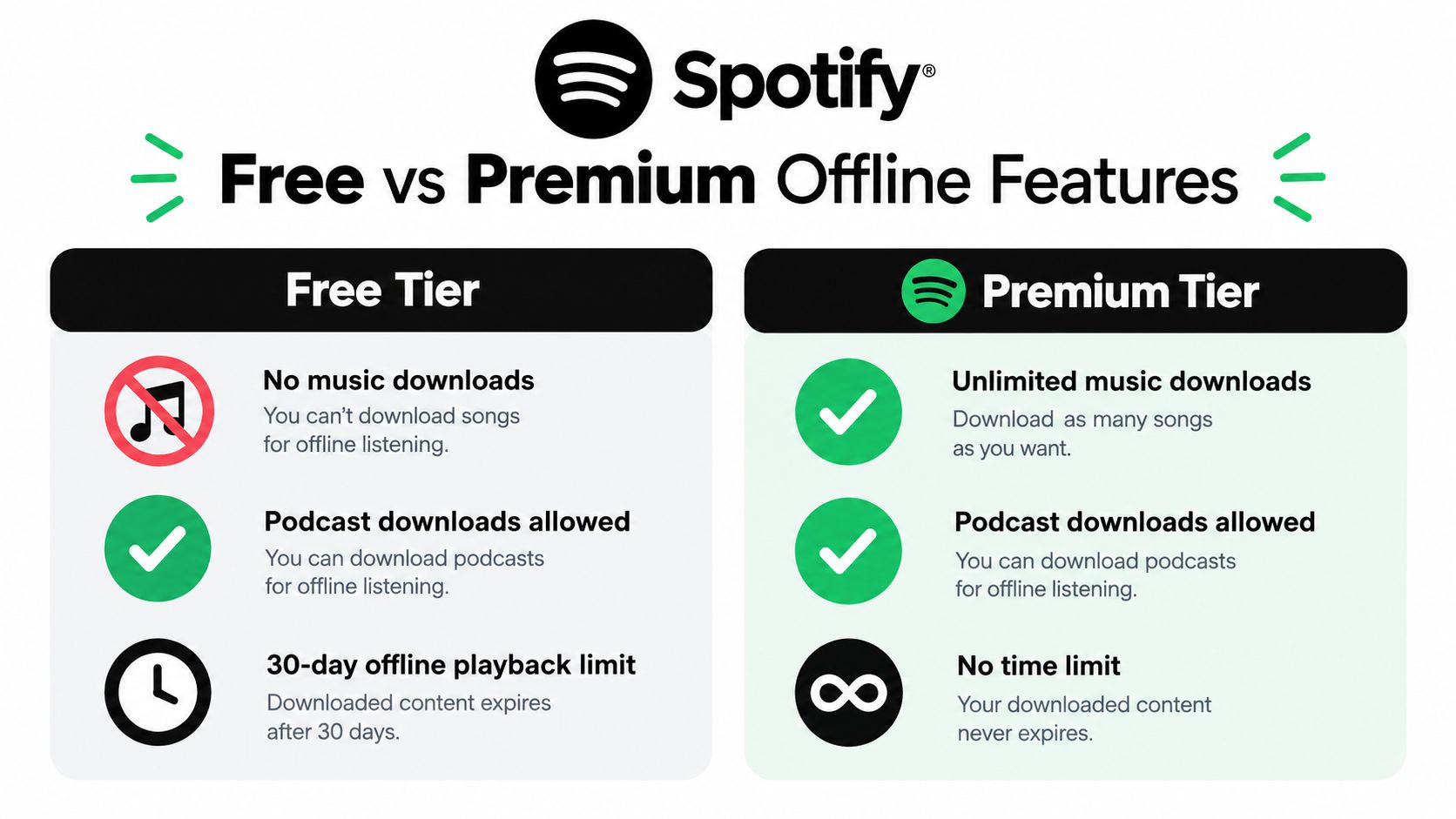
Spotify Free and Spotify Premium offer different offline options. According to Spotify's official offline-listening guidance, Free users can download podcast episodes for offline playback, while offline music downloads are unavailable on the free plan. Premium users can download albums, playlists, and podcasts inside the Spotify app.
That difference matters before a flight or a commute through an area with no signal. A free account can prepare a podcast queue, but it will not officially save Spotify's music catalog for offline listening. A playlist that plays while you are connected may still stop when the connection disappears.
The two practical paths
- Spotify Free: Download podcast episodes in the app and play them without an internet connection.
- Spotify Premium: Download albums, playlists, and podcasts for offline playback controlled by the app.
- Music you already own: Play your local files separately instead of treating them as Spotify catalog downloads.
- Unofficial downloaders: Skip them unless you accept the security, copyright, and account risks.
Spotify downloads are not ordinary MP3 files that you can export to another player. They remain tied to the Spotify app. Premium downloads also require the account to reconnect to the internet at least once every 30 days, as noted in Spotify's support guidance. For more context on app-based access, see this guide to Spotify offline music.
Use a simple decision rule. For free offline audio, choose podcasts. For Spotify music offline, use Premium or play music you legally own elsewhere.
The Myth of Free Music Downloads
There isn't an official Spotify setting that gives free users music downloads. Changing playback quality, using Offline Mode, reinstalling the app, or downloading a playlist while connected won't turn a free account into a Premium account.
Spotify's restriction isn't a technical oversight. Music availability depends on licensing arrangements, rights ownership, and the terms under which Spotify distributes recordings. Those rights affect how services can let listeners cache or save tracks, while sample clearances and related permissions create another layer of complexity, as explained in this practical music sample rights guide.
Why the hacks look convincing
Third-party sites often present a simple workflow:
- Paste a Spotify link.
- Choose an audio format.
- Download a file.
That workflow may produce something, but it doesn't make the method official or safe. A downloader can expose you to aggressive advertising, malware, fake browser alerts, credential theft, broken files, or copyright problems. It may also stop working without warning after Spotify changes its systems.
Screen recording has the same basic problem. It can capture sound in some situations, but the result is inconvenient, often poor in quality, and still doesn't make the activity an approved way to download Spotify's catalog. I wouldn't install a random downloader just to avoid planning a podcast queue or paying for music access you need.
Practical rule: If a tool promises free Spotify music downloads outside the Spotify app, treat the promise as a risk signal, not a feature.
The useful free alternative is already built into Spotify. Download podcast episodes through the app, use local music files you already have permission to play, or decide that Premium is worth the convenience for your travel routine.
Downloading and Playing Podcasts Without Paying
Spotify's free tier gives you a legitimate offline option for podcasts. The process is simple, but you need to complete it while connected and confirm that the episode has finished downloading before you leave coverage.
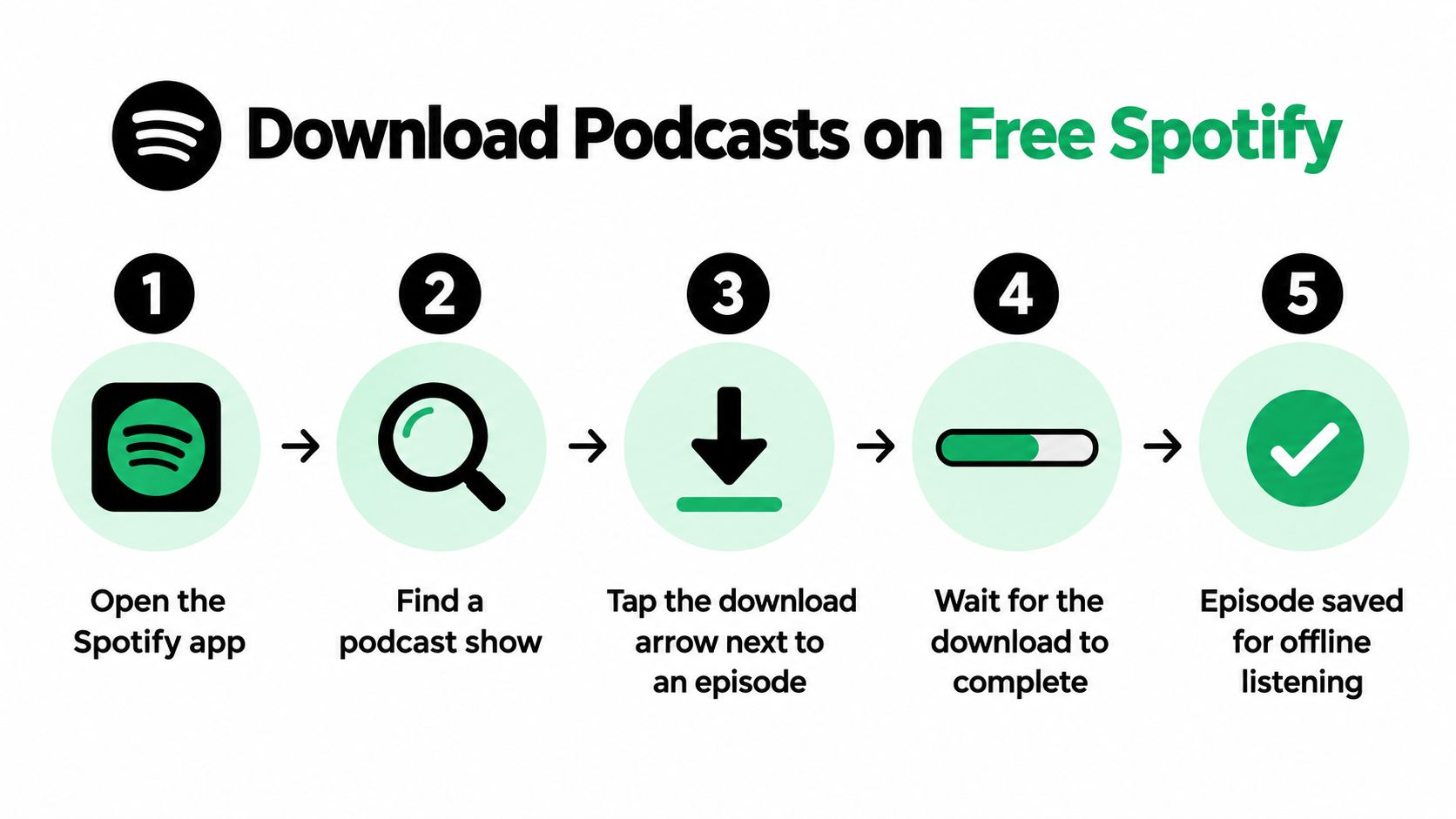
Open the Spotify mobile app and search for the podcast show you want. Open an episode, tap the download arrow beside it, and wait until the download indicator shows completion. Repeat the process for the episodes you want available during your trip.
A reliable preparation routine
Download over Wi-Fi before you leave. This avoids using mobile data and gives you time to catch an episode that fails because of weak connectivity or insufficient storage.
A student heading onto a long bus ride can save several lectures or interview episodes the night before. A runner can download a show before leaving and switch the phone to airplane mode during the workout. Someone boarding a flight should open the downloaded episodes while still connected, so the app has a chance to confirm their availability.
- Check the indicator: Don't assume an episode is ready because you tapped the arrow. Wait for the completed state.
- Test before leaving: Disconnect from the internet briefly and start one downloaded episode. This catches incomplete downloads early.
- Manage storage: Remove episodes you've finished so new downloads don't compete for space.
- Build a queue: Save a mixture of shorter and longer episodes, rather than relying on one show.
- Use Wi-Fi deliberately: Download at home, school, or another trusted connection instead of waiting until the station or airport.
Offline playback works best when you treat it as preparation rather than improvisation. Spotify Free can handle podcast listening without a connection, but it won't transform music playlists into free offline files. That boundary is exactly why podcast downloads are the sensible no-cost workaround.
Workarounds Worth Knowing About and Ones to Skip
The best workaround depends on whether you want convenience, control, or zero extra cost. These options aren't equivalent, so judge them by three questions: does it work offline, is it safe, and does it fit Spotify's documented rules?
| Method | Works Offline | Safe | Allowed |
|---|---|---|---|
| Download podcasts in Spotify Free | Yes | Yes, when using the official app | Yes |
| Download music with Spotify Premium | Yes | Yes, through Spotify | Yes |
| Third-party Spotify downloader | Sometimes | No reliable guarantee | May violate Spotify's terms |
| Screen-recording Spotify playback | Sometimes | Depends on the software | Not an official download method |
| Spotify local files you already own | Yes | Yes, if the files are legitimate | Separate from downloading Spotify's catalog |
| Shared Premium access through a group service | Yes, where the account arrangement supports it | Depends on the provider and account setup | Check the service terms |
Third-party downloaders rank poorly because they trade a subscription restriction for security and account uncertainty. They can leave you with unusable files, suspicious installers, or a compromised login. Screen recording is less attractive than it sounds because it requires real-time capture and produces a result that's awkward to manage.
Local files are a different case
Spotify's local-files feature can help you play music already stored on your computer or phone, subject to the app's supported setup. That isn't a way to access Spotify's catalog. It's a way to organize music you already own or have permission to use.
Family sharing and group purchasing also deserve careful attention. If you want music downloads but don't want to cover the entire cost alone, Spotify Premium shared access is one option to compare with an individual subscription. Read the provider's account rules, privacy terms, and access conditions before committing.
My ranking is blunt: official podcast downloads are the safest free path, local files are useful for music you already own, Premium is the cleanest full-catalog option, and third-party downloaders belong at the bottom.
Using Offline Mode and the 30-Day Rule
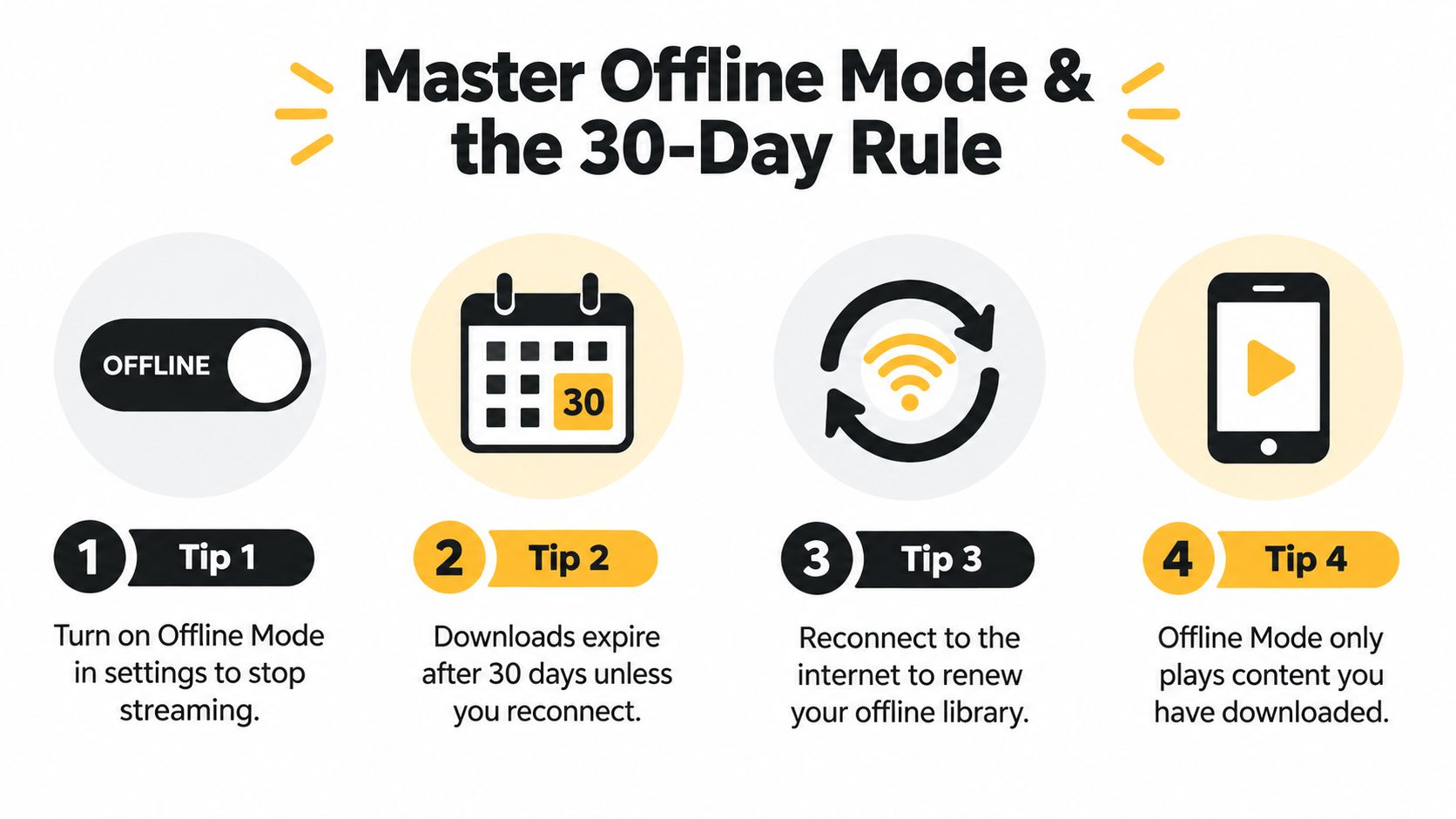
Before boarding a plane, entering a subway tunnel, or starting a workout with poor reception, download what you need and switch on Offline Mode. Spotify then stops reaching for a stream and plays only content stored on that device.
That setting also exposes any gap in your preparation. Undownloaded music or podcasts will not appear as playable offline, even if they are saved in a playlist. Test the library with Wi-Fi and mobile data disabled before leaving.
Keep downloads available while traveling
Premium downloads follow the 30-day reconnection rule covered earlier. Spotify periodically checks the account, so a trip without any internet access can eventually make stored content unavailable. If downloads expire, the app can show them as unavailable until the account reconnects and verifies access.
Spotify also permits up to 10,000 downloaded tracks on each of up to 5 devices, or a theoretical 50,000 track-download slots per account, according to its published device limits. Storage still matters because each phone, tablet, or computer holds its own downloads.
- Reconnect before extended travel: Open Spotify online before the 30-day window expires.
- Switch on Offline Mode at the right time: Use it when you want to prevent streaming and mobile-data use.
- Check the travel device: Confirm the library on the same device you will carry.
- Remove stale downloads: Delete albums or episodes you no longer need to free storage.
- Run a final test: Start a downloaded item with Wi-Fi and mobile data disabled.
For iPhone-specific controls, follow this guide to Spotify Offline Mode on iPhone. Prepare while connected, test the library, and reconnect periodically. Those steps prevent a last-minute offline failure better than relying on a playlist that was never downloaded.
Fixing the Most Common Offline Problems
Offline playback failures usually have a specific cause. Match the symptom to the fix instead of immediately reinstalling the app.
- The download won't start: Check your connection, available storage, and Spotify's download settings. Move to a stable Wi-Fi network and remove old episodes or albums if the device is full.
- A download appears unavailable: Reconnect the account to the internet. Premium downloads depend on periodic account verification, and Spotify requires reconnection within its documented 30-day window.
- Offline Mode shows little content: The app can only display content saved to that device. A playlist saved on another device doesn't automatically become available everywhere.
- Playback is silent: Check the active Bluetooth output, headphone volume, and whether another app has taken audio control. Test through the phone speaker before blaming the download.
- A podcast episode disappeared: Look at the show page and your downloads list. Some episodes may no longer be available from the publisher, even if you previously listened to them.
Quick check: Before leaving service, start one downloaded item with Wi-Fi and mobile data disabled. A ten-second test is faster than discovering the problem underground or in the air.
Choosing the Right Path Before Your Next Trip
Use this rule before you pack: free offline Spotify means podcasts or music you already own. If you want Spotify's full music catalog without a connection, Premium is the honest route, whether you choose an individual plan or compare a shared arrangement.
Avoid downloaders that promise an effortless MP3 library. They solve the wrong problem by adding security, copyright, and account concerns to a situation that already has legitimate options.
If you're traveling somewhere with unreliable mobile service, sort out connectivity separately with a practical nomad SIM card guide, then download your podcasts over trusted Wi-Fi. Test everything before departure, and don't confuse a cached screen or visible playlist with confirmed offline playback.
AccountShare offers shared access options for services such as Spotify Premium, which can make offline music features available without carrying the entire individual subscription cost alone. Compare the access terms and choose the arrangement that fits how often you travel, commute, or lose reliable service, then visit AccountShare to review the available options.