

How to Cancel Free Trial on Crunchyroll: how to cancel free trial on crunchyroll
It’s easy to forget about a free trial, but when it comes to Crunchyroll, that mistake will now cost you. In the past, forgetting to cancel just meant you’d be bumped down to the free, ad-supported tier. Those days are over.
The streaming game has changed, and understanding how it impacts your wallet is the key to avoiding those surprise credit card charges.
This is more than just a stock image; it’s a real-world reminder. Staying on top of trial end dates is crucial for keeping your finances in check.
The Ad-Supported Safety Net Is Gone
Crunchyroll made a significant shift recently by getting rid of its free, ad-supported streaming for new shows. This was a huge change that pushed millions of viewers toward needing a paid plan to keep up with the latest episodes.
What does this mean for you? There's no longer a safety net. If you forget to cancel your trial, you don't just lose access or get stuck with ads—you get charged. Studies have shown that a staggering 68% of people on streaming trials forget to cancel before the first bill hits. With Crunchyroll's Fan tier starting at $7.99, that’s a charge you want to control.
The new reality for Crunchyroll users is simple: a free trial is a direct path to a paid subscription unless you take deliberate action. Forgetting is no longer an option if you want to avoid a charge.
The First Step: Know Where You Signed Up
Before you can cancel, you have to know where you started the trial. This is the single most common tripping point. You can't cancel an App Store subscription on the Crunchyroll website, and you can't cancel a website subscription through the Google Play Store.
Think back: Did you sign up directly on the Crunchyroll website with your credit card? Or did you subscribe through the app on your iPhone, Android, Roku, or Amazon Fire TV? Your answer determines exactly where you need to go.
Quick Guide to Canceling Your Crunchyroll Trial
Find your subscription method below to see exactly where you need to go to cancel your trial. This table helps you jump to the right instructions instantly.
| Where You Subscribed | Platform to Cancel On | Best For |
|---|---|---|
| Crunchyroll Website | Your Crunchyroll account page in a web browser. | Users who signed up with a credit card or PayPal directly. |
| Apple App Store | Your iPhone/iPad's Settings app or the App Store. | Anyone who subscribed through an iOS device. |
| Google Play Store | The Google Play app or play.google.com. | Users who subscribed through an Android device. |
| Roku | Your Roku device or my.roku.com. | Anyone who signed up directly on their Roku player. |
| Amazon Appstore | Your Amazon account's "Memberships & Subscriptions." | Users who subscribed on a Fire TV or Fire Tablet. |
Pinpointing your sign-up source is the critical first move. Once you've identified it, you can follow the specific steps to cancel without any guesswork.
Take Back Control of Your Subscriptions
This isn't just about one anime service; it’s about building smarter financial habits. Actively tracking trial end dates and ditching unwanted services is a powerful way to manage your budget.
When you know where your money is going, you're in control. Learning about practical strategies to reduce monthly expenses can help you plug these small leaks before they drain your bank account. The following sections give you the exact steps to cancel your Crunchyroll trial, no matter how you signed up.
Canceling Your Trial Directly on the Crunchyroll Website
If you signed up for your Crunchyroll free trial with a credit card on your computer or phone's web browser, this is the most straightforward way to cancel. You're going straight to the source, which means you don't have to navigate through third-party app stores like Apple or Google.
Cutting out the middleman puts you in direct control. The whole process takes just a few clicks within your account settings on the official Crunchyroll site. Let's walk through it so you know exactly where to go and what to expect.
Finding Your Subscription Settings
First thing's first: open a web browser and head over to the Crunchyroll website. Get yourself logged in.
Once you're on the main page, find your profile icon in the top-right corner. Give that a click, and a little dropdown menu will appear. From that list, you’re looking for My Account. Think of this as the command center for your profile, billing, and membership details.
After landing on the "My Account" page, glance over to the navigation menu on the left. You'll want to click on Membership Plan. This is the key screen—it shows your current subscription, when it renews (or when your trial ends), and is exactly where you'll go to cancel.
The Final Clicks to Cancel
On the "Membership Plan" page, Crunchyroll usually has a pretty clear button or link that says Cancel Membership. Click it.
Don't be surprised if a pop-up appears asking why you're leaving or offering you a special deal to stay. This is a totally standard retention tactic. You can fill it out if you want, but you can also just skip it and confirm you want to proceed with the cancellation.
After you confirm, you should land on a final page that explicitly says your membership has been canceled.
Crucial Tip: Don't just close the tab. Wait until you see that final confirmation message on your screen. This is your proof that the process actually went through and you won’t get a surprise charge on your card.
This might seem simple, but it’s a hurdle millions of users face every year. Crunchyroll’s subscriber count blew past 15 million paying users by August 2024, but many of those started as free trials. In fact, data showed that in 2024, an estimated 4.5 million users were hit with unexpected charges from free trials they forgot to cancel. You can read more about Crunchyroll's incredible growth and what it means for anime fans.
As a final step, check your email. Crunchyroll should send a confirmation message right away. If you don't see it, check your spam folder. Hang onto that email—it’s your official record that you ended the trial on time, which can be a lifesaver if any billing disputes come up later.
So, you signed up for that Crunchyroll free trial directly through the app on your phone? This is a common trip-up. If you used your iPhone or Android to start the trial, Crunchyroll doesn't actually handle your billing. It's all managed by Apple or Google, which means you have to cancel it through them, too.
Trying to cancel on the Crunchyroll website when you're billed by Apple will get you nowhere. You're just spinning your wheels because Crunchyroll literally can't stop a payment processed by a different company.
How To Cancel on an iPhone or iPad
If you're on an Apple device, your subscription lives inside your main Settings. It's a few taps away, but you have to know where to look.
First, open the Settings app. You’ll want to tap on your name right at the top, where it shows your Apple ID. From there, go into the Subscriptions menu. You'll see a neat list of everything you're subscribed to. Just find Crunchyroll, tap it, and hit the big Cancel Free Trial button. Confirm your choice, and you're done—Apple takes care of the rest.
Tackling Cancellation on an Android Device
For the Android crowd, your destination is the Google Play Store. This is where Google keeps all of your subscription details locked down.
Open the Play Store app and tap your profile icon in the top-right corner. A menu will pop up; from there, select Payments & subscriptions. This is your command center for anything billed through Google.
Now, tap on Subscriptions. You'll see a list of all your active services. Find Crunchyroll in the list, tap it, and then choose the Cancel subscription option. Just follow the final prompts, and Google will prevent the charge.
The Golden Rule: Always cancel where you pay. If your bank statement says "Apple" or "Google," that's where you need to go to manage the subscription. This applies to almost any app, not just Crunchyroll.
The flowchart below shows the much simpler path for canceling if you signed up directly on the Crunchyroll website, which is a completely different process.
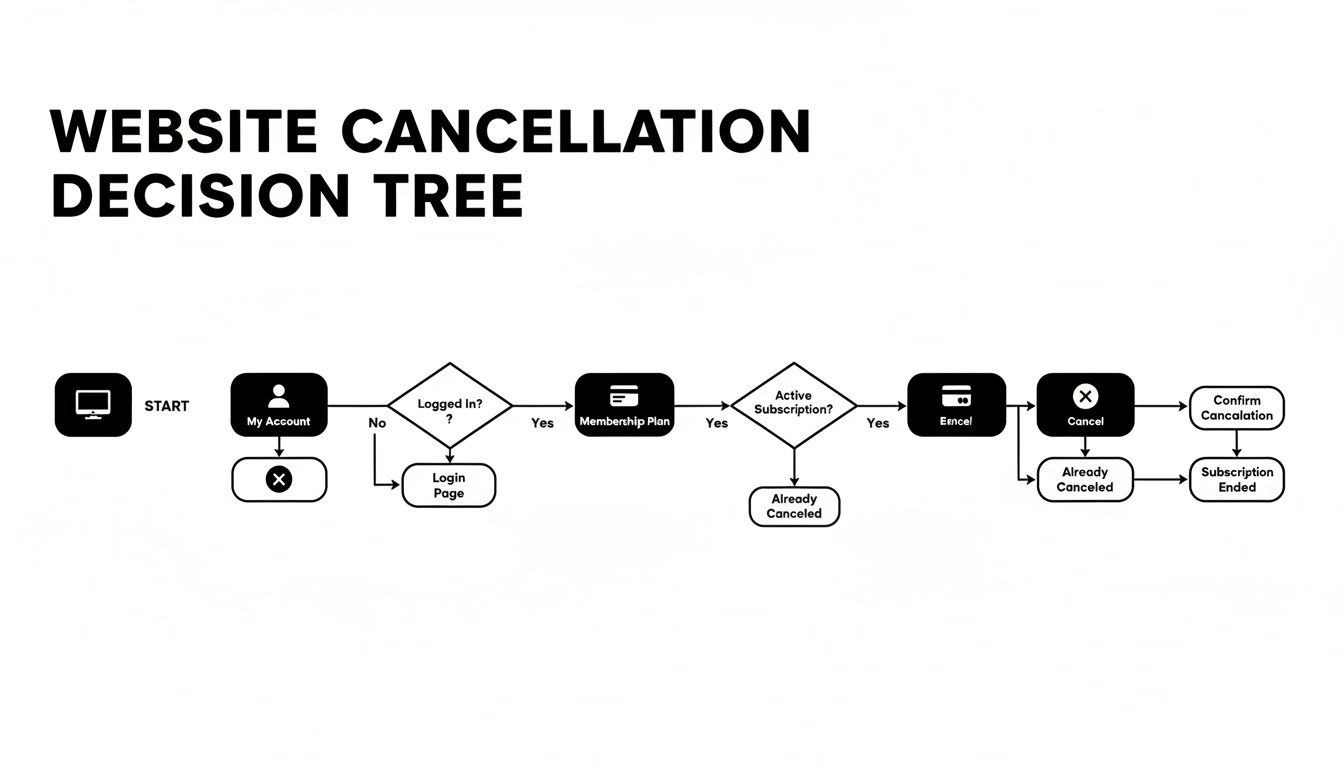
As you can see, knowing how you signed up is the most important piece of the puzzle. It determines your entire cancellation path.
Direct vs Third-Party Cancellations Explained
Understanding the key differences between canceling directly with Crunchyroll and going through a service like Apple or Google is crucial for success. This table breaks it down.
| Feature | Direct Crunchyroll Cancellation | Third-Party (Apple/Google/Roku) Cancellation |
|---|---|---|
| Location | Your account page on the Crunchyroll website. | Your device's central subscription settings (e.g., Apple ID, Google Play). |
| Control | Crunchyroll has full control over billing and cancellation. | The third-party platform (Apple, Roku, etc.) controls the billing. |
| Customer Support | Contact Crunchyroll support for any issues. | You must contact Apple, Google, or Roku support for billing problems. |
| Confirmation | You receive a cancellation confirmation email directly from Crunchyroll. | Confirmation comes from the third-party platform, not Crunchyroll. |
Ultimately, third-party billing adds an extra layer of management you have to be aware of. It's convenient for signing up but requires you to remember which company is actually handling your money.
What If I Subscribed on Roku or Amazon?
The same rule applies to streaming devices. If you kicked off your trial using a Roku, you'll need to log into your Roku account on their website to manage it. Started it through an Amazon Fire TV? You'll have to head over to your Amazon account and find the "Memberships & Subscriptions" page.
It's shockingly easy to forget where you've subscribed to a service. If you're drawing a blank, our guide on how to check subscriptions can help you hunt down all your active payments. Keeping tabs on these third-party subscriptions is the best way to avoid those surprise charges.
What Happens After You Cancel
So, you've gone through the steps and hit that final confirmation button. What now? The best part is that canceling your Crunchyroll free trial doesn't mean the anime marathon stops immediately. You still get to enjoy all the premium features right up until the last day of your trial period.
Think of it this way: if you signed up for a 14-day trial and canceled on day ten, you've still got four more days of ad-free viewing. This is a really fair policy that lets you explore the service without the stress of remembering to cancel at the last possible second. It’s all about making sure you don't get charged while still getting the full experience.
Confirming Your Cancellation Is Successful
Never just assume the cancellation worked. Taking a minute to double-check can save you a world of frustration later on. A little verification now brings a lot of peace of mind.
You have two easy ways to confirm everything is sorted:
- Check Your Subscription Status: Head back to the same menu where you just canceled. On the website, this would be your "Membership Plan" section. In an app store, it's the main subscriptions list on your device. It should now clearly say "Canceled" or list an expiration date without any mention of renewal.
- Look for the Confirmation Email: This email is your golden ticket. Crunchyroll, Apple, or Google will send a message confirming the cancellation. If you don't see it in your inbox within a few minutes, have a peek in your spam or junk folder just in case.
Key Takeaway: Don’t delete that confirmation email! If a billing error ever occurs, this email is your proof to customer support that you canceled on time and should get a refund.
Recent data on streaming cancellations really drives this point home. A lot of people think they've canceled, only to be surprised by a charge because they never confirmed it went through. Thankfully, Crunchyroll's system is pretty quick, usually sending that confirmation email in under five minutes, which helps cut down on billing headaches compared to some other services. You can discover more insights about streaming service trends and how different companies are handling these things.
Common Cancellation Mistakes to Avoid
Knowing how to cancel free trial on Crunchyroll is just as much about knowing what not to do. It's surprisingly easy to fall into a couple of common traps that lead to an unexpected bill.
The biggest mistake by far is simply deleting the app. Tossing the Crunchyroll app off your phone or tablet does absolutely nothing to your subscription. The billing agreement isn't with the app; it's with the platform you signed up through—be it Crunchyroll's site, Apple, or Google. You will still be charged.
Another pitfall is thinking a declined payment will solve the problem. If your card gets declined, the system will almost certainly try charging it again, and again. This doesn't cancel your subscription—it just kicks the can down the road and can cause problems with your account. You have to go through the official cancellation process to truly stop the billing.
A Smarter Way to Enjoy Premium Anime
So you've mastered the art of managing your Crunchyroll trial. That's a great skill to have, but what if you could keep all the premium perks without paying the full price or worrying about another trial deadline sneaking up on you?
Let's be real, juggling multiple subscriptions is a headache. It's what people call "subscription fatigue," and it happens when the monthly bills and mental energy of managing everything just become too much. It’s a super common problem, but there's a much more sustainable way to handle it.
Instead of footing the entire bill for a premium plan yourself, you can legally and safely share the cost. This approach lets you enjoy all the good stuff from a top-tier subscription, like Crunchyroll’s Mega Fan plan, for just a fraction of what you'd normally pay. It's a fantastic solution for anyone who loves anime but also loves being smart with their money.
Joining a Shared Premium Plan
This is where platforms like AccountShare come in. They're designed to connect people who want to split the cost of a single, shareable subscription. Think of it like a carpool for your digital services—instead of everyone paying for their own gas and driving alone, you all ride together and split the bill. It's cheaper and way more efficient for everyone.
You can easily join an existing group that already has a premium plan up and running. Once you do, you get immediate access to all the features you want, like:
- Ad-Free Streaming: Finally, no more ads breaking the tension in the middle of a big fight scene.
- Multiple Device Streaming: Perfect for families or households where everyone wants to watch on their own screen at the same time.
- Offline Viewing: Download episodes and take them with you. It’s a lifesaver for commutes or flights.
This isn't some shady workaround; it’s a legitimate service built specifically for cost-sharing. It’s perfect for students on a tight budget, families sharing access across different devices, or really any anime fan who wants maximum value without the full-price commitment.
This collaborative approach turns a $9.99/month solo expense into a much smaller, more manageable cost—often just a few bucks. It’s the difference between buying the whole pizza yourself and just chipping in for your slice.
By sharing, you get the complete premium experience without the premium price tag. All the perks of the Mega Fan tier—from exclusive content to offline downloads—are suddenly affordable and easy to access. This is a practical, long-term solution that goes way beyond just knowing how to cancel free trial on Crunchyroll.
It’s all about finding a way to enjoy premium anime that actually fits your budget. You can learn more about the specific advantages you unlock when you explore all the Crunchyroll premium benefits that come with a shared plan. It’s a smarter way to manage your entertainment costs while still getting everything you want from your favorite streaming service. Best of all, this strategy completely removes the stress of forgetting to cancel a trial, because you’re already on an affordable plan you can stick with.
Your Crunchyroll Cancellation Questions Answered
Even with the best instructions, you might still have a few questions rattling around. It's totally normal. Let's clear up some of the most common concerns people have when they decide to end their Crunchyroll trial.
Think of this as the final check-in to make sure you're completely in the clear.
Will I Lose Access Immediately If I Cancel My Free Trial?
Nope, you're good. Canceling your free trial doesn't slam the door shut right away. You can keep binging all the premium content right up until the last day of the trial period.
So, if you sign up for a 14-day trial and cancel it on day five, you still have nine more days of glorious, ad-free anime. All canceling does is tell Crunchyroll not to charge your card when the trial officially ends.
What Are My Options If I Was Charged by Mistake?
This is a really common frustration, and it's an easy mistake to make. The first thing you need to do is track down your proof of cancellation. Dig through your inbox for that confirmation email or find a screenshot of your updated subscription status.
If you can't find any proof, it’s likely the cancellation didn't go through properly. Your next step is to contact Crunchyroll support directly through their website's help center. Just be calm, explain what happened, and have your account details ready. While refunds are never a sure thing, having solid evidence puts you in the best possible position.
Pro Tip: Don't wait on this. The faster you report an accidental charge, the better your chances are of getting it sorted out. Letting it sit for a few weeks only makes things more complicated.
Can I Resubscribe After Canceling a Trial?
Absolutely. Hitting cancel on a trial doesn't torch your account. All your important stuff—your watch history, your carefully curated queues, and any custom lists—will still be there waiting for you.
You can log back in whenever you want and jump onto a paid plan. Just keep in mind that the free trial offer is usually a one-time deal for new accounts, so you probably won't be able to get another one.
Does Deleting the Crunchyroll App Cancel My Subscription?
This is a huge one, so please pay attention: deleting the app does not cancel your subscription. It's probably the single biggest mistake people make, and it almost always leads to an unexpected credit card charge.
When you remove the app from your phone or Roku, it does absolutely nothing to the billing agreement you made through Crunchyroll, Apple, or Google. The subscription is still active and will roll over into a paid plan. To stop the payments, you have to follow the formal cancellation steps for the platform you signed up on. It's a small detail, but learning how to properly cancel unwanted subscriptions is a crucial skill for keeping your finances in order.
Ready to enjoy premium anime without the full cost or subscription stress? At AccountShare, we make it easy to join shared premium plans, giving you all the benefits of a Mega Fan account for a fraction of the price. Stop worrying about trial deadlines and start enjoying your favorite shows. Explore shared plans on AccountShare today!