
How Do I Cancel Paramount Plus Subscription 2026
Cancel Paramount+ through the company that bills you, not by deleting the app; access usually lasts until the paid period or trial ends, and fees already paid generally aren't refunded. Check the merchant on your latest receipt or bank statement first, then cancel through that company's account settings.
You might watch Paramount+ on a living-room TV but see the charge on a phone-store receipt. The TV is where you watch, not necessarily where you subscribed. Finding the biller first helps you reach the right cancellation page and avoid leaving a renewal active.
Find the Company That Bills Paramount Plus
The merchant on your receipt picks the cancellation page. Check your latest receipt, bank statement, or subscription list before selecting any cancel button. Paramount+ subscriptions can be billed directly or through app stores and partners, so cancelling on the Paramount+ website won't necessarily stop a plan managed by another company, as Paramount+ explains in its subscription guidance.
| Billing source | How it shows on a statement | Where you cancel | Who owns the charge |
|---|---|---|---|
| Paramount+ website | Paramount or Paramount+ | Account page, Cancel Subscription | Paramount+ |
| Apple App Store | Apple, iTunes, or App Store | Apple ID Subscriptions | Apple |
| Google Play | Google Play or Google | Play Store Payments and subscriptions | |
| Amazon | Amazon or Prime Video Channels | Memberships and Subscriptions or Channels | Amazon |
| Roku | Roku | Roku account subscriptions | Roku |
| Cable or partner bundle | TV or bundle provider name | That provider's account | The partner |
| Gift card funded | Paramount gift card | The billing account that holds the plan | Paramount+, with any Paramount-determined refund credited to a gift card |
Match the receipt to one route
Choose the row that matches the merchant, then use that provider's subscription settings. If the charge says Apple, for example, cancel under the Apple ID that received the subscription receipt, even if you usually watch on a Roku or smart TV. For a bundle, use the TV, satellite, or live-TV provider's account rather than the Paramount+ app.
If you're unsure which subscriptions are billed through your accounts, this guide to checking subscriptions can help you look for them. A merchant name on a bank statement may be abbreviated, so compare it with the receipt or the payment history in the relevant store account.
Deleting Paramount+, signing out, or removing your payment card doesn't cancel recurring billing. You need to complete cancellation with the billing provider and check that it records the plan as cancelled or shows an end date.
Security check: Paramount+ says customers can cancel directly without a cancellation fee. Don't hand over your login or personal information to an outside service that offers to cancel for you.
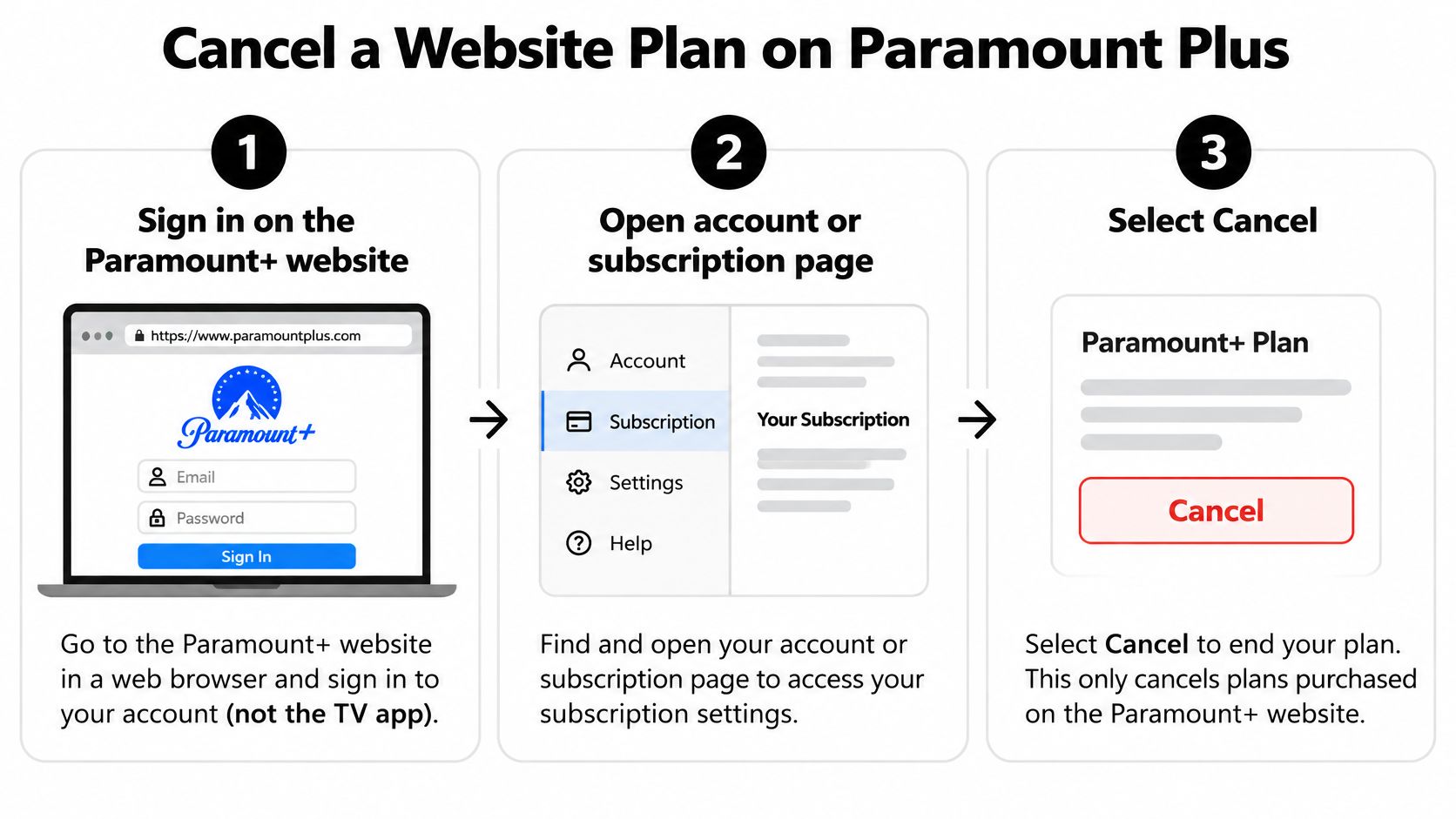
Cancel a Website Plan on Paramount Plus
This path is for a subscription purchased directly from the Paramount+ website. If Apple, Google Play, Amazon, Roku, or another partner bills you, use that provider's cancellation settings instead.
- Sign in on the Paramount+ website in a browser. A TV app may let you watch, but it's not the right place to manage a website-billed plan.
- Open your account or subscription page. Look for the account settings tied to your subscription.
- Select “Cancel Subscription.” Paramount+ documents this link as the starting point for cancelling a direct website plan.
- Follow the on-screen prompts. If the page displays a save offer, continue through it if you still want to end the renewal.
- Save the confirmation. Keep the confirmation email or take a screenshot of the cancelled status and the date access ends.
Know which date ends access
Cancelling usually stops the next renewal, not your access right away. Paramount+ says a direct website subscription generally remains available through the current billing period, and fees already paid aren't refunded; see its website cancellation instructions. In other words, the button confirms you're ending future billing, not that your paid access has already disappeared.
A promotion can have a different practical end date than you expect. If you cancel during a promotional offer, access may end at the close of the current billing period rather than at the end of the longer promotional period. Read the date shown on the account page and use that as your guide.
Paramount+ identifies a 7-day free trial in Australia, France, Germany, Italy, the United Kingdom, and Ireland. Cancellation takes effect at the end of that trial. If the Cancel Subscription link isn't there, don't keep repeating the same steps. Check the statement merchant again, because a store or partner may manage the plan.
A completed cancellation should leave a clear sign, such as a cancelled status or an “ends on” date, rather than a next renewal amount. Save that proof before closing the page.
Cancel in Apple Google Amazon or Roku
If a store billed you, cancel inside that store's account. The device you use to watch doesn't decide which company can stop the charge. Follow the path for the merchant on the receipt, then capture the store's confirmation before leaving.
- Apple: On an iPhone or iPad, open Settings, tap your name, then Subscriptions. Select Paramount+ and tap Cancel Subscription. On a Mac, manage it through the App Store account's subscriptions page. If the plan doesn't appear, check which Apple ID received the receipt or whether a family organizer manages the subscription.
- Google Play: Open the Play Store, tap your profile icon, then select Payments and subscriptions, Subscriptions, and Paramount+. Choose Cancel subscription and follow the prompts. A plan connected to another Google account won't show in the account you're currently viewing.
- Amazon: Open Memberships and Subscriptions or Prime Video Channels, find Paramount+, and cancel the membership or turn off the channel. Amazon handles the charge if Paramount+ was added through its channel service.
- Roku: Sign in to your Roku account, open your subscriptions, select Paramount+, and cancel. Confirm the status or end date shown in the Roku account.
Take a screenshot of the store page showing a cancelled status or an expiration date. A screenshot of the button before you select it doesn't prove that cancellation finished.
Cable, satellite, and live-TV bundles use the provider's own account page rather than these app-store menus. For other recurring charges you're trying to track down, this subscription cancellation guide offers another place to check common cancellation routes.
Confirm the End Date and Refunds
A paid Paramount+ plan usually stays watchable until the current billing period ends. Cancelling stops the next renewal; it doesn't usually end access immediately. A free trial generally runs until its stated end date after cancellation, while fees already paid are generally nonrefundable unless a legal requirement or specific applicable exception applies, as described in the Paramount+ terms of use.
Cancel when you decide to stop, rather than waiting until the final evening of the cycle. That leaves room to handle a missed confirmation, a store-processing delay, or a difference between the time shown on your account and the renewal cutoff. The remaining paid days don't disappear just because you cancel early.
Make three checks before you leave
- Check the provider's status page. It should show that the plan is cancelled or give an end date. If the account still says “renewing,” the cancellation may not have completed.
- Look at the next payment line. Confirm that no upcoming renewal amount is listed. If it still shows a scheduled charge, return to the biller's account and finish the cancellation.
- Save the last day of access. Add the date to a calendar and keep the confirmation. If other people in your household use the account, let them know when access ends rather than changing shared login details early.
Deleting the app, signing out, removing a saved card, muting notifications, or pausing downloads doesn't stop recurring billing. Make sure the subscription status itself shows the change.
Know where a refund goes
Don't assume an automatic refund will follow cancellation. Paramount+ generally doesn't refund fees already paid, subject to legal or specifically applicable exceptions. For a gift-card-funded plan, a refund Paramount+ determines is due is issued as account gift-card credit, not necessarily returned to a bank card.
If you're reviewing other entertainment costs while deciding what to keep, you can also compare the cost of Paramount+. Keep the cancellation confirmation with the end date. If a charge appears after a confirmed cancellation, send that proof to the company that processed the payment.
Stop a Renewal That Still Goes Through
A charge after cancellation needs a quick comparison: check when it posted against the confirmation time and the end date. If the charge came after cancellation was confirmed, send the evidence to the biller that took the payment, since that company holds the billing record.
| What you see | Likely cause | What to do |
|---|---|---|
| Charge after a confirmation | Renewal posted before cancellation, or a different account was cancelled | Send the confirmation to the biller that charged the card |
| No cancel link on the website | A store or partner bills the plan | Match the statement and cancel there |
| Store still says renewing | Cancellation wasn't finished, or a family organizer owns the plan | Have that account owner cancel and save the end date |
| Access ended the same day | A trial or promotion closed with the current period | Confirm that no future charge is scheduled |
| A service offers to cancel for you | An unaffiliated service is pitching cancellation | Don't share your login; cancel through the billing account |
A missing cancellation link on Paramount+ usually means you're looking in the wrong account, not that the charge can't be stopped. Find the merchant on the receipt and open that company's subscription settings. If a store page still shows “renewing,” check whether a different Apple ID or Google account owns the plan, or whether a family organizer needs to cancel it.
If access disappears on the same day, check the stated end date and the next payment status before treating it as a billing error. A trial or promotion may end with the current period, but the important confirmation is whether another payment is scheduled.
Ignore cancellation offers that ask you to pay an outside service or share your password. Keep the order email, the last four digits of the card, screenshots of the account status, and the date access was supposed to end. For an account-side issue, contact Paramount+ support with the order email and end date; for a charge, contact the store or partner named on the statement. Use a bank dispute only after the billing platform refuses to address a charge that posted after confirmed cancellation. If you're also cleaning up other recurring charges, this guide to cancelling unwanted subscriptions can help you organize the next steps.
AccountShare helps people access selected digital subscriptions through group purchasing, which can be useful if you're comparing lower-cost options after cancelling a service. Review the available plans and terms, then visit AccountShare to see what fits your needs.