
Custom Access Security for Shared Accounts
You're probably sharing something right now. A streaming login with family, a software subscription with classmates, or a work tool with a small team. It works, until someone changes a setting, a device you don't recognize appears, or you realize you can't remove one person without changing the password for everyone. Custom access security fixes that problem by giving each person a defined identity, limited permissions, and access you can revoke.
Why Shared Passwords Create Hidden Risk
Three friends split a streaming subscription. One person creates the account, picks a password, and sends it to the group chat. Everyone signs in within minutes, and nobody thinks about it again. That's the appeal. One password feels fast, friendly, and fair.

The trouble starts later. If the plan upgrades itself, who approved the charge? If a profile disappears, who deleted it? If one friend moves out or falls out with the group, how do you remove only that person? With one shared password, you usually can't. You change the password for everyone, hope old sessions end, and redistribute the new secret. That's disruption, not control.
One Key Copied Too Many Times
Think of a shared password as a master key that's been copied at the hardware store. Every copy opens every door. The holder can watch content, change the email address, update billing details, add devices, and sometimes lock the original owner out. The system also can't tell copies apart, so activity logs show the account acting, not a specific person.
This isn't a rare edge case. Verizon's 2025 Data Breach Investigations Report on credential abuse found credential abuse was the leading initial access vector in 22% of analyzed breaches, while third-party involvement rose from 15% to 30%. Shared credentials widen that third-party circle every time they're forwarded, saved in a chat, or reused elsewhere.
- Ownership blurs: Anyone with the password may be able to change recovery details.
- Billing blurs: You can't always prove who upgraded, rented, or bought something.
- Revocation blurs: Removing one person often means disturbing everyone else.
Sharing access is not the problem by itself. Uncontrolled credential sharing is. Custom access security replaces that single all-or-nothing key with separate identities, defined permissions, and sessions that expire. Not every platform supports the same controls, so part of staying safe is knowing what to ask for. If a shared login is already circulating, it's worth reviewing practical steps for account takeover prevention before you invite anyone else.
Understanding Custom Access Security
Custom access security is easier to grasp if you picture a house instead of a login screen. You wouldn't give a house sitter, a teenager, and a plumber identical keys with no time limits. You'd decide who each person is, which doors they can open, what they can do inside, and when their key stops working. Digital access works the same way when it's designed well.
Five Ideas That Build on Each Other
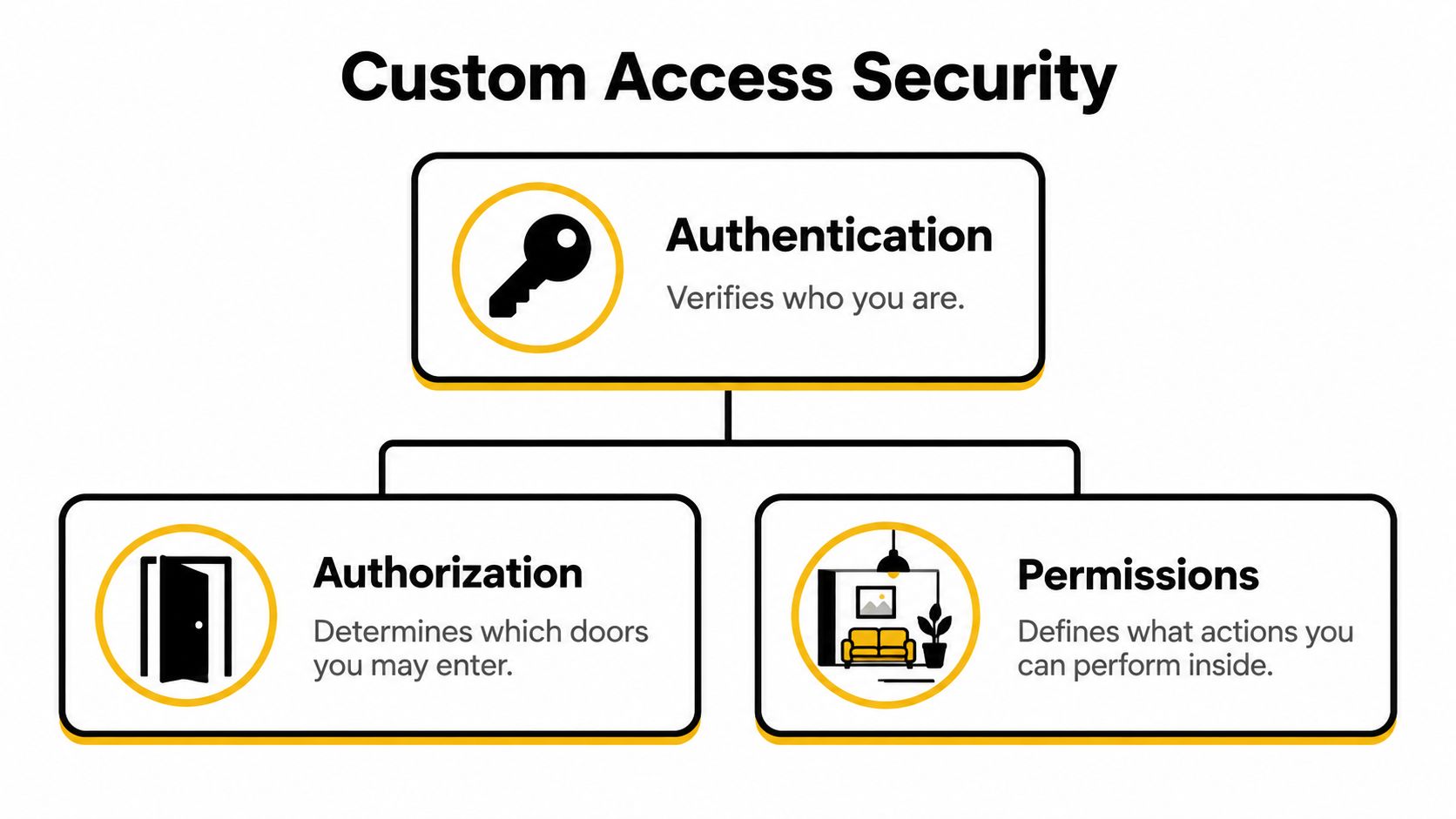
Authentication answers who you are. It's showing ID at the door, using a password, a passkey, or another proof that you're the person you claim to be. Authorization comes next. It decides which doors you may enter once your identity checks out. Proving you're Maya doesn't automatically mean Maya should reach billing settings.
Permissions narrow things further. Inside a room, you might be allowed to look around but not rearrange the furniture. In a shared account, that means viewing content without changing the plan. Resource-level rules apply those permissions to a specific service, profile, file, or workspace rather than the whole account. Session controls decide how long your key works before you must prove yourself again.
| Control | Question It Answers | Shared-Account Example |
|---|---|---|
| Authentication | Who is this person? | Maya signs in with her own passkey |
| Authorization | Which service can she reach? | Maya can open the streaming plan, not the AI workspace |
| Permissions | What can she do there? | She can watch and create a profile, not change billing |
| Session controls | How long does access last? | Her login expires and can be revoked if she leaves |
A useful distinction: Authentication proves identity. Authorization decides access. Confusing the two is how a verified person ends up with far more power than anyone intended.
Here's where readers often get tripped up. Changing a shared password doesn't always end access that's already active. If someone's signed in on a TV or laptop, that session may keep working until it expires or gets revoked. That's why custom access security separates four things people often lump together, namely identity, access, data visibility, and accountability. Each one needs its own rule, and each rule should be removable without rebuilding the whole house.
Comparing RBAC, ABAC, and Tokenized Access
Once you stop copying the master key, you need a system for deciding who gets which key. Three models cover most shared-account situations. None of them is automatically best. The right choice depends on how predictable your group is, how often membership changes, and how sensitive the actions are.
Role-Based Access Control
Role-based access control, or RBAC, assigns permissions through roles such as owner, administrator, member, or viewer. You define what a member can do once, then place people into that role. It's simple to explain and simple to audit, which is why it suits stable groups. A family can keep one adult as billing owner while everyone else holds a standard viewing role.
RBAC struggles when real life gets specific. A role can't easily say a student may use a tool on a school laptop during term time but not on an unknown device at midnight. Roles also tend to accumulate permissions over time, a problem often called privilege creep. For a grounded example of roles applied outside tech companies, this guide to keep church data secure with RBAC shows how predictable responsibilities map neatly to role templates.
Attribute-Based Access Control
Attribute-based access control, or ABAC, evaluates details about each request. It can consider who's asking, what resource they want, what action they're attempting, which device they're using, where they're connecting from, and what time it is. That flexibility fits temporary and context-sensitive sharing, such as granting a contractor access to one project until a deadline.
The trade-off is complexity. More conditions mean more rules to write, test, and explain when someone gets blocked. OWASP guidance on authorization design and least privilege recommends mapping users, resources, and operations during design, granting only minimum permissions, evaluating resource-level checks on every request, and recording authorization decisions in immutable audit logs. That discipline matters more as rules multiply.
Tokenized Access
Tokenized access separates the access you hand someone from the underlying master credential. Instead of revealing the underlying password, the system issues a token or managed session that represents limited access. Done well, the token expires, can be revoked for one person, and never exposes the secret that controls the whole account.
A token isn't magic, though. Its value depends on enforcement, expiration, and recovery design. A token that never expires or can't be revoked is just a password with a friendlier name.
| Model | How It Decides | Best-Fit Scenario | Main Caution |
|---|---|---|---|
| RBAC | By assigned role | Families and stable teams | Roles can grow too broad |
| ABAC | By user, resource, device, time, and context | Temporary or sensitive sharing | Rules get hard to manage |
| Tokenized access | By an issued, revocable token | Sharing without exposing the master password | Weak expiration undermines it |
Start with the simplest model that matches your actual sharing pattern. Many groups combine them, using roles for everyday access and attribute checks for sensitive actions. If you're weighing options, comparing common access control methods side by side helps you match the model to your group instead of adding complexity to sound secure.
Protecting Privacy Inside Trusted Groups
Most security advice focuses on outsiders stealing passwords. Shared accounts raise a different question. What happens when everyone is technically authorized, but they don't expect to see the same things? Trusting someone to use a subscription doesn't mean trusting them with your viewing history, saved prompts, personal files, or payment details.

That gap shows up quickly. A shared AI workspace may expose conversation history and uploaded documents. A streaming account reveals what someone watched and when. A collaborative app can show usage patterns, saved cards, and profile details. None of that requires a breach. It only requires access that was granted too broadly.
Confidence is already fragile. Consumer Reports survey findings on confidence in personal data privacy found that only 32% of surveyed Americans were at least somewhat confident that their personal data was private, down from 48% the previous year. Shared accounts shouldn't make that worse by treating authorized access as unlimited visibility.
Authorization answers whether an action is allowed. It doesn't answer whether every participant should see the same data.
Questions to Settle Before You Invite Anyone
- Profiles: Does each person get a separate profile, history, and saved items?
- Visibility: Which activity can other members or administrators see, if any?
- Recovery: Can an administrator reset access without reading someone's content?
- Disputes: If members disagree about a change, what records settle it?
- Departure: What gets deleted or transferred when someone leaves?
Regulated settings make this separation even clearer. People who need to find HIPAA compliant autism tools face strict expectations about who can view sensitive information, and that same mindset helps any shared group. You separate access to the service from exposure of personal data inside it.
Write these expectations down before invitations go out, then review them when membership changes. Consent prompts, per-user profiles, and selective visibility protect relationships as much as data. For the rules side of that conversation, reviewing privacy and compliance basics for shared accounts gives your group shared language before a disagreement forces the issue.
Configuring Permissions Without Creating Friction
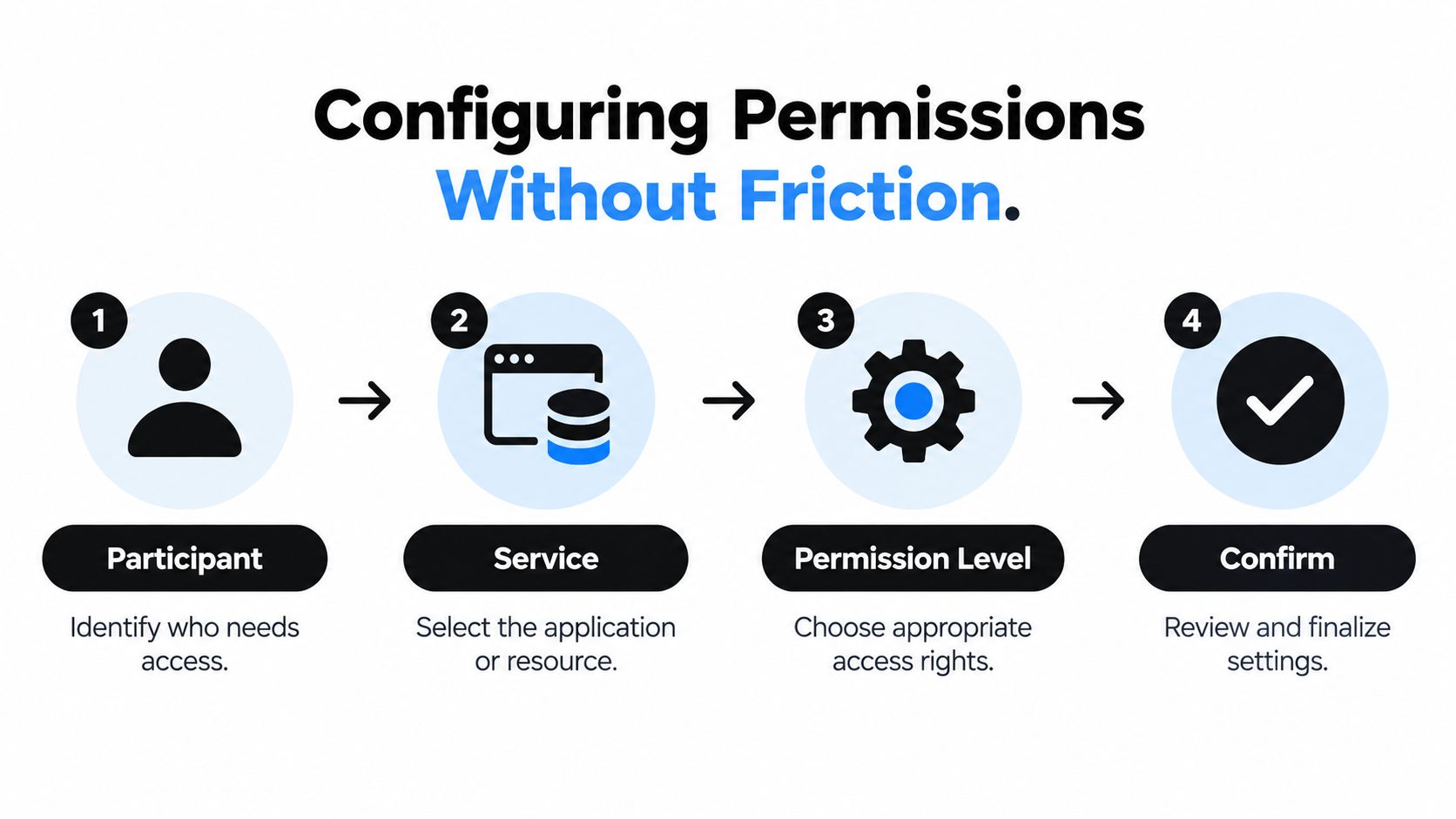
Good custom access security shouldn't make people beg for approval every day. The goal is quiet automation. Rules handle routine access, expiration handles temporary access, and extra checks appear only when risk or sensitivity rises. You can build that pattern in a sequence, even if your platform's exact settings differ.
Start With an Inventory
List every participant, every service, and every action that matters. Don't write vague labels like full access or safe access. Write concrete pairs, such as Jordan can use the design tool but can't invite members, or Priya can view invoices but can't change payment methods. That inventory becomes the source your permissions are built from.
Next, apply least privilege with deny-by-default decisions. Nobody gets an action unless a rule grants it. In keys-and-doors terms, every door starts locked, and you cut keys only for rooms someone needs. Where a platform allows it, keep policy decisions separate from ordinary application settings so rules are evaluated consistently on each request, not trusted because a session exists.
Add Expiration and Strong Authentication
Temporary access should expire on its own. A guest, a short-term student, or a contractor shouldn't depend on someone remembering to remove them weeks later. Automatic expiration also reduces friction, because nobody has to chase approvals or wonder whether old access is still floating around.
For owners, administrators, and anyone changing billing, passwords, devices, or sharing settings, use phishing-resistant authentication where available. CISA guidance on FIDO2 and WebAuthn authentication identifies FIDO2/WebAuthn authenticators as phishing-resistant and notes FIDO2 aligns with NIST Authentication Assurance Level 2, while some hardware-based implementations may satisfy stronger Level 3 requirements depending on deployment. Passkeys built on this standard don't hand a reusable secret to a fake login page the way typed codes can.
Sessions deserve the same attention. Keep them short-lived, rotate refresh tokens after use, and revoke active sessions when membership or permissions change. Add step-up authentication when context looks risky, such as a new device, an unusual location, or a sensitive action. Everyday viewing stays smooth, while powerful changes ask for fresh proof.
Plan Recovery, Logging, and Testing
Legitimate people will sometimes get blocked. They'll travel, replace a phone, or lose a device. Give them a recovery path that verifies identity and restores only their own access. Don't let recovery become a backdoor that hands out the master password. If recovery bypasses every rule you built, attackers will aim at recovery first.
Finally, log and test decisions. Useful audit records capture who acted, which resource they touched, what action they attempted, whether policy allowed it, and when it happened. Then run authorization tests for both allowed and denied cases:
- Revoked members: Confirm a removed person can't regain access through an old session.
- Expired invitations: Confirm stale invites and temporary grants stop working.
- Cross-account attempts: Confirm one group's member can't reach another group's resources.
- Permission changes: Confirm ordinary members can't raise their own or others' access levels.
That combination is what makes security feel light. People notice fewer prompts because the system notices context, limits scope, and records why each decision happened.
Applying Controls to Real Sharing Scenarios
Abstract rules become clearer when you attach names and situations. The same controls produce different permission sets depending on who's sharing and what's at stake. In each scenario below, notice what's authenticated, what's authorized, what's logged, and what gets revoked.
A Family Sharing Streaming and Gaming
A parent holds the owner role and approves billing changes with a passkey. Each child gets an individual profile with viewing access on approved devices, but no ability to rent content, change the plan, or see payment details. A grandparent visiting for the holidays receives temporary access that expires after the trip.
When the visit ends, expiration handles removal. Nobody changes the household password, and the children's sessions keep working. Activity stays separated by profile, so recommendations and watch history don't bleed together.
Students Sharing Study and AI Tools
A student group shares access to learning software during a course. Each student signs in as an individual on an approved laptop or tablet. They can use the tool and keep their own work private, but they can't change account ownership, export another student's files, or invite people outside the group.
Access ends when the course ends. If a student drops the class early, the administrator revokes that one membership and its active sessions. Everyone else continues without interruption, and the audit log shows exactly when access stopped.
A Small Business Sharing Software
A small business uses role templates for everyday work. Staff members open shared tools and collaborate, while only administrators manage seats, billing, and integrations. Sensitive actions, such as adding a device or modifying sharing permissions, trigger step-up authentication even for administrators.
File sharing needs the same separation. Guidance on how to lock down shared files is useful here because a shared folder raises identical questions about viewing, editing, and removing access. When an employee leaves, the business revokes their identity, sessions, and file permissions in one motion, then reviews logs to confirm nothing remains.
The pattern to copy is specificity. Saying someone has safe access means nothing you can test. Saying Sam can use one service, on approved devices, without billing rights, until a set date, with actions logged, is a rule you can implement, explain, and remove.
Evaluate and Improve Your Access Setup
You don't need a security team to audit a shared account. You need honest answers to a short set of questions, asked for every person and every service you share. Weak answers point directly at the next fix.
The stakes justify the effort. IBM research on data breach costs and phishing reported a global average data-breach cost of USD 4.44 million and identified phishing as both a common initial access vector and an expensive one, supporting phishing-resistant authentication and restricted account privileges. Households won't face corporate-scale losses, but the same weak points, stolen credentials and excessive privileges, drive both.
When you evaluate a platform such as AccountShare, check the capabilities it claims, including customizable permissions, secure shared-account management, password-sharing options, and administration for services such as streaming, AI tools, and software. Verify current behavior with the provider rather than assuming a feature works a particular way.
- Who: Can you name every person with access right now?
- What: Can each person perform only the actions they need?
- Visibility: Is personal data separated from subscription access?
- Expiration: Does temporary access end automatically?
- Departure: Can you revoke one member, including active sessions, without disturbing others?
- Evidence: Can logs explain who did what and why it was allowed?
Secure sharing doesn't depend on hiding a password better. It depends on separation, least privilege, revocability, and accountability. Build those four properties into your setup, and sharing stays convenient without handing everyone a copy of the master key.
If you're ready to share premium streaming, AI tools, and software without circulating one master password, AccountShare offers group access with customizable permissions and managed shared accounts built around the controls covered here. Visit the platform to see how its permission and password-sharing options fit your household, study group, or small business.