

Backup Systems Explained: A Practical Guide for 2026
Your laptop dies at an airport gate, three days before a client deadline. The charging cable is warm, the screen shows a spinning beach ball, and the project folder exists only on the failing drive. Your invoices, design exports, and Lightroom catalog are suddenly out of reach.
A college student can face a different version of the same disaster. After a phishing incident, password reset emails arrive for a shared family account. Logins are rotated, access disappears, and years of photos, coursework, and shared subscription libraries become difficult or impossible to retrieve. In both cases, the problem isn't bad luck. The people involved had data, but they didn't have a dependable path back to it.
A working backup system turns catastrophe into an interruption. It must survive hardware failure, account compromise, accidental deletion, and ransomware, then restore the right data within a timeframe you can accept. The most useful question isn't “Did the backup run?” It's “Could I restore what matters under pressure?”
The Night a Backup Would Have Saved Everything
The designer tries another charging cable. She closes the lid, reconnects the laptop, and watches the same beach ball return. Her last working file is on the internal drive, alongside client contracts, tax records, and a catalog that took years to organize. A replacement laptop might arrive quickly, but hardware alone won't recreate the missing work.

The student notices the warning signs later. Password reset confirmations fill an inbox, none requested by the account owner. A family login no longer works, a shared cloud folder asks for credentials again, and the person who managed the subscription has lost control of the recovery address. The files may still exist somewhere, but access has become the emergency.
These situations look different, yet they share the same weakness: one active copy and one fragile access path. A synced folder isn't automatically a protected backup. A shared password isn't an access-control plan. If an attacker can encrypt, delete, or lock every available copy, the system has no safe recovery point.
Practical rule: Treat important data and the credentials that protect it as separate assets. Back up both, but don't give every user unrestricted control over both.
A good backup system answers four questions before anything goes wrong:
- What matters: Which files, devices, accounts, and settings need protection?
- Where copies live: Can one local incident affect every copy?
- How old a restore may be: How much recent work can you afford to lose?
- How recovery works: Can someone restore a file, application, or complete device without improvising?
The designer needs more than a replacement laptop. She needs recent versions of active projects, an accessible catalog, and credentials that weren't stored only on the failed machine. The student needs a protected export of important files and a recovery process that doesn't depend on one shared password.
A backup copy that has never been retrieved is an assumption. A tested restore is evidence.
What a Backup System Actually Does
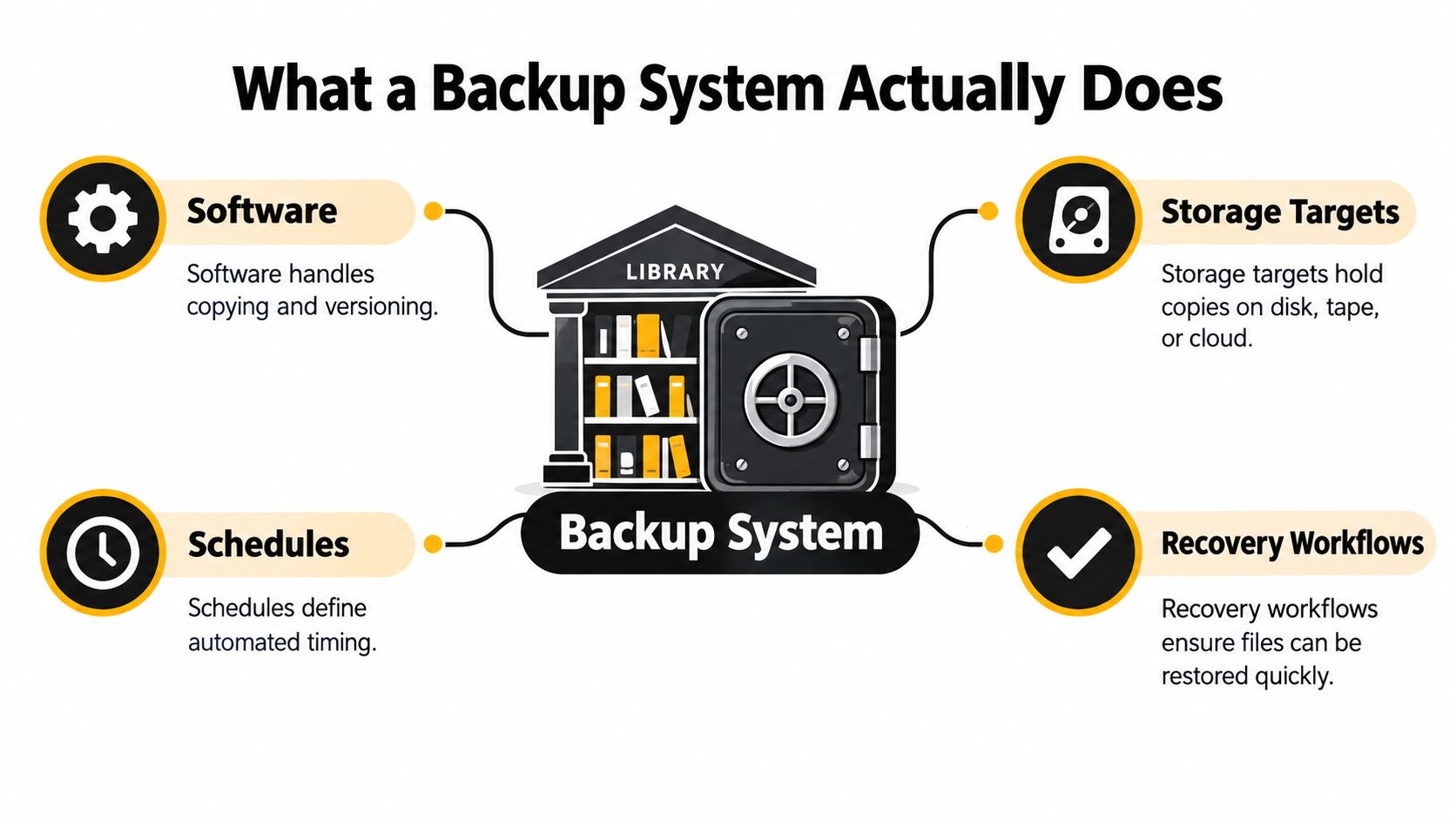
A backup system combines source selection, copying software, storage repositories, schedules, versioning, and recovery procedures. Think of a library: your laptop or server is the working collection, the repository is a secure archive, the scheduler sends new manuscripts to that archive, and the recovery engine is the librarian who can find the correct edition when someone asks for it.
The system has four practical components:
- Source selection identifies what gets captured. That may include documents, databases, photos, application data, operating-system settings, or an entire device image. If a folder isn't selected, the backup process can't restore it.
- The repository holds the copies. It could be an external disk, a NAS, removable media, or a cloud storage target. The repository's location and permissions determine which failures it can withstand.
- The scheduler controls timing. It can run continuously, at regular intervals, or when a device connects to a particular network. Versioning determines how many earlier states remain available.
- The recovery engine browses backup points, checks their integrity, and restores files or systems. It should support the kind of recovery you need, not only the kind that's easiest to advertise.
File-level backup is suitable when you need individual documents or photos. Image-level backup captures a broader representation of a device, including the operating system and installed configuration, which can simplify migration to replacement hardware. Snapshot-based protection records point-in-time states, making it possible to return to an earlier version after accidental deletion or unwanted changes.
Copying isn't the same as preserving
Deduplication removes repeated data blocks before the system stores them again. If many files share identical content, the repository keeps one instance and references it from multiple backup records. Compression then reduces the size of the remaining data, much like packing clothing into a vacuum bag.
An IEEE study reported approximately 74% to 87% reduction when combining deduplication, delta compression, and GZIP compression, though the result depends on the data and implementation (IEEE study on backup reduction techniques). Deduplication can reduce storage and bandwidth demands, but a poorly chosen deduplication domain may complicate recovery or limit savings.
The lifecycle is straightforward: select data, capture changes, store versions, monitor jobs, validate copies, and restore them. A successful job message proves only that a copying operation completed. It doesn't prove that the repository still has usable data, that encryption keys are available, or that an application can start after restoration.
A copy that has never been restored is hopeful duplication, not dependable recovery.
On-Prem, Cloud, and Hybrid Backup Systems Compared
The deployment model changes the failure you can tolerate. A disk or NAS beside your computer offers control and fast local recovery, but a fire, theft, flood, or ransomware event can reach both production data and the backup. Cloud storage creates geographic separation and reduces dependence on local equipment, but restoration depends on provider access, bandwidth, account security, and recovery costs.
Hybrid backup systems combine both advantages. A local repository handles urgent file or device recovery, while a separate cloud or object-storage copy protects against site-level damage. For a small business, an immutable cloud tier can add protection when attackers gain administrative access to local systems.
| Dimension | On-Prem (Disk/NAS/Tape) | Cloud Backup | Hybrid Backup |
|---|---|---|---|
| Recovery speed | Usually fastest for local restores | Depends on connection and provider | Local speed with cloud fallback |
| Control | Direct control over equipment and keys | Provider manages much of the platform | Control is divided across local and cloud layers |
| Geographic resilience | Weak unless a copy leaves the site | Stronger against local disasters | Strong when the off-site layer is isolated |
| Ongoing burden | Hardware, maintenance, and monitoring | Account, storage, and service management | Requires coordination between both targets |
| Ransomware exposure | High if always connected or broadly writable | Varies with immutability and access controls | Can be reduced with an immutable off-site copy |
| Best fit | Home labs, offices, rapid local recovery | Students, nomads, small data sets | Families, small businesses, critical workloads |
A digital nomad often benefits from an encrypted, cloud-first design because carrying a second physical repository is inconvenient. A family may prefer a NAS for large photo libraries plus a cloud replica. A solo student can start with encrypted cloud backup, then add removable storage if coursework becomes difficult to recreate. A small business generally needs local recovery speed and an off-site copy with stronger isolation.
Shared subscriptions introduce another decision. Don't place a master backup credential inside a general family login or give every participant administrative access to the repository. Shared access should expose only the service or folder a person needs, while backup administration stays separate.
Readers responsible for a regional business may also find this backup guide for East Midlands SMBs useful for translating general principles into operational choices. For small-business cloud storage decisions, compare repository ownership, permissions, versioning, and exit options in this small-business cloud storage guide.
Core Strategies That Make Backups Survive Real Failures
The 3-2-1 rule gives backup planning a simple shape: three copies of the data, two different media types, and one off-site copy. The original counts as one copy, while additional copies occupy separate storage targets and at least one location beyond the primary site.
The modern 3-2-1-1-0 model adds one immutable or air-gapped copy and zero recovery errors. Immutability prevents permitted users, compromised administrators, or ransomware from changing protected recovery points during their retention period. Air-gapping separates a copy from ordinary network access, which limits the path an attacker can use.
Each layer closes a different gap
A local copy addresses fast recovery. A different medium reduces dependence on one storage technology. An off-site copy limits the damage from a site disaster. An immutable or offline copy addresses hostile modification. The zero-error requirement forces the team to verify that the stored data can be recovered.
Object Lock and write-once-read-many controls can enforce immutability in object storage. A disconnected rotation drive can provide a simpler air-gapped layer, provided staff disconnect it after the job and protect it from theft. Snapshots and versioning help with accidental overwrites and slow corruption, but they don't automatically protect against an administrator who can delete every snapshot.
Attackers often begin with credentials rather than storage hardware. They may encrypt a synced cloud folder, remove mapped backup drives, or use stolen administrative access to alter replication settings. Replication can spread a damaged or encrypted state just as efficiently as it spreads a healthy file.
The strongest backup layer is the one an attacker can't rewrite with the credentials already stolen.
Retention should match the way damage appears. Short-lived mistakes need recent versions, while corruption that remains unnoticed needs older recovery points. Use deduplication and compression to manage repository growth, but don't trade away clear restore paths for storage efficiency.
A practical design might keep local versions for quick retrieval, send selected data to an off-site repository, and place a protected copy beyond the authority of ordinary production credentials. The exact tools can vary, but the topology should avoid a single account, network, or administrator controlling every copy. For broader continuity planning, the disaster recovery planning guide provides useful context around recovery beyond backup jobs.
Metrics That Turn Backups Into a Recoverable System
Backup maturity becomes measurable when you define acceptable loss and acceptable delay. Recovery Point Objective, or RPO, answers how much recent data you can lose. Recovery Time Objective, or RTO, answers how long the service or device can remain unavailable.
A student writing coursework may accept an RPO of 24 hours and an RTO of 4 hours if the work can be recreated from notes or a local copy. Those targets are examples, not universal requirements. A small business operating a point-of-sale system may need an RPO close to zero and an RTO measured in minutes because each missing transaction and every period of downtime affects daily operations.
| User Type | RPO (max data loss) | RTO (restore speed) | Retention Window | Notes |
|---|---|---|---|---|
| Student | 24 hours | 4 hours | Current term plus older milestones | Protect coursework, settings, and portable devices |
| Family | Several hours to one day | Same day | Photos and records kept long term | Separate family access from backup administration |
| Freelancer | Hours | Same day | Active projects plus archived work | Include catalogs, invoices, and application data |
| Small business | Near zero for critical systems | Minutes for priority services | Multiple retention tiers | Add immutable off-site protection |
| Digital nomad | Hours | Same day where connectivity allows | Active work plus travel archives | Use encrypted cloud copies in separate regions |
Retention isn't just a storage decision. Daily versions catch recent mistakes, while weekly, monthly, or yearly checkpoints can preserve a clean state after slow-burn corruption. Choose the window by asking how far back you might need to investigate, then test whether the repository can hold it.
Recovery drills should include more than opening a document. Restore a file to a separate location, rebuild a device image on replacement hardware, and verify that an application can read its restored database. A tabletop exercise can also expose missing contact details, unavailable keys, or unclear approval steps.
Measure restore success, restore speed, and validation coverage. A dashboard full of completed jobs can't compensate for a failed recovery.
Security, Encryption, and the Shared-Account Blind Spot
Many people protect the production system and leave the repository broadly accessible. That reverses the priority. Backup repositories contain concentrated copies of valuable data, so ransomware operators and intruders have a reason to find them, delete them, encrypt them, or steal their credentials.
Recent coverage found that 93% of respondents considered immutable backup storage critical, while 16% said their environment met that standard (Keepit on backups as ransomware targets). The gap points to a practical problem: organizations may understand immutability without implementing the access boundaries that make it work.
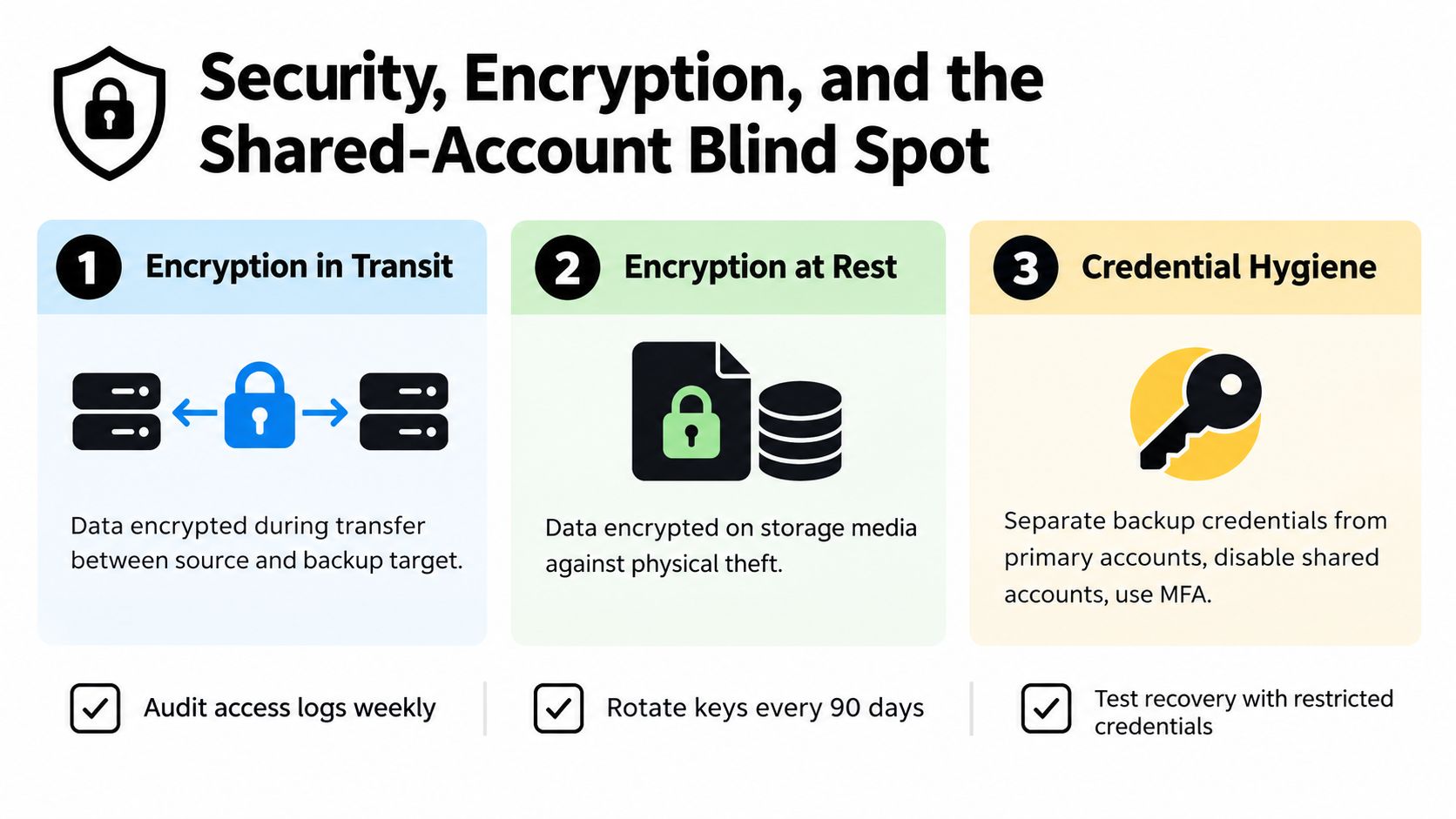
Encryption in transit protects data while it moves between a device and a repository. Encryption at rest protects stored data if someone obtains the disk or storage media. Client-side encryption gives the customer more control over keys, but losing those keys can make recovery impossible. Server-side encryption can simplify operations, yet the provider's key-management design and administrator permissions require careful review.
Shared access magnifies one mistake
Families, students, and small teams often pool subscriptions and cloud services. That arrangement can expose photo libraries, shared drives, password vaults, and backup settings through one reused password. A phishing attack against one participant may become an incident for everyone.
Use separate identities where the service supports them. Limit each person's permissions to the folders or features they need, keep backup administration outside the shared account, and require MFA for privileged access. A convenient group login shouldn't become the only key to every copy.
Synced cloud folders also deserve a warning. Synchronization mirrors changes, including unwanted encryption and deletion. It can support collaboration, but it shouldn't replace an independent, versioned, and access-controlled backup.
If a copy is already missing, damaged, or inaccessible, professional services that help recover lost data may be relevant. Prevention remains safer: isolate the repository, protect keys, review access logs, and test recovery with restricted credentials. This data security guide offers additional perspective on managing shared digital access without treating one password as a complete security boundary.
Sample Architectures for Every Kind of User
A useful architecture starts with the data and the failure you fear most. A home user may prioritize photo recovery, while a business owner may prioritize restoring an application before opening time. The tools can change, but the separation between source, repository, off-site copy, schedule, and credentials should remain.
| Persona | Primary Repository | Offsite Layer | Cadence | Shared-Account Rule |
|---|---|---|---|---|
| Solo home user | NAS or encrypted external drive | Cloud replica | Frequent changes, with versioned checkpoints | Keep repository administration private |
| Family | Household NAS with separate folders | Encrypted cloud copy | Photos and documents captured automatically | Give each person scoped access |
| Student | Encrypted cloud backup | Optional removable copy | At least daily for active coursework | Never store recovery keys only in a shared login |
| Small business | Local backup appliance or rotation drive | Immutable cloud snapshots | Frequent operational backups | Separate staff accounts from backup administration |
| Digital nomad | Encrypted laptop images | Cloud copies in separate geographic regions | Capture while connected, retain versions | Use individual identities for shared services |
A home and family pattern
A home NAS can provide quick access to large photo collections and device backups. A scheduled cloud replica protects the household if the NAS disappears with the computer. Family members should receive individual folders or service permissions, while the account that changes retention or deletes repositories stays limited to one or two trusted administrators.
For a password vault, protect the vault export separately from ordinary household documents. Store recovery information in a secure location that doesn't depend on the same compromised account. Shared streaming access should remain separate from access to personal files and backup controls.
A student and nomad pattern
A student with limited equipment can use encrypted cloud backup for coursework, research notes, and device settings. Keep milestone exports in a second location when the work is difficult to reproduce. Test restoring a complete folder before a deadline, not after a laptop failure.
A digital nomad needs a design that assumes loss of the laptop and unreliable connectivity. Encrypted device images can move to cloud repositories in separate regions, while local working files remain available for speed. Recovery credentials should not live only on the traveling laptop. A trusted recovery channel and a documented sequence matter as much as storage capacity.
A business pattern
A small business can combine a local repository for rapid operational recovery with immutable cloud snapshots and a removable rotation drive. The rotation drive should leave the network after backup and be protected physically. Critical application data needs its own restore test because a collection of files may be intact while the application still fails to start.
In every persona, shared subscriptions should be managed as scoped access, not shared ownership of the entire digital environment. That distinction preserves convenience without allowing one stolen credential to control every recovery point.
Implementation Checklist and Common Backup Questions
Use this quick-reference card to build a system you can verify:
- Inventory devices, accounts, applications, and irreplaceable data.
- Classify what needs file-level protection and what needs full-device recovery.
- Choose local, cloud, or hybrid repositories.
- Define acceptable RPO and RTO targets.
- Create multiple copies across different media and locations.
- Add an immutable or air-gapped copy.
- Encrypt data in transit and at rest.
- Separate backup credentials from everyday accounts.
- Enable schedules, versioning, and retention policies.
- Monitor failed jobs and unusual access.
- Test file, application, and full-system restores.
- Document recovery steps, key custody, and responsible people.
Common questions
How often should backups be tested? Test often enough to match the importance of the data, and include complete recovery scenarios rather than only single-file restores.
What should I do after cloud credentials leak? Revoke sessions, rotate credentials and keys, inspect access logs, preserve protected copies, and test recovery from an unaffected repository.
Do local-only backups satisfy 3-2-1? No. They can provide useful redundancy, but they don't provide off-site protection.
How long should versioning last? Keep recent versions for everyday mistakes and older checkpoints for corruption that may be discovered later.
When has a backup plan failed? It has failed when the required data, credentials, or application can't be restored within the agreed RPO and RTO.
AccountShare helps families, students, small businesses, and digital nomads manage shared subscriptions with controlled access, password-sharing options, and customizable permissions. Use those same isolation principles to keep pooled service access separate from backup administration, then visit AccountShare to organize shared digital services more safely and affordably.