

7 Best AI Subscription Services in 2026: Plans Compared
You're comparing AI subscription services because the free version has started to feel limiting. Perhaps you need better writing, more reliable research, image generation, coding help, or AI inside the apps you already use. The difficult part isn't finding options. It's deciding which subscription earns its monthly place when limits, account rules, storage, premium models, and team access all differ.
This roundup compares seven leading services for distinct reader profiles. Each recommendation explains what the plan does well, where it falls short, and whether shared access can reduce the effective cost. Some subscriptions work well for individual access or governed group purchasing. Others tie premium features to one account so closely that sharing creates more friction than savings.
1. OpenAI ChatGPT Plus and higher tiers
ChatGPT Plus remains the strongest starting point for readers who want one general-purpose assistant rather than a specialist tool. It supports everyday writing, coding, research, data analysis, file work, image creation, and custom workflows across web, desktop, and mobile. Paid access also brings stronger reasoning models on eligible tiers, expanded message and file limits, projects, scheduled tasks, custom GPTs, deep research tools, and earlier access to new features through OpenAI's ChatGPT service.
OpenAI introduced ChatGPT Plus on February 1, 2023, at $20 per month, after ChatGPT reached an estimated 100 million monthly active users two months after public release. Ars Technica reported on that launch and user growth. The launch established a subscription model built around faster responses, priority access during demand spikes, and premium features rather than ad removal.
Who should choose ChatGPT
Choose ChatGPT Plus if you switch between several kinds of work every day. It's particularly useful for a freelancer drafting proposals, a developer debugging code, a student organizing notes, or a small-business owner turning research into usable content. The broad ecosystem also makes it easier to find integrations, custom assistants, and workflows for common tasks.
The trade-off is capacity. Limits can change by model or feature, and the most advanced administrative controls sit in separate business offerings. A personal plan also isn't a substitute for a properly managed team workspace when prompts, files, and permissions need strict separation.
Practical rule: Use ChatGPT Plus as an individual productivity plan. For a shared setup, verify whether the provider's terms and the specific feature support group access before pooling credentials.
Readers comparing trial options can also review this ChatGPT trial guide. For privacy considerations, see guidance on protecting data with MY CYBER GUARD.
2. Anthropic Claude Pro and Max
Claude is the better fit for readers who spend long sessions writing, reviewing documents, reasoning through complex material, or working with code. The service emphasizes helpful, safety-conscious responses, strong long-context handling, and clear organization through Projects. Claude Code and Claude Science extend the product beyond ordinary chat, while Chrome and Microsoft 365 integrations connect it with familiar work environments.
Claude's plan page presents Pro as the mainstream individual option and Max as the heavy-use upgrade. Max offers substantially more capacity than Pro, with options reaching 5× or 20× Pro usage, plus priority access and included API credits. Those higher allowances matter to developers, researchers, and writers who repeatedly hit ordinary plan limits rather than using AI occasionally.
Best for long-form work
Claude Pro is the sensible choice for a writer, analyst, or developer who values coherent reasoning over a crowded feature catalogue. It handles long documents and sustained editing particularly well, and Projects help keep related files and instructions together. The interface feels focused, which suits readers who want fewer distractions.
Claude Max makes sense only when usage volume justifies the premium. The increased capacity and API credits can support serious development work, but they don't make the service a universal team platform. Some features remain in beta, and the highest-capacity tier is expensive compared with a standard individual subscription.
Shared access needs care. A common login can expose conversation history, uploaded files, project instructions, and connected integrations to other users. If separate workspaces or administrative boundaries matter, choose an official team arrangement instead of treating a personal plan as a shared account.
3. Google Google AI Pro with Gemini
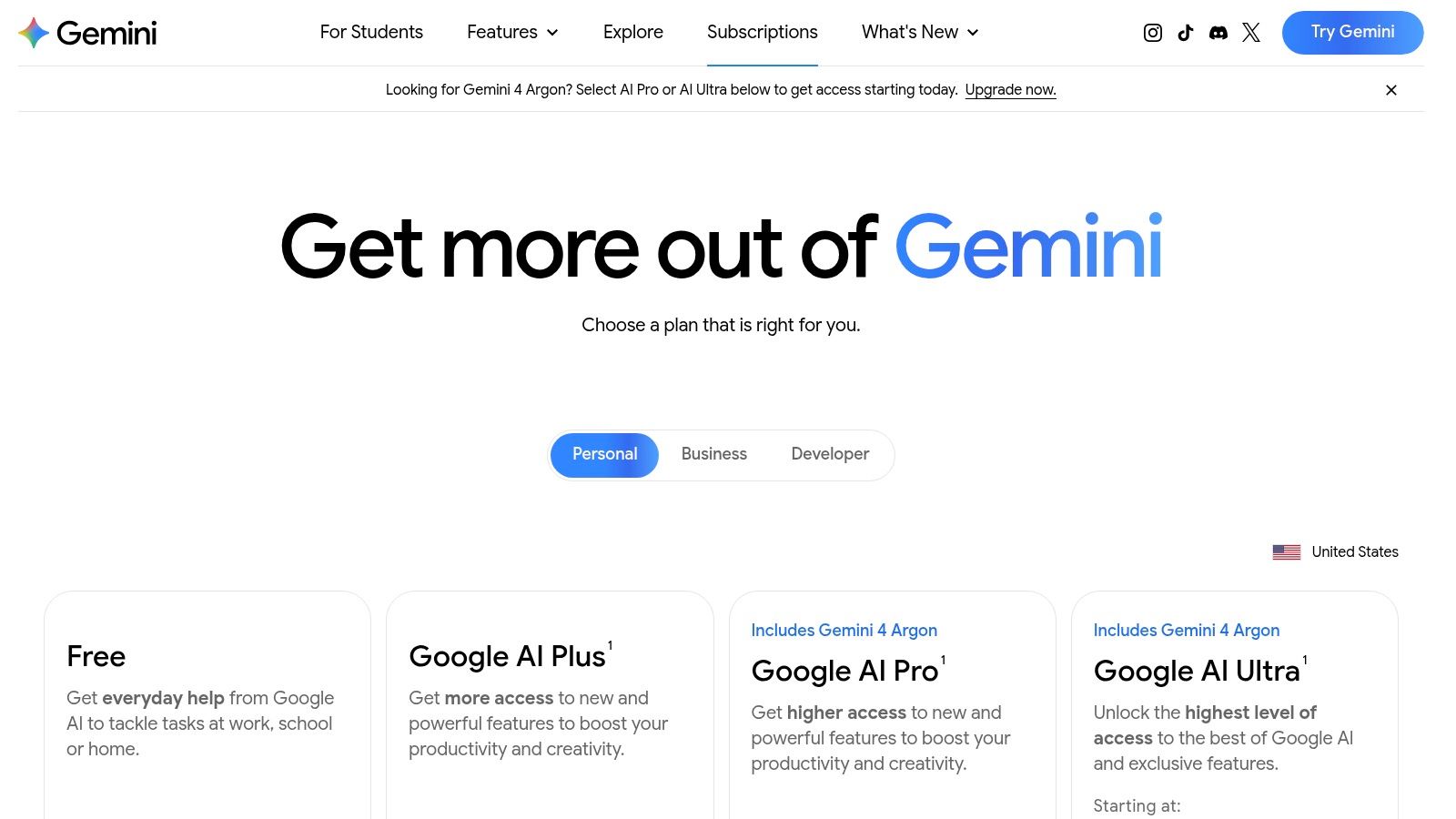
Google AI Pro is the clearest recommendation for people whose work already lives in Gmail, Docs, Drive, and Chrome. Gemini appears inside familiar Google applications, so the value comes from reducing context switching rather than opening a separate assistant for every task. Eligible features include deep research, expanded usage, newer Gemini capabilities, and a 1 million-token context window in supported workflows, as described on the Google AI subscriptions page.
The subscription also includes 5 TB of Google One storage, which changes the cost calculation for users who already need substantial cloud storage. That bundle can make the plan more practical than a standalone chatbot subscription, especially for someone who drafts in Docs, summarizes material in Drive, and uses Gemini while handling email.
The account-bound limitation
Google AI Pro is built around the subscriber's Google identity. Premium Gemini features, storage, Gmail access, and document context attach to that account, so informal sharing doesn't create a clean multi-user experience. A family may share some Google services, but each person who needs premium AI features may still require an individual AI plan.
Usage also varies by platform, region, and feature. Intensive research, long prompts, video generation, and newer tools can face rate limits or availability restrictions. Check the features shown for your account before buying, particularly if a specific Gemini capability is the main reason for subscribing.
Privacy check: Never connect shared credentials to Gmail, Drive, or personal files unless every user is authorized to see that data. Account separation matters more than a lower monthly bill.
For a broader comparison of practical assistants, read this guide to the best AI tools. You can also review this budget guide for AI video clips if video creation affects your decision.
4. Microsoft Copilot Pro for individuals
Microsoft Copilot Pro is the right choice for an Office-first reader. If most of your working day happens in Word, Excel, PowerPoint, Outlook, or OneNote, Copilot's value comes from appearing inside those applications instead of forcing you to copy material into a separate chat window. Microsoft's Copilot Pro page explains the premium tier and its relationship with eligible Microsoft 365 plans.
The subscription provides priority access to current Microsoft and OpenAI models during busy periods, faster performance than free Copilot, and AI features inside desktop and web Office applications. It's useful for turning notes into a Word draft, restructuring a presentation, exploring spreadsheet data, or preparing an Outlook response while staying inside the existing workflow.
Choose it for Office, not for everything
Copilot Pro is strongest when Microsoft 365 is already central to your work. A consultant preparing client documents, a finance professional working in Excel, or a manager building presentations will get more practical value than someone who rarely uses Office. Setup is also straightforward if you already have Microsoft 365 Personal or Family.
The main limitation is account ownership. Copilot Pro benefits are account-bound, and Microsoft 365 Family sharing doesn't extend premium Copilot features to every family member. Business-grade governance requires different enterprise products, so a small company shouldn't assume an individual plan provides central administration, auditability, or organizational data controls.

5. Perplexity Pro
Perplexity Pro is the strongest pick for a student, journalist, analyst, or researcher who wants answers connected to visible sources. Instead of treating research as a separate browsing task, Perplexity combines search, synthesis, citations, document uploads, and follow-up questions in one interface. Its Perplexity Pro plan adds Pro Search, Projects, file and image uploads, premium model choices, and advanced research modes.
The cited-answer format is the central advantage. You can inspect the sources behind a response, open the relevant pages, and ask a narrower follow-up without rebuilding the search from scratch. Projects also help organize an investigation, course topic, client brief, or reporting assignment.
A good research subscription with limits to watch
Perplexity Pro works best when source discovery and quick verification are more important than polished creative writing. It can help identify relevant material rapidly, compare documents, and create a research trail. That makes it a useful companion to a writing-focused assistant rather than a complete replacement for every AI tool.
New users should pay attention to usage rules. Advanced features may have separate limits, and some compute-heavy workflows can require another tier or additional access. The product's flexibility is useful, but it also means you should check exactly which models and research modes your plan includes.
A shared account can also expose search history, uploaded files, and organized Projects. Students or small teams considering group purchasing should use permission controls where available and avoid mixing personal research with confidential client material.
6. Midjourney image generation subscriptions
Midjourney is the best recommendation for creators who care most about visual style, iteration, and consistent image-making workflows. It offers access through the web and Discord, with tools for reference images, styling, upscaling, and prompt experimentation. The Midjourney website remains the starting point for reviewing current subscription options and capabilities.
Its subscription structure is based on GPU-time allowances and tier-specific features. That model is easy to understand at a high level, but heavy users can move through lower-tier allowances quickly when generating many variations. A designer developing campaign concepts, an illustrator exploring characters, or a social media creator producing visual directions will benefit most from the ability to iterate repeatedly.
Buy it for aesthetics and control
Midjourney's strength is not office automation or cited research. It's the visual result and the creative control available through prompting, references, style choices, and upscaling. The active community also gives new users practical examples and documentation for improving prompts.
The trade-offs are important. Consumer plans don't provide a public API, and advanced workflows take time to learn. If your job requires automated image generation inside another application, Midjourney may not be the right foundation.
Shared access can lower the effective cost only when the arrangement follows Midjourney's terms and doesn't create confusion over private images, prompts, or project ownership. A single account also makes it harder to separate personal work from a client's confidential assets.
For readers who need a lower-cost starting point, compare this Midjourney free alternative guide.
7. Jasper Pro for marketing teams
Jasper Pro is designed for marketers who need repeatable, on-brand content rather than an open-ended chatbot. Its Canvas supports multi-step campaign work, while Brand Voices, Knowledge, and Audiences help keep language aligned across channels. Agents can assist with briefs, SEO tasks, translations, and research, and browser extensions bring parts of the workflow into Chrome or Edge.
Visit Jasper's pricing page to compare the individual and business options. The important distinction is governance. Jasper becomes more compelling when a marketing team needs shared instructions, approved knowledge, consistent voice, and a controlled process for producing multiple assets.
The right fit for governed content production
Choose Jasper Pro if you manage content calendars, campaign briefs, landing pages, ads, email sequences, or social copy and want one environment for the process. Canvas is particularly useful when a campaign involves several connected deliverables instead of one isolated article. Jasper's stated business positioning also includes SOC 2 Type II and a defined data-use posture for business users, which should still be reviewed against your own security requirements.
Jasper isn't the best value for someone who only wants general chat, coding help, or occasional research. Its strongest collaboration and administrative features sit in Business plans with custom pricing. That means a solo creator should compare the marketing workflow benefits against a general assistant before subscribing.
Password sharing is a poor shortcut for team governance. Multiple users need distinct permissions, clear ownership of brand knowledge, and appropriate handling of confidential campaign data. If those controls are essential, buy the plan designed for team administration rather than repurposing one individual login.
Top 7 AI Subscription Services Compared
| Product | Implementation complexity 🔄 | Resource requirements ⚡ | Expected outcomes ⭐ 📊 | Ideal use cases 💡 | Key advantages ⭐ |
|---|---|---|---|---|---|
| OpenAI, ChatGPT Plus (and higher tiers) | 🔄 Low, plug‑and‑play for individuals | ⚡⚡ Moderate, subscription costs, higher tiers add capacity | ⭐⭐⭐⭐ High general‑purpose quality (coding, research, creative) | Individual/small teams needing versatile assistant across devices | Broad ecosystem, frequent updates, strong code & data tools |
| Anthropic, Claude Pro and Max | 🔄🔄 Medium, some setup for projects & long‑context | ⚡⚡ Moderate; Max tiers increase capacity and include API credits | ⭐⭐⭐⭐ Strong writing/reasoning and long‑context performance | Long‑context work, writers, developers needing bundled credits | Long context support, transparent tiers, developer credits |
| Google, Google AI Pro (Gemini) | 🔄 Low, integrated into Gmail/Docs/Drive | ⚡⚡⚡ Moderate→High, bundled storage (5TB) and large context options | ⭐⭐⭐⭐ High impact for Workspace workflows; strong research tools | Users embedded in Google Workspace who want seamless AI in apps | Deep app integration, storage value, clear upgrade path |
| Microsoft, Copilot Pro (for individuals) | 🔄 Low, native in Office apps for eligible users | ⚡⚡ Moderate, subscription tied to Microsoft 365 | ⭐⭐⭐⭐ Reliable boost to Office productivity and automation | Office‑centric individuals using Word/Excel/PowerPoint frequently | Direct Office embedding, predictable pricing, priority access |
| Perplexity, Perplexity Pro | 🔄🔄 Medium, research workflows and projects to manage | ⚡⚡ Moderate, rate limits and some premium features | ⭐⭐⭐⭐ High factuality with cited answers and organized research | Students, journalists, analysts needing source‑backed answers | Transparent sourcing, Projects for organization, quick cited search |
| Midjourney, Image Generation Subscriptions | 🔄🔄 Medium, learning prompts and Discord/web workflow | ⚡⚡⚡ High, GPU‑hour based subscriptions for creators | ⭐⭐⭐⭐⭐ Best‑in‑class stylized visuals and iterative image quality | Creators and designers needing consistent, high‑quality imagery | Extensive style control, predictable pricing, active community |
| Jasper, Pro (marketing‑focused AI) | 🔄🔄 Medium, Canvas and team governance setup | ⚡⚡ Moderate, team plans and business features add cost | ⭐⭐⭐⭐ Strong for on‑brand, multi‑asset marketing outputs | Marketing teams and creators building campaigns and assets | Brand governance, multi‑step Canvas workflows, marketing agents |
Pick Your AI Subscription Plan Without Overpaying
Start by listing the tasks you repeat each week, then match them to the one or two plans that cover those tasks at the lowest total cost. ChatGPT Plus is the best all-rounder for mixed personal work. Claude Pro is the stronger choice for long-form writing and sustained reasoning. Google AI Pro fits Google Workspace users, Copilot Pro belongs with Microsoft 365 workflows, Perplexity Pro suits source-backed research, Midjourney serves visual creators, and Jasper Pro is for governed marketing production.
The broader market shows why one subscription rarely satisfies every reader. Deloitte reported that 53% of U.S. respondents had used or experimented with generative AI in 2025, while approximately 40% of regular users said their households paid for AI-enabled tools or services. Deloitte's 2025 consumer research also found that half of non-paying users believed free tools met their needs. Premium access therefore has to solve a specific recurring problem, not merely provide a larger model.
Cost control matters because AI subscriptions compete with every other digital service in a household budget. Deloitte reported average household spending of $183 per month on digital services and subscriptions in 2025, compared with $175 in 2024. Forrester's September 2025 Consumer Pulse Survey found that only about one in five U.S. online adults had a paid generative-AI subscription, which reinforces the need to choose selectively.
Before sharing any login or seat, check the provider's terms and confirm which features stay tied to the individual account. Shared access can reduce the effective bill, but it can also expose prompts, files, histories, connected applications, and billing details. Use separate seats, profiles, workspace isolation, administrator roles, two-factor authentication, export and deletion controls, and audit logs where the provider supports them.
AccountShare offers group purchasing for streaming, AI tools, and software, with password-sharing options and customizable permissions. Its approach is relevant when a service permits an appropriate shared arrangement, but it shouldn't override provider licensing or account-security requirements. For another perspective, read this comparison of AI subscription picks.
A practical buying sequence is simple. Select the service that matches your main weekly workflow, test whether its limits cover real usage, and cancel tools that duplicate another subscription. Keep account-bound services personal, and use governed group purchasing only where access rules, privacy boundaries, and user permissions remain clear.
AccountShare helps users coordinate group access to AI tools, streaming services, and software while managing billing, passwords, and permissions in one place. If you're comparing AI subscription services and want to lower the shared cost without ignoring account boundaries, visit AccountShare to review the available options.