

Access Control Management for Shared Accounts
“Never share passwords” is tidy advice, but it fails the moment real people share digital services. Families split streaming costs, small teams collaborate in software, students share resources, and digital nomads rely on common tools. The security problem isn't legitimate cooperation. It's uncontrolled, invisible, and irreversible access.
Effective access control management treats sharing as an authorization problem. Each person or automated system should receive only the access required, under conditions you can observe, and through a process you can reverse quickly. That means separating authentication from authorization, preserving individual accountability, limiting credential exposure, and making revocation routine rather than exceptional.
Rethinking Access Control Management for Shared Environments
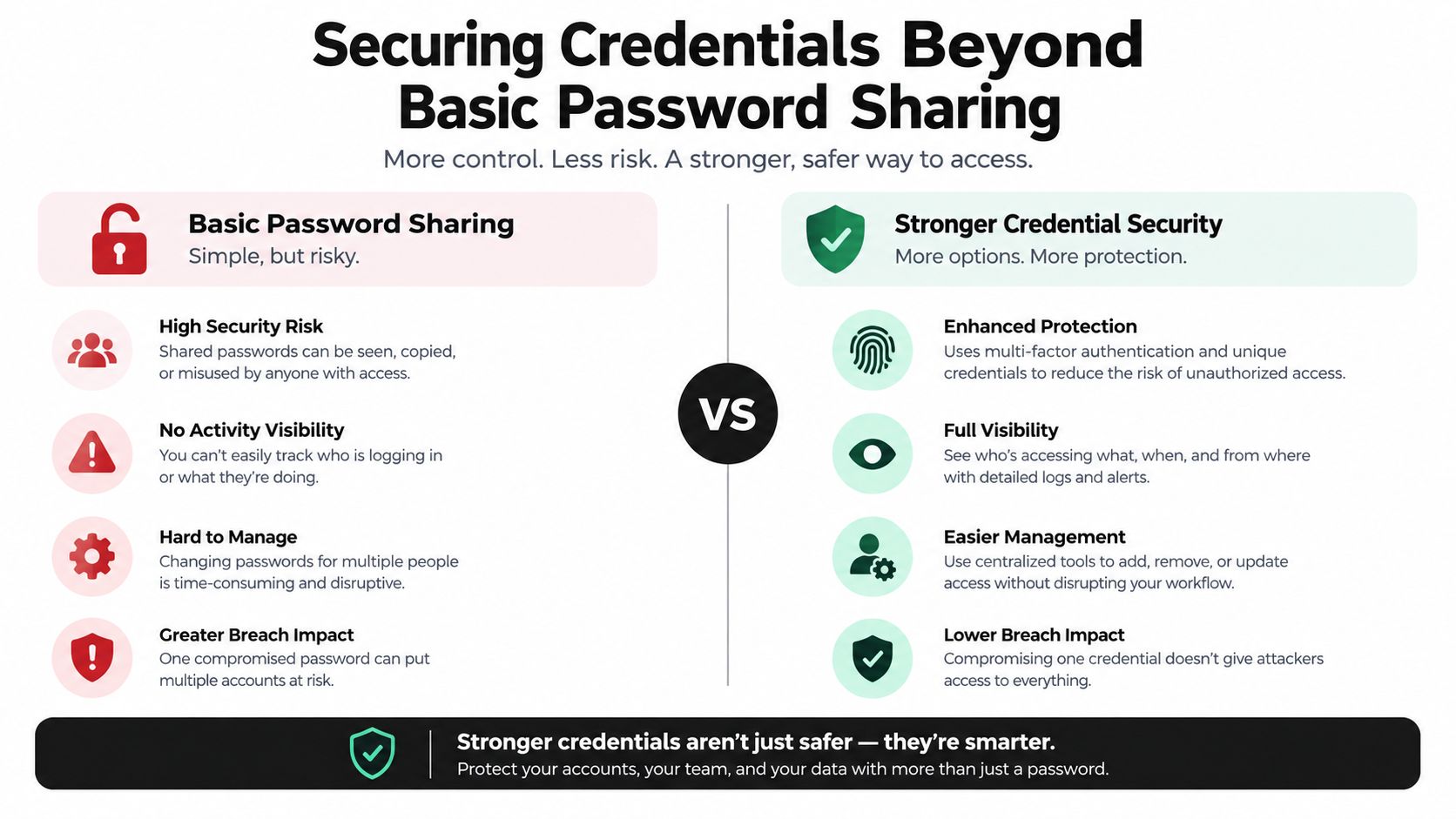
The traditional rule exists for a good reason. A shared primary password makes it difficult to identify the person who accessed an account, impossible to limit permissions precisely when the service offers no granular controls, and awkward to revoke one participant without changing access for everyone. Yet “never share passwords” often ends the conversation instead of solving the operational need.
A family member may need a streaming profile, not the billing settings. A contractor may need one project workspace, not the entire software account. A small business collaborator may need to use a service temporarily, while an AI tool may need permission to perform one narrowly defined action. Treating all of those situations as identical creates workarounds, including copied passwords, informal spreadsheets, and accounts that remain active after a relationship ends.
A better model makes shared access observable, bounded, and reversible. Practical guidance on shared access security follows that same principle. The question is not just whether a password has been shared. The question is whether the owner can answer four operational questions:
- Who has access: Can each participant be identified individually rather than hidden behind one anonymous login?
- What can they do: Are permissions limited to the service, workspace, profile, or action they actually need?
- When does access end: Is there a clear trigger for removing a former contractor, household member, or temporary collaborator?
- What happened: Do invitations, sign-ins, permission changes, and revocations leave an audit trail?
Practical rule: Centralize access only when centralization improves attribution and revocation. A single dashboard that conceals individual activity merely concentrates risk.
Account owners should prefer native delegated access, separate user seats, or a credential vault that conceals the underlying password. If a service supports none of these, sharing may still be necessary, but the compensating controls should be explicit. Limit the number of participants, avoid using the account for unrelated sensitive activities, protect the recovery channel, and rotate the credential when membership changes.
This approach also changes how convenience is evaluated. Convenience isn't the absence of controls. It is the ability to grant the right access without repeated manual work, see who has it, and remove it without disrupting every legitimate user. For families and small teams, that is a more useful definition of secure sharing than a rule that assumes every service offers enterprise identity features.
The Financial and Operational Risks of Weak Governance
Weak access governance creates two kinds of exposure. First, an attacker may use a stolen credential to enter an account. Second, a legitimate user, vendor, or automated process may use valid permissions outside the intended purpose. The second category is harder to detect because the activity can look normal at the authentication layer.
Verizon's 2025 Data Breach Investigations Report analyzed more than 22,000 security incidents and 12,000 confirmed breaches worldwide during the period covered by the report. It identified credential abuse as the leading initial access vector, and a related Verizon analysis found compromised credentials in 22% of reviewed breaches. The same body of reporting found that approximately 88% of breaches in the relevant attack pattern involved stolen credentials. These figures make password distribution a governance decision, not a casual convenience. (Verizon's 2025 DBIR resources)
The persistence of exposed credentials matters as much as the initial compromise. Verizon reported that leaked secrets discovered in GitHub repositories took a median of 94 days to remediate, showing how long a known access weakness can remain active when ownership and response processes are unclear. (Verizon's credential-stuffing analysis)
Why legitimate permissions increase the blast radius
IBM's 2025 Cost of a Data Breach research, independently conducted by the Ponemon Institute, studied 600 organizations affected by breaches between March 2024 and February 2025. The global average breach cost was $4.44 million, compared with $4.88 million in 2024, a 9% decrease that still leaves a substantial financial exposure. (IBM's 2025 Cost of a Data Breach executive summary)
Malicious insider attacks produced the highest average cost among the initial attack vectors at $4.92 million, followed closely by third-party vendor and supply-chain compromises at $4.91 million. Those figures point to a practical weakness: insiders and partners don't need to bypass authentication if their permissions already exceed the task they were given.
For a small business, the same pattern appears at a smaller scale. A collaborator with access to a shared software account may also see billing information, customer records, exports, integrations, or recovery settings. A family account may contain payment details or personal profiles that have nothing to do with the service being shared.
Fragmentation turns ownership into guesswork
Scattered invitations, copied credentials, and disconnected tools make it difficult to answer basic questions. Who approved access? Which device is active? Has the old session ended? Did the former contractor retain a token? If the answer requires checking several systems manually, offboarding will be slow and incomplete.
Subscription planning should therefore include permission ownership, not only seat utilization or cost. Guidance on subscription optimization is most useful when it accounts for both financial efficiency and the controls that keep each shared seat attributable.
A sound governance model grants the minimum permission for a defined purpose, records the decision, monitors its use, and withdraws it when the purpose ends. That sequence reduces both the probability of misuse and the scope of damage when a credential or trusted relationship fails.
Implementing Attribute-Based Access Control Policies
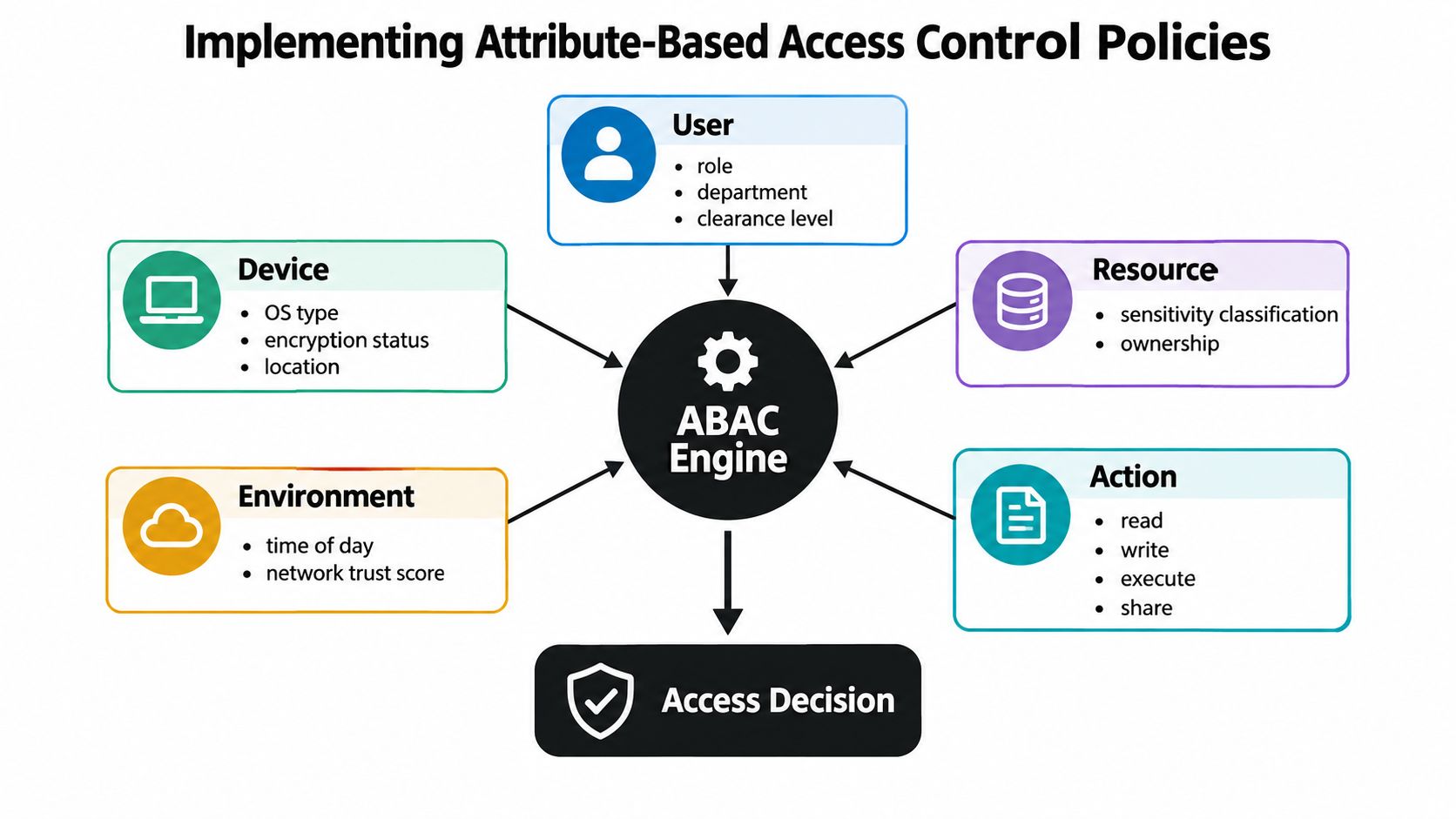
Role-based access control works well when roles are stable and permissions are predictable. Shared environments are less tidy. The same person may need read access from a trusted laptop, temporary write access for a project, and no access from an unmanaged device. Attribute-Based Access Control, or ABAC, handles that variation by evaluating the request context rather than relying only on a fixed role.
NIST describes ABAC as authorization based on attributes of the subject, object, requested operation, and relevant environment. A policy can evaluate a user's department, device trust state, data classification, location, and time before granting access. (NIST's ABAC implementation guidance)
Start with the objects and decisions
Inventory what needs protection before writing policies. In a shared subscription, the objects might include the service account, individual workspaces, billing settings, invitation functions, exported data, and administrative controls. For a small team, distinguish a project workspace from the organization account. For a family, distinguish an individual profile from the payment and recovery settings.
Then define the actions separately. “Access” is too broad to be useful. Identify whether the person can view, create, edit, download, invite, share, change billing, or administer the account. A collaborator may be allowed to edit documents while being denied permission to invite another user.
NIST recommends identifying authoritative attribute sources and establishing processes to write, validate, and manage policies. In practice, that means deciding where device status, membership, department, ownership, and data classification come from. If an attribute has no reliable owner, don't use it as a critical security condition.
Write conditions that reflect real usage
A policy might grant a collaborator access to a workspace only when:
- User attribute: The person belongs to the approved project group.
- Device attribute: The device is managed or otherwise trusted.
- Resource attribute: The workspace belongs to that project.
- Action attribute: The request is for editing, not administration.
- Environment attribute: The request occurs within an approved context.
For a household service, the policy can be simpler. A family member may access an approved streaming service while being denied billing changes and membership administration. A small-business user may access a designated workspace, but the system can deny the request when the device is unmanaged or the seat is no longer valid.
Use deny by default. Make administrative permissions separate from end-user permissions, issue short-lived sessions where possible, and test representative allow and deny cases before deployment. The policy should fail closed when an authoritative attribute is missing or stale.
The biggest ABAC risk is policy complexity. A rule that looks precise can become impossible to troubleshoot when multiple attributes change at once. Log the evaluated attributes, policy version, decision, and reason. That record lets an administrator distinguish a genuine security denial from a bad group assignment or an outdated device record.
For readers designing controls beyond digital subscriptions, the same logic applies to securing shared housing in 2026. The resource changes, but the policy questions remain consistent: who is requesting access, what are they accessing, under which conditions, and how can the permission be withdrawn?
Teams that need a deeper comparison of authentication and authorization choices can use this guide to access control methods, then map each method to the sensitivity of the resource rather than selecting one control for every scenario.
Securing Credentials Beyond Basic Password Sharing
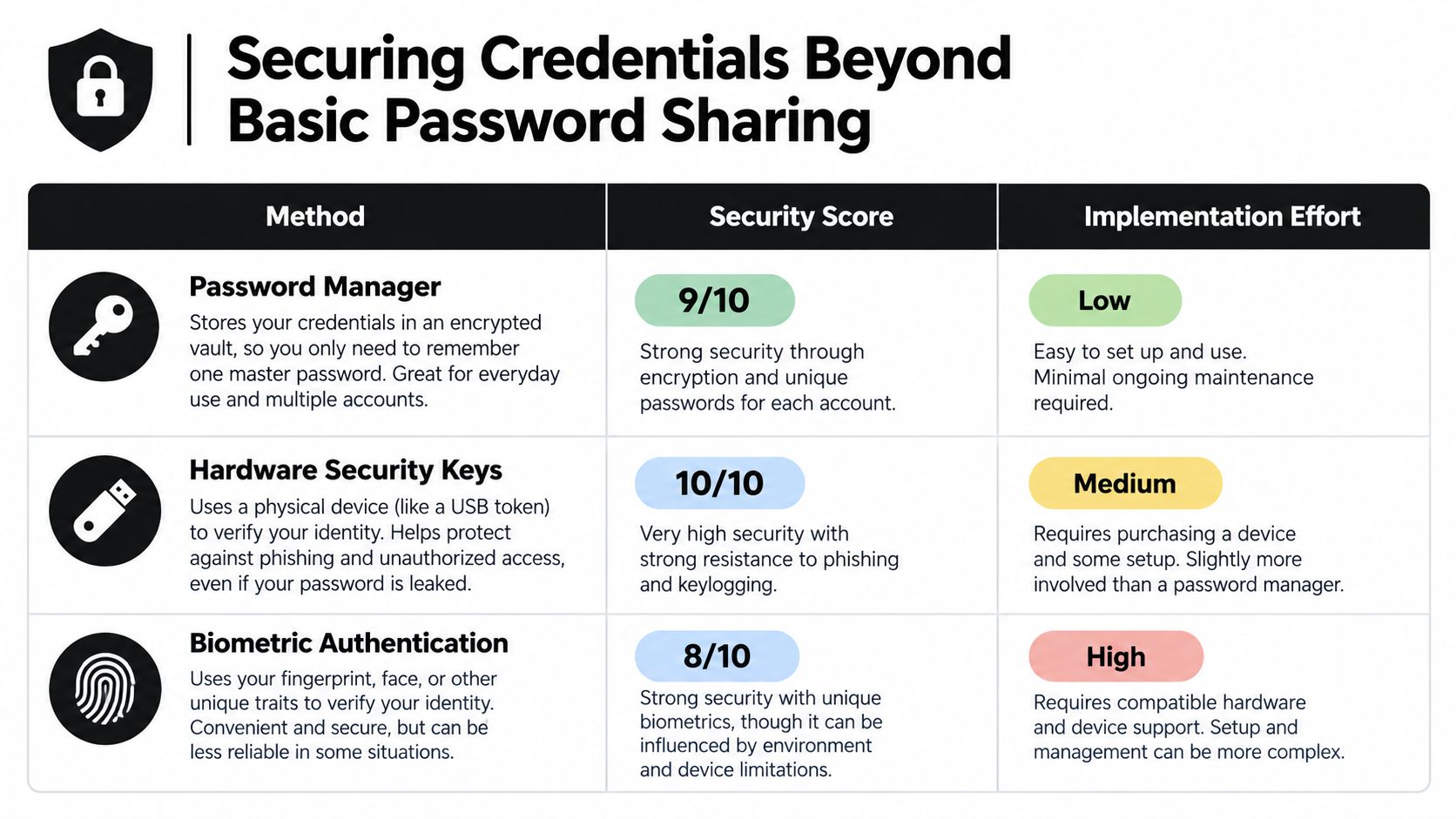
A shared password is a secret copied across multiple people and devices. It doesn't establish strong authentication, and it doesn't prove which participant used the account. Even a well-managed password can become a liability when it appears in chat history, browser storage, screenshots, or an unmanaged device.
Ordinary one-time-password MFA doesn't fully solve the problem. CISA explains that app-generated, SMS, email, and other out-of-band codes can be captured and replayed during a phishing attack. Push approvals can also be manipulated through fraudulent prompts. (CISA guidance on phishing-resistant MFA)
Match the control to the account
For administrators and other high-impact accounts, use phishing-resistant authentication such as FIDO2 or WebAuthn. These methods use protocol-bound cryptographic credentials, so a phishing site can't replay captured authentication messages against the legitimate service.
For ordinary shared-service workflows, use a hierarchy of safer alternatives:
| Method | Where it fits | Main trade-off |
|---|---|---|
| Individual accounts | Services with native member seats or delegated permissions | Strong attribution, but potentially higher cost or limited availability |
| Scoped vault access | Services that require a shared login | The vault can conceal the password and restrict viewing or copying, but the service may still record one account identity |
| Delegated permissions | Platforms with granular roles or workspace controls | Better separation of duties, but dependent on the provider's authorization model |
| FIDO2 or WebAuthn | Administrative and high-impact accounts | Strong phishing resistance, but every authorized person needs an appropriate authenticator |
A vault should release only what the participant needs. If the service supports a delegated session or token, prefer that over exposing the primary password. Set short session lifetimes, revoke sessions when membership or device status changes, and rotate secrets after suspected exposure.
Preserve signals for detection
Credential protection isn't complete without monitoring. Record invitations, permission changes, authentication events, secret rotation, failed sign-ins, unusual device or location changes, repeated sharing attempts, and privilege elevation. These signals help distinguish a normal household login from a sudden attempt to copy a credential or change recovery details.
The most secure option isn't always the most usable. Hardware keys may be appropriate for an owner account but impractical for every family member using a low-risk profile. The practical answer is to apply stronger controls where compromise would cause the greatest harm, then use scoped delegation and vault-mediated access for lower-impact shared workflows.
Governing AI Agents and Non-Human Identities
An AI agent isn't an employee, so copying an employee access model onto it creates the wrong controls. A human typically has a stable identity, a known manager, and a relatively understandable job scope. An agent may be launched by a user, operate through an orchestration platform, inherit permissions from a service account, and change behavior as its task or connected tools change.
Recent research makes the gap visible. A 2026 survey reported that 90% of organizations said their identity-management practices need improvement for agentic-AI risks, while only 26.7% reported using dynamic RBAC that supports AI and analytics. A separate 2026 study found that 43% of organizations rely on shared service accounts for agents, 31% permit agents to operate under human identities, and 74% say agents often receive more access than necessary. (Delinea and Frost & Sullivan's 2026 privileged access management report)

Give every agent an identity
Create a record for each agent, connector, and automation workflow. The record should identify its owner, business purpose, approved tools, permitted resources, credential issuer, expiration condition, and emergency contact. Don't allow an agent to operate under a person's identity unless the platform can preserve a separate, auditable agent identity for every action.
Human intent and automated execution should remain distinct. A user may authorize an agent to draft a report, but that doesn't automatically authorize it to publish the report, change billing, invite users, or export an entire dataset. Use delegated authorization with explicit action boundaries, approval gates for sensitive operations, and logs that connect the user's request to the agent's subsequent actions.
Replace long-lived trust with short-lived authority
Issue short-lived credentials and rotate tokens. Limit the agent to the resource and action it needs for the current task, then reduce or remove the permission when the task ends. Revoke access when the owner leaves, the connected tool changes, the device becomes untrusted, the model workflow is retired, or the agent attempts an action outside its approved scope.
Quarterly reviews alone aren't enough. An autonomous system can accumulate permissions faster than a periodic governance cycle detects them. Continuous checks should compare actual actions with the declared purpose and trigger a review when the agent requests a new tool, accesses an unfamiliar resource, or repeatedly encounters denials.
For financial or cryptographic workflows, boundary design deserves particular attention. A practical cosigner control guide for crypto platforms illustrates the broader principle: an automated system can prepare or propose an operation while a separate authority retains approval over the irreversible step.
The rule is simple but demanding: an agent should never be more trusted merely because it acts automatically. Automation should narrow execution, shorten credential life, and improve evidence, not turn one human login into a universal service identity.
Managing the Shared Access Lifecycle and Offboarding
Access control fails most often at the edges of the relationship. A user receives access quickly, stays longer than expected, changes devices, or leaves without anyone remembering every connected service. A lifecycle process prevents the shared account from becoming a permanent archive of old permissions.
Begin with a written access record, even if the environment is small. Record the person or agent, resource, allowed actions, approving owner, start condition, expiration trigger, and recovery path. Don't rely on the service's member list alone. That list may not show copied passwords, active sessions, browser tokens, API connections, or access granted through a third-party integration.
Provision with purpose
At invitation time, select the narrowest permission that supports the task. Give a collaborator access to one workspace rather than the full organization. Give a household member a profile rather than account administration. Give an AI agent a defined action against a defined resource rather than a broad service account.
If you use a shared credential, place it in a controlled vault, restrict whether members can view or copy it, and protect the recovery channel separately. Central management is useful only when it preserves individual membership records and supports immediate removal.
Monitor changes, not just logins
Review permission changes, new invitations, device changes, recovery attempts, and unusual access patterns. A successful login isn't proof that the request was appropriate. Owners should know which events require a pause, such as a request to add an unknown member, a sudden export, or a device that no longer meets the trust condition.
Use clear triggers for revocation:
- Relationship change: Remove a former contractor, household member, or volunteer when the approved purpose ends. Resources about a volunteer background check may help organizations assess people before granting access, but screening doesn't replace ongoing authorization controls.
- Device loss: Revoke sessions and tokens tied to a lost or compromised device, then issue new access only after verifying the replacement.
- Credential exposure: Rotate the secret, invalidate existing sessions, inspect connected integrations, and review recent activity.
- Service change: Recheck permissions when a subscription tier, workspace structure, or provider policy changes.
Offboard completely
Offboarding should be a sequence, not a single click. Remove the member, revoke active sessions, invalidate tokens, rotate shared secrets, remove third-party connections, review recovery options, and confirm that exported data is handled appropriately. Test the process before an urgent departure so the owner knows which steps the provider supports.
Peak-demand outages create a tempting exception. Don't distribute the primary password to bypass a capacity problem. Use an approved waiting process, a separate low-impact account, or a controlled temporary permission that can be removed after service stability returns. Convenience during an outage shouldn't create an untracked permanent identity.
Building a Resilient Access Control Checklist
A resilient setup doesn't require an enterprise identity platform. It requires an owner who can explain every permission and remove it without guessing. A family managing a streaming service, a small team using design software, and an AI workflow connected to a business tool can all apply the same decision test.
Start with the account that would cause the most harm if compromised. Separate its administrative controls from ordinary use, protect the recovery channel, and enable phishing-resistant MFA where the provider supports it. Then review every shared participant and ask whether the person or agent has an individual identity, a defined purpose, and a permission scope that matches the task.
Use this checklist as an implementation pass:
- Map resources: List profiles, workspaces, billing controls, exports, integrations, and recovery settings.
- Name owners: Assign a human owner for each account, policy, credential, and automated workflow.
- Reduce permissions: Remove unused actions, seats, invitations, and administrative capabilities.
- Protect secrets: Prefer delegated access or scoped vault mediation over exposing a primary password.
- Separate agents: Give each AI agent its own identity, short-lived credentials, tool limits, and approval boundaries.
- Log decisions: Capture invitations, authentication events, policy changes, denied requests, token rotation, and revocations.
- Test denial: Try access from an untrusted device, an expired membership, an unauthorized workspace, and an out-of-scope action.
- Define triggers: Document what happens after a lost phone, suspected phishing, role change, relationship change, provider change, or agent retirement.
- Verify offboarding: Confirm that sessions, tokens, integrations, shared secrets, and recovery paths no longer grant access.
The strongest design balances convenience with attribution. A centralized sharing platform can support that balance when it offers customizable permissions, controls whether members can view or copy credentials, and lets an owner remove members or revoke unused share links. AccountShare is one option for managing those shared-account functions across premium services, alongside native provider controls and dedicated password-vault tools.
Review the checklist after every meaningful change, not only after an incident. Access control management works when permission is treated as temporary authority with an owner, a purpose, and an expiration path.
AccountShare can help you organize shared access to premium services with customizable permissions, password-sharing controls, member invitations, and revocation options. If you need a more accountable way to manage shared subscriptions for a household, small team, or collaborative workflow, visit AccountShare and review the available access controls.