

SSO Implementation for Shared Accounts
Why SSO Is the Right Fit for Shared Subscriptions
Here's the problem with shared subscriptions: traditional password sharing barely holds up when more than a couple of people are involved. A single credential ends up copied into password managers, reused on other sites, or sticking around long after someone's left the group. When the password finally gets rotated, every legitimate user gets locked out, and admins are left guessing who actually logged in and when.
SSO flips that model entirely. The identity provider handles authentication for each person, then passes a secure token to the connected service. The application trusts that token instead of juggling individual passwords. That trust relationship between identity provider and service provider is what SSO implementation is all about, and it's covered in depth in this SSO implementation guide.

For an AccountShare group, the practical payoff looks like this:
- Individual accountability: Auth logs show which specific member accessed a subscription, not just a generic shared username.
- Faster offboarding: Removing someone from the identity provider or group blocks their future access instantly, no password rotation needed.
- Consistent policies: Admins can enforce MFA, set session limits, and manage role-based permissions from one central place.
- Less credential sprawl: Members use their own account instead of stashing a premium service password across multiple devices.
Key takeaway: Shared access should mean shared entitlement, not shared credentials.
If you're rolling this out, start with one low-risk subscription and a small pilot group. Test login, logout, account matching, and access removal before bringing in more services. And keep a separate emergency administrator path, because if the identity provider goes down, you don't want every member locked out simultaneously.
Protocol choice is one of those early decisions that quietly shapes everything else in an SSO rollout — which apps work smoothly, how mobile behaves, how tokens get handled day to day. SAML works by passing XML assertions between the identity provider and the service provider. OIDC sits on top of OAuth 2.0 and adds the authentication layer OAuth was missing. OAuth 2.0 by itself is about authorization, not verifying who the user actually is. Don't let anyone blur those two concepts together.
SAML still earns its keep when AccountShare needs to plug into established enterprise software. A lot of older SaaS tools ship with SAML metadata, certificate configuration, and assertion settings baked right in — and zero OIDC support.
For most of AccountShare's newer integrations, OIDC tends to win out. JSON tokens are friendlier to web apps, mobile clients, and APIs, and the authorization code flow with PKCE handles public clients well.
Quick rule of thumb: Reach for SAML when you're connecting to legacy enterprise services. Go with OIDC when you're building something API-connected and mobile-first.
Match the Protocol to Your Architecture
Before locking in an identity provider contract, pull together a quick inventory of each service you're targeting and note:
- Supported protocols — SAML, OIDC, or both. Don't assume.
- Client types — Browsers, native apps, or direct API calls change the calculus.
- Provisioning needs — SCIM and group mapping are separate from authentication, and not every app handles them.
- Logout behavior — Some apps end the session locally, some centrally, and some only when the token actually expires. Test it.
A typical AccountShare setup might use SAML for an enterprise design platform and OIDC for a cloud AI workspace. One IdP can usually cover both, but each integration still needs its own redirect URIs, claim mappings, certificates, and session policy settings.
Watch out for vendors selling "OAuth login" that never mention OIDC discovery, signed ID tokens, issuer validation, or key rotation. Similarly, skip SAML providers that can't explain certificate rollover, audience validation, or give you usable error logs.
Run a small pilot with one low-risk subscription before going broad. Test sign-in, account matching, mobile login, logout, and access removal. Real behavior in that pilot will tell you far more about whether a protocol actually fits a shared-account workflow than any feature matrix ever could.
Selecting an identity provider (IdP) is one of the more consequential calls in any SSO implementation — it shapes how easily you can manage shared subscriptions in AccountShare without creating credential chaos. Brand recognition matters less than whether the provider can clearly model groups, roles, and application access for a multi-user entitlement.
Start by mapping out what each service actually needs. Record supported protocols, provisioning options, claim formats, session limits, and logout behavior. An IdP that handles SAML and OIDC well on paper may still fall short on group mapping — which is exactly where shared subscriptions get tricky.
Check Group Administration
In an AccountShare workspace, a single group might hold five members but map to one premium plan. The IdP should grant or revoke access based on group membership alone, without forcing admins to spin up duplicate credentials or manually update every connected app.
Focus on these capabilities first:
- Group-based provisioning — joining or leaving a group should change access predictably, with no manual cleanup.
-
Custom attributes — fields like
subscription_id,seat_role, oraccount_ownerlet you distinguish the owner from regular members. - Role mapping — the owner manages membership while others get restricted permissions inside the shared account.
- Audit logs — you need visibility into who signed in, changed membership, or had access removed.
Practical test: Pull a pilot member out of the group and confirm their access is revoked instantly — without deleting the shared entitlement itself.
Test Before You Commit
Build a small compatibility checklist and run it against a low-risk service before signing anything. Walk through browser login, mobile authentication, concurrent sessions, failed assertions, logout, reauthentication, and account matching. Make sure the IdP keeps distinct user identities intact, even when the destination service sees only one subscription.
| Capability | What to verify |
|---|---|
| Attribute mapping | Required claims arrive consistently |
| Session controls | Limits don’t trigger unexpected logouts |
| Provisioning | Joiners and leavers sync correctly |
| Support | Errors produce actionable diagnostics |
Watch the fine print on pricing too — connector fees, active-user charges, support tiers, and migration assistance all add up. Marketing claims about enterprise scale don’t replace a working pilot. For a deeper take, this guide to identity management solutions for shared access is worth a read.
Pick the provider that fits your actual architecture, documents failure behavior clearly, and gives administrators precise control over shared groups. That last part matters more than most vendors admit.
When several people tap into the same subscription, your authentication flow still needs to know exactly who's on the other end. The whole point of SSO in a shared-account model is to map each individual to the AccountShare group, then let the service itself handle seats, devices, and concurrency limits. Without that identity layer, you're flying blind.
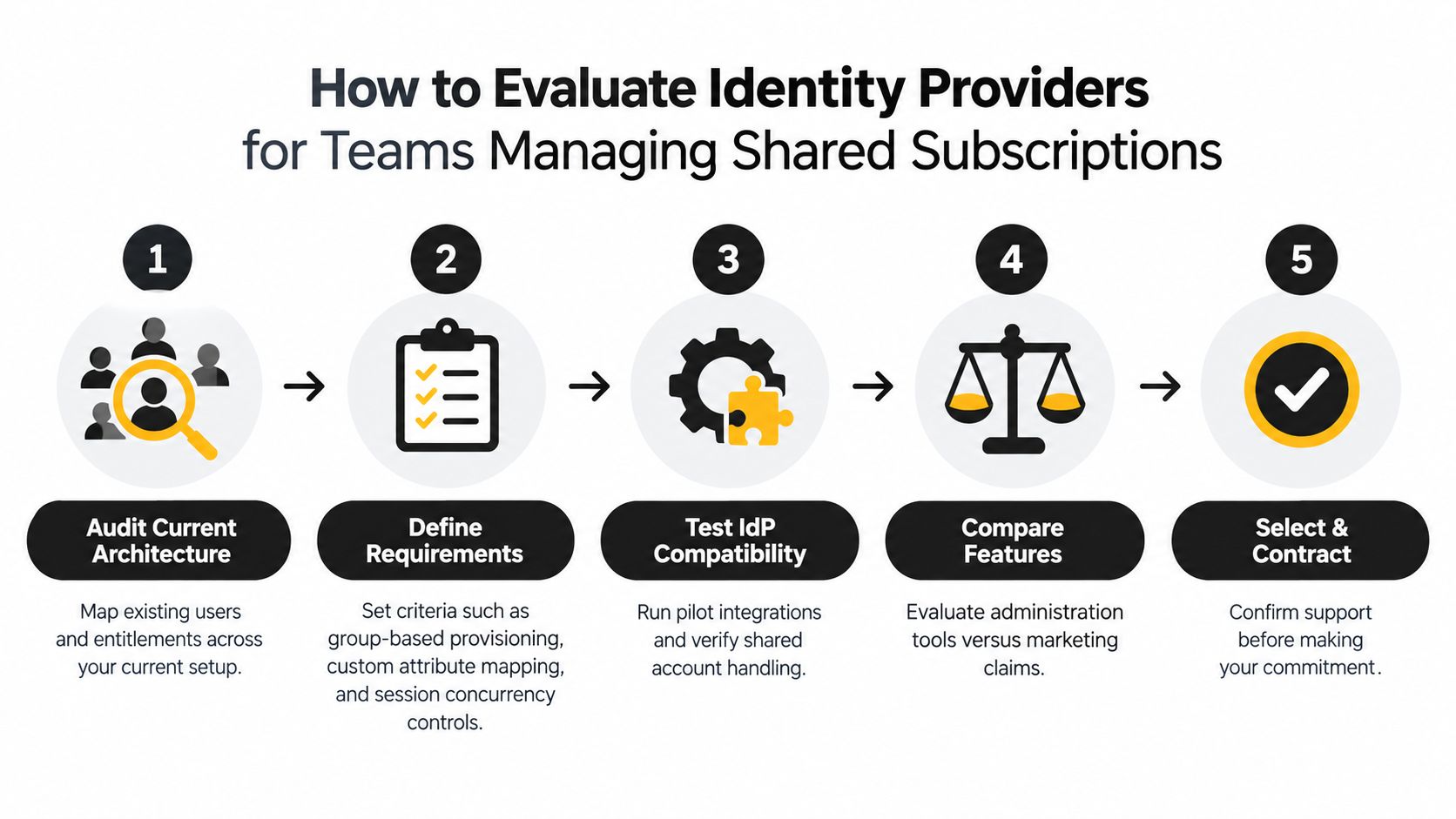
The infographic above walks through the IdP evaluation path — auditing users and entitlements, defining requirements, testing compatibility, comparing features, and finally contracting. The takeaway worth highlighting: test group behavior before trusting vendor claims. Marketing slides rarely reflect what actually happens when five people hit the same account at once.
Model Sessions Around Real Usage
Picture a five-person design team gearing up for a product launch. They'll likely need three concurrent sessions running at the same time. A strict one-session-per-user policy would boot an active teammate mid-task, while unlimited sessions might quietly violate the subscription's terms. Neither extreme works.
Set your limits with intention:
- Match the concurrent session count to what the service actually permits.
- Apply shorter idle timeouts on unrecognized devices — shared machines in particular.
- Keep active work intact during normal token renewal so nobody loses progress.
- Display a clear handoff message when another session claims a limited seat, rather than just dropping the connection.
Separate the lifetimes of your IdP session, application session, access token, and refresh token. There's no reason to force everyone to reauthenticate just because one short-lived access token expired. Renew tokens securely, rotate refresh tokens where the provider supports it, and revoke sessions promptly when someone leaves the group.
Design rule: Revoke the person's access, not the shared entitlement. The subscription stays intact; only the individual's entry point changes.
Test Conflicts Before Launch
A solid pilot should throw real-world chaos at the system: simultaneous browser and mobile logins, an expired token mid-session, a member who's been removed trying to reconnect, and a device-limit conflict all happening in the same window. What you're checking is whether the service correctly identifies the AccountShare member through stable claims like sub — not email addresses, which change when someone switches roles or gets married.
- Run both SP-initiated and IdP-initiated login flows.
- Confirm that logout propagates across all active devices, not just the one that triggered it.
- Note which session gets denied and the reason given — vague error messages will frustrate users fast.
- Keep an emergency administrator route outside the normal group flow, so you're never locked out of your own account.
Roll out gradually. Start with one low-risk subscription and a small, cooperative group. Watch for failed SAML or OIDC assertions, unexpected logout spikes, token renewal errors, and delays in access revocation after someone departs. These signals tell you whether your SSO setup actually protects the account without making legitimate collaboration feel like a punishment.
Manual membership updates get risky fast once an AccountShare group scales past a handful of people. SCIM provisioning bridges your identity provider with each supported service, so joining a group automatically creates access and leaving removes it, no repetitive admin tasks required.
That automation works hand-in-hand with SSO. SSO handles the authentication part; SCIM handles the ongoing sync of accounts, attributes, and membership status. When Maya gets added to a design-tool group, SCIM spins up her profile, assigns the right seat role, and logs the whole thing.
Map Attributes Before Turning On Sync
Run a small pilot first. Figure out exactly which identity fields each app needs. Don't lean solely on email addresses as identifiers—they change. Pick something stable.
Common mappings worth setting up:
-
userNamefor the application login -
displayNamefor member-facing screens -
subscription_idfor the shared entitlement -
seat_rolefor owner or member permissions -
activefor immediate suspension
Key takeaway: Provision individual identities while keeping the shared subscription intact. Removing one member shouldn't wipe out the group's entitlement.
Test three scenarios before going wider: one person joining, one role change, one person leaving. Keep provisioning logs that capture the request, result, timestamp, and which admin or IdP event triggered it. That audit trail becomes essential during access reviews and compliance checks.
Handle Sync Failures Without Panic
Failed SCIM operations usually trace back to a missing required attribute, an invalid role value, a duplicate identifier, or a group name mismatch. Compare what you're sending against the app's schema, fix the source mapping, then retry.
Orphaned accounts deserve regular attention. Reconcile the IdP roster, AccountShare membership, and the connected service on a schedule. Any profile flagged inactive should lose app access immediately, while the shared plan stays available to everyone still authorized.
For practical onboarding controls, check out this guide on managing new members and access. Beyond that, keep an eye on provisioning latency, failed requests, unexpected deactivations, and membership drift. A weekly sync review catches small errors before they snowball into real security gaps.
A solid SSO setup means adding MFA without turning every shared-account login into a headache. Adaptive policies tend to work best here: prompt for extra verification when a member logs in from an unfamiliar device, odd location, or unusual time, and let trusted devices follow the normal flow.
Pick Factors That Actually Work for a Group
In an AccountShare setup, avoid tying everything to one person's phone or email. Offer methods that handle the group's variety of devices:
- Passkeys give you phishing-resistant, passwordless sign-in through a device's built-in security.
- Authenticator apps suit members who regularly access the subscription from their own devices.
- Magic links can cut down credential fatigue, but lock down the email account and keep links short-lived.
- Backup codes should be issued privately and stored securely, never pasted in a group chat.
A five-person group, for example, might use passkeys for frequent users and authenticator codes for occasional access. The IdP can then apply stricter checks only when risk shifts. For practical configuration ideas, check out this multi factor authentication guide.
Key takeaway: MFA should verify the individual member, not force the entire group to share a second factor.
Plan Recovery and Rollout Carefully
Recovery deserves the same attention as login. Require identity proofing through the IdP, notify admins about factor changes, and revoke existing sessions after any suspicious reset. Don't make the shared subscription owner the sole recovery path because that quickly becomes a fragile bottleneck.
Pilot the policy with a small AccountShare group before rolling it out everywhere. Track failed challenges, recovery requests, device enrollment, and login abandonment. If members struggle with one method, offer an approved alternative rather than weakening the policy across the board.
You can also read up on how to enable two-factor authentication for additional setup guidance.
AccountShare helps groups manage shared premium access securely and affordably. Explore AccountShare to learn more.