

Share Games on PS4: How to share games on ps4 with Friends
Yes, you can absolutely share your digital PS4 games with a friend or family member you trust. The magic behind this is a feature that lets you designate their console as your account's Primary PS4. Doing this gives anyone on that console access to your entire digital game library and even some of your PlayStation Plus perks.
Unlock Your Library With PS4 Game Sharing
Here's your practical guide to sharing your digital game library on the PlayStation 4. This isn't just about saving a few bucks—it's about opening up your gaming world and sharing amazing experiences with people you trust. The whole system is built around one key setting: Primary PS4. Think of it as telling Sony which console is your "home base" for all your digital stuff.
When you set someone else's PS4 as your primary console, you're basically creating a shared digital bookshelf. It's a simple switch, but it unlocks some serious benefits.
- Instant Library Access: Your friend or family member can immediately download and play any digital game you've ever bought, right from their own account.
- Shared Online Play: If you're a PlayStation Plus subscriber, anyone using that primary console gets to hop online for multiplayer games.
- Cost-Effective Gaming: This is the big one. Two people can dive into a massive collection of games for the price of one, which effectively doubles the value of every digital game you buy.
The core idea is simple: one person buys the game, and two people get to play. This is a powerful feature for households with multiple gamers or for close friends looking to coordinate their game libraries without breaking the bank.
Why Game Sharing Is So Popular
The appeal of game sharing is huge, and it makes perfect sense. To truly get the most out of your digital collection, you need to know how to make it accessible to others, much like the idea behind creating shareable digital collection displays for other types of media.
With the PlayStation 4 selling over 117 million units worldwide, the desire for shared gaming experiences is massive. In Europe alone, an estimated 55.2 million units were sold, which shows just how common it is for households to look for ways to maximize their gaming budget. You can see more details on these impressive PS4 sales figures on WorldPopulationReview.com.
A word of caution, though: this system is built entirely on trust. Sharing your account means handing over your login details, so it's absolutely critical that you only do this with someone you know and trust completely. For a deeper dive into the mechanics, check out our guide on what is game sharing.
Setting Up Your Primary PS4 For Game Sharing
Alright, this is where the real magic happens. The whole game-sharing system boils down to one critical setting: making someone else's console your account's Primary PS4.
Let's use a classic example. Say you and a buddy want to pool your digital game libraries. You get access to their games, they get access to yours. It’s a win-win. To do this, you'll need to physically log into your PlayStation Network (PSN) account on your friend's PS4. Once you’re in, the rest is a piece of cake.
This little diagram gives you a quick visual of how it all connects.
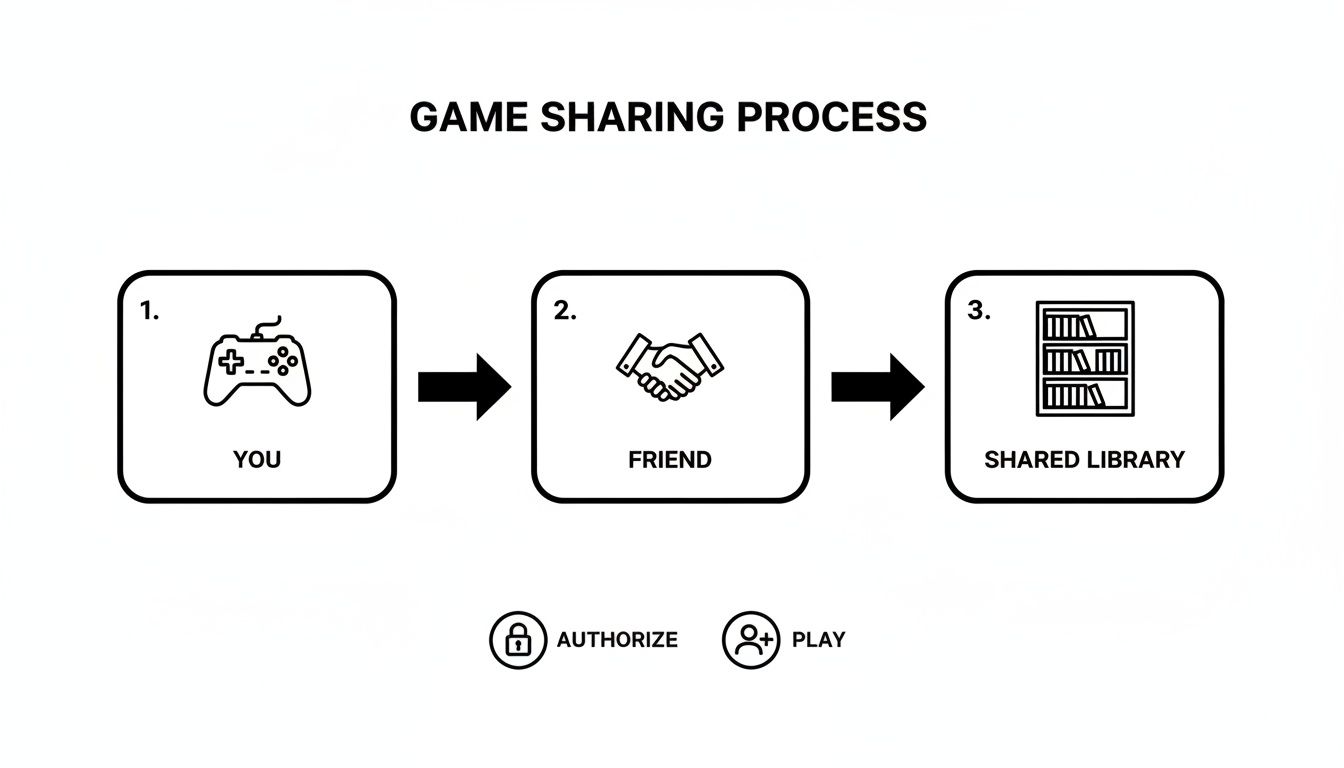
Essentially, you're linking your account to their hardware, which creates that shared library for both of you to enjoy.
Activating the Primary Console
Fire up your friend's PS4 and, from the home screen, head over to Settings (it's the little toolbox icon). From there, jump into Account Management. Think of this as the control room for your PSN account on that particular console.
You're looking for one specific option: Activate as Your Primary PS4. This is the button that makes it all happen.
Once you select it, you'll see a simple menu. Just hit "Activate," and the console will confirm the change almost instantly. A message will pop up saying, "This PS4 has been activated as your primary PS4." And that's it!
Now, your friend can log back into their own account, and voila—all of your digital games will appear in their library, ready to be downloaded and played.
Key Takeaway: Making their console your "primary" gives every user on that PS4 access to your digital games and your PlayStation Plus online multiplayer perks. They can even play your games when their internet is down.
How to Deactivate a Primary PS4
Knowing how to undo this is just as important, especially if you get a new console or just want to stop sharing. Thankfully, deactivating is just as straightforward.
You just follow the same path you took to activate it:
- On the console you want to remove, go back to Settings.
- Head into Account Management.
- Choose Activate as Your Primary PS4 again.
- This time, simply select the Deactivate option.
The change takes effect immediately, and all the shared game licenses are revoked from that system. Remember, you can only have one primary PS4 active at a time, so you'll always need to deactivate the old one before you can set up a new one. This keeps you in full control of where your library lives.
Maximizing Your PlayStation Plus Benefits Across Multiple Accounts
Sharing your digital game library is great, but the real magic happens when you share a PlayStation Plus subscription. For any household with more than one gamer, this is a total game-changer. By setting your console as the "primary PS4," you can extend some of the best PS Plus perks to every single user on that machine, essentially multiplying the value of your subscription.
Think about it in a real-world scenario: a parent subscribes to PS Plus and activates the living room PS4 as their primary console. Instantly, both of their kids can log into their own accounts and hop into online multiplayer matches in games like Fortnite or Call of Duty. They get the complete online experience without needing their own separate, expensive subscriptions. This feature alone makes it incredibly easy to share games on PS4 that are built around multiplayer.
What You Can Share With Everyone
The biggest perk that everyone gets is access to online multiplayer. This is the core reason most people subscribe to PlayStation Plus, and as long as the primary account on the console has an active subscription, every other profile can play online. Simple as that.
On top of that, everyone on the console can play the monthly PS Plus games downloaded by the subscriber. When you add those free monthly titles to your library, anyone on your primary PS4 can download and play them from their own account, complete with their own save files. It's an awesome way to build up a huge, shared game library for the whole family over time.
What Stays Personal to the Subscriber
Of course, not everything gets shared. Some benefits are tied directly to the PSN account that pays for the subscription. These are personal perks that don't transfer over to other users, even on the primary console.
- Cloud Saves: Only the PS Plus subscriber can back up their game saves to the cloud. Other users will have to stick to saving their progress locally on the console's hard drive.
- Exclusive Discounts: Those special member-only deals you see on the PlayStation Store are only visible and available to the subscriber's account.
- Automatic Patch Downloads: This handy little feature, which keeps games updated in the background, only works for the account holder.
The enthusiasm for these sharing capabilities has been a hallmark of the platform since day one. In the first few weeks after the PS4 launched, its Share Menu was used over 10.9 million times, resulting in nearly 800,000 gameplay broadcasts. You can dig into these impressive early stats in the original PlayStation announcement on GamrConnect.
To make it crystal clear, here’s a breakdown of what gets shared and what doesn’t.
PlayStation Plus Shared Vs Personal Benefits
| Feature | Shared With All Users On Primary PS4 | Notes |
|---|---|---|
| Online Multiplayer | Yes | This is the main shared benefit, allowing everyone to play online. |
| Downloaded PS Plus Monthly Games | Yes | Any game claimed and downloaded by the subscriber is playable by all. |
| Purchased Digital Games | Yes | All digital games bought by the primary account holder are shared. |
| Cloud Storage for Game Saves | No | Exclusive to the PS Plus subscriber's account. |
| Exclusive Store Discounts | No | Only the subscriber can access and use PS Plus member discounts. |
| Automatic Patch Downloads | No | This convenience feature only applies to the subscriber's account. |
Knowing the difference helps you get the most out of your subscription without any surprises.
By setting up your primary console strategically, you can give friends and family an amazing gaming experience built around online play and a massive shared library. At the same time, your personal account perks, like cloud saves and discounts, stay securely yours. It turns a single PS Plus subscription from a personal expense into a household entertainment essential.
Game sharing on the PS4 is a fantastic way to stretch your budget, but it’s crucial to know how it all works under the hood to sidestep some common frustrations. Your digital game licenses are essentially digital keys. When you set a console as your "Primary PS4," you're giving it the master key to your entire library. This means anyone on that console can play your games, even if they're not logged into your account or connected to the internet.
Your own console, on the other hand, becomes a "secondary" machine. It needs to connect to the PlayStation Network every time you want to play one of your own games, just to verify that you still own the license.
This is where the biggest catch comes in. If your internet connection drops, you'll find yourself locked out of your entire digital game collection. You'll see that dreaded padlock icon on all your games, and you won't be able to play a thing until you're back online. It’s a real headache and a common trade-off for the person sharing their account.

The demand for this kind of sharing makes sense when you look at the numbers. With 117.2 million PS4s sold by 2025 and an incredible 65.9 million games sold in a single quarter for PS4/PS5, players are always looking for ways to get more out of their purchases. You can dig deeper into these PlayStation engagement statistics on ElectroIQ.com.
Understanding The One Console Limit
So, can you just activate multiple primary consoles and share with everyone? Unfortunately, no. Sony is pretty strict on this: you can only have one PS4 activated as your primary console at any given time.
If you log into a new PS4 and set it as your primary, the old one instantly gets demoted. All the game licenses on that first machine are revoked, and anyone using other accounts on it will lose access to your library. This one-console rule is Sony's way of keeping game sharing contained to a small scale, like within a household or between two good friends, rather than becoming a free-for-all.
Pro Tip: What if your primary PS4 breaks or you sell it without deactivating your account first? You're not totally stuck. You can log into the Sony Entertainment Network website and remotely deactivate all devices linked to your account. Be careful, though—this is a powerful option that you can only use once every six months. Save it for a real emergency.
Security Risks And Best Practices
Beyond the technical rules, you have to think about security. When you hand over your PSN login details, you're not just sharing games. You’re giving someone access to your saved credit card info, your personal details, your friends list—everything.
This cannot be stressed enough: only share your account with someone you absolutely trust. Think close family or a friend you've known for years. A stranger you met online is a massive gamble. Here's what can go wrong:
- Unauthorized Purchases: They could go on a shopping spree with your saved payment methods, buying games and DLC on your dime.
- Account Lockout: A malicious person could change your password or associated email, effectively stealing your account and locking you out completely.
- PSN Ban: If the other person cheats online or violates PlayStation's rules, it's your account that could face suspension or even a permanent ban.
Protect yourself before you share. Always use a strong, unique password for your PSN account and, most importantly, enable two-factor authentication (2FA). For an extra layer of security, it’s a good idea to learn about the best practices for a secure way to share passwords before giving anyone your credentials.
Taking Sharing Beyond The Console
Let’s be honest, the whole process of sharing games on a PS4 is built on trust. You're handing over your login details to a friend or family member, hoping for the best. It works, sure, but it definitely highlights a bigger need for safer, more organized ways to share all our other digital subscriptions.
This idea of splitting costs isn't new. We do it for everything from Netflix to productivity software. The real trick has always been figuring out how to manage it all without passing around passwords and creating a security nightmare.
How Digital Sharing Has Grown Up
Thankfully, modern platforms are finally tackling this problem. They create a secure space where people can pool their money for group subscriptions without ever having to share their personal login info. For anyone who loves the cost-saving perks of sharing but hates the risk, this is a massive improvement.
Think about taking the same principle behind PS4 game sharing and applying it to your entire digital life. You could get access to a whole library of premium services for a fraction of the price, all while keeping your personal accounts locked down. It’s a smart move for anyone looking to make their budget stretch further.
Moving beyond your console means you can get way more organized and secure with all your shared subscriptions. It’s all about getting the access you paid for without putting your personal data on the line—a big step up from the handshake deals we use for gaming.
Managed Platforms vs. Doing It Yourself
So, how does this new way of sharing stack up against the method you’re using on your PlayStation? While sharing directly on your console is a great start, you can take your gaming to the next level by looking into a complete streaming setup to expand your community reach.
Here’s a quick look at the main differences:
- Security: Managed platforms act as a trusted go-between. No more sharing your email and password—they handle everything securely and protect your payment details.
- Convenience: Instead of trying to coordinate with one other person, you just join a group purchase. The platform figures out all the logistics for you.
- Guaranteed Access: These services manage the user slots, so you don’t have to worry about getting locked out because someone else logged in.
- Broader Scope: This model works for tons of services beyond just gaming, letting you manage all your shared digital costs in one spot.
This structured approach makes splitting digital bills way easier and much more reliable. And for those of you who have the PS4 system down and are ready for the next generation, our guide on https://accountshare.ai/blogs/new/game-sharing-ps-5 has you covered. Ultimately, these platforms take the simple idea of sharing and make it safer and bigger for pretty much everything you subscribe to.
Frequently Asked Questions About PS4 Game Sharing
Even when you know the steps, setting up game sharing on your PS4 for the first time can feel a bit weird. It's totally normal to have a few lingering questions about how it all works in practice. Getting a handle on the finer points helps you avoid those common "gotcha" moments and keeps your account safe.
Let's walk through some of the most common questions I hear from gamers who are just getting started with sharing.
Can I Share My Games with More Than One Person?
This is easily the number one question. The short answer is no—you can only have one PS4 console set as your primary at any given time.
Think of it this way: your digital game library can only live in one other place besides your own console. While anyone with a profile on that primary PS4 can play your games, your account itself is tethered to that single machine. If you try to set a new console as your primary, the old one gets booted off immediately, and they'll lose access. It’s Sony's way of keeping this feature for close-knit sharing, like within a household.
Is It Actually Safe to Share My PS4 Account Details?
Handing over your login info is a big deal, and it's not something to take lightly. You should only ever share your account details with someone you trust implicitly, like a family member or your absolute best friend.
When you give someone access, you're giving them the keys to the kingdom—including any payment methods you have saved. It's a huge risk. Always make sure you're sharing with someone in your inner circle. A strong, unique password and two-factor authentication (2FA) aren't optional here; they're essential.
A Word of Warning: Never, ever share your credentials with a stranger you met online. You're opening yourself up to having your account stolen, getting hit with fraudulent charges, or even being banned from the PlayStation Network if they misbehave. It's just not worth the gamble.
What Happens if My Internet Goes Down on My Console?
Here’s the biggest catch for the person doing the sharing. If your PS4 is not set as your primary console, you need an active internet connection to play your own digital games. Sony has to ping the network to verify your licenses each time you boot up a title.
If your internet cuts out, you're locked out of your entire digital library until it comes back. Meanwhile, the person on your primary PS4 can keep playing all of your games offline without a single issue. It’s a serious trade-off you need to be comfortable with before you go through with it.
Can We Both Play the Same Game at the Same Time?
Yes, you absolutely can! This is one of the coolest parts of PS4 game sharing. The person using your primary PS4 can log into their own PSN account and play any of your games.
At the same time, you can be logged into your account on your own (non-primary) console, playing the exact same game. This is perfect for co-op or multiplayer games, letting two people play together with just one digital copy of the game.
Keeping track of shared accounts can get complicated, but platforms like AccountShare are built to make managing group subscriptions simple and secure. Instead of passing passwords back and forth for streaming, software, and more, you can safely split costs without the risk. You can check it out at https://accountshare.ai.