

How to Cancel Crunchyroll Free Trial Before You Get Charged
So, you've jumped into a Crunchyroll free trial to binge-watch the latest season of your favorite anime. It's a great way to explore their massive library, but there's one crucial catch you need to keep in mind to avoid an unexpected bill.
The most important thing to remember is that your free trial will automatically roll over into a paid subscription the moment it ends. You have to be the one to step in and cancel it beforehand. Let's talk about why this is so critical.
Why Timely Cancellation Is Non-Negotiable
We've all been there. You sign up for a trial, get busy, and the next thing you know, a charge for a service you forgot about pops up on your credit card statement. Subscription services like Crunchyroll are built on this auto-renewal model. If you don't tell them to stop, they'll assume you’re happy to start paying.
This is especially relevant now that Crunchyroll has changed its model. They've moved away from offering new episodes on their free, ad-supported tier, which means a premium plan is the only way to stay current with simulcasts. This shift makes it even more important to be on top of your trial period.
Think of it this way: not canceling is the same as saying "yes" to a paid plan. Taking a few minutes to manage your trial puts you back in the driver's seat of your finances.
What Happens If You Forget?
If the cancellation deadline slips your mind, you'll be charged for the first billing cycle the instant your trial expires. Whether you chose the Fan or Mega Fan tier, it's a charge you probably weren't planning on.
Here’s a quick breakdown of why you need to act fast:
- It’s Automatic: The system is designed to convert you to a paying member seamlessly. Once your trial is up, your card gets charged. Simple as that.
- Refunds Are Unlikely: Don't count on getting your money back if you forget. Most services, including Crunchyroll, don't offer partial refunds for subscription periods that have already started.
- Avoid the Stress: Honestly, who needs another deadline to worry about? Canceling early gives you one less thing to track.
Learning how to cancel your Crunchyroll trial is a simple, practical skill that protects your wallet and prevents a lot of future headaches.
Canceling Your Trial Directly Through Crunchyroll
If you signed up for your free trial directly on the Crunchyroll website, you're in the clear. This is by far the most straightforward way to cancel, and it only takes a few clicks. The key is knowing exactly where to look so you can get it done quickly and avoid any surprise charges.
The golden rule is to cancel where you pay. If you gave your credit card info to Crunchyroll.com, that’s where you need to go to manage your subscription. Following this one piece of advice prevents a ton of headaches.
Cancellation Methods at a Glance
Not sure where you signed up? This quick table should point you in the right direction. It’s designed to help you find the correct cancellation path based on your original billing platform.
| Billing Platform | Cancellation Path | Key Tip |
|---|---|---|
| Crunchyroll Website | Login > Profile > Settings > Membership Info > Cancel | The most direct method. You'll get an email confirmation. |
| Apple App Store (iOS) | iPhone Settings > Apple ID > Subscriptions > Crunchyroll > Cancel | Managed entirely through your Apple account, not the Crunchyroll app. |
| Google Play Store (Android) | Play Store App > Profile > Payments & subscriptions > Subscriptions > Cancel | Managed through your Google account. |
| Third-Party (Roku, etc.) | Log into the third-party service and manage subscriptions there. | Crunchyroll support can't cancel these for you. |
Remember, you have to go back to the source. If you subscribed through your iPhone, you can't cancel on the Crunchyroll website, and vice versa.
Canceling on a Web Browser
Alright, let's walk through the process on your computer. First things first, open your browser and head over to the Crunchyroll homepage. You'll need to make sure you're logged into the correct account—this trips people up more often than you’d think, especially in homes with more than one anime fan.
Once you’re in, look for your profile icon, usually tucked away in the top-right corner. Give that a click, and a dropdown menu will appear. From there, select Settings. This is your main account dashboard.
Inside the Settings area, you're looking for a section called Membership Info (or something similar) on the left-hand menu. This is your command center for the trial. You should see all the details about your current plan, including that all-important renewal date. Right there, you'll find the Cancel Membership button. Click it and follow the final prompts to confirm.
Pro Tip: Keep an eye out for the cancellation confirmation email. This is your official proof that you've successfully ended the trial. If it doesn't land in your inbox within an hour, it's a good idea to log back into your account and double-check that your subscription status says "Canceled."
Using Your Mobile Device
Now, when it comes to mobile, how you cancel depends entirely on how you first signed up. If you just used your phone's browser to subscribe on the Crunchyroll website, the steps are exactly the same as the desktop method above. But if you subscribed through the App Store or Google Play, the rules change completely.
You have to cancel through the store that handles your billing.
- For iPhone/iPad (iOS) users: Open your iPhone's Settings app, tap your name at the top, then go to Subscriptions. Find Crunchyroll in the list and hit Cancel Subscription. It’s a bit buried, which is likely why 12% more Apple sign-ups were caught by auto-renewal last year.
- For Android users: Open the Google Play Store app. Tap your profile icon in the top-right, then select Payments & subscriptions, and then Subscriptions. Find Crunchyroll on your list and tap Cancel subscription.
This decision tree clearly shows how a simple action—or inaction—can affect your wallet.
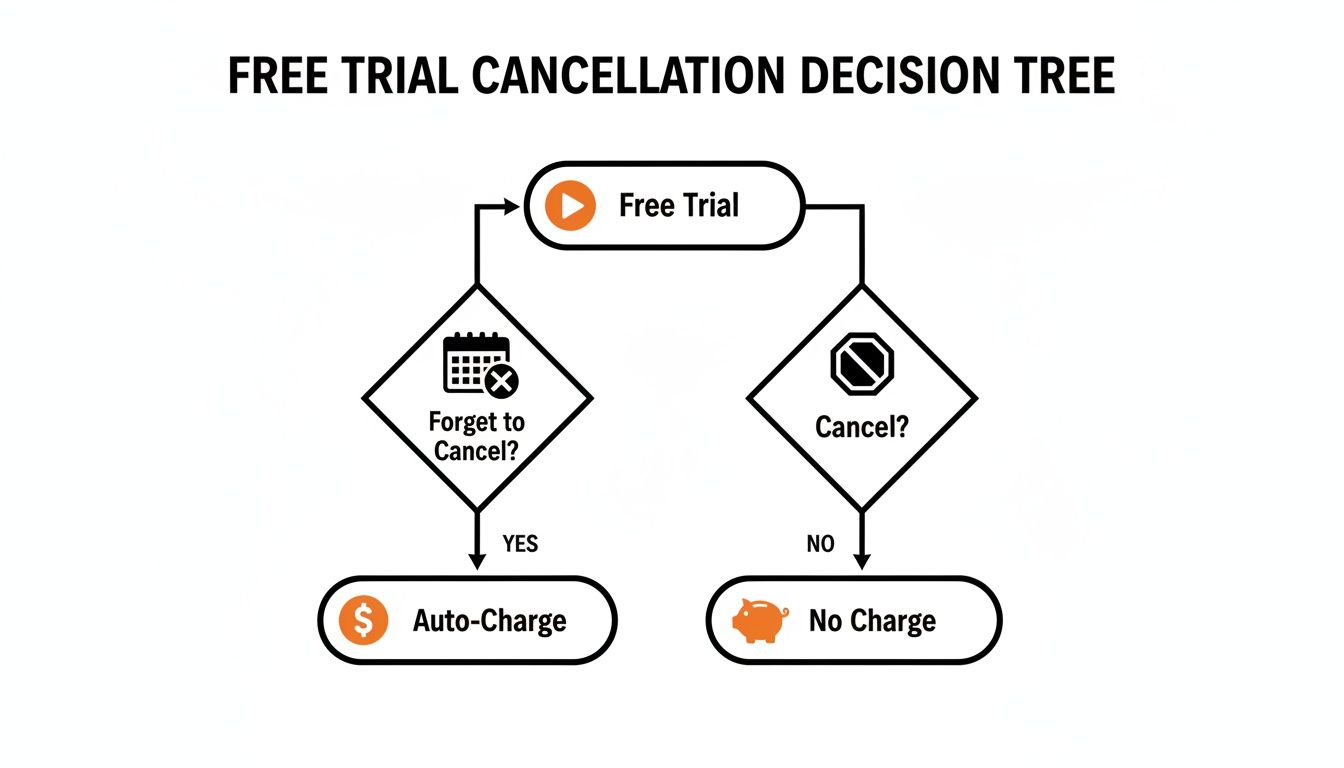
The takeaway is simple: being proactive guarantees you won't pay a dime, while forgetting about it leads directly to a charge on your card.
If you're looking to completely wipe your presence from the platform, that's a different step known as the account deletion process. Just keep in mind this is more permanent than simply canceling a subscription. For more detailed tips on managing your paid plan, our guide on how to cancel a Crunchyroll subscription covers all the bases.
What If You Subscribed Through a Third-Party Service?
So, you didn't sign up directly on the Crunchyroll website? Don't worry, this happens all the time and it's a huge source of confusion for a lot of people. If your trial is billed through a service like Amazon Prime Video, Roku, or even a gaming console, you'll need to handle the cancellation a bit differently.
Here's the one thing you absolutely have to remember: you must cancel the trial through the same service that's managing your payments. Trying to cancel on the Crunchyroll app or website won't do anything because they simply don't have access to billing systems run by another company. It can be a little frustrating, but that's just how these partnerships work.
Finding Where to Manage Your Subscription
The biggest challenge is often just figuring out where to go to manage these third-party subscriptions. You'll need to log into the account for whatever service you used to get the trial in the first place. For example, if you added Crunchyroll as a Prime Video Channel, you have to manage it through your Amazon account, not on your Roku device.
This rule holds true for every platform. Subscribed through your Apple account? You’ll need to cancel through your iPhone's Settings. Added it as an Amazon Prime add-on? You'll have to go to your Prime Video account management page. It’s a common setup for streaming services, as detailed in this breakdown of platform-specific subscription rules on CBR.com.
Key Takeaway: Always follow the money back to the source. Crunchyroll’s customer support team can't cancel a subscription billed by a third party for you—you have to do it yourself on that service's platform.
If you're juggling a few different services and aren't sure where your subscriptions are, our guide on how to check your subscriptions is a great place to start.
To help you out, here’s a quick rundown for a couple of the most common third-party billers:
-
Roku: Head to your Roku home screen and find the Crunchyroll channel. Instead of opening it, press the star button
(*)on your remote. From the menu that pops up, choose Manage subscription and just follow the prompts from there. - Amazon Prime Video: You’ll need to log into your Amazon account on a web browser for this one. Go to Memberships & Subscriptions, find Crunchyroll listed under your Prime Video Channels, and then click the option to Cancel Channel.
Troubleshooting Common Cancellation Problems
It's one of those uniquely frustrating moments: you've followed all the steps to cancel your Crunchyroll free trial, but something's gone wrong. Maybe the cancel button has vanished, or worse, you just got a notification for an unexpected charge. Let's walk through the most common snags and how to get them sorted out.
By far the most frequent issue is not being able to find the "Cancel" button on your Crunchyroll account page. If it's grayed-out or just not there, it’s a huge red flag that you signed up through a third party. Think back—did you subscribe via Roku, Amazon, Google Play, or the Apple App Store? If so, that's where you need to go to manage the subscription, not the Crunchyroll site.
Another classic headache is getting charged even though you're positive you canceled in time. The very first thing you should do is dig up your cancellation confirmation email. This is your golden ticket. With that proof in hand, reach out to Crunchyroll support right away.
What to Do if You Were Charged Unfairly
Seeing an unexpected charge is jarring, but don't panic. The key is to have your evidence ready. Grab that confirmation email or take a screenshot showing your canceled subscription status and send it over to their support team. In most cases, this is all it takes to get things cleared up.
But what if you're not getting anywhere with customer service? You still have moves to make. If you’ve done everything right and were still charged after your trial ended, learning how to win a credit card dispute is a powerful next step to get your money back.
Remember, timing is everything. Data shows that 65% of free trials convert to paid subscriptions simply because they weren't canceled within 48 hours of expiring, which underscores the need for prompt action. Discover more insights about subscription trial conversions on DealNews.com.
Ultimately, being proactive and keeping good records are your best defenses against surprise charges. A quick screenshot or saving that confirmation email can save you a lot of trouble down the line.
You've successfully figured out how to cancel your Crunchyroll free trial, which puts you squarely in charge of your subscriptions. That's a great feeling. But what if you could keep all the premium perks without paying the full price or worrying about another cancellation deadline sneaking up on you?
Let's be honest, juggling free trials is a pain. It's a short-term fix, and many of us would rather just find a way to watch our favorite anime without the hassle.
A Different Way to Watch: Shared Subscriptions
This is where a totally different approach, like account sharing, can be a game-changer. Instead of hopping from one limited-time offer to the next, you can lock in consistent, affordable access to the shows you actually want to watch. It's an especially smart move for students, families, or anyone trying to make their entertainment budget go a little further.
Platforms like AccountShare make this process simple. You can join a shared group and split the cost of a Crunchyroll Mega Fan plan, which gives you full access for a much smaller price. This completely sidesteps the risk of forgetting to cancel and getting hit with a charge you didn't want. It’s all about enjoying the anime, not managing billing cycles.
Think of it this way: instead of chasing a temporary solution, you're getting a permanent one. You secure long-term access to premium features like ad-free viewing and offline downloads without ever paying the full sticker price.
This is the perfect strategy for savvy viewers who want the best of both worlds. To see exactly what you'd be getting, you can explore the full list of Crunchyroll Premium benefits in our detailed guide.
Got Questions About Canceling Your Crunchyroll Trial?
So, you've gone through the steps to cancel your free trial. But what happens next? It's completely normal to have a few lingering questions about the fallout. Let's clear up some of the most common things people wonder about after hitting that cancel button.
What Happens to My Account After I Cancel?
Don't worry, canceling your trial doesn't nuke your account. It simply downgrades you from a premium member back to a free user once your trial period is officially over.
You can still log in, browse, and watch anime. The main difference? You'll lose the premium perks like ad-free streaming and access to the newest episodes right as they drop in Japan. Your viewing experience will have ad interruptions, just like the standard free version of Crunchyroll.
Will I Lose My Watch History and Queue?
This is a huge relief for most people: no, you won't lose your data. Your watch history, all those carefully curated queues, and any Crunchylists you’ve made are all tied to your account itself, not your subscription.
If you ever decide to jump back in and resubscribe down the road, everything will be exactly as you left it. You can pick up right in the middle of that season finale without having to remember where you were or rebuild your lists from scratch.
Can I Get a Refund if I Forgot to Cancel?
I'll be straight with you—it's highly unlikely. Once that free trial rolls over into a paid subscription and you've been charged, Crunchyroll’s policy is pretty firm about not offering refunds for forgotten cancellations. It's one of those things where the responsibility is on you to cancel in time.
The absolute best way to handle this is to avoid it altogether. The moment you sign up for a trial, pull out your phone and set a calendar reminder for a day or two before it ends. It's a simple, two-minute task that can save you the headache of an unexpected charge.
Ready to enjoy premium anime without worrying about trial end dates? AccountShare offers a much smoother way to access services like Crunchyroll. You can join a shared group and get all the premium benefits for just a fraction of the price. That way, you can spend more time watching and less time stressing about subscriptions. Learn more at AccountShare.