

Collaborative Project Management Software: Complete Guide
You open one chat to find the travel dates, another to locate the latest group assignment, and a spreadsheet to remember who promised what. A family holiday, student thesis, or small campaign can become difficult for the same reason: the work is spread across too many places. Messages disappear, files get duplicated, and deadlines depend on someone remembering an old conversation.
Collaborative project management software gives a group one shared workspace for tasks, conversations, files, schedules, and decisions. It isn't only for corporations. Families, students, freelancers, and digital nomads can use the same basic ideas to make shared work visible and easier to coordinate.
Understanding Collaborative Project Management Software
A family preparing for a trip can lose time without realizing it. One person stores the booking confirmation in email, another keeps the packing list in a notes app, and a third posts transport updates in a group chat. Each tool works alone, yet the family lacks one dependable view of the plan. A changed departure time then creates extra messages, repeated checks, and a risk that someone acts on an old detail.
The same fragmentation affects a student thesis group. Research notes may sit in a shared drive, decisions remain in chat, citations live in separate documents, and the deadline appears only on one member's calendar. Digital nomads face a similar problem while coordinating a move, a shared trip, or freelance work across time zones. The hidden cost is not just confusion. It is the time spent searching, checking versions, repeating updates, and reconstructing decisions.
Collaborative project management software brings those pieces into a shared workspace. A task can include an owner, due date, status, related files, comments, and decision history. Instead of asking, “Where did we put that?”, the group opens the relevant project and sees what is current, what is waiting, and what needs attention.
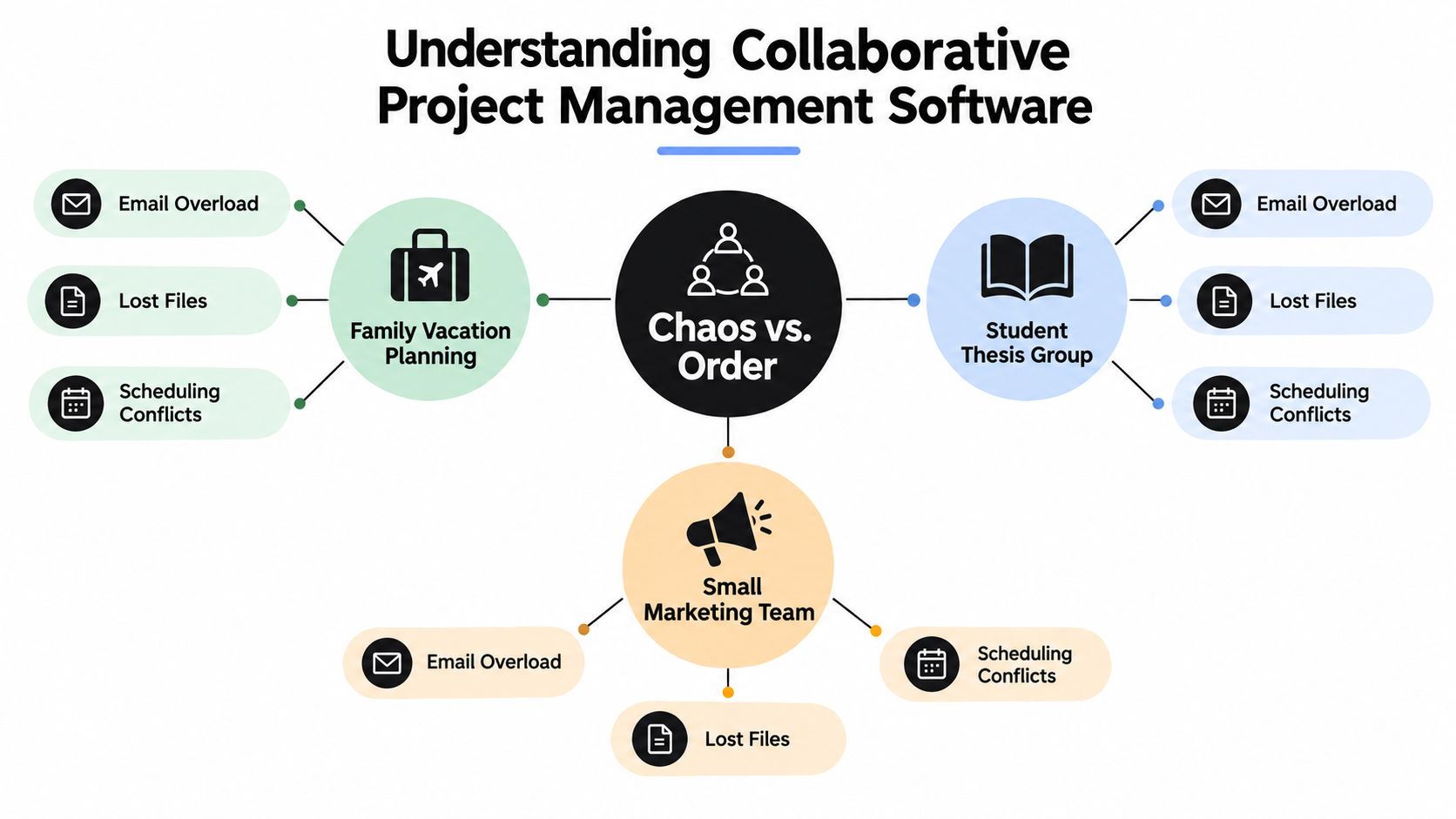
From scattered messages to shared context
The key idea is context. A chat message saying “I'll handle it” leaves several questions unanswered: what does “it” mean, when is it due, and what counts as finished? A project task turns that promise into visible work that others can understand without searching through old conversations.
A useful workspace usually connects:
- Tasks: Specific actions such as “book the train,” “review chapter two,” or “approve the campaign image.”
- People: An assigned owner plus reviewers or collaborators where needed.
- Timing: Due dates, milestones, recurring work, and dependencies.
- Evidence: Files, links, comments, decisions, and status updates kept with the work.
- Visibility: A view showing what is pending, active, blocked, or complete.
This structure keeps conversation attached to the work it explains. That matters for asynchronous groups, including families in different cities, students with different schedules, and digital nomads working across time zones. It also reduces tool fragmentation: fewer searches, fewer duplicate files, and less reliance on one person's memory.
The category continues to grow, but the practical test remains simple: can everyone find the right information and act on it without reconstructing the project from fragments?
Core Features That Make Collaboration Work
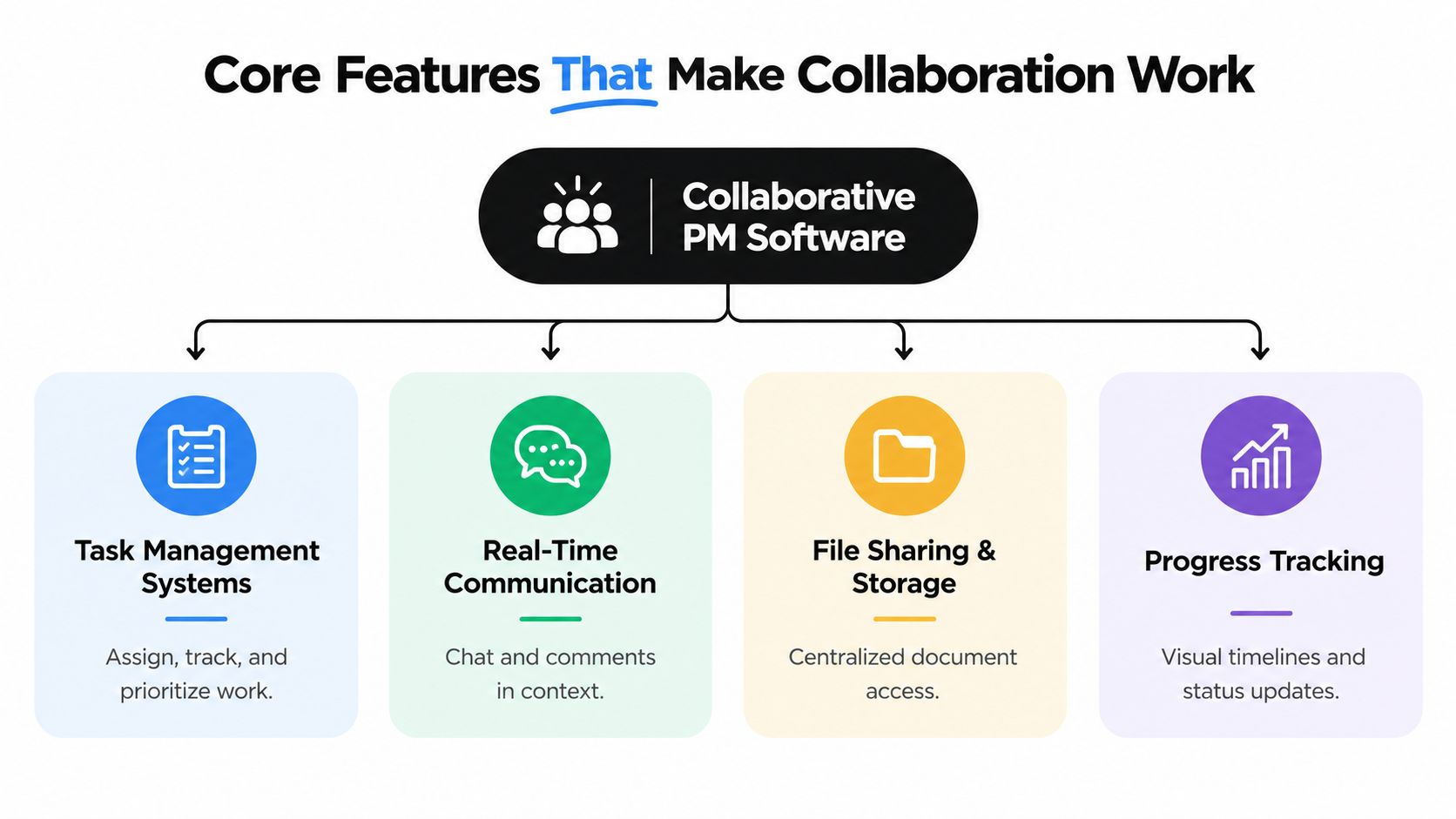
A platform may advertise dozens of functions, but effective collaboration rests on a small set of connected capabilities. You should evaluate how these capabilities work together, not just count the items on a feature page.
Tasks, ownership, and dependencies
Task management answers the basic questions: what needs to happen, who owns it, and when is it due? For a family, “prepare for the trip” can become separate tasks for checking passports, confirming accommodation, arranging pet care, and downloading tickets. For a thesis group, “finish literature review” might become research, source verification, drafting, editing, and citation review.
Dependencies add an important layer. If a designer can't create the final graphic until a writer approves the wording, the system should show that relationship. A checklist records activities, while a dependency explains how one delay affects another.
Communication in context
Chat is helpful for quick questions, but comments attached to a task preserve the reason behind a decision. Real-time editing, discussion threads, mentions, and notifications can reduce the need to repeat information in several channels.
Collaboration tools represented US$1.19 billion in global project management software spending in 2025, or 17.5% of total market value, according to DataIntelo's market analysis. The same source reports that collaboration tools represented 22% of the online project management software market in 2025 and expected a 16.5% CAGR for the segment. These figures help explain why shared comments, document access, and activity updates have become core expectations rather than decorative additions.
Files and progress
A project workspace should make the current file easy to identify. Version labels, file history, comments, and approval states help prevent a student group from editing an outdated draft or a marketing team from publishing an unapproved image.
Progress views serve different needs. A board works well for a simple household list. A calendar helps a nomad coordinate across locations. A timeline or Gantt view becomes more useful when several deliverables depend on one another.
Permissions and integrations
Not everyone needs the same access. Modern systems increasingly use role-based, context-aware permissions that can consider a person's role, project sensitivity, device trust, location, and the risk of an action. Strong implementations can require approval for permission changes and maintain timestamped audit logs, as described in Capterra's overview of project management software security and AI.
Integrations connect the workspace to tools such as Google Drive, Slack, Microsoft Teams, Zoom, calendars, and storage services. Independent reviews now compare platforms on integrations, customization, and communication features, which shows that interoperability is a central buying criterion. For legal departments, a specialist resource such as LegesGPT for in-house legal teams can also help teams think about how matter-specific work should connect with broader task and document processes.
For a practical comparison of how different services fit together, see this guide to collaborative software tools. The best integration is the one that removes duplicate entry without making the project harder to understand.
Benefits Across Different User Groups
The value of a shared workspace changes with the people using it. A family doesn't need a corporate portfolio dashboard, while a distributed team may need stronger permissions and dependency mapping. The common benefit is a shared view of responsibility.
Families
A household can create a recurring home board with chores, school activities, appointments, shopping, and maintenance. Each task has an owner and a clear status, so one person doesn't become the unofficial memory system for everyone else.
A vacation project can include a packing checklist, booking documents, transport details, meal ideas, and emergency contacts. Relatives who join only part of the trip can receive access to the relevant area instead of every private household detail.
Students
A student group benefits from dividing a large assignment into visible pieces. One person can own source collection, another can draft a section, and another can coordinate formatting and submission requirements. Comments attached to each task keep feedback close to the work instead of scattering it across private messages.
A shared timeline also exposes late handoffs. If editing depends on completed research, the group can see the risk early and adjust the plan before the final evening.
Small teams
A small marketing, design, or community team can use dependencies, approvals, and workload views to reduce informal chasing. A campaign might move from brief to copy, design, review, scheduling, and publication, with each stage assigned to a person.
The advantage is not just speed. It's clarity about bottlenecks. If one person owns every approval, the team can change the workflow rather than discovering the problem after several deadlines slip.
Digital nomads
Digital nomads need cloud access, searchable history, and communication that doesn't depend on everyone being online simultaneously. A task update can replace a meeting, while a due date and local-time display reduce confusion across locations.
Practical rule: Write updates so someone in another time zone can act without asking a follow-up question.
For all four groups, the software should remain lighter than the process it supports. If maintaining the workspace takes more effort than completing the work, simplify the views, remove unnecessary fields, and keep one reliable source of truth.
How to Choose the Right PM Software
A family planning errands, a student group preparing a thesis, and a client-facing team may all need shared tasks, yet their coordination problems differ. Start by defining the work before comparing brands. A household may need a list and calendar. A thesis group may need document collaboration and approvals. A client project may require dependencies, workload planning, guest permissions, and integrations.
The market is substantial and competitive, which makes a focused evaluation more important. The United States market is estimated at US$3.2 billion in 2026, with revenue growth at a 5.2% CAGR from 2021 to 2026, according to Mordor Intelligence's market report. Buyers have plenty of options, but a larger feature list does not automatically mean a better fit.
Decision criteria
Use these questions before testing products:
- Work complexity: Do you need a checklist, or do tasks have dependencies, approvals, and multiple stages?
- Collaboration style: Will people work together live, asynchronously, or through both methods?
- File needs: Do you need basic links, version history, document editing, or proofing?
- Access model: Will guests, clients, classmates, or relatives need restricted visibility?
- Integration needs: Which existing tools must exchange tasks, files, calendars, or notifications?
- Growth path: What happens when you add projects, collaborators, automation, or reporting?
A student team may choose a tool with strong documents but limited workload planning. A family may value quick mobile updates more than detailed reports. Digital nomads may prioritize searchable decisions and clear notifications across time zones. Match the software to the moments when confusion currently appears.
Platform Comparison Matrix
The matrix below is a qualitative starting point. Free-tier restrictions and pricing can change, so verify current terms directly before subscribing. The listed platforms and their general positioning reflect independent comparison coverage such as this collaboration software comparison.
| Platform | Best For | Free Tier Limits | Key Strength | Pricing Range |
|---|---|---|---|---|
| Trello | Simple personal or small-group boards | Limits may apply to collaborators, views, and add-ons | Easy visual task flow | Free plan and paid tiers |
| Asana | Structured workflows and goals | Advanced functions may require a paid tier | Dependencies and automation | Free plan and paid tiers |
| ClickUp | Teams wanting many functions in one workspace | Feature and usage limits vary by plan | Broad customization | Free plan and paid tiers |
| Notion | Notes, documentation, and lightweight projects | Advanced workspace features may be restricted | Flexible pages and databases | Free plan and paid tiers |
| Slack | Conversation-centered coordination | History and features may be limited | Channels and fast communication | Free plan and paid tiers |
| Microsoft Teams | Users already in Microsoft 365 | Plan-dependent access to collaboration features | Chat, meetings, and file ecosystem | Plan-dependent |
The hidden cost is tool fragmentation. A cheap task app combined with separate chat, storage, calendar, and approval tools can scatter decisions across several places. People then repeat updates, miss attachments, and spend time checking which version is current. Celoxis's discussion of free project management software challenges notes that lower-priced plans can restrict collaboration, advanced views, storage, integrations, and automation. The lowest subscription is not always the lowest-cost workflow.
Pick the smallest platform that handles the coordination problem. Check whether its next tier includes features the group is likely to need soon. A household should not pay for enterprise controls when a board is enough. A complex project should not be forced into a chat app just because the starting plan is free. Test one realistic workflow, including an overdue task, a file revision, and a handoff, before committing.
Implementation and Migration Checklist
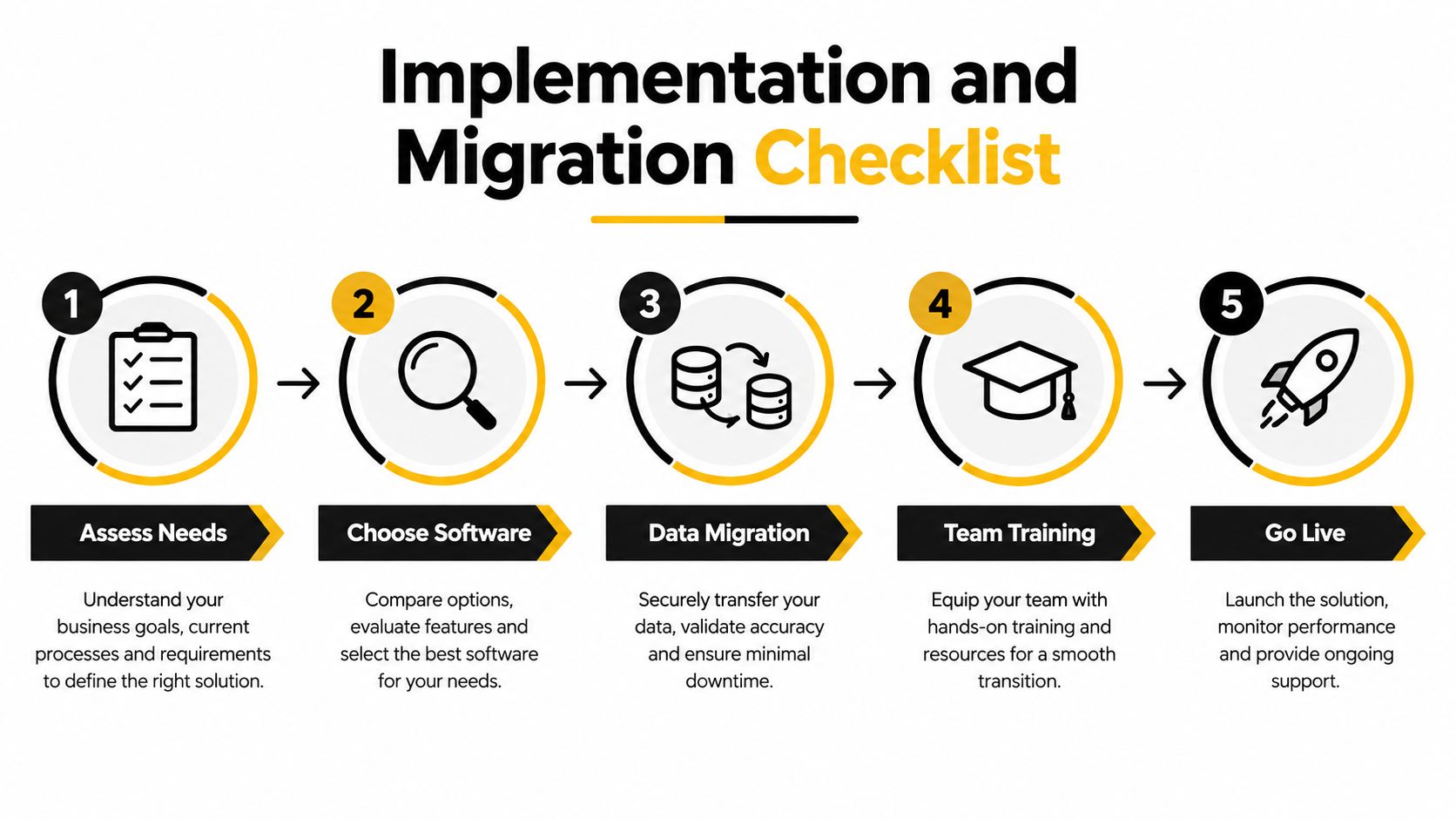
Adoption fails when people receive a new tool without a clear reason to use it. Introduce the workspace around one real project, define the minimum workflow, and make the first experience easier than the old collection of chats and spreadsheets.
A practical rollout
- Assess needs. List the current locations of tasks, files, decisions, and dates. Ask where information gets lost and which handoffs cause confusion.
- Choose software. Select a platform that matches the group's complexity. Test one representative workflow before importing everything.
- Prepare the data. Remove duplicate tasks, archive outdated files, and agree on naming rules. Export or back up important material before migration.
- Build the workspace. Create project areas, task statuses, templates, calendars, and access roles. Keep the first version deliberately small.
- Train through practice. Show members how to create a task, assign it, comment, attach a file, and mark it complete. Use the actual project rather than a theoretical presentation.
- Go live gradually. Move one project first, review what worked, then expand the structure. Keep the old system available for reference only during the agreed transition period.
Preventing common problems
Feature overload makes people return to familiar chat. Hide views and fields that nobody needs.
Unclear ownership creates attractive boards with no accountability. Every active task should have one responsible person, even when several people contribute.
Weak permissions expose files unnecessarily. Give guests and external collaborators access only to the projects or folders they need, then review permissions after the pilot.
Migration without verification leaves broken links and missing attachments. Ask users to check a sample of tasks, files, dates, and comments before the old system is retired.
A short weekly review can keep the workspace healthy. Archive finished work, close abandoned tasks, correct ownership, and ask whether each notification still helps someone act.
Cost-Saving Through Shared Accounts
Premium collaboration software can be difficult to justify for a household, student group, or small team that only needs occasional access. The temptation is to combine separate free tools, but that choice can create costs that don't appear on an invoice: repeated data entry, missed messages, duplicated files, and time spent switching between platforms.
A shared account model can reduce the number of separate subscriptions when the provider's terms allow shared use and the group can manage access responsibly. The key is not merely splitting a bill. It is designing a controlled arrangement that protects account ownership, private information, and continuity.
Where shared access can work
Families may share a workspace for household planning, while students can coordinate access to a paid research or productivity service. Small teams may use a collective subscription for a tool that supports a common project, provided the service permits the arrangement and the account doesn't contain confidential material that every participant should not see.
Before joining a shared plan, check:
- Provider rules: Confirm that shared use, seats, and locations comply with the service's terms.
- Permission boundaries: Use separate profiles or roles when available rather than passing around one unrestricted login.
- Data sensitivity: Keep private client information, financial records, and personal documents out of a broadly shared account.
- Account recovery: Establish who controls recovery methods and how access changes when someone leaves.
- Auditability: Review activity history and remove inactive members promptly.
- Continuity: Decide what happens to files, tasks, and exports if the shared arrangement ends.
Password sharing alone isn't a security strategy. A safer arrangement uses unique credentials where supported, multi-factor authentication, limited permissions, a designated administrator, and a documented process for adding or removing participants. For a broader approach to reducing unnecessary subscriptions, consult this guide to subscription optimization.

The best saving is the one that preserves usability. If a shared arrangement forces people to wait for access, hide work in private apps, or copy sensitive information into unsafe channels, it has created a new form of fragmentation. Use shared accounts for appropriate, permitted services, keep the project workspace organized, and choose a plan whose collaboration controls match the group's trust level.
AccountShare helps groups access eligible premium services through collective purchasing, with shared-account management features such as customizable permissions and password-sharing options. If fragmented subscriptions are making collaborative project management harder to afford, visit AccountShare to explore a more organized way to manage shared digital services.